
You are using an out of date browser. It may not display this or other websites correctly.
You should upgrade or use an alternative browser.
You should upgrade or use an alternative browser.

UI.X 1.5.22.0
No permission to download
- Thread starter Dad.
- Start date


If you invest a day of figuring out the XenForo correlation of padding, line-height, min-height, height and the magical .textCtrl.verticalShift (say whaaat?) plus everything with what U.IX settles onto it... then you can have it looking "okay" throughout the board. 

We just kinda added some css into uix.css, so if you want to make edits just add them to a new CSS file or into EXTRA.css.
@Mike Creuzer Thank you for the reply. Can you please provide me with a short example of how to add to Extra.css

please delete,
Last edited:
How can I get my nav tabs to stay below the header image?
This has been driving me crazy for a while.
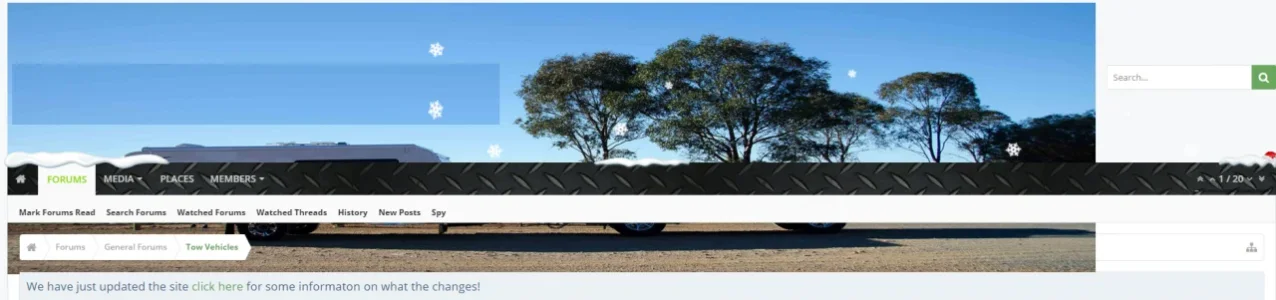
This has been driving me crazy for a while.
You need to either decrease logo width or increase the header height.How can I get my nav tabs to stay below the header image?
This has been driving me crazy for a while.
View attachment 124283

Can someone give me a hand (the post above #5908)?
Setup your node icons in the Admin CP: Applications ---> Display Node Tree ---> [On Specific Node] click "Node Options" ---> Node Icons Tab ... then you come to the following screen and there you can change your icons.
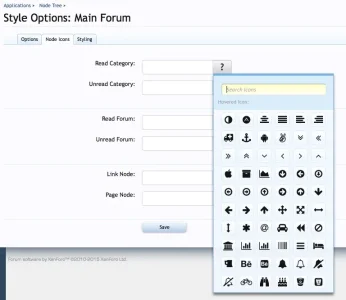

Setup your node icons in the Admin CP: Applications ---> Display Node Tree ---> [On Specific Node] click "Node Options" ---> Node Icons Tab ... then you come to the following screen and there you can change your icons.
View attachment 124437
- So, ALL the font awesome icons that there are are contained in there?
- There are a few other places around in the framework which deal with icons. Anything else I have to tick or untick?
Thanks!
EDIT:
*** I have no icons showing on my footer or sidebar ****
Last edited:
- So, ALL the font awesome icons that there are are contained in there?
- There are a few other places around in the framework which deal with icons. Anything else I have to tick or untick?
Thanks!
Yes all current (4.5.0) version icons are contained there. Check this overview to have a orientation: http://fortawesome.github.io/Font-Awesome/cheatsheet/
Under Appearance --> Style Properties --> [UI.X] Forum Nodes you can set up the default and you need to activate "Forum nodes as Glyph" to override the XenForo default icons.
The way I showed you above is the way to set it up for each node/forum individually (which overrides the default then).
Yes all current (4.5.0) version icons are contained there. Check this overview to have a orientation: http://fortawesome.github.io/Font-Awesome/cheatsheet/
Under Appearance --> Style Properties --> [UI.X] Forum Nodes you can set up the default and you need to activate "Forum nodes as Glyph" to override the XenForo default icons.
The way I showed you above is the way to set it up for each node/forum individually (which overrides the default then).
OK, thanks. I will certainly check that out.
I activated the fontawesome in the footer (Style Properties: ├ [UI.X] Footer) but it's tough to see. I assume the only way to fix that is to change the background color of the footer via color palette?

@Bob_R It seems like you will need individual coaching or someone who helps you with custom styling and templates and CSS. I think your questions are very individual for this general support thread and it takes away focus from the more critical questions. I would suggest you either approach Audentio via a support ticket on their website or ask for some professional who can customize your individual XF environment. I would help you but right now my time is limited, sorry.
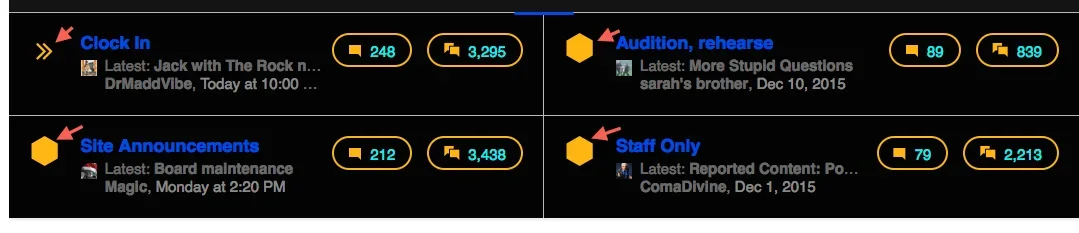
My nodes are showing like this:
View attachment 124303
I wish to use nodes like these:
View attachment 124304
How can I accomplish this?
instead of 'iconic shape-hexagon' just put 'fa fa-star' or whatever. Should be able to use the iconator in the chooser as @Freelancer kindly pointed out.
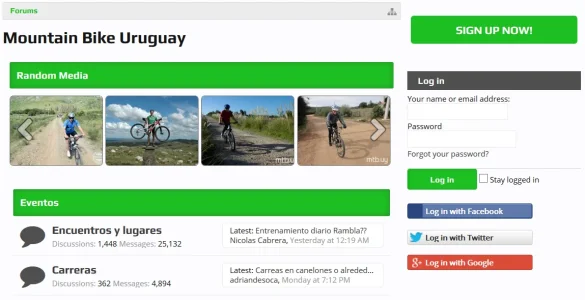
Does this style have an option to add a login/password box in the sidebar and also social logins like in the image?
View attachment 124365
Yes check the UI.X Sidebar style properties, there should be a style property to show that block on the sidebar.
2) How can I move this somewhere else?

Yes just move the template include whereever. Its in footer.
@Freelancer @Mike Creuzer Sorry for being a bother. (sad)
I actually have been delving into it. I like to ask questions when I can't find the answer myself thru research and searches.
If it proves futile I will get/use another style other than Audentio.
I actually have been delving into it. I like to ask questions when I can't find the answer myself thru research and searches.
If it proves futile I will get/use another style other than Audentio.
Well, no bother, I guess one thing to note is that we typically want to keep this thread open for bugs/suggestions, etc. Individual customization questions are best asked in a ticket at our website or on a general CSS/HTML forum. Here to help you, I just also want other UI.X users to not start ignoring this thread because of one individual's posts.@Freelancer @Mike Creuzer Sorry for being a bother. (sad)
I actually have been delving into it. I like to ask questions when I can't find the answer myself thru research and searches.
If it proves futile I will get/use another style other than Audentio.

Thanks for using UI.X/Rekt


Thank you Mike.Yes check the UI.X Sidebar style properties, there should be a style property to show that block on the sidebar.

I don't have UI.X yet, I'm thinking about buying it.

Do you have some kind of trial or demo where I can have a look at the admin options and not just at the frontend)?
Similar threads
- Replies
- 1
- Views
- 464


