
You are using an out of date browser. It may not display this or other websites correctly.
You should upgrade or use an alternative browser.
You should upgrade or use an alternative browser.

UI.X 1.5.22.0
No permission to download
- Thread starter Dad.
- Start date


Got a Firefox issue myself. Might be addon related, but on the desktop when I reply to a post, the floating nav bar covers up the editor panel:
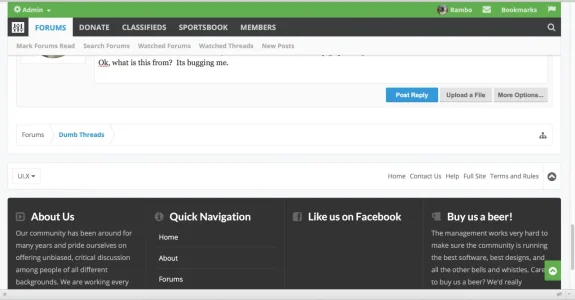
Seems to do that all the time.
Also, don't mean to be a nag, but is there a place I should ask about feature requests rather than here since I'm getting lost in the cloud?
Seems to do that all the time.
Also, don't mean to be a nag, but is there a place I should ask about feature requests rather than here since I'm getting lost in the cloud?
I dig the logo slogan thing. That's kind of cool. Q's: would it be possible to get that on mobile underneath the logo/text? And would it be possible to have it centered under the logo/text on desktop?
Crap >.<. So now I dont know what was wrong.
I think I can make the iOS problem reproducible for you.
Surf a site with UI.X installed with an iPhone in portrait mode (upright phone). The sticky navigation will work perfectly. Turn your iPhone 45 degrees into landscape mode. The sticky navigation stops working and only comes back if you turn the iPhone upright again.
Last edited:

After the Update I see this on the style that I'm actually using:

 I tried to find the CSS, or what ever is causing this issue but I was not able to identify anything.
These are the two edited Versions. They are the one where I change my settings an alter the templates.
My installation:
-UI.X BASE
----UI.X <--Problem
----UI.X Dark BASE
-------UI.X Dark <--Problem
I tried to find the CSS, or what ever is causing this issue but I was not able to identify anything.These are the two edited Versions. They are the one where I change my settings an alter the templates.
My installation:
-UI.X BASE
----UI.X <--Problem
----UI.X Dark BASE
-------UI.X Dark <--Problem

brstrm
Active member
After the Update I see this on the style that I'm actually using:
View attachment 72860 View attachment 72861 I tried to find the CSS, or what ever is causing this issue but I was not able to identify anything.
These are the two edited Versions. They are the one where I change my settings an alter the templates.
My installation:
-UI.X BASE
----UI.X <--Problem
----UI.X Dark BASE
-------UI.X Dark <--Problem
The tabLinks now pull its border color from the @navTabs.border-color style property. Locate the @navTabs style property using the search via Admin CP. Now reset this style property for both problem skins. In fact, it may be best to reset many of your customizations in the Header and Navigation style property group, and then re-insert your custom rules (e.g. text-shadows, box-shadows, etc.).
If all else fails, you're more than welcome to create a ticket.
Thanks.
Last edited:

This issue has been around since the original version. Ill try to make this a priority in the next release. If I knew how to fix it I would have a very long time ago, so apologies.Got a Firefox issue myself. Might be addon related, but on the desktop when I reply to a post, the floating nav bar covers up the editor panel:
View attachment 72835
Seems to do that all the time.
Also, don't mean to be a nag, but is there a place I should ask about feature requests rather than here since I'm getting lost in the cloud?
I dig the logo slogan thing. That's kind of cool. Q's: would it be possible to get that on mobile underneath the logo/text? And would it be possible to have it centered under the logo/text on desktop?
I found it easier to just hide on mobile, but you can keep it displaying with some extra CSS. But its not something in the framework itself.
I think I can make the iOS problem reproducible for you.
Surf a site with UI.X installed with an iPhone in portrait mode (upright phone). The sticky navigation will work perfectly. Turn your iPhone 45 degrees into landscape mode. The sticky navigation stops working and only comes back if you turn the iPhone upright again.
This is purely intentional. We thought the fixed header got in the way on landscape mode. People complained there wasn't enough room to view let alone type out responses.

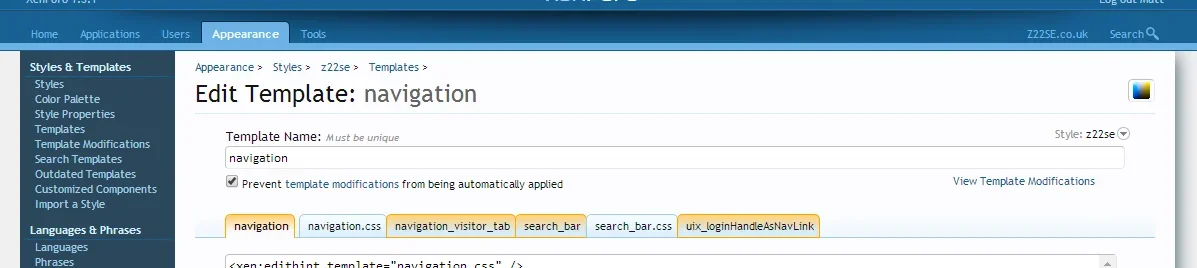
Oooh no sir, not intentionally.@Audentio - are you specifically applying the Prevent template modifications from being automatically applied to the navigation template for any reason?
View attachment 72866
This broke a few things, such as the unread post count, and features threads link from displaying (plus my own custom navigation link)
 Will have that fixed.
No worries. Again, just pointing out things that pop up.This issue has been around since the original version. Ill try to make this a priority in the next release. If I knew how to fix it I would have a very long time ago, so apologies.
Q's: How do I change the default theme color from the green its currently at? I'm in the AD Styler property but I'm not sure of the setting.

Today i installed the patch for IE and .....
The layout messed up after update microsoft internet explorer.
has anyone else this same problem?
The layout messed up after update microsoft internet explorer.
has anyone else this same problem?
Audentio updated UI.X with a new update entry:
CSS Bug Evident in Firefox Now Fixed, Other HTML Fixes
Read the rest of this update entry...
CSS Bug Evident in Firefox Now Fixed, Other HTML Fixes
This is a minor update addressing a css bug that broke the style when certain style properties were enabled. The bug was most evident to Firefox users.
Some other invalid html errors (that weren't picked up in modern browsers) were also fixed in the process.
Read the rest of this update entry...
brstrm
Active member
Hello,
I have just bought and testing it now.
It header and footer broken in firfox if I turn the navbar on to top.
Things are ok with chrome.
The bug has been found and we've just pushed a patched release to fix the issue. Thanks for reporting!
Patch installed and problems for me are solved.The bug has been found and we've just pushed a patched release to fix the issue. Thanks for reporting!
Thanks for the quick support.
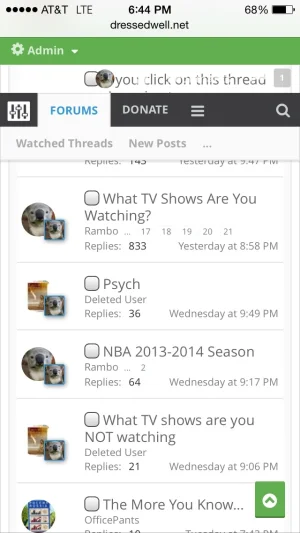
Found a weird bug today on mobile. I haven't updated to the 1.3.1.1 yet. See under the admin bar:
@Rambro
I think it was patched in latest version.
@Audentio
I literary updated to 1.3.1.0 today and I made a lot of changes to the template and now the version 1.3.1.1 is out, in the update log it says that you can just overwritte the .XML file but I don't know how to do that, can anyone please explain how?
I think it was patched in latest version.
@Audentio
I literary updated to 1.3.1.0 today and I made a lot of changes to the template and now the version 1.3.1.1 is out, in the update log it says that you can just overwritte the .XML file but I don't know how to do that, can anyone please explain how?
Styles - Import a Style - Import from uploaded file (select the new xml) and then overwrite a style (select your current style that you want to update)@Rambro
I think it was patched in latest version.
@Audentio
I literary updated to 1.3.1.0 today and I made a lot of changes to the template and now the version 1.3.1.1 is out, in the update log it says that you can just overwritte the .XML file but I don't know how to do that, can anyone please explain how?
Similar threads
- Replies
- 1
- Views
- 464


