Ah I suppose thats a bug then. Will fix it now and have it patched in the 1.3 version.The board URL links to our community. The full logo links to stratics.com/community, but when you scroll down and see the small icon, it links to stratics.com.

You are using an out of date browser. It may not display this or other websites correctly.
You should upgrade or use an alternative browser.
You should upgrade or use an alternative browser.

UI.X 1.5.22.0
No permission to download
- Thread starter Dad.
- Start date

Ah I suppose thats a bug then. Will fix it now and have it patched in the 1.3 version.
Thank you.

Another thing I noticed is that, in Quark and Antiquark, avatars in messages aren't animated (not until you click on them to view member card).
How are they normally animated?Thank you.
Another thing I noticed is that, in Quark and Antiquark, avatars in messages aren't animated (not until you click on them to view member card).
How are they normally animated?
Sorry about the false alarm. Looks like I just needed to give it some time.
Apologies, this is probably obvious to everyone. Have some templates that cannot be automatically merged. I see red and green amendments to templates. My template structure is set this way:
UI.X
>Child UI.X
>>Quark
>>>Edited quark
>>Antiquark
>>>Edited Antiquark
Some changes were made to the child UI.X, but it's templates in the parent that apparently need to be merged.
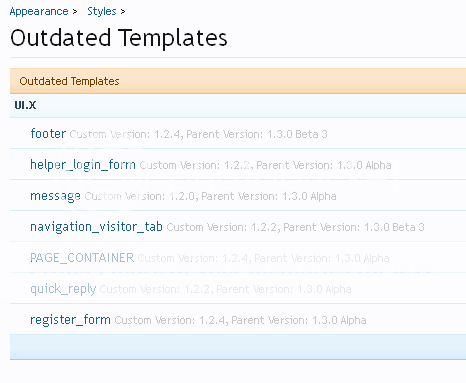
UI.X
>Child UI.X
>>Quark
>>>Edited quark
>>Antiquark
>>>Edited Antiquark
Some changes were made to the child UI.X, but it's templates in the parent that apparently need to be merged.

Is it possible to hide some tabs in the navigation bar and display them again when the navBar is fixed at the top of the screen scrolling down the page?

Not obvious to me eitherApologies, this is probably obvious to everyone. Have some templates that cannot be automatically merged.
 Glad I tried this on my dev forum first...
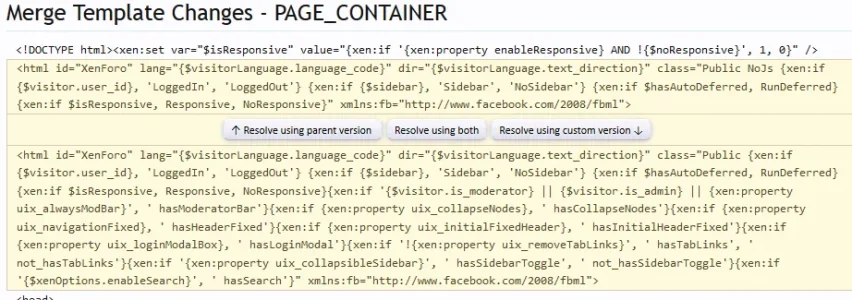
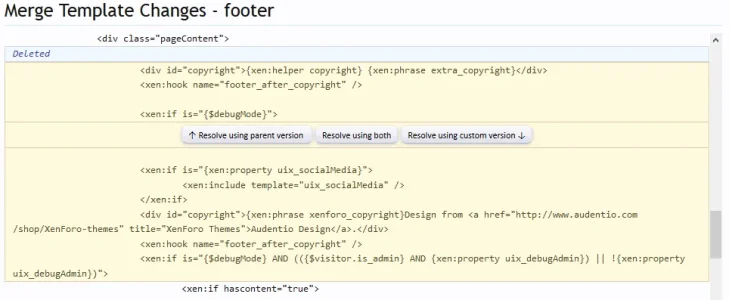
I've been getting this issue on 1.3 RC1 except I can auto merge all but PAGE_CONTAINER & footer. I did ask in the support forum and Mike suggested I need to determine what has changed and manually edit them, but to be honest I'm a bit lost on that...
Screenies below...
PAGE_CONTAINER shows
footer shows
Attachments

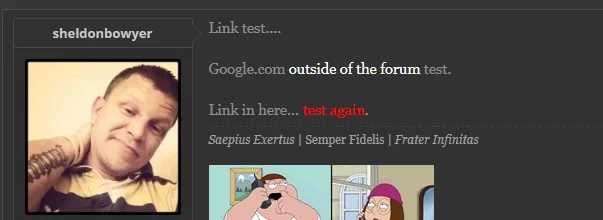
Where do I set the CSS styling for hyperlinks? Here is what my output HTML code is:
.... and the hyperlink is too close in colour and style to the body text and is almost impossible to see.
Source: http://netrider.net.au/threads/chocolate-run-sunday-09-march-2014.178138/
HTML:
<span style="color: #ff0000"><span style="color: #ff0000"><a href="http://www.chocmill.com.au/index1.html" target="_blank" class="externalLink ProxyLink" data-proxy-href="proxy.php?link=http%3A%2F%2Fwww.chocmill.com.au%2Findex1.html&hash=f7cc210bd1a9723dc69dde77eaf1cf1c" rel="nofollow">Chocolate Mill</a></span> </span>Source: http://netrider.net.au/threads/chocolate-run-sunday-09-march-2014.178138/
Apologies, this is probably obvious to everyone. Have some templates that cannot be automatically merged. I see red and green amendments to templates. My template structure is set this way:
UI.X
>Child UI.X
>>Quark
>>>Edited quark
>>Antiquark
>>>Edited Antiquark
Some changes were made to the child UI.X, but it's templates in the parent that apparently need to be merged.
Your structure is correct. If they cannot be automatically merged that essentially means there is something UI.X changes that XenForo 1.3 also changes, and they are different enough where the system feels human eyes should be involved. I will have this ready for 1.3, already do. Everything is in place just have to release.
Yes, can be done. I add a class to header when the sticky navigation is "currently running" or active.Is it possible to hide some tabs in the navigation bar and display them again when the navBar is fixed at the top of the screen scrolling down the page?
For example:
Code:
#header.activeHeaderSticky li.members {display: none !important;}Will hide the members tab when the navigation is sticky. If you wanted to hide members UNTIL the navigation became sticky it would require the opposite, like this:
Code:
#header li.members {display: none !important;}
#header.activeHeaderSticky li.members {display: list-item !important;}Hi,
Is there a quick way to restore the default colors of UI.X? I have messed up the colors, and when I use the restore function in the color palette I dont get the default UI.X colors.
I would just install UI.X again and compare. I can post the variables here if you want though, would just have to type out the values.
Not obvious to me either
I've been getting this issue on 1.3 RC1 except I can auto merge all but PAGE_CONTAINER & footer. I did ask in the support forum and Mike suggested I need to determine what has changed and manually edit them, but to be honest I'm a bit lost on that...
Screenies below...
PAGE_CONTAINER shows
View attachment 68398
footer shows
View attachment 68398
Since we haven't released the 1.3 version yet, that would explain why it isn't 1.3 supported. I have all the leg work done, just need to release
Since things are going along smoothly I figured I wait until the official release which, if everything goes well for XenForo I could see it being no more than a week or two.
Thank you, I'll try it soon then
Clearly I got carried away by seeing other sites visit running UI.X on 1.3... Ho hum, will sit back and twiddle me thumbs and wait for release day like a good boySince we haven't released the 1.3 version yet, that would explain why it isn't 1.3 supported. I have all the leg work done, just need to release
SorryClearly I got carried away by seeing other sites visit running UI.X on 1.3... Ho hum, will sit back and twiddle me thumbs and wait for release day like a good boy
 . I release all my themes the same day so I prefer to do it as little as possible. If I thought the release would be a month away I'd do it now, but I have a strong feeling it won't be far along.
Hi,
I have two questions:
1) I want to change the icons in the side bar (I use widgets framework). How do I do this? See attachment.
2) When I look at pictures in posts some of the buttons are missing. Is this something I can fix by using the color palette? How? See attachment.
Thank you. Great theme
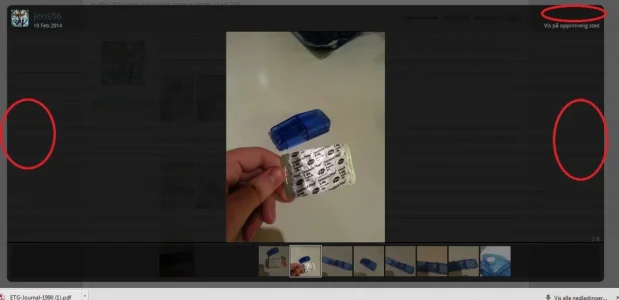
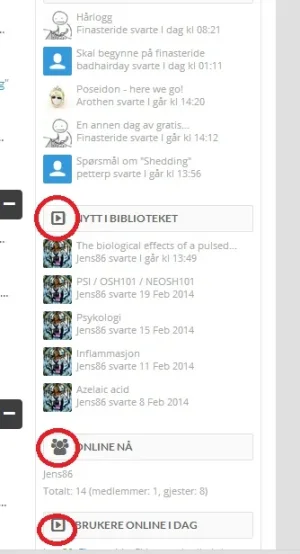
I have two questions:
1) I want to change the icons in the side bar (I use widgets framework). How do I do this? See attachment.
2) When I look at pictures in posts some of the buttons are missing. Is this something I can fix by using the color palette? How? See attachment.
Thank you. Great theme

I've had a ticket for days with no response. 
Trying to get the theme to work with forum tabs. Worked fine with my previous styles, but stopped working with this one. When you click on the tabs, nothing shows up except for the top one, rest are blank.
http://xenforo.com/community/resources/forum-list-tabs-by-waindigo.1476/
Trying to get the theme to work with forum tabs. Worked fine with my previous styles, but stopped working with this one. When you click on the tabs, nothing shows up except for the top one, rest are blank.
http://xenforo.com/community/resources/forum-list-tabs-by-waindigo.1476/

I've had a ticket for days with no response.
Trying to get the theme to work with forum tabs. Worked fine with my previous styles, but stopped working with this one. When you click on the tabs, nothing shows up except for the top one, rest are blank.
http://xenforo.com/community/resources/forum-list-tabs-by-waindigo.1476/
I've answered this one a few times.
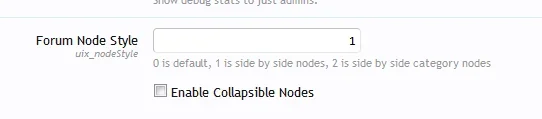
Disable your "Collapsible Nodes" in the style.
I posted the answer in the add-on thread as well.
http://xenforo.com/community/threads/forum-list-tabs-by-waindigo.45429/page-8#post-724518
Hi,
I have two questions:
1) I want to change the icons in the side bar (I use widgets framework). How do I do this? See attachment.
2) When I look at pictures in posts some of the buttons are missing. Is this something I can fix by using the color palette? How? See attachment.
Thank you. Great theme
View attachment 68471 View attachment 68472
Hi
1. Due to the inconsistent nature of sidebar markup it is a bit difficult for me to explain except on a per plugin basis. So on my demo, I've enabled the widget framework. Here is a screenshot of the area in question; the icon.
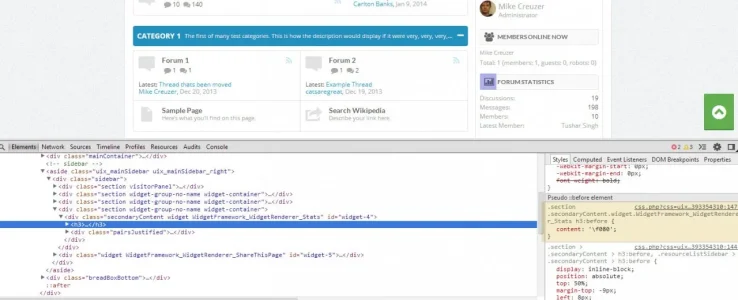
Note the markup is different than XenForo's ever so slightly but enough to where (I) couldn't find a way to make it work with one line of code. So this will be different if you do not have the widget frame work installed:
Code:
.section .secondaryContent.widget.WidgetFramework_WidgetRenderer_Stats h3:before {
    content: '\f080';
}1. Find an icon that you want
2. Note its character unicode value (the thing in parentheses on the link in point 1; the fontawesome cheat sheet
3. From that unicode value, strip out some stuff. So for example, if I wanted fa-heart, the unicode value for that is: . So what I want to do is just note the f004; or just everything after the f character, really.
4. Find the class of the block you want. Do so by inspecting or viewing the source on your webpage. You'll have to see the unique class on each block, and generally they will end in blahblah_users or blahblah_donate or something. Note that above I was selecting the stats block, or as the widget framework names it: WidgetFramework_WidgetRenderer_Stats
5. Now fill in the blanks:
Rich (BB code):
.section .secondaryContent.widget.theClassFromPoint4 h3:before {
    content: '\f080';
}
The green is the class you found from the source code, the red is the stripped out unicode from the icon you wanted from FontAwesome. If you want to use a different icon, you can just replace this with a background image to that icon or a font-family + new unicode and I think it should work fine. but by default I have the font-family of FontAwesome here.
6. Add the code from point 5 you created to somewhere generic, such as extra.css, which is where I'd recommend adding it.
Should be good!
I've had a ticket for days with no response.
Trying to get the theme to work with forum tabs. Worked fine with my previous styles, but stopped working with this one. When you click on the tabs, nothing shows up except for the top one, rest are blank.
http://xenforo.com/community/resources/forum-list-tabs-by-waindigo.1476/
Sorry for the delay in response had a flu all weekend. As you can see our collapse function doesn't seem to like the waindigo tabs, so I will take a look and try and figure out why when I get a chance.
Similar threads
- Replies
- 1
- Views
- 464


