UI.X

UI.X 1.5.22.0

No permission to download
This is what it always does, no?

No sir it does not (for me). See the screenshots. And, also as you can see from the screenshots, my forum nodes are screwy. I'd like to use font awesome and if you (or anyone) could explain it to me I would appreciate it.

Thank you.
 

Attachments

  • Screen shot 2015-12-10 at 8.20.10 PM.webp
    Screen shot 2015-12-10 at 8.20.10 PM.webp
    6 KB · Views: 24
  • Screen shot 2015-12-10 at 8.19.54 PM.webp
    Screen shot 2015-12-10 at 8.19.54 PM.webp
    4.5 KB · Views: 23
Give admins the ability to add more header logos.
Give members the ability to choose between those header logos.
 
No sir it does not (for me). See the screenshots. And, also as you can see from the screenshots, my forum nodes are screwy. I'd like to use font awesome and if you (or anyone) could explain it to me I would appreciate it.

Thank you.

I've figured out how to supply nodes of my choice. But, how do I use font awesome?

Also, what is going on with the avatars on forum home? (see screenshot)

Thanks!
 

Attachments

  • Screen shot 2015-12-11 at 11.15.03 AM.webp
    Screen shot 2015-12-11 at 11.15.03 AM.webp
    6.2 KB · Views: 20
Using these just to see if they would render and they are not. What am I doing wrong and/or not doing?

I would have been live with this style already.
 

Attachments

  • Screen shot 2015-12-11 at 11.28.45 AM.webp
    Screen shot 2015-12-11 at 11.28.45 AM.webp
    3.4 KB · Views: 22
Last edited:
Might as well add to the list. This is disappointing the amount of time waiting for support

Logo is "smaller"/"shrunken" not the uploaded size. Yes, I edited the height portion in style properties.
 
Give admins the ability to add more header logos.
Give members the ability to choose between those header logos.

Hmm Im not sure if anyone else would need this feature. We always want to keep UI.X powerful, but not bloated with features only a few people would use. That is best left to a custom modification of some kind. I could be wrong.

But, how do I use font awesome?

I do not understand what you mean. Where do you want to use it?

Also, what is going on with the avatars on forum home? (see screenshot)

Can you elaborate? Are you talking about the gold border? That can be removed in General style properties > Avatar. Just remove the padding.

Might as well add to the list. This is disappointing the amount of time waiting for support

Logo is "smaller"/"shrunken" not the uploaded size. Yes, I edited the height portion in style properties.

Rekt's logo is in the navigation. By design we have to constrain the height of the logo with respect to the height of the navigation. Not every style of logo will work with nav style 3, tweaking is required or a different navigation style. Thankfully we add in a bunch :P
 
I do not understand what you mean. Where do you want to use it?

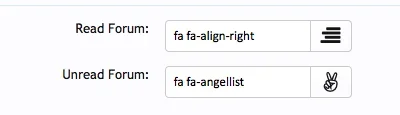
I'd like to use font awesome (read and unread) as my forum node icons. I cannot find where to set that and have them render.
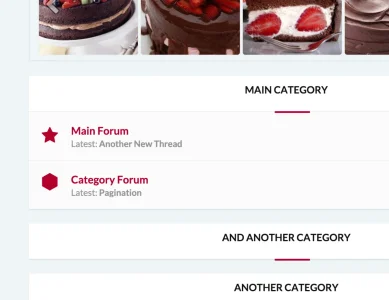
Can you elaborate? Are you talking about the gold border? That can be removed in General style properties > Avatar. Just remove the padding.

A picture is worth a thousand words. Uploaded 2 screenshots from forum home, as you can see one has a member name and the last post date and time. The REKT one does not.

Also: As per the screenshot the avatar is chopped off to the left.

Rekt's logo is in the navigation. By design we have to constrain the height of the logo with respect to the height of the navigation. Not every style of logo will work with nav style 3, tweaking is required or a different navigation style. Thankfully we add in a bunch :p

I fixed this issue. I changed it so the logo would appear above the navigation and now the full logo renders. I originally had it and wanted it to the left of the navigation but I guess it just doesn't fit. Like you mentioned not every logo will work with every style.
 

Attachments

  • Screen shot 2015-12-11 at 2.14.29 PM.webp
    Screen shot 2015-12-11 at 2.14.29 PM.webp
    4.9 KB · Views: 18
  • Screen shot 2015-12-11 at 2.14.07 PM.webp
    Screen shot 2015-12-11 at 2.14.07 PM.webp
    5 KB · Views: 16
I'd like to use font awesome (read and unread) as my forum node icons. I cannot find where to set that and have them render.

I just tried it on Rekt, just setting an icon in UI.X Forum Nodes (using the iconator chooser), and it worked fine for me. (fa fa-star)Screen Shot 2015-12-11 at 1.29.05 PM.webp
A picture is worth a thousand words. Uploaded 2 screenshots from forum home, as you can see one has a member name and the last post date and time. The REKT one does not.

Also: As per the screenshot the avatar is chopped off to the left.

Add this in to extra.css:

Code:
.node .nodeLastPost .lastThreadMeta {display: block;}

Like you mentioned not every logo will work with every style.

It will work with this style, but to be more specific not every orientation of logo will work with every different theme context. We recognized this and added a bunch of different contexts for you to choose from.
 
1 - What else do I need to tick and/or untick? I did just as you did in your post to me and I do not see the node icon.

2 - Thanks, for the member and time display.

3 - OK, about logo.

4 - The left side of the avatar on forum home is a little chopped off.
 
@Mike Creuzer after latest update and merging templates, alerts and conversations button in off-canvas right navigation aren't clickable.

Never mind, fixed.
 
Last edited:
Which template can I edit the spoiler button?

Nvm. I found it, how can I create a different CSS just for the spoiler button? The spoiler seems to be using the same button as the rest of the site.
 
Last edited:
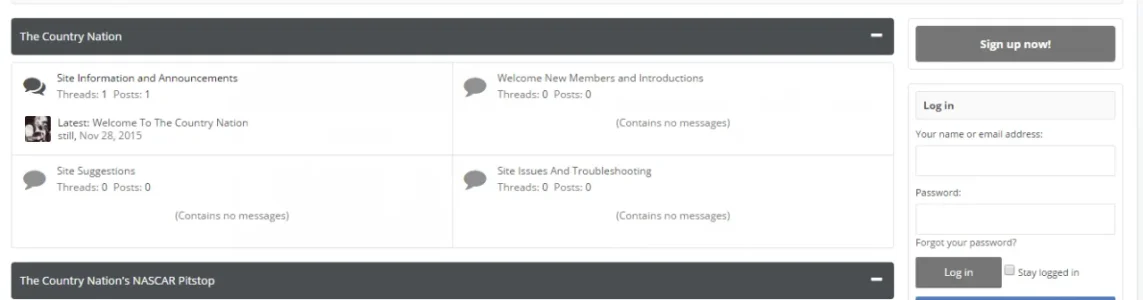
Maybe a bug:

Sidebar set to sticky;

Sign up button and log in doesn't line up with forum node bar:

Capture.webp

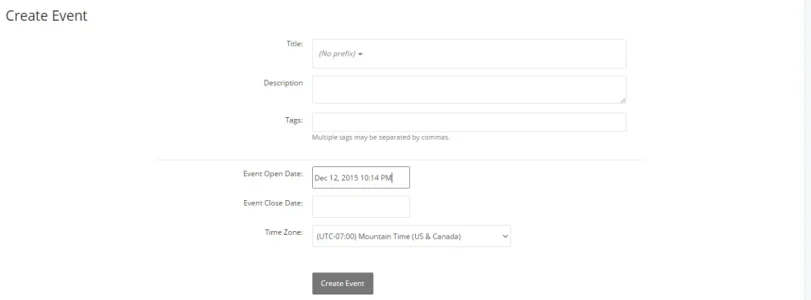
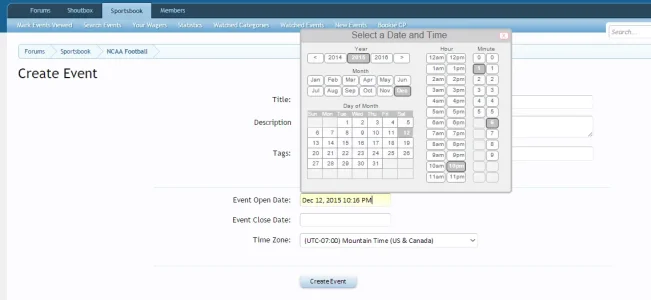
Also, this is a bug, when creating a sportsbook event, the date and time doesn't show in calendar as it should:

upload_2015-12-12_22-15-51.webp

In default works fine:

upload_2015-12-12_22-17-7.webp

@Bob @Mike Creuzer
 
Last edited:
@stilly for the second problem/bug go check the z-indexes. I had a similar problem with TagEssentials add-on where a popup did not show at all and it was a z-index problem. While in XF default style the z-indexes are very low, in UIX the z-indexes escalated to very high numbers that could override other add-ons due to the new OnCanvas feature of UIX.
 
Back
Top Bottom