
You are using an out of date browser. It may not display this or other websites correctly.
You should upgrade or use an alternative browser.
You should upgrade or use an alternative browser.

s9e Media Sites 2.19.3
No permission to download
- Thread starter JoshyPHP
- Start date


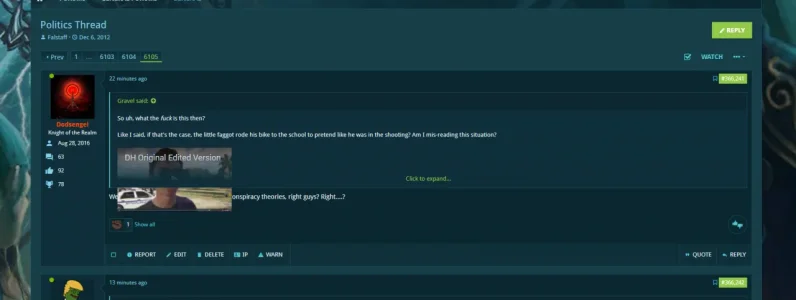
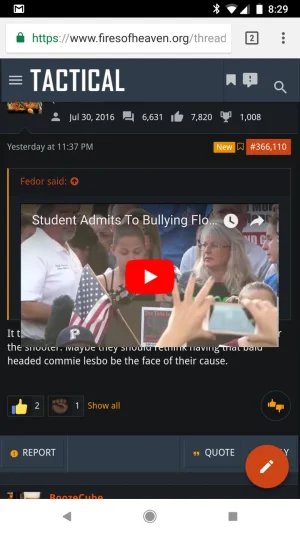

@JoshyPHP not sure if it is s9e but my youtube in quotes are acting kind of wonky. I tried with default style and it's doing it for that also so I am assuming it isn't theme related. Below you will see desktop and then mobile and it is happening on both.
That is a browser issue, https://xenforo.com/community/threads/youtube-bb-code-media-site-breaks-out-of-quote.144694/

Well look at that, I didn't assume it was an XF stock issue like I should have and then went and looked in the bug report section.
Crisis averted!

JoshyPHP updated s9e Media Sites with a new update entry:
Added temporary CSS to hotfix a Chrome issue
Read the rest of this update entry...
Added temporary CSS to hotfix a Chrome issue
Fixes the issue described in https://xenforo.com/community/threads/s9e-media-bbcodes-pack.61883/post-1231384
This is a browser issue that only affects Chrome versions between 6X and 65. It is fixed in Chrome 66.
Read the rest of this update entry...
@JoshyPHP are you seeing CBS News videos autoplaying?
In Firefox, yes. In Chrome, no. As I recall, Chrome doesn't allow videos with sound to autoplay anymore.
It is for me in Chrome right now.In Firefox, yes. In Chrome, no. As I recall, Chrome doesn't allow videos with sound to autoplay anymore.
Yeah, in the meantime I have it disabled and will keep an eye on it.I assume it depends on the browser's version.
Throwing a suggestion for acast (podcasts) into the mix...
https://www.acast.com/
Example URL:
Embed Code:
https://www.acast.com/
Example URL:
Code:
https://www.acast.com/<PODCAST NAME>/<PODCAST ID>Embed Code:
Code:
<iframe width="100%" height="188" src="https://embed.acast.com/<PODCAST NAME>/<PODCAST ID>" scrolling="no" frameborder="0" style="border:none;overflow:hidden;"></iframe>Throwing a suggestion for acast (podcasts) into the mix...
I'll look into it. I like podcast sites because they're usually simple to implement and generally useful, but this one is still early in its growing phase so I'm not sure whether adding it is a net positive.
Is that a podcast site that you'd use in your forums or is it more of a general suggestion? If it's the former, would you be willing to sponsor its addition?
I don't know if there was something inherent before with embeds but my users are saying that they had line breaks inserted automatically when they embedded something and now it doesn't do that. Is that something that sounds like what was going on?
I have noticed that embeds are stacked next to each other and before were on individual lines but not sure what was automatically causing that before vs. now.
I have noticed that embeds are stacked next to each other and before were on individual lines but not sure what was automatically causing that before vs. now.
This add-on has always worked this way: if you put multiple videos on the same line, they appear on the same line.
The default XenForo media sites and most other add-ons display each video on a different line. If that's something you want to force, you can add the following rule to your custom CSS:
The default XenForo media sites and most other add-ons display each video on a different line. If that's something you want to force, you can add the following rule to your custom CSS:
Code:
[data-s9e-mediaembed] {
    display: block !important;
}Perfect, fixed it of course. Thank you.This add-on has always worked this way: if you put multiple videos on the same line, they appear on the same line.
The default XenForo media sites and most other add-ons display each video on a different line. If that's something you want to force, you can add the following rule to your custom CSS:
Code:[data-s9e-mediaembed] { display: block !important; }

I am at https://www.firesofheaven.org and embeds are being blocked by adblockers a lot more than they were in 1.5 but most are working still.Does anybody here use a UI.X 2 theme? If so, have you experienced any issues with media embeds from this add-on or does it just work fine?
JoshyPHP updated s9e Media Sites with a new update entry:
Updated Imgur and MLB
Read the rest of this update entry...
Updated Imgur and MLB
Updated Imgur and MLB
Read the rest of this update entry...
Similar threads

- Replies
- 0
- Views
- 2K

- Replies
- 13
- Views
- 3K

- Replies
- 1
- Views
- 2K


- Replies
- 3
- Views
- 1K