Do you have the source files uploaded? Whats your site.Hi,
Can anyone help me resolve a issue.
When I disable or remove XFMG it breaks all my Font Awesome icons in UI.X and UI.Flex.
Any ideas where to look for a solution?
Thanks.

You are using an out of date browser. It may not display this or other websites correctly.
You should upgrade or use an alternative browser.
You should upgrade or use an alternative browser.

UI.X 1.5.22.0
No permission to download
- Thread starter Dad.
- Start date

Hey,
I visited PixelExit page and I liked what they have done with their node layout. I would like to accomplish the same thing with UI.X if its possible. I would like to the have "Message" and "Discussion" stats on each node. You can find a screen shot of what I would like to accomplish attached to this post. What steps I need to do to accomplish that?
Thank you
I visited PixelExit page and I liked what they have done with their node layout. I would like to accomplish the same thing with UI.X if its possible. I would like to the have "Message" and "Discussion" stats on each node. You can find a screen shot of what I would like to accomplish attached to this post. What steps I need to do to accomplish that?
Thank you
Attachments
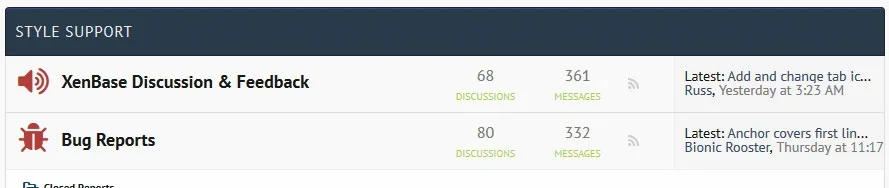

I do hope that one day the UI.X Iconator will support something like this addon: https://xenforo.com/community/resources/nodes-icon-tweak-themescorp-com.4221/ (in particular the icon from server option) so we can complete our node style appearance. In the meantime keep up the great work everyone 

I do hope that one day the UI.X Iconator will support something like this addon: https://xenforo.com/community/resources/nodes-icon-tweak-themescorp-com.4221/ (in particular the icon from server option) so we can complete our node style appearance. In the meantime keep up the great work everyone
There is no need for the Iconator to support that as UI.X has this functionality built in (as long as I'm correctly understanding what that does)

There is no need for the Iconator to support that as UI.X has this functionality built in (as long as I'm correctly understanding what that does)
Custom node icons that are images as far as I know are not supported, unless you guys managed to get it built in in the last few weeks? When I asked just before my S&U expired, I got told I'd have to disable the Iconator/Glyph Icons settings and then manually do each and every node through CSS which would start to get messy and defeat the object of your Iconator system


Under Typography settings. I set it from "@imagePath/uix/css/font-awesome.min.css" to "https://cdnjs.cloudflare.com/ajax/libs/font-awesome/4.3.0/css/font-awesome.css" and it fixed it.Do you have the source files uploaded? Whats your site.
Thanks.

Hi.
What would be the way to add Google Translate to the footer? I want it to the right of style chooser at the bottom of the page.
Here's the code:
What would be the way to add Google Translate to the footer? I want it to the right of style chooser at the bottom of the page.
Here's the code:
Code:
<div id="google_translate_element"></div><script type="text/javascript">
function googleTranslateElementInit() {
  new google.translate.TranslateElement({pageLanguage: 'en', layout: google.translate.TranslateElement.InlineLayout.SIMPLE, gaTrack: true, gaId: 'UA-29708374-1'}, 'google_translate_element');
}
</script><script type="text/javascript" src="//translate.google.com/translate_a/element.js?cb=googleTranslateElementInit"></script>Hi.
What would be the way to add Google Translate to the footer? I want it to the right of style chooser at the bottom of the page.
Here's the code:
Code:<div id="google_translate_element"></div><script type="text/javascript"> function googleTranslateElementInit() { new google.translate.TranslateElement({pageLanguage: 'en', layout: google.translate.TranslateElement.InlineLayout.SIMPLE, gaTrack: true, gaId: 'UA-29708374-1'}, 'google_translate_element'); } </script><script type="text/javascript" src="//translate.google.com/translate_a/element.js?cb=googleTranslateElementInit"></script>
Try adding:
Code:
<dl class="choosers chooser_googleTranslate">
<dt></dt>
<dd>
<div id="google_translate_element"></div><script type="text/javascript">
function googleTranslateElementInit() {
  new google.translate.TranslateElement({pageLanguage: 'en', layout: google.translate.TranslateElement.InlineLayout.SIMPLE, gaTrack: true, gaId: 'UA-29708374-1'}, 'google_translate_element');
}
</script><script type="text/javascript" src="//translate.google.com/translate_a/element.js?cb=googleTranslateElementInit"></script>
</dd>
</dl>
Code:
               <xen:if is="{$uix_adStyler_enabled}">
                    <xen:if is="!@uix_hideAdStylerTrigger && ( {$uix_canUseStylerPanel} || {$uix_canUseStylerPresets} )">
                        <dl class="choosers chooser_AdStyler">
                            <dt>{xen:phrase uix_ad_styler}</dt>
                            <dd><a href="#" class='si-reveal-toggle Tooltip' title="{xen:phrase uix_open_ad_styler}" rel="nofollow">{xen:phrase uix_ad_styler}</a></dd>
                        </dl>
                    </xen:if>
                    <xen:if is="@uix_adStylerColorOptions && {$uix_canUseStylerSwatches}">
                        <dl class="choosers chooser_colorOptions">
                            <dt>{xen:phrase uix_color_options}</dt>
                            <dd><a href="#" class='uix_colorOptionsToggle Tooltip' title="{xen:phrase uix_toggle_color_options}" rel="nofollow">{xen:phrase uix_color_options}</a></dd>
                        </dl>
                    </xen:if>
                </xen:if>
No guarantees, but that (or something like that) should work

Another one - sorry!
My selected Off Canvas links - need to change the colour. They go black and are not right when selected.
Also, unread PM's are also black. Impossible to see.
See the selected 'Contact Details' link is black when selected.
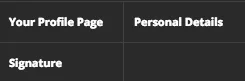
My selected Off Canvas links - need to change the colour. They go black and are not right when selected.
Also, unread PM's are also black. Impossible to see.
See the selected 'Contact Details' link is black when selected.


mikelowrey
Active member
@Mike Creuzer since @Chojo came in looking for the same thing as I am, is it possible that you can show us how to achieve this? Also I noticed in @Mackeral_Fillet forum that he has icons next to Login and Signup, how can achieve that as well. Thank you for your time.

Is this theme responsive?

Of course.Is this theme responsive?

Hello,
I'm requesting some help in making some tuning in this (amazing) UI.X Theme. There's two things I would like to do and I've not yet found how...
1. I would like to be able to define a background color based on member's membergroup in the postbit (see picture attached). Like 'red' for 'admin', 'blue' for 'premium', ... you get the idea
2. My Userblock is located above the message (see picture attached) and I would like to reduce the height of it, but don't know how I could do that ?
Thank you in advance for your savvy help
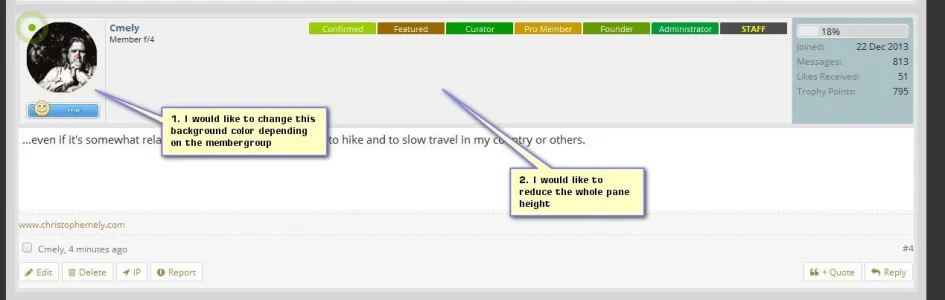
I'm requesting some help in making some tuning in this (amazing) UI.X Theme. There's two things I would like to do and I've not yet found how...
1. I would like to be able to define a background color based on member's membergroup in the postbit (see picture attached). Like 'red' for 'admin', 'blue' for 'premium', ... you get the idea
2. My Userblock is located above the message (see picture attached) and I would like to reduce the height of it, but don't know how I could do that ?
Thank you in advance for your savvy help
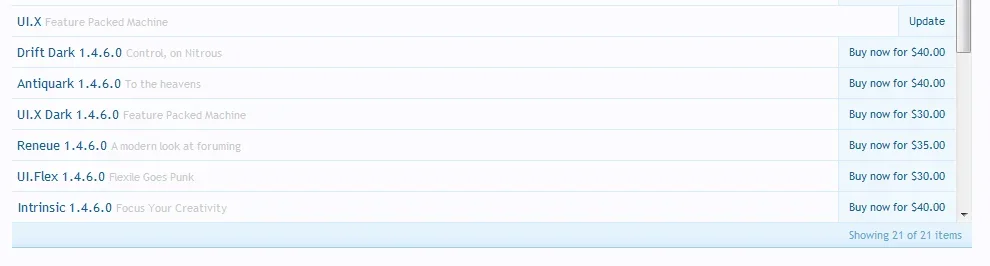
I'm showing an update too, yet there's no mention of it when I log into my account on Audentio. I'm already on 1.4.6.0. @Mike Creuzer can you confirm what the update is and why there is no available 'manual' installation to download?I am showing that there is an update available in my ACP, does anyone know if there are new features or bug fixes? Should I update?
Hey,
I visited PixelExit page and I liked what they have done with their node layout. I would like to accomplish the same thing with UI.X if its possible. I would like to the have "Message" and "Discussion" stats on each node. You can find a screen shot of what I would like to accomplish attached to this post. What steps I need to do to accomplish that?
Thank you
We have themes that accomplish this, but we do not add things to the framework that are strictly style related. That is to say, this framework is a logical system for layout structure and common features. We have themes that do this style, its quite simple but requires multiple edits in multiple templates.
Its something we can consider adding to the framework as this is the third or fourth time I've heard the request.
Well it needs a bit of love, since Google likes to style their widgets different than XenForo/UI.X. Just remove the padding, border, and background and it should play a bit nicer.
Another one - sorry!
My selected Off Canvas links - need to change the colour. They go black and are not right when selected.
Also, unread PM's are also black. Impossible to see.
See the selected 'Contact Details' link is black when selected.
View attachment 104684
What theme are you using? Straight UI.X? In any case I cannot replicate this on 1.4.6.0. But I do recall something like this in a past version so I think we have this fixed now. What version are you running?
Help! I need to get the background image but dont know what to do with the path
If you want to set the background, try going to Style Properties > General > Body (or HTML)
Is there a way to set the dark version of this theme as a child of the light version so that when the light version is updated, so too is the dark one? (I didn't know if it could be done normally without breaking anything)
Yes there is. If you own UI.X Dark and Light, there is a theme called child-ui.x-dark.xml that you can use to install as a child of UI.X theme. So your structure will want be like:
-- UIX (source files - disabled from view, do not edit directly)
----- BASE Theme (make all major edits here that you want applied to both, disabled from view though)
---------- UI.X Dark (source files - disabled from view, do not edit directly)
--------------- DARK - the theme that is enabled for viewing
---------- LIGHT - the theme that is enabled for viewing
@Mike Creuzer since @Chojo came in looking for the same thing as I am, is it possible that you can show us how to achieve this? Also I noticed in @Mackeral_Fillet forum that he has icons next to Login and Signup, how can achieve that as well. Thank you for your time.
For icons next to login and sign up there is a style property for that called Enable Login Trigger Icons under UI.X Header style property group.
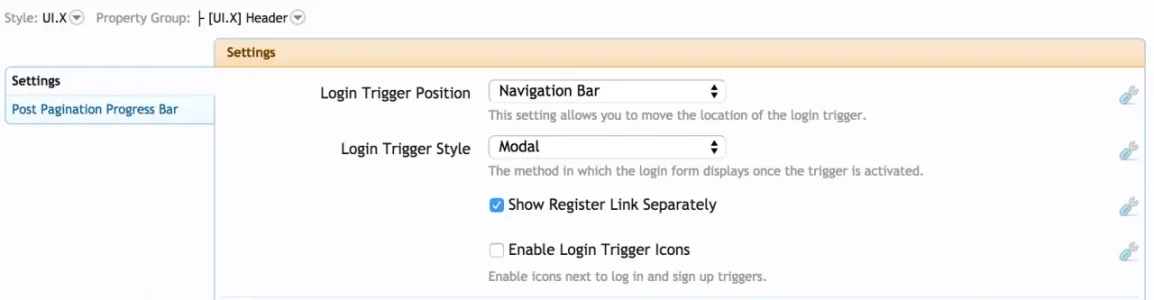
As for the forumbit style, we have themes like Scratch, Reneue, Rekt, and many others that use this style. Its something we will consider adding to the framework
I am showing that there is an update available in my ACP, does anyone know if there are new features or bug fixes? Should I update?
I'm showing an update too, yet there's no mention of it when I log into my account on Audentio. I'm already on 1.4.6.0. @Mike Creuzer can you confirm what the update is and why there is no available 'manual' installation to download?
An update for UI.X theme or add-on? Can someone screenshot the message? There should be no update for the theme past 1.4.6.0. We did update the add-on once since we did 1.4.6.0 and it was nothing necessary.
Hello,
I'm requesting some help in making some tuning in this (amazing) UI.X Theme. There's two things I would like to do and I've not yet found how...
1. I would like to be able to define a background color based on member's membergroup in the postbit (see picture attached). Like 'red' for 'admin', 'blue' for 'premium', ... you get the idea
This will require CSS and a template edit. You essentially need to add the user's usergroup to the li class message in the message template. So open the message template, and near the top find:
Code:
{xen:if $message.isNew, 'new'}Replace with:
Code:
{xen:if $message.isNew, 'new'} group_{$message.display_style_group_id}Then in your css, you can do things like:
Code:
.message.group_6 {background-color: lightblue;}Which for the usergroup 6 people make their post backgrounds blue. Naturally you'll need to find what the ID is for each group but the process for the CSS is the same.
2. My Userblock is located above the message (see picture attached) and I would like to reduce the height of it, but don't know how I could do that ?
Thank you in advance for your savvy help

Well you can do the background thing the same way as above.
As for the height, I mean thats reflecting the height of the avatar plus the user banner.
 You can make the avatar smaller in UI.X Threads and Posts > Avatar size (set to small).
Here you go @Mike Creuzer

--------------------------------------------------------------------------------------------------------------------------------------------------------------------------------------------------------------------

--------------------------------------------------------------------------------------------------------------------------------------------------------------------------------------------------------------------

---------------------------------------------------------------------------------------------------------------------------------------------------------------------------------------------------------------------
--------------------------------------------------------------------------------------------------------------------------------------------------------------------------------------------------------------------
--------------------------------------------------------------------------------------------------------------------------------------------------------------------------------------------------------------------
---------------------------------------------------------------------------------------------------------------------------------------------------------------------------------------------------------------------
Similar threads
- Replies
- 1
- Views
- 464


