
You are using an out of date browser. It may not display this or other websites correctly.
You should upgrade or use an alternative browser.
You should upgrade or use an alternative browser.

UI.X 1.5.22.0
No permission to download
- Thread starter Dad.
- Start date


These might be some rookie questions, but I'm new to both Xenforo and UI.X, so bear with me.. 
I was on another forum running UI.X and saw an avatar displayed next to the Latest post, as shown below:

I didn't see an option to do this in the UI.X settings, so I'm assuming that this person did some sort of template edit to accomplish this? If so, does anyone have the template to edit and the code to do this?
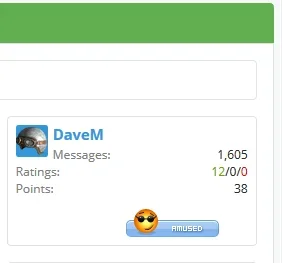
Also, I've seen a number of Xenforo sites where the user info box displayed in a thread is much more detailed than the standard UI.X user box, including their join date, # of messages, etc, as shown below:

Is this done through an add-on, or is this another template edit? Thanks!
I was on another forum running UI.X and saw an avatar displayed next to the Latest post, as shown below:
I didn't see an option to do this in the UI.X settings, so I'm assuming that this person did some sort of template edit to accomplish this? If so, does anyone have the template to edit and the code to do this?
Also, I've seen a number of Xenforo sites where the user info box displayed in a thread is much more detailed than the standard UI.X user box, including their join date, # of messages, etc, as shown below:
Is this done through an add-on, or is this another template edit? Thanks!
Last edited:
These might be some rookie questions, but I'm new to both Xenforo and UI.X, so bear with me..
I was on another forum running UI.X and saw an avatar displayed next to the Latest post, as shown below:
I didn't see an option to do this in the UI.X settings, so I'm assuming that this person did some sort of template edit to accomplish this? If so, does anyone have the template to edit and the code to do this?
Also, I've seen a number of Xenforo sites where the user info box displayed in a thread is much more detailed than the standard UI.X user box, including their join date, # of messages, etc, as shown below:
Is this done through an add-on, or is this another template edit? Thanks!
First of all, welcome to XenForo. You'll find the community here is very helpful, passionate, and a close knit group that loves newcomers. And also, thank you for purchasing UI.X! I hope you are enjoying it.
To answer your question, you need this plugin: http://xenforo.com/community/resources/last-post-avatar-by-waindigo.266/ I do not believe you'll have to do anything manually.
To show that extra information in the postbit, you'll want to head over to the Style Properties. So that's ACP > Appearance > Styles > UI.X > UI.X Child Theme that you created to make all changes to > Style Properties. Then, find the Message Elements group. In the first page, Settings, you can turn on all sorts of things.
And finally, I must warn you about about going to sites as is the one where you took that screenshot from. As a XenForo supporter and resource developer, such sites drastically hurt our community and so you may find that using that site gets you a bad reputation or worse. Feel free to talk to a staff member for further clarification.
First of all, welcome to XenForo. You'll find the community here is very helpful, passionate, and a close knit group that loves newcomers. And also, thank you for purchasing UI.X! I hope you are enjoying it.
To answer your question, you need this plugin: http://xenforo.com/community/resources/last-post-avatar-by-waindigo.266/ I do not believe you'll have to do anything manually.
To show that extra information in the postbit, you'll want to head over to the Style Properties. So that's ACP > Appearance > Styles > UI.X > UI.X Child Theme that you created to make all changes to > Style Properties. Then, find the Message Elements group. In the first page, Settings, you can turn on all sorts of things.
And finally, I must warn you about about going to sites as is the one where you took that screenshot from. As a XenForo supporter and resource developer, such sites drastically hurt our community and so you may find that using that site gets you a bad reputation or worse. Feel free to talk to a staff member for further clarification.
Thanks for your help Audentio, UI.X rocks and your YouTube tutorial really helped fill in the gaps. As for the extra info in the postbit, I must have skipped over the Message Elements group somehow in my haste, but I found it now and that did the trick. And I'll be installing Waindigo's plugin shortly, which should do the trick!
Did you revert the slogan style properties from the last upgrade?Two questions:
How do I fix the slogan? The space between the "logo" and the slogan is too big, and the text is too far up.
View attachment 75014
Any tricks to get UI.X working with xenporta's Recentfeatures widget?

Im sorry I dont understand what you mean..Did you revert the slogan style properties from the last upgrade?

There is also a bug (that has always been there with uix, at least for me): a lot of the letter i is changed to capital letter I. Like the text Administrator is changed to AdmInIstrator
Ah apologies. When did you first install UI.X? And if it wasn't in the last month, you'll likely need to upgrade your theme.Im sorry I dont understand what you mean..
February. I have ****ed up the installations and modifications (by making a mess and sometimes not editing the child theme etc.) so I will just reinstall the whole theme.Ah apologies. When did you first install UI.X? And if it wasn't in the last month, you'll likely need to upgrade your theme.
However; I want an responsive adsense banner on the right side of the header (where the search box is). Do you have a noob-friendly way to do this?
Sadly not noob-friendly. It is something we want to add to the framework, some quick easy responsive ad management system. So will let you know when this is ready.February. I have ****ed up the installations and modifications (by making a mess and sometimes not editing the child theme etc.) so I will just reinstall the whole theme.
However; I want an responsive adsense banner on the right side of the header (where the search box is). Do you have a noob-friendly way to do this?
Sadly not noob-friendly. It is something we want to add to the framework, some quick easy responsive ad management system. So will let you know when this is ready.
Ok, thanks. But is there somewhere I can read up on this? There has to be someone out there allready doing this.
I reinstalled the theme from scratch, and now everything works as it is supposed to
Is this the right theme structure?
UI.X
->UI.X child, where i make my changes
---> Child of the one above, this is the one I let my visitors choose

@Audentio ok did the overwrite of the XML file and in my parent UI.X I can see the Open Quick navigation but not in any of the styles below it. Here is the structure I am working on
View attachment 74612
@Audentio well I never know if I get support here or on your ticket system as that also has had no response to this! It is now a week later and I still have not been able to update my styles because of this?
Ticket ID #1473: Quick Navigation Missing
Yes I'd say that is a good structure.Ok, thanks. But is there somewhere I can read up on this? There has to be someone out there allready doing this.
I reinstalled the theme from scratch, and now everything works as it is supposed to
Is this the right theme structure?
UI.X
->UI.X child, where i make my changes
---> Child of the one above, this is the one I let my visitors choose
@Audentio well I never know if I get support here or on your ticket system as that also has had no response to this! It is now a week later and I still have not been able to update my styles because of this?
Ticket ID #1473: Quick Navigation Missing
You get support in the ticket system, more general support such as basic questions here. The problem to your solution was emailed to you. There was an update sent out weeks ago that you need to upgrade to in order to fix your problem.
Yes I'd say that is a good structure.
You get support in the ticket system, more general support such as basic questions here. The problem to your solution was emailed to you. There was an update sent out weeks ago that you need to upgrade to in order to fix your problem.
I did the upgrade the day you released it and I still have the issue

My support ticket has not been answered yet either
1473 Quick Navigation Missing Mike Creuzer High Awaiting Feedback
Yes it is possible but requires a template edit.Out of curiousity, is there a way to make the Admin bar use style 1 (covered) while the navigation bar uses style 0?
It is a bit hard to explain, but you essentially just switch '<div class="pageContent">' and '<div class="pageWidth">' and make sure thats all that shows up. Look for <xen:if is="@uix_pageStyle == 1">

Yes it is possible but requires a template edit.
It is a bit hard to explain, but you essentially just switch '<div class="pageContent">' and '<div class="pageWidth">' and make sure thats all that shows up. Look for <xen:if is="@uix_pageStyle == 1">
Thanks!
Last edited:

Can anyone help me out understand why our sticky navbar is flickering when scrolling up and down in Safari? www.truckmountforums.com

Similar threads
- Replies
- 1
- Views
- 464


