

You are using an out of date browser. It may not display this or other websites correctly.
You should upgrade or use an alternative browser.
You should upgrade or use an alternative browser.

UI.X 1.5.22.0
No permission to download
- Thread starter Dad.
- Start date
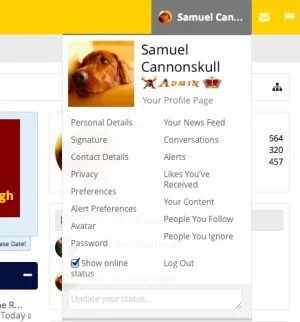

Style Properties: Popup Menus: Minimum Menu Width@Mike Creuzer , is there a way to make the width of this wider? The width of the drop down panel.
View attachment 96923
Itworx4me
That's for the navbar menu items, not for the user drop down.Style Properties: Popup Menus: Minimum Menu Width
Itworx4me
This picture is controlled by : Style Properties: Popup Menus: Minimum Menu Width@Mike Creuzer , is there a way to make the width of this wider? The width of the drop down panel.
View attachment 96923
Just tested this and it worked.....
Afaik @Oren Segal there is no property just for that. Would need manual code.

@Mike Creuzer , is there a way to make the width of this wider? The width of the drop down panel.
View attachment 96923
Code:
#AccountMenu { width: 400px; }
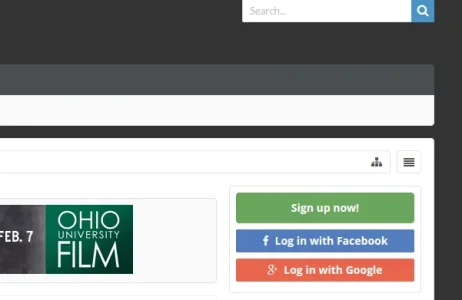
@Mike Creuzer
Some questions
1) The Discuss this resource tab is not having the same width as the sidebar width.
https://www.quantnet.com/resources/cmu-computational-finance-program.7/
2) What css class I use to have the button at a specific page. I have a button here that is too wide.
https://www.quantnet.com/cpp/
Some questions
1) The Discuss this resource tab is not having the same width as the sidebar width.
https://www.quantnet.com/resources/cmu-computational-finance-program.7/
2) What css class I use to have the button at a specific page. I have a button here that is too wide.
https://www.quantnet.com/cpp/
Ok thanks, in the EXTRA.css?should do what you want.Code:#AccountMenu { width: 400px; }
Wait, but I also want the Navbar User items at the right to also increase in size. Just this item:Ok thanks, in the EXTRA.css?

Correct.Ok thanks, in the EXTRA.css?
Yep add this in too:Wait, but I also want the Navbar User items at the right to also increase in size. Just this item: View attachment 97070
Code:
.navTabs .navTab.account .navLink .accountUsername {max-width: 200px;}Thanks!Correct.
Yep add this in too:
Where 200px is whatever size you want.Code:.navTabs .navTab.account .navLink .accountUsername {max-width: 200px;}
I somehow got the "log in" option in the menu to disappear.
View attachment 97056
There should be a log in link in the top right in the menu bar. It's there when I go back to the default style. What the heck did I do?
Hard to say. I guess create a ticket and Ill do my best.
1) The Discuss this resource tab is not having the same width as the sidebar width.
https://www.quantnet.com/resources/cmu-computational-finance-program.7/
Code:
.sidebar .callToAction {margin: 15px 0;}2) What css class I use to have the button at a specific page. I have a button here that is too wide.
https://www.quantnet.com/cpp/
I wouldn't use the sign up button I dont think. But if you do want to, you'll likely need to add:
margin: 0 auto;
max-width: 200px;
Or something like that to center it and make sure it doesn't get too big.
Thanks,
Mike
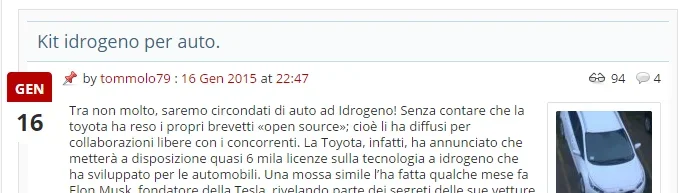
Hi there, can you be a bit more specific? Whats wrong?I'm having some problems with XenPorta2 pro and UIX. The old solution for xenporta 1.6 did not worked on xenporta2.
How could I solve this? Please see the title
View attachment 97076

Sorry, the title on xenporta home page does not have the background. It's the same problem that was mentioned here (there are some screenshots): https://xenforo.com/community/threads/ui-x-paid.57944/page-64#post-741517
That solution worked for the old XenPorta 1.6 but not for the new version 2.0
That solution worked for the old XenPorta 1.6 but not for the new version 2.0
@Mike Creuzer , for some reason, my search bar is having some issues, I don't know why. This how it looks on the mobile version:
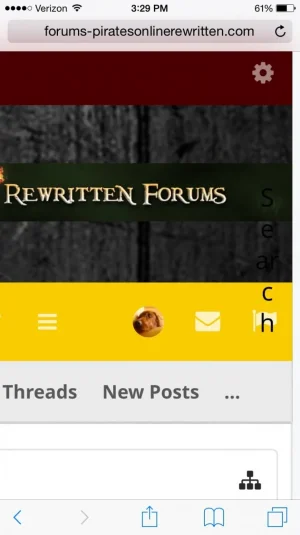
On the side there. And I'm pretty sure that the 'search button' is missing as well.
Thanks!
On the side there. And I'm pretty sure that the 'search button' is missing as well.
Thanks!
Sorry, the title on xenporta home page does not have the background. It's the same problem that was mentioned here (there are some screenshots): https://xenforo.com/community/threads/ui-x-paid.57944/page-64#post-741517
That solution worked for the old XenPorta 1.6 but not for the new version 2.0
I will see about supporting XenPorta 2.0. We made the choice not to support 1.X because of how poorly it worked with pretty much every aspect of the XenForo markup.
@Mike Creuzer , for some reason, my search bar is having some issues, I don't know why. This how it looks on the mobile version:
View attachment 97203
On the side there. And I'm pretty sure that the 'search button' is missing as well.
Thanks!
Hm very strange. Feel free to create a ticket with login details Ill take a look.
 Just let me know
Alright. I think something was changed in one of the search templates. I'm not sure exactly, I don't really know.I will see about supporting XenPorta 2.0. We made the choice not to support 1.X because of how poorly it worked with pretty much every aspect of the XenForo markup.
Hm very strange. Feel free to create a ticket with login details Ill take a look.
Similar threads
- Replies
- 1
- Views
- 464


