
You are using an out of date browser. It may not display this or other websites correctly.
You should upgrade or use an alternative browser.
You should upgrade or use an alternative browser.

UI.X 2 [Paid] 2.3.10.0.0
No permission to buy ($59.50)
- Thread starter ThemeHouse
- Start date

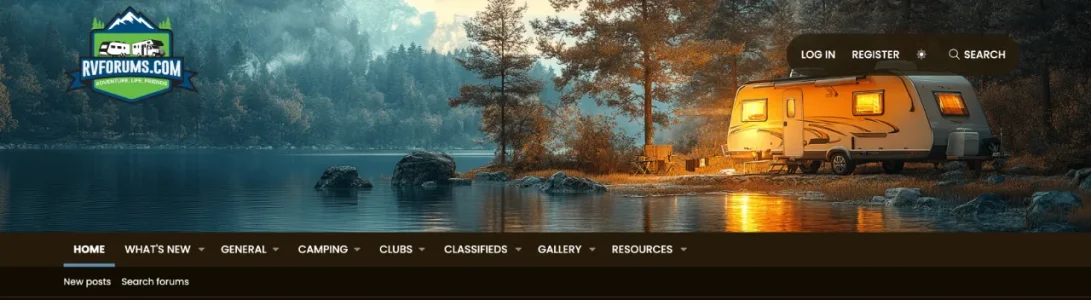

No need to edit a template; you can accomplish that via style properties.
You'll want to make sure the logo row is showing by going to Appearance -> Style Properties -> Head and navigation, and setting "Minimum viewport width to show logo block" to 0.
Then expand the Header/logo row section; you can set the background there.
You'll want to make sure the logo row is showing by going to Appearance -> Style Properties -> Head and navigation, and setting "Minimum viewport width to show logo block" to 0.
Then expand the Header/logo row section; you can set the background there.

Hi Will,
How do I fix category name from taking 2 lines like the "What's new"?
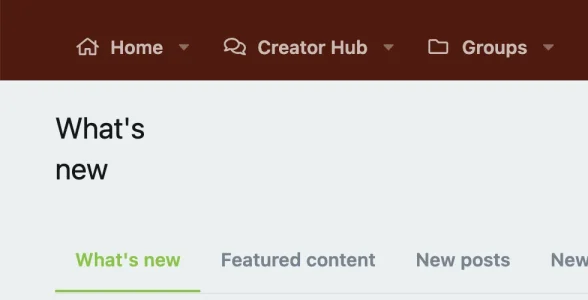
How do I fix category name from taking 2 lines like the "What's new"?
I'd need to see it on the site in order to troubleshoot; Can't think of any reason why it'd be doing that without some customization causing it.Hi Will,
How do I fix category name from taking 2 lines like the "What's new"?
View attachment 330494
It's really kind of odd. It doesn't always do it. Today it's fine. You can have a look here http://sneaker-groups.comI'd need to see it on the site in order to troubleshoot; Can't think of any reason why it'd be doing that without some customization causing it.
That's pretty odd; I couldn't replicate myself.It's really kind of odd. It doesn't always do it. Today it's fine. You can have a look here http://sneaker-groups.com
It is odd. I’ll live with it.That's pretty odd; I couldn't replicate myself.

Is it possible to use custom icons for all categories (nodes), as is otherwise only possible with this plugin? https://xenforo.com/community/resources/xfa-nodes-icon-tweak-xf2.5683/
Is this another extra plugin from you that needs to be installed, or is it already included here in this theme? https://www.themehouse.com/xenforo/2/themes/ui-xCertainly! Our nodes addon supports custom icons for categories as well as nodes.
The Nodes addon is a separate addon, but if you've ever bought a theme from us you should have it in your account as it's included for free with our themes.Is this another extra plugin from you that needs to be installed, or is it already included here in this theme? https://www.themehouse.com/xenforo/2/themes/ui-x

ThemeHouse updated UI.X 2 with a new update entry:
Version 2.3.8.0.0 Released
Read the rest of this update entry...
Version 2.3.8.0.0 Released
Changelog:
Fixed search node icon on variations version
Minor bugfixes, updated for XF 2.3.8
Note: This release cannot be used on XenForo 2.2, it is exclusively for XenForo 2.3 only.
Note: This update does not require a UI.X add-on update to function properly.
Read the rest of this update entry...

ThemeHouse updated UI.X 2 with a new update entry:
Version 2.3.8.0.0 Released
Read the rest of this update entry...
When I navigate to ACP > Appearance > ThemeHouse Styles, why don't I see an option to upgrade?
I used to see that option when there was a new release. My license is current FYI.
The cron to check our webserver for updates may not have ran yet; If you go to Tools -> Cron entries, you can manually run any of the crons necessary there (For Install & Upgrade it's "[TH] Install & Upgrade: Update Check").When I navigate to ACP > Appearance > ThemeHouse Styles, why don't I see an option to upgrade?
I used to see that option when there was a new release. My license is current FYI.
Yep, tried that and still no luck. Weird, huh?The cron to check our webserver for updates may not have ran yet; If you go to Tools -> Cron entries, you can manually run any of the crons necessary there (For Install & Upgrade it's "[TH] Install & Upgrade: Update Check").
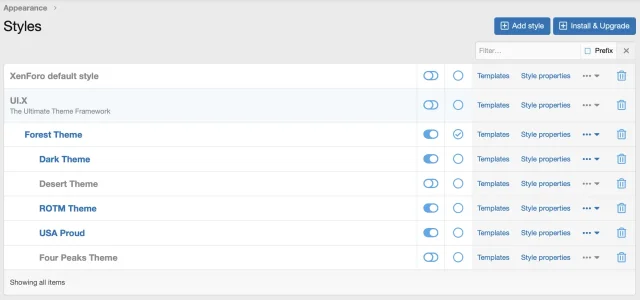
If I upload the XML file from here, will it overwrite the UI.X child themes? I assume not, but I figure I should ask beforehand since I've always just used the upgrade button under ACP > Appearance > ThemeHouse Styles which is missing for whatever reason.
Last edited:
Exceptionally weird; Anyway, yeah, you can absolutely just upload the xml file and overwrite the ui.x style itself with that. If you're running an XF 2.3.x version already, too, then you don't have to worry about uploading the files (as those won't have changed).. But if you're upgrading from XF 2.2.x or earlier, you'll need to also upload the files contained in /upload in the zip.Yep, tried that and still no luck. Weird, huh?
If I upload the XML file from here, will it overwrite the UI.X child themes? I assume not, but I figure I should ask beforehand since I've always just used the upgrade button under ACP > Appearance > ThemeHouse Styles which is missing for whatever reason.
View attachment 332976
Your child styles will remain fine just like if you had done the upgrade button method.

I've realized that UI.X 2 updates have transitioned to a paid model, and I'm fine with that. However, I am having trouble renewing my license on the Themehouse website.
Every time I try to complete the process, I encounter the error shown in the image below:
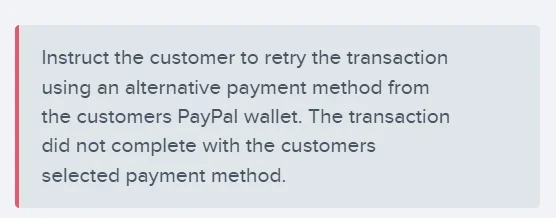
Could someone from the @ThemeHouse team please look into this or advise on how I can proceed with the renewal? Thank you!
Every time I try to complete the process, I encounter the error shown in the image below:
Could someone from the @ThemeHouse team please look into this or advise on how I can proceed with the renewal? Thank you!
I've realized that UI.X 2 updates have transitioned to a paid model, and I'm fine with that. However, I am having trouble renewing my license on the Themehouse website.
Every time I try to complete the process, I encounter the error shown in the image below:
View attachment 333206
Could someone from the @ThemeHouse team please look into this or advise on how I can proceed with the renewal? Thank you!
Poked some folks on the team here, but I'd suggest creating a ticket here as we're probably going to need some additional details to fully diagnose.
EDIT: Can confirm we'll want you to submit a ticket, as we'll need some account-specific information in order to fix it (your e-mail) and will possibly need to do some follow-ups on that.
Last edited:
ThemeHouse updated UI.X 2 with a new update entry:
Version 2.3.8.0.1 Released
Read the rest of this update entry...
Version 2.3.8.0.1 Released
Changelog:
Fixed issue with variation selections not being retained on new page load with UIX/AC.UI variations (page_container)
Fixed first/last page buttons not rendering icon on UIX/AC.UI variations (core_pagenav.less)
Fixed rare issue where mobile sidebar canvas toggle would fail to work when the trigger is on sub-nav row (uix_js)
Note: This release cannot be used on XenForo 2.2, it is exclusively for XenForo 2.3 only.
Note: This update does not require a UI.X add-on update to function...
Read the rest of this update entry...

So, I've tried to install the "Legend" theme on our old Xenforo 2 install that really needed a facelift after the old forum theme we used broke when we updated Xenforo. I've tried everything to my knowledge, but can't get the theme to load.
Install / Upgrade returns with:
![VFYZzB5[1].webp](https://xenforo.com/community/data/attachments/332/332658-e9b5a1185411719315bc4cf6e675beea.jpg?hash=0UuKGL-OkT "VFYZzB5[1].webp")
These are the currently installed addons (we nuked every addon to purchase new licenses and such):
![NvBb3jA[1].webp](https://xenforo.com/community/data/attachments/332/332657-bfb3fddd7f855d6c0fdd32e819b81852.jpg?hash=dXqUk8vGxS "NvBb3jA[1].webp")
UI.X-2.3.8.0.1 gives the same error as Legend with the same version name. I've also tried to manually install the files by FTP with no luck.
API Key has been added to options and works as intended. However, trying to install "Legend" from the "ThemeHouse Styles" results in:
![urShIvH[1].webp](https://xenforo.com/community/data/attachments/332/332659-fbc8a0f64e12955f654a332f7f1537a0.jpg?hash=65ezPB4I7v "urShIvH[1].webp")
![S6PRWtW[1].webp](https://xenforo.com/community/data/attachments/332/332660-93e25fd9287c7822779cfc3b8761bf11.jpg?hash=YyK3VBM3GY "S6PRWtW[1].webp")
I'm running out of options here. We are running the newest Xenforo, 2.3.9 which should be supported.
Any ideas? Oh, and I can't create a ticket on ThemeHouse website as "Create Ticket" returns with a blank page.
Install / Upgrade returns with:
These are the currently installed addons (we nuked every addon to purchase new licenses and such):
UI.X-2.3.8.0.1 gives the same error as Legend with the same version name. I've also tried to manually install the files by FTP with no luck.
API Key has been added to options and works as intended. However, trying to install "Legend" from the "ThemeHouse Styles" results in:
I'm running out of options here. We are running the newest Xenforo, 2.3.9 which should be supported.
Any ideas? Oh, and I can't create a ticket on ThemeHouse website as "Create Ticket" returns with a blank page.
Similar threads

- Locked
- Question
- Replies
- 9
- Views
- 104


- Question
- Replies
- 20
- Views
- 414


- Replies
- 1
- Views
- 27