Elegance [Deleted]

Arty updated Elegance with a new update entry:

Update for XenForo 1.5.0 rc 2

Other changes:
  • RTL support for tags
  • Adjustments for notices layout
To update from previous version import new XML file and update following files:
  • For Elegance v1:
    • styles/elegance/xenforo/style.js
    • styles/elegance/xenforo/tags-rtl.png
    • styles/elegance/xenforo/tags-rtl-hd.png
  • For Elegance v2:
    • styles/elegance2/xenforo/js/ (all files in directory)
    • styles/elegance2/xenforo/tags-rtl.png...

Read the rest of this update entry...
 
Any chance to pay with credit card? Or payoneer?
You can use credit cards with PayPal.

As for Payoneer, looks like it has some hefty fees (30/year for account maintenance? ripoff), so no, sorry.
 
Thank you!

Style has been updated to 1.5.0 earlier today, I'll post announcement here later.
 
Arty updated Elegance with a new update entry:

Update for XenForo 1.5.0

Style has been updated for XenForo 1.5.0

Major changes:
  • Version number has changed. From now on both Elegance 1 and Elegance 2 will have same version number, which matches supported XenForo version. Latest version is 1.5.0 for XenForo 1.5.0.
  • Elegance 2 zip file now includes Artodia Styles Framework add-on. Add-on is not required for style to work, but I recommend installing it. Add-on improves performance by parsing custom options in PHP code instead of JavaScript. It also makes...

Read the rest of this update entry...
 
Both versions already have icon for Showcase. Did you change tab name?
 
Both versions already have icon for Showcase. Did you change tab name?


I see the icon now, but would like to do the following:
  • Change the icon for showcase as its the same one for XFMG
  • Add an icon to a custom tab

Thanks
 
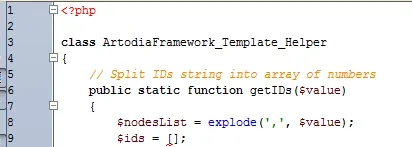
I'm getting the following error with the framework
Parse error: syntax error, unexpected '[' in C:\wamp\www\library\ArtodiaFramework\Template\Helper.php on line 9

upload_2015-9-4_9-36-23.webp
 
Sorry, that syntax requires php 5.4

Replace that line with
Code:
$ids = array();
About icon for Elegance 1: there are only 6 built in icons, you can see them in bottom left corner of xenforo-ui-sprite-editable-big.png. I'll add few more icons for next release, including something for Showcase.
 
@0ptima what about keeping camera icon for showcase, but change icon for gallery to 4th icon in attached image?

extra-icons-hd.webp
 
Im using my showcase for a garage. Would it be possible to have an automotive icon?
 
Download that image and image attached to this post, upload to styles/elegance/xenforo/

Add this to extra.css:
Code:
.navTabs .navTab.showcase .navLink:before
{ 
    background-image: url('@imagePath/xenforo/extra-icons.png'); 
    background-size: 225px 45px;
    background-position: -195px 0;
}
@media (-webkit-min-device-pixel-ratio: 2), (min-resolution: 192dpi), (min-resolution: 1.5dppx)
{
    .navTabs .navTab.xengallery .navLink:before { background-image: url('@imagePath/xenforo/extra-icons-hd.png'); }
}
.navTabs .navTab.showcase.selected .navLink:before, .navTabs .navTab.showcase:hover .navLink:before, .navTabs .navTab.showcase.PopupOpen .navLink:before { background-position: -195px -30px; }
 

Attachments

  • extra-icons.webp
    extra-icons.webp
    2.8 KB · Views: 1
Back
Top Bottom