Custom 404 Page by Siropu

Custom 404 Page by Siropu 1.2.1

No permission to download
It seems there's a bug in the new version. I have set many redirects now, and when I check, it shows only 2 with redirect URLs.
 
What exactly do you mean with "it"?
seems there's a bug in the new version.
Which new version? The latest one seems to date back to August 2024, so not far from being two years old.
I have set many redirects now, and when I check, it shows only 2 with redirect URLs.
Did the redirects work before (if you say you've set them "now" this does not sound like you had them before)? Is there a possiblity that your redirect logic does not work as you intended? How do you come to the conclusion that the behavior is a but and not a misconfiguration or wrong expectiation?

What exactly did you configure and how? Maybe RegEx hasn't been your friend (which is quite common)... ;)
 
Last edited:
What exactly do you mean with "it"?

Which new version? The latest one seems to date back to August 2024, so not far from being two years old.

Did the redirects work before (if you say you've set them "now" this does not sound like you had them before)? Is there a possiblity that your redirect logic does not work as you intended? How do you come to the conclusion that the behavior is a but and not a misconfiguration or wrong expectiation?

What exactly did you configure and how? Maybe RegEx hasn't been your friend (which is quite common)... ;)
You should read what I am trying to say first and avoid generating unnecessary questions, even though you are not the plugin's author. "Latest" means latest; it doesn't matter when it updates. If it was last updated in 1980, it is still the latest version until a new one comes out. It shows only 2 entries in the With redirect option. I have set many 404 pages to point to working URLs, but only two entries are visible there. All other redirects are not showing.
 
How can I prune all entries older than 30 days?
The table is gigantic.
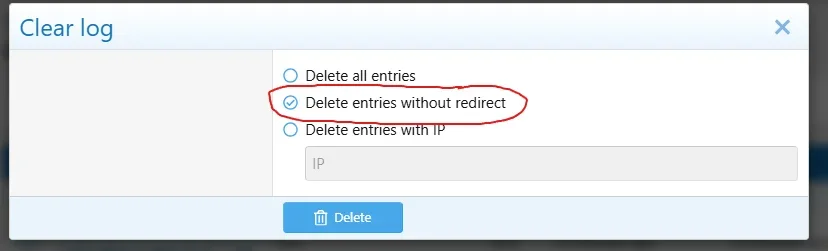
Not sure if you already know this, but there is an option to clear the log which will clear all entries. I use this once in a while to reduce the table:

1779521645254.webp

Warning: make sure you select Delete entries without redirect. The other option will delete everything including redirects :(
I personally think it would be better if Delete entries without redirect was the default.

1779521721850.webp
 
Had a further look into it and apart from malicious bots also the bing bot it affected. I.e I had this call in the log that ended with a 404:

View attachment 321229
upper one:
msnbot-40-77-167-149.search.msn.com - - [08/Apr/2025:15:15:17 +0200] "GET /tags/start/ HTTP/1.1" 404 9472 "-" "Mozilla/5.0 AppleWebKit/537.36 (KHTML, like Gecko; compatible; bingbot/2.0; +http://www.bing.com/bingbot.htm) Chrome/116.0.1938.76 Safari/537.36" 315 10202

The URL "/tags/start/" exists (there is a tag "start"). It seems only accessble when you are logged in (which bingbot is not). If I call the URL when not logged in I do indeed get a 404 - a bit strange, I would have expected a 401 here. Clearly not your fault - rather a bug in XF that may impact SEO ranking to the negative (as bing will this way get hundreds of 404s on my forum)


second one:
msnbot-40-77-167-76.search.msn.com - - [08/Apr/2025:14:26:41 +0200] "GET /threads/Threadurl.1338/Picture-Name.jpg HTTP/1.1" 404 9505 "-" "Mozilla/5.0 AppleWebKit/537.36 (KHTML, like Gecko; compatible; bingbot/2.0; +http://www.bing.com/bingbot.htm) Chrome/116.0.1938.76 Safari/537.36" 796 14614

There are hundreds of those. The requested picture does exist (it is embedded in the thread) but as full size pictures are only accessible to logged in users the bot won't get the ful resolution pic. It would however have a different URL than the bot requested anyway - no idea where he got his from.

Anyway: This makes the log pretty useless as it is spoiled with 100s of entries caused by bing that can only manually be identified by grepping through the web.log.

This should work
Code:
# Block Bing fake image URLs in thread paths
RewriteRule ^threads/.*\.(jpg|jpeg|png|gif|webp|mp4)$ - [R=404,L]
 
@Siropu Is there any way for the addon to show the actual URL of a broken link? I have a lot of attachments with weird names, and when I edit them I get 404 errors, but I don't know which URL corresponds to each one.
 
Back
Top Bottom