Which dark theme is currently compatible with chatbox since I'm shopping for one?
Eg. Is XenDark a good candidate?
Any other suggestion is appreciated!
Thx!
Eg. Is XenDark a good candidate?
Any other suggestion is appreciated!
Thx!



Should look ok on any style. If something isn't looking as it should, you can adjust things from Chat style properties very easily.Which dark theme is currently compatible with chatbox since I'm shopping for one?
Added two new admin options:
- Count room reactions
- Count private conversation reactions
Deleting a user will also delete their attachments.
Bugs Fixed
Fixed an issue with muted sanction type where messages are still visible.
Board wide banned users can still see Chat in "All pages" mode.
Made some changes to prevent potential front-end errors when upgrading add-on.

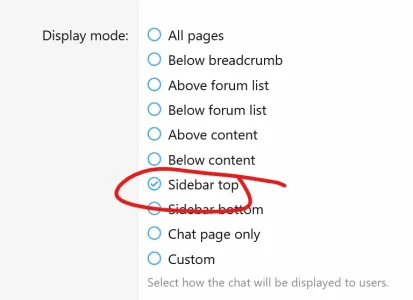
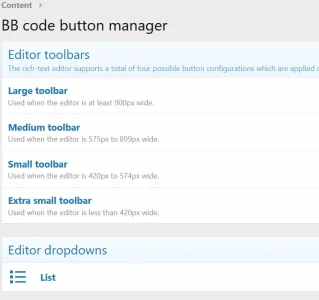
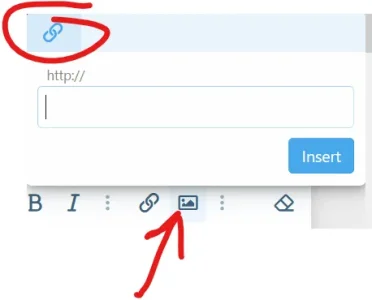
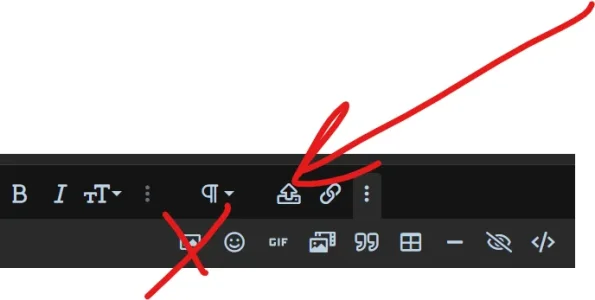
In order to upload images, you have to add the Chat upload button to the editor from Admin Control Panel > Content > BB code button manager > Click to edit the toolbars
On the toolbar edit page, drag and drop the Chat upload icon from the top toolbar to the bottom one and save.

@Siropu, can you please explain how to enable the prune command for anybody, not just administrators? Details of the issue I'm seeing are outlined in my previous message quoted above. Thanks.I have the same issue described by RallyFan, but cannot find the control panel that Siropu suggested. Running Xenforo 2.2.8 Patch 1 and Chat 2.2.3.
ACP > Setup > Options > Chat or ACP > AddOns > Chat > Options seem to both go to the same control panel (I am assuming the slight difference in location is due to a change in Xenforo since the above message). This control panel does not have a section for "Commands".
So I cannot find the control panel that was referred to, and see no way to enable the prune command for anybody - at present it only works for admiistrators, even if the user permissions are set to allow it. It is probable that I've just missed something, please explain more clearly where to find this setting.
Not sure where to edit.
View attachment 266535
But, on my chat, there is an image upload button. However, the only option is to use a link (URL). No ability to upload an image file directly from my computer. Is there a way to do this? This would be a BIG help for planned chat events with a "speaker" who wants to use images in the presentation.
View attachment 266537
Thanks! I'm working my way through the functions of this add-on. It is very robust!

UseCan a chat (I would use it for a committee meeting) be exported to say a thread in a forum so its saved ?
/export command. Type /help in the chat to see how you can use it.
Use/exportcommand. Type/helpin the chat to see how you can use it.
Giphy API key used for the /giphy command has stopped working so I have added a command option to add your own API key (ACP > Chat > Commands > Giphy)
Also, a new command has been added called /gif where you can use either Giphy or Tenor as a provider. It require an API key for any of the providers (ACP > Chat > Commands > Gif).
For Chat navigation tab? You cannot.is there any way to hide the user flag when it is "0"
Yeah, just doesn't make much sense for it to say 0, I have other tabs with indicators and they don't show when no new content.For Chat navigation tab? You cannot.

Is there a way this add-on can automatically use the API key which Xenforo has us produce for its GIF feature (if one has been inserted)?Siropu updated Chat 2 by Siropu with a new update entry:
Improvements
Read the rest of this update entry...
Working fine now. I don't know what happened at that time. Maybe a server restart/update.problems at your website ?

We use essential cookies to make this site work, and optional cookies to enhance your experience.