Does anyone know how long should it take for thread comments to be pulled through to beneath a wordpress article?
I'm finding 24+ hours - could Cloudflare impact?
I'm finding 24+ hours - could Cloudflare impact?



The duration you choose in the plugin settings (defaults to 30mins) will send the request. Try manually clearing the cache of a page you are testing to see if the comments are refreshed after the right amount of time has passed (you can test this by setting refresh time to 1minute)Does anyone know how long should it take for thread comments to be pulled through to beneath a wordpress article?
I'm finding 24+ hours - could Cloudflare impact?
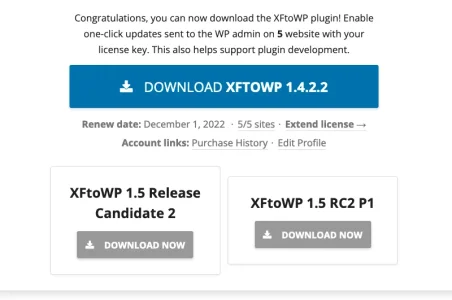
- An important security patch has been made and is now available for immediate update in XFtoWP 1.4.2.2. Licensed users can one-click update from WP admin > Plugins > Updates.
- You may also access your private account area to directly download the plugin files here. To manually update the plugin, simply upload the new files to the Plugins page.
- Respectively, XFtoWP 1.5 Beta 4 Patch 1 has...
The duration you choose in the plugin settings (defaults to 30mins) will send the request. Try manually clearing the cache of a page you are testing to see if the comments are refreshed after the right amount of time has passed (you can test this by setting refresh time to 1minute)
We had some issues with caching (CloudFlare) but now it is solved (/etc/hosts has the IP for the xenforo domain so php api call from wordpress host to xenforourl/api/ does not go via cloudflare's dns but directly to the IP of http host). Currently the whole XF domain is excluded from caching in the CloudFlare setting, but additionally on our end any request to xenforourl/api/ goes directly to the backend.
Let me know please if you have some ideas what I could do to find reason for wrong comment number.

It is recommended to perform most actions from the WP side, however the registration and sync process works perfectly fine with our free companion addon installed to XF:Hello, does the user need to register and login on WordPress side always? Or is it possible to register on xenforo side and be added to WordPress?

 xenforo.com
Registering over social using the addon I just linked to doesn't work, but I have an update that helps address the issue. I will release that shortly.If registering on WordPress side is it compatible with social login registrations? (register with Google, Facebook, Twitter etc)
That's a good suggestion, but where would the image come from?Also, the XF widget to use in WordPress should really have an option to display a thumbnail image from the forum post
The first image (attachment or link) from the first post, the same way it's selected in xenbros / etc plugins for thread thumbnails...That's a good suggestion, but where would the image come from?
That is worth a look, thank you for the suggestion.The first image (attachment or link) from the first post, the same way it's selected in xenbros / etc plugins for thread thumbnails...
XFtoWP 1.5 is nearly marked as stable with this solid round of improvements made from the last beta release. It is still not recommended to run this software on a live site and is strongly recommended you test any bulk user actions on staging or test websites.
Changes made in XFtoWP 1.5 RC1:
- Overall syncing stability improvements
- Improved real time permissions check during user import/syncing processes
- Better error handling if improper API connection setup...
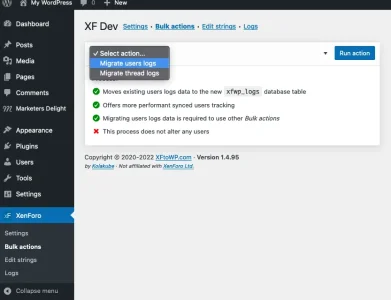
The final version of XFtoWP 1.5 is even closer with today's maintenance release. It is still not recommended to run this software on a live site and you should test any bulk user actions on staging websites first.
XFtoWP 1.5 RC2 is now available to all licensed customers from the account area at XFtoWP.com. See changelog:
- To match XF date field validation, the date synced to custom...

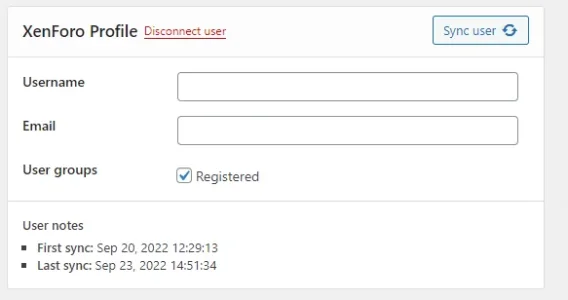
XFtoWP 1.5RC2-P1 package. It has a fix that I think will help here, as the user looks synced, but there is a slight glitch in the UI.
Hi @Festinger, go to your account and download theXFtoWP 1.5RC2-P1package. It has a fix that I think will help here, as the user looks synced, but there is a slight glitch in the UI.
Let me know if installing that version shows the correct details.

Hi,
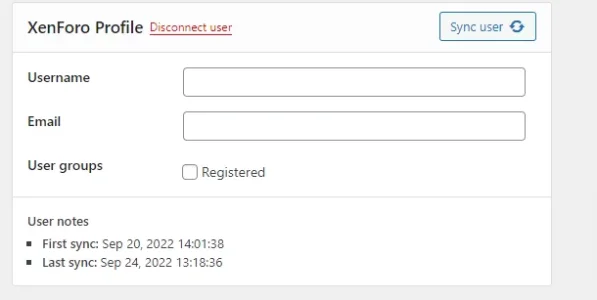
I downloaded the suggested version, but it didn't fix my issue.
View attachment 273793
When I try to connect with an account registered on XenForo with the same username and email, it didn't go through.
Please advice in this matter, as thousands of my customers cannot sync their account.
We just switched from Discourse to XenForo but the bridge isn't really stable at this moment.
To help confirm a resolution, edit a user that is not correctly synced and disconnect/re-connect the accounts and see if the proper data now shows.
That's great to hear.Thanks I tried that and it seems to be working.

No, this shouldn't be necessary unless you are talking about thousands of users with the same issue.Should I bulk disconnect now all users (because the log shows connected previously, but there was no user data connected)?
That's great to hear.
No, this shouldn't be necessary unless you are talking about thousands of users with the same issue.
We use essential cookies to make this site work, and optional cookies to enhance your experience.