I'll add it to the list!Hello!
Could you please add mail.ru and yandex.ru, thank you.
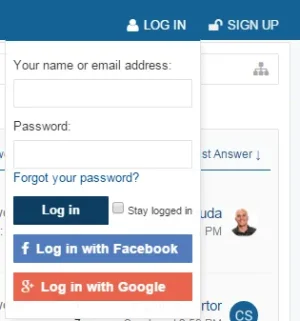
It works on mine. Are you using different login settings and did you fill out the LinkedIn options?UI.X dropdown login doesn't have Linkedin. Slidein panel and Modal options shows Linkedin login but not dropdown UI.X. option
UI.X support checked in style properties.
Ohhh then it's a template-specific thing. I'll have to code it in with the next update.Linkedin Works for all modes except dropdown login mode. Since it's working for other modes (sliding panel, modal) I am assuming Linkedin options are filled in correctly
View attachment 125286
I'm using the addon on my forum and it simply appears at the bottom of the list of external accounts. No issues D:It seems that the newest Release "overwrites" the Steam Login Button from the AddOn Steam Authentication & Integration.
If i disable the External Accounts Extended Addon, the Steam Login Button appears. When enabled, the Steam Login again disappears.
Do you have an Idea how to fix that?
Thanks for any Help!
oNdsen
Hey sorry about the delay, if you PM me I'll send you the temporary fix. Once the new update comes out you can remove the template modification.Linkedin Works for all modes except dropdown login mode. Since it's working for other modes (sliding panel, modal) I am assuming Linkedin options are filled in correctly
View attachment 125286
Is the execution order 25?Hey Silence
I have activated (under Options > External Accounts Extended):
When im disabling all Template Modifications from External Accounts Extended, then the Steam Button appears.
- External Provider Twitch
- External Provider Battlenet
- Nothing else
I just figured out that the Button only dissappears when i activate the following Template: login_bar_form Includes the EE login form
sorry, can you please explain what do you mean with "execution order 25"?Is the execution order 25?
Click the template modification that you said was the culprit and scroll down and find 'Execution Order'.sorry, can you please explain what do you mean with "execution order 25"?
Go to this link, change website.com to your website:sorry, can you please explain what do you mean with "execution order 25"?
edit:
ah, nevermind.
yes, execution order 25!
Yes, Steam is available there.Go to this link, change website.com to your website:
http://website.com/login
Does the steam login show up there?
Yeah it looks like the template modification login_bar_form Includes the EE login form isn't working properly for some stylesYes, Steam is available there.
Thank you very much!Yeah it looks like the template modification login_bar_form Includes the EE login form isn't working properly for some stylesI'll go through and fix it now. I'll post a bug fix in the thread.
I found a fix but it's not very good. It should fix your issues. NOTE: if you aren't experiencing this issue, DONT APPLY THIS FIX.Thank you very much!
Let me know if i can help you!
<xen:if is="{$xenOptions.facebookAppId}">
<xen:require css="facebook.css" />
<li><a href="{xen:link register/facebook, '', 'reg=1'}" class="fbLogin" tabindex="110"><span>{xen:phrase login_with_facebook}</span></a></li>
</xen:if>
<xen:if is="{$xenOptions.twitterAppKey}">
<xen:require css="twitter.css" />
<li><a href="{xen:link register/twitter, '', 'reg=1'}" class="twitterLogin" tabindex="110"><span>{xen:phrase login_with_twitter}</span></a></li>
</xen:if>
<xen:if is="{$xenOptions.googleClientId}">
<xen:require css="google.css" />
<li><span class="googleLogin GoogleLogin JsOnly" tabindex="110" data-client-id="{$xenOptions.googleClientId}" data-redirect-url="{xen:link register/google, '', 'code=__CODE__', 'csrf={$session.sessionCsrf}'}"><span>{xen:phrase login_with_google}</span></span></li>
</xen:if>

We use essential cookies to make this site work, and optional cookies to enhance your experience.