
You are using an out of date browser. It may not display this or other websites correctly.
You should upgrade or use an alternative browser.
You should upgrade or use an alternative browser.
![[XenCustomize] News Publisher: Home Page, Portal & CMS](/community/data/resource_icons/9/9522.jpg?1759724984)
[XenCustomize] News Publisher: Home Page, Portal & CMS 2.3.14.2
No permission to buy ($55.00)
- Author Veer
- Creation date
XenCustomize News Publisher 2.3.7 is Here!
We’re excited to bring you version 2.3.7, packed with powerful new features, improvements, and important bug fixes! The highlight of this release is the Scheduled News Publication featurecommissioned by @80sDude, allowing users to choose whether to publish news instantly or schedule it for a future date and time — complete with timezone selection! Moderators also get a new "View scheduled news" permission, and a dedicated "Your Scheduled News" page makes managing upcoming news stories easier. A cron job ensures that scheduled news is automatically published every 5 minutes (triggered by site activity).
Beyond scheduling, we've enhanced search autocomplete results by ensuring that the best available news thumbnail is always displayed. Additionally, news thumbnails in compact mode, search results, and tag pages now maintain their correct aspect ratio for a cleaner look.
Navigation also gets a refresh! The "Your News Stories" link has been renamed to "Your News" and is now a dropdown menu. Inside, you'll find "Your Published News" (previously "Your News Stories") and a brand-new "Your Scheduled News" link for quick access.
Of course, no update is complete without bug fixes! We’ve addressed missing phrases, resolved template errors, and fixed a moderator action alert issue where alerts were increasing the count but not appearing in the list. Everything should now work smoothly!
Special thanks to @80sDude for commissioning the Scheduled News Publication Feature.
Get ready to schedule your news stories, enjoy a more polished experience, and take advantage of these exciting improvements!Full changelog below:
New Features & Enhancements:
Scheduled News Publication
- Added new Publication options on the news creation page, allowing users to choose between:
- Publish Now – Make news live immediately upon submission.
- Schedule Publication – Set a future date, time, and time zone for automatic publishing (must be in the future).
- Added a "Scheduled" label next to news titles for clear identification.
- Added a block status message to indicate scheduled news.
- Added a "Reschedule Publication" (pencil icon) button for quick rescheduling.
- Added a "Publish Now" button to immediately publish a scheduled news item.
- Added a "Your Scheduled News" navigation link for easy access to all scheduled news.
- Added a new moderator permission: "View scheduled news" to allow access to other users' scheduled news.
- Added a new "Publish Scheduled News" cron entry, running every 5 minutes to automatically publish scheduled news. (Note: The cron runs only when site activity triggers it, as XenForo cron jobs do not run independently.)
Improved Search Autocomplete
- Search autocomplete results now utilize the
getCoverImage()method to ensure the best available image is displayed consistently. If no image is found, a default thumbnail is used.Improved News Thumbnails
- Enhanced thumbnail display in compact mode, search results, and tag pages to maintain the correct aspect ratio using custom styling instead of XenForo's avatar classes.
Changes:
Public Navigation Enhancements
- Renamed "Your News Stories" to "Your News" and changed it to a dropdown menu.
- Renamed the previous "Your News Stories" to "Your Published News", now a sub-navigation link under "Your News".
- Added "Your Scheduled News" as a new sub-navigation link under "Your News".
Bug Fixes:
Fixed various missing phrases. (Reported by @PhineasD and others)
alert_nwp_news_updateis unknown". (Reported via ticket)alert_user_news_converted_threadis unknown". (Reported via ticket)
If you like this update, please take a moment to rate the add-on!
Rate on XenForo.com or


News Publisher v2.3.6 is now available!
We’re excited to bring you an all-new update with some amazing new features and improvements! With v2.3.6, you can now convert article and discussion threads into news stories with ease, thanks to the new "Thread to News Story Conversion" feature. This feature is fully customizable, allowing you to choose the destination category, tags, and more. It’s perfect for streamlining the process of turning regular discussions into official news posts!
Additionally, the news post editor has received a boost with a full-screen layout, making editing and content creation even easier. We’ve also added a convenient admin option to control the visibility of the search box on the homepage, so you can manage your site's layout exactly how you want.
We’ve made a few tweaks behind the scenes, such as updating the default display order of the "News" tab and adjusting the default number of news posts shown on the index page for fresh installs.
Special thanks to @Lelouch0612 for commissioning the Thread to News Story Conversion Feature.
Read on below for the full version change log and details on all the exciting updates!
1. Convert Thread to News Story - Commissioned by @Lelouch0612
2. Enhanced News Post Editor - Suggested by @PhineasD.
- Introduced a requested feature that allows you to convert article and discussion type threads into news stories!
- Streamlined process accessible via Thread Tools.
- Customizable options during conversion, including destination category, prefix, tags, and news state.
- Automatically links the original thread as the Discussion Tab for the news story.
- Transfers key thread data (attachments, reactions, publish date, views) to the news story while ensuring engagement continuity.
- Fully permission-controlled with the new user group permission "News Publisher: Convert thread to news".
- Requires categories configured with the "Automatically create thread in forum" option enabled.
- Complete documentation is available on our support site to help you get started!
3. New Admin Option: Show Search Box on the Homepage - Suggested by @secnam.
- Enhanced the news post editor with a full-screen layout for better space utilization and an improved editing experience.
- Easily toggle the search box's visibility on the homepage through a simple admin option "Show search box on the homepage".
Updated the default display order of the "News" navigation tab for higher visibility in the navigation menu.
Default number of news displayed for the default category on the index page changed from 6 to 3. This change applies only to fresh installs.
xcu_nwp_news_countin the "Sort by" option for Search Users functionality.nwp_commentdisplayed on search results.
News Publisher 2.3.5 is now available! This update introduces significant improvements to News Thumbnail handling and expands functionality with the newgetCoverImage()method for consistent fallback options.
Additionally, the Expanded List Display Mode has been enhanced, thanks to the funding of @hakyangler, making it more responsive and visually refined.
As always, we’d love your feedback! If you find the update useful, please take a moment to rate News Publisher on XenForo or at XenCustomize.
New Features & Enhancements
- Improved Expanded List Display Mode
- Thanks to @hakyangler's funding, the Expanded List Display Mode has been enhanced for better responsiveness and usability.
- Improved layout consistency and updated styling for a polished, user-friendly experience.
- Template Updated:
xcu_nwp_expanded_list.lessxcu_nwp_news_list_macros- Improved News Thumbnail fallback options
- Introduced a new method
getCoverImage()for consistent thumbnail handling across all display modes and templates.- Fallback priority enhanced to include:
- Uploaded thumbnails
- Internal attached images
- Embedded (external) images
- Default thumbnail set in style properties.
- Consistent Template Updates:
- All relevant templates now utilize the
getCoverImage()method for a unified thumbnail fallback approach.- Templates Updated:
embed_resolver_nwp_newssearch_result_nwp_newstrending_content_item_nwp_newsxcu_nwp_news_bookmark_custom_iconxcu_nwp_news_list_macros- Added a missing template
search_result_nwp_comment.
Important Upgrade Notes
- If you’ve modified any of the updated templates, you must revert them after upgrading for the changes to take effect.
Enjoy the new features and improvements in News Publisher 2.3.5! For more details and examples, visit the related threads and suggestions on XenCustomize.com.
News Publisher 2.3.4 is now available! This update brings enhanced social media sharing, flexible side block placement options, and additional widget positions for better control over your news layout. We've streamlined the widget setup process and included essential bug fixes.
As always, we’d love your feedback! If you find the update useful, please take a moment to rate News Publisher on XenForo or at XenCustomize.
New Features & Enhancements
- SEO Meta Tags for Better Visibility (Suggested by @Luca_)
- Boost SEO and social sharing with added meta tags for news stories:
og:imagefor Open Graphtwitter:imageandtwitter:cardwith "summary_large_image" for Twitter previews- Admin Option for Side Block Position (Suggested by @Luca_)
- New setting to customize side block placement on the News Index and Category View pages:
- Choose between Side Navigation (left) or Sidebar (default on right)
- Category Side Block Display Control (Suggested by @hakyangler)
- Admins can now hide or show the category side block on listing pages, enabling cleaner and more tailored layouts. The default setting is Side Block.
- New Widget Positions
- Additional widget positions for better layout control:
- Index Sidebar — displays on the News Publisher index page
- Category Sidebar — displays on the Category View page
Changes
- Improved Widget Creation Process
- New sidebar positions are now included automatically on fresh installations.
- Default Side Block Position Set to Sidebar
- For new installs, side blocks default to the sidebar, providing a consistent right-side layout.
Important Upgrade Step
After upgrading to News Publisher v2.3.4, follow these steps in your Admin Control Panel (ACP) to ensure correct widget placement:
Following these steps will ensure that all widgets display correctly, maintaining the intended layout for your news listings.
- Navigate to Widgets in ACP
- Adjust Existing Widgets: (Step by step guide)
- For
xcu_nwp_latest_news_simple:
- Set the position to "XenCustomize News Publisher: Category Sidebar".
- Set Display Order to 200 and Save.
- For
xcu_nwp_latest_comments:
- Set positions to "XenCustomize News Publisher: Index Sidebar" and "Category Sidebar".
- Set Display Order to 300 for both and Save.
- For
xcu_nwp_news_statistics:
- Set position to "XenCustomize News Publisher: Index Sidebar".
- Set Display Order to 1000 and Save.
Bug Fixes
Enjoy the new features and flexibility in News Publisher 2.3.4! For more details and examples, visit the related threads and suggestions on XenCustomize.com.
- Resolved an issue where Author's Other News block didn't hide when set to 0 or had insufficient content. (Reported by @hakyangler)
- Added the missing "Headlines" phrase for News Ticker. (Reported by @hakyangler)
- Included missing bookmark templates: (Reported by @tmrerdgn)
bookmark_item_nwp_newsxcu_nwp_news_bookmark_custom_icon
News Publisher 2.3.3 is now available! This update introduces the ability to embed News Publisher stories across the platform! For more details on the various XF, XFRM, and XFMG Embed Resolvers, refer to the XF 2.3 - Embed your content anywhere.
As always, we’d love your feedback! Please take a moment to rate the add-on on XenForo or at XenCustomize.
New Features & Enhancements
- Embed News Publisher Stories Anywhere!
- You can now embed News Publisher stories across your site using the new EMBED BBCode. Simply paste a News story URL into any Rich Text Editor (RTE) that supports embedding.
- See an example screenshot and more details about this feature at XenCustomize.com:
- Please read the HYS thread for more information: XF 2.3 - Embed your content anywhere.
Example
News Publisher 2.3.2 is now available! This update includes some key improvements, including the ability to add a customized meta description to the News Publisher index page. This feature is designed to help improve your News Publisher index page's SEO, especially if you're using News Publisher as your site's homepage.
Additionally, you can now easily rename the News Publisher title and control the visibility of the News Ticker with a new user group permission.
As always, we’d love your feedback! Please take a moment to rate the add-on on XenForo or at XenCustomize.
New Features & Enhancements
- Introduced a new option to easily rename the News Publisher index title. (Suggested by @80sDude @hello2029)
- Added the ability to enter a meta description for the News Publisher index page.
- Added a new user group permission, "View News Ticker," to control the visibility of the News Ticker. (Suggested by @hello2029)
- Implemented a post-upgrade script to automatically apply this new permission based on existing permissions.
- Added support for News Thumbnail fallback options on the "New Comments" page.
Changes
- Changed the default Public navigation title from "News Publisher" to "News".
- Changed the default News Publisher index page title from "News Publisher" to "News Index".
Bug Fixes
Features in detail & screenshots
Check out the detailed threads with screenshots that explore all these new features!
News Publisher 2.3.1 is now available! This update brings exciting new features, including a new Standout Card Grid display mode, a featured ribbon to highlight news stories, improved news thumbnail handling, and a more polished search box design. We’ve also enhanced the Expanded List display mode by adding a snippet of news content as a fallback description.
As always, we’d love your feedback! Please take a moment to rate the add-on on XenForo or on our site – your support is greatly appreciated!
New Features & Enhancements
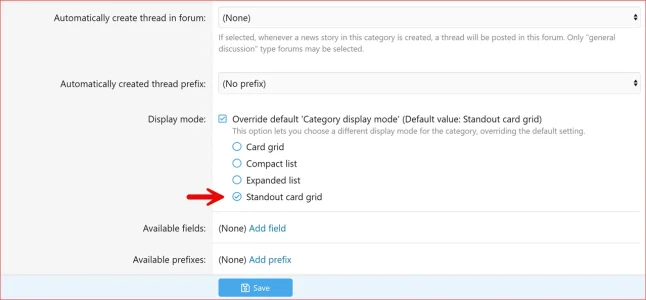
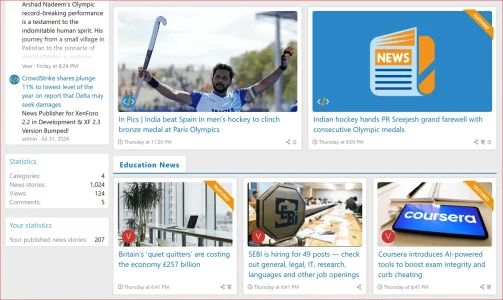
- Introduced a new 4th display mode among the available category display modes:
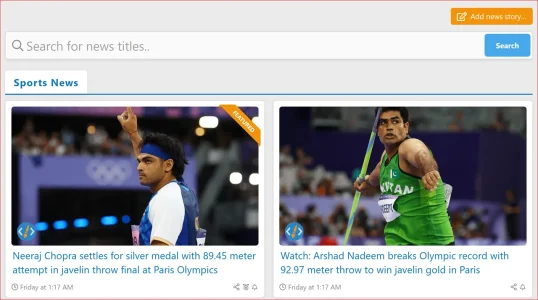
- Added a featured ribbon to highlight featured news stories in the "Standout Card Grid" and "Card Grid" display modes.
- Improved News Thumbnail fallback options
- Added support for external image URLs as a secondary fallback when no news thumbnail is uploaded.
- Moved the default thumbnail image to the third fallback option, utilizing the default thumbnail set in style properties.
- Updated various templates to ensure consistent display of images, thumbnails, and avatars across different views.
- Enhanced the "Expanded List" display mode by including a snippet of the news story content as a fallback description.
- Refined the search box design for a more polished look.
Changes
- Updated the default News Thumbnail (Landscape) image.
- Updated the default News Thumbnail (Square) image.
Screenshots and details
- News Publisher: Display Mode - Standout Card Grid
- News Publisher: Featured Ribbon
- News Publisher: Improved News Thumbnail Fallback Options
- News Publisher: Snippet as Fallback Description
- News Publisher: Search Box Design Polished
Desktop: Example Video of the Index
Mobile: Example Video of the Index
Attachments

We're pleased to announce that the News Publisher for XenForo 2.2 is officially released!
Understanding that many of you are still using XF 2.2, we've created a dedicated version to bring you the same excellent features, minus the XF 2.3-specific enhancements.
And great news: News Publisher 2.2.0 is upgradeable to News Publisher 2.3.0 once you upgrade your XenForo to 2.3!
Here are the two versions now available:
Thank you for your ongoing support and feedback!
- News Publisher 2.2.0: Compatible with XenForo 2.2
- News Publisher 2.3.0: Compatible with XenForo 2.3
First, thanks for the great response we have received since the release!
As we receive feedback, we understand that many of you are still using XenForo 2.2 and may not plan to upgrade to 2.3 soon but are interested in using the News Publisher. Therefore, we have decided to develop a separate XF 2.2 compatible version with all the same features, excluding those introduced in XF 2.3, such as featured content, trending news, etc. We’re happy to say it’s in development and will let you know as soon as it’s ready.
Additionally, we've bumped the XF 2.3 compatible version from 1.0.0 to 2.3.0. The XF 2.2 compatible version will be labeled as 2.2.0.