- Compatible XF 2.x versions
- 2.3
- License
- Use limited to one site per license
- Updates duration
- 12 Months
- Visible branding
- No
Enhanced Contact Form for XenForo
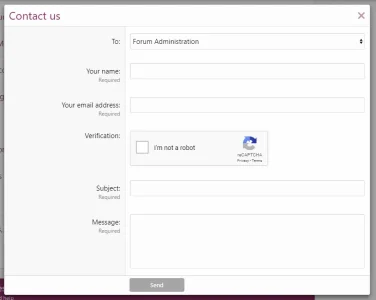
This powerful addon expands the default XenForo contact form with essential new features, allowing site visitors to send messages to specific teams or departments. It enables:- Sending contact form emails to predefined groups of recipients.
- Optionally creating a new thread in a designated forum, ensuring messages are posted to, for example, admin or moderators.
- Additional customisable contact form fields to capture relevant information.
Key Features
At the core of this addon is the Recipient Groups system. Each group represents a team or department (e.g., Forum Admin, Site Feedback, Advertising Team) and appears as a selectable option in the contact form. Admins can:- Define recipient email addresses.
- Automatically create a new thread in a specific forum containing the sender’s details and message content.
I am vetting who I sell licenses to, so if you wish to purchase a license, please click the purchase link and then send me a message as per the instructions in the product description. Thank you

Contact form options are found via the admin Home -> Contact Form
List the recipient groups. You can have several recipient groups and their order is determined by the Display Order value. In the screenshot below, we can see the recipient groups set up for AVForums.
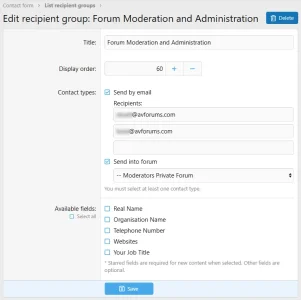
Then add your recipient group and enter the recipient group details.
You may also choose to create a thread in a chosen forum. In the example above, you can see that a thread will be created in the Moderators' Private Forum.
You may also create custom fields in the form for any extra piece of information you may need. Use the Custom contact fields option in the admin menu (shown above).
Setting up the Contact Us form
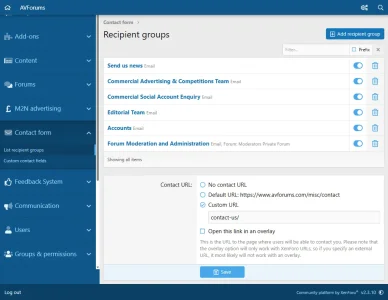
In the contact form set up page, select Custom URL and enter contact-us/ as above.
Linking directly to the form
Also, if you wish to link directly to the form with a particular recipient group and subject pre-selected, use a link like this:
HTML:
Please <a data-xf-click="overlay" href="{{ link('contact-us/?to=2&subject=I have an enquiry about M2N Limited') }}">click here</a> to send an email to us.Change the recipient group number (in the above example, it's 2) to whatever recipient group you want. The ID is visible when you mouse-over the group in the list
View attachment 444
Enter any subject line you like by changing the text I have an enquiry about M2N Limited in the above example.
Live Example
Contact Us | AVForums
Terms And Conditions
- Each license is valid for use on one site.
- 12 months support renewals are in place; when your support runs up you can continue to use the add on but will not be able to receive updates until you renew it.