- Compatible XF 2.x versions
- 2.2
- 2.3
- Additional requirements
- Standard Library by @Xon
- Updates duration
- 12 months
- Visible branding
- No
Prefix Essentials adds a range of useful thread prefix features to XenForo, including the ability to watch prefixes, automatically expire threads based on their prefixes, filter thread lists by prefix and ignore threads with unwanted prefixes.
These features make thread prefixes considerably more useful for both forum members and administrators, helping members find and follow relevant discussions while reducing the work involved in managing threads.
Requirements: XenForo 2.3 or later and Standard Library by Xon. There will be no further XenForo 2.2 releases.
Compatibility: Supports SV/MultiPrefix.
Members can watch individual thread prefixes and receive notifications whenever a new thread is created with a watched prefix, or an existing thread is assigned that prefix.
For example, a member interested in a particular type of discussion can watch its prefix and be notified when relevant threads appear, even across multiple forums.
Prefixes can be configured to expire automatically or manually. When a thread expires, Prefix Essentials can perform one or more actions without requiring a moderator to intervene.
This is particularly useful for classified adverts, wanted threads, time-limited offers and other discussions that have a defined lifespan.
For example, a classified advert could be locked, moved to an archive forum or assigned a different prefix after an agreed period, or when its author indicates that the item has been sold.


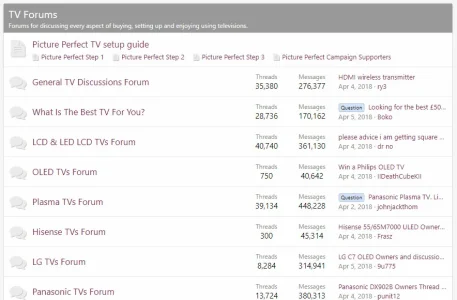
Prefix Essentials adds convenient prefix filtering controls to several areas of XenForo, reducing the need to navigate through the standard thread filtering options.


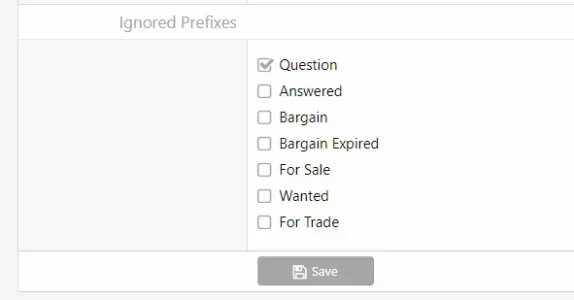
Members can select prefixes to ignore in their account preferences, helping them concentrate on the subjects that matter to them.
These features make thread prefixes considerably more useful for both forum members and administrators, helping members find and follow relevant discussions while reducing the work involved in managing threads.
Requirements: XenForo 2.3 or later and Standard Library by Xon. There will be no further XenForo 2.2 releases.
Compatibility: Supports SV/MultiPrefix.
Watch Prefix
Follow the subjects you're interested in without having to watch individual threads or entire forums.Members can watch individual thread prefixes and receive notifications whenever a new thread is created with a watched prefix, or an existing thread is assigned that prefix.
For example, a member interested in a particular type of discussion can watch its prefix and be notified when relevant threads appear, even across multiple forums.
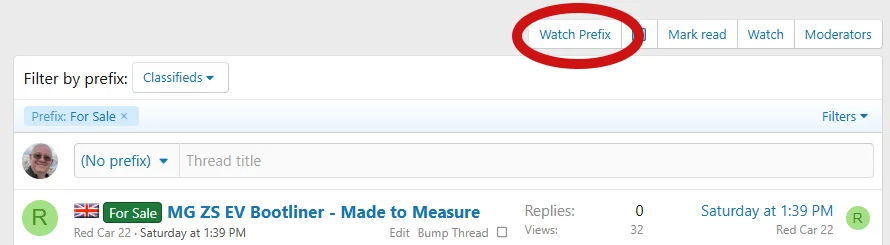
- Watch or unwatch prefixes from prefix-filtered forum thread lists. Click a prefix beside a thread title or one of the prefix filter buttons above the thread list to access the Watch Prefix or Unwatch Prefix option.
- Receive notifications when new threads are created with a watched prefix.
- Receive notifications when existing threads acquire a watched prefix.
- Supports prefix changes resulting from XenForo's question-and-answer functionality, such as a thread gaining an Answered prefix when a solution is selected.
- Choose alerts, emails or both, including email-only notifications.
- Manage watched prefixes from a dedicated Watched Prefixes page in the member's account, including removing subscriptions that are no longer wanted.
- Unsubscribe directly from notification emails.
- Respects applicable permissions and prefix visibility.
- Automatically cleans up obsolete prefix subscriptions.
- Watch/Unwatch Prefix control.
- Watched Prefixes section in the member account page.
Expiring Prefixes
Automatically manage threads when their purpose has been fulfilled or a specified period has elapsed.Prefixes can be configured to expire automatically or manually. When a thread expires, Prefix Essentials can perform one or more actions without requiring a moderator to intervene.
This is particularly useful for classified adverts, wanted threads, time-limited offers and other discussions that have a defined lifespan.
For example, a classified advert could be locked, moved to an archive forum or assigned a different prefix after an agreed period, or when its author indicates that the item has been sold.
When to expire
Each prefix can have its own expiry configuration.- Member-selected date and time: Allow the thread author to specify an expiry date and time when creating or editing a thread.
- Time-based expiry:Automatically expire the thread after an administrator-defined number of minutes from:
- The thread's creation.
- The most recent post, including the first post.
- Manual action: Allow the member to trigger expiry by clicking a custom action button, such as Deal Agreed.
What happens when a prefix expires?
Administrators can configure up to four actions to take place when a thread expires:- Delete thread: Soft-delete the thread, removing it from public view without permanently deleting it.
- Lock thread: Prevent further replies.
- Move thread: Move the thread to an administrator-selected forum.
- Change prefix: Assign a different prefix or remove the prefix entirely.
Prefix Filtering
Make it easier for members to find threads covering the subjects that interest them.Prefix Essentials adds convenient prefix filtering controls to several areas of XenForo, reducing the need to navigate through the standard thread filtering options.
Forum List - Prefix Filter Menus
Display prefix group menus on the main forum list, allowing members to browse threads with a particular prefix across different forums.- Display links to threads using prefixes from selected prefix groups.
- Choose which prefix groups are included through their administrator settings.
- Click a prefix to view matching threads across the forums the member can access.
- Respect forum visibility and the member's ignored-prefix preferences.
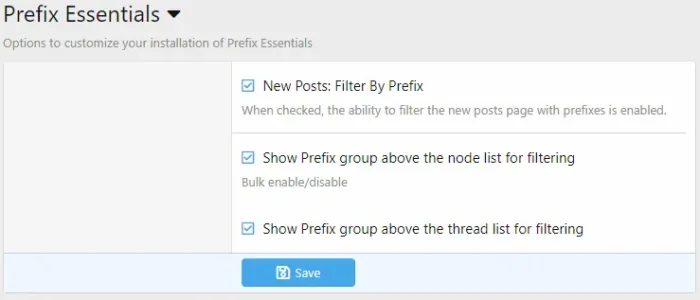
- Enable or disable the feature through an administrator option.
Forum View - Prefix Filter
Display the prefixes used by threads above the forum's thread list, making it easy to filter discussions with a single click.- Click a prefix to display only threads with that prefix.
- Display the number of threads associated with each prefix.
- Respect thread visibility and ignored-prefix preferences.
- Retain XenForo's standard Filters menu as an alternative.
- Enable or disable the additional controls through an administrator option.
New Posts - Prefix Filter
Add prefix filtering to the New Posts page, allowing members to narrow the list of recent discussions to threads with selected prefixes.Ignore Prefixes
Let members hide discussions they are not interested in.Members can select prefixes to ignore in their account preferences, helping them concentrate on the subjects that matter to them.
- Select ignored prefixes under Account > Preferences.
- Hide matching threads from thread lists, the new threads widget and the new posts widget.
- Continue to display threads the member already watches, even if they have an ignored prefix.