XF2 [8WR] XenCarta 2 (Wiki) PRO

XF2 [8WR] XenCarta 2 (Wiki) PRO [Paid] 2.3.0.2

No permission to buy ($30.00)
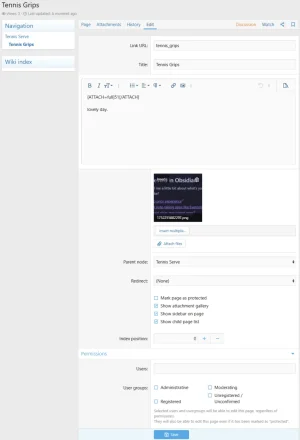
Just made a new XenCarta page.

The permissions are set page by page (see below) as you make the pages.
You could set the admin group to be editors and then just add members one by one.

1752256223250.webp
 
Short question:
If I change a template, is it possible to have those changes automatically reflected on the page?


Currently, after every change, I have to manually edit the page and re-paste the code to apply the updated template. Is there a way to avoid that?
 
Short question:
If I change a template, is it possible to have those changes automatically reflected on the page?


Currently, after every change, I have to manually edit the page and re-paste the code to apply the updated template. Is there a way to avoid that?
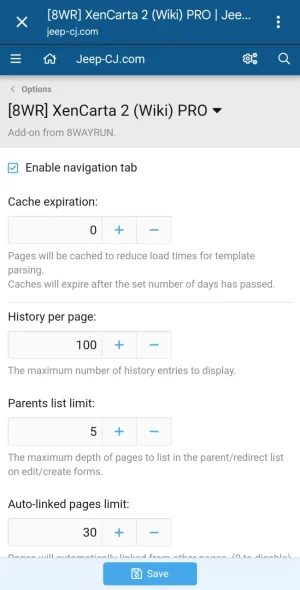
When editing you should turn off caching. Then empty the cache.

1000015174.webp

1000015175.webp
 
Last edited:
Hi,

I’ve encountered a bug when creating pages via the Admin CP.

Problem:
When creating a new page and selecting a parent, the parent is not saved.
However, if you edit the page afterwards and select the parent again, it saves correctly.

Cause:
In the file:
Code:
src/addons/EWR/Carta/Admin/Controller/Page.php

Inside
Code:
actionModify()
, this code overwrites all submitted page options when creating a new page:

PHP:
$input['page_options'] = ['sidebar'=>1,'sublist'=>1];

This completely removes any values submitted from the form, including:
Code:
page_options[parent]

Fix:
Instead of overwriting, the array should be merged with existing input:

PHP:
$input['page_options'] = ($input['page_options'] ?? []) + ['sidebar' => 1, 'sublist' => 1];

And in the else block:

PHP:
$input['page_options'] = ($input['page_options'] ?? []) + $wiki['page_options'];

Result:
  • Parent is correctly saved during page creation
  • Existing options from the form are preserved
  • Behavior is consistent with editing

This looks like an unintended overwrite rather than expected behavior.
 
Issue: Pages hierarchy not visible in AdminCP (EWR Carta)

I ran into a usability issue with the pages list in the admin panel. By default, all pages were displayed as a flat list, which made it difficult to understand the parent–child structure, especially when working with a large wiki.

Problem
Even though the add-on supports hierarchy (parent pages), the AdminCP list:
  • does not visually reflect nesting
  • does not sort pages as a tree
  • makes navigation and management inconvenient

Root cause
1. Pages were sorted alphabetically instead of by hierarchy
2. The template did not use page_depth to visually indicate nesting

Solution

1. Fix sorting in repository (PHP)


File:
/src/addons/EWR/Carta/Repository/Page.php

Replaced default sorting:

PHP:
public function findPage()
{
    return $this->finder('EWR\Carta:Page')
        ->order('page_family', 'ASC')
        ->order('page_left', 'ASC');
}

This ensures pages are ordered according to the nested set model (tree structure).

2. Improve visual hierarchy in Admin template

Template:
admin:EWRcarta_page_list

Replaced the default xf:main block with a custom layout using page_depth:

HTML:
<xf:foreach loop="$wikis" value="$wiki">
    <xf:datarow>
        <xf:cell>
            <a href="{{ link('ewr-carta/pages/edit', $wiki) }}" class="dataList-cellMain" dir="auto">
                <div class="dataList-mainRow">
                    <span style="display: inline-flex; align-items: center; padding-left: {{ $wiki.page_depth * 24 }}px;">
                        <xf:if is="$wiki.page_depth > 0">
                            <span style="display:inline-block; width:16px; margin-right:6px; color:#b0b7c3;">↳</span>
                        </xf:if>
                        <span>{$wiki.page_name}</span>
                    </span>
                </div>
                <div class="dataList-subRow" style="padding-left: {{ $wiki.page_depth * 24 + ($wiki.page_depth ? 22 : 0) }}px; color:#8a94a6;">
                    {$wiki.page_slug}
                </div>
            </a>
        </xf:cell>

        <xf:action href="{{ link('ewr-carta/pages/modify', $wiki) }}" overlay="true">
            {$wiki.page_type}
        </xf:action>
        <xf:action href="{{ link('ewr-carta/pages/edit', $wiki) }}">
            <xf:date time="{$wiki.page_date}" />
        </xf:action>
        <xf:delete href="{{ link('ewr-carta/pages/delete', $wiki) }}"
            tooltip="{{ phrase('delete') }}" />
    </xf:datarow>
</xf:foreach>

Result
  • Pages are now displayed in proper hierarchical order
  • Child pages are visually indented
  • Structure is much easier to read and manage

Suggestion
It would be great if this behavior (tree sorting + indentation) was included by default in the add-on, as it significantly improves UX in AdminCP.
 
Back
Top Bottom