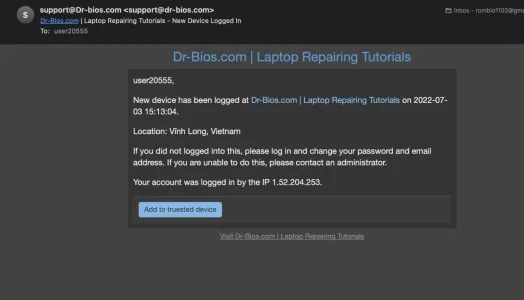
What alternative text would you propose?I don't know if it has been mentioned, but the security breach text should really be changed. It is like telling everyone my site's security has failed to the less knowledgeable.


![[DBTech] DragonByte Security](/community/data/resource_icons/5/5193.jpg?1465255166)
What alternative text would you propose?I don't know if it has been mentioned, but the security breach text should really be changed. It is like telling everyone my site's security has failed to the less knowledgeable.

I'm not sure if this is a template modification or a template directly - if it's a TM, you can't edit it - but there's no setting for it at this time.Is there a way to specify whether the "Trust this device permanently" checkbox is checked by default or not?

Alright, thank you. Just seen that I've accidentally posted in the XF1 category - should rather be in XF2. Mind throwing that onto your "suggestions" list?but there's no setting for it at this time.

It is sent to "Contact email address" - as per the description "Email address where board-related messages will be sent." this address should be able to receive email. If you have configured the contact email address to be an unmonitored one, you should change that.What email address is used for the 'webmaster'?
In the security watchers, one option is to email the webmaster. What email address is that?
Because if it's the Default email address as set up at
/admin.php?options/groups/basicBoard/
then I'm never going to get those emails because that address is a noreply unmonitored address.
If this is the case, would it be possible to set up the 'webmaster' email address used by this addon separately?

It would be preferable to upgrade to XenForo 2.2 before attempting to use these features, because you can then simply use XF's built in "batch update" feature and this field:Is it possible to disable/uninstall the plugin after running the "Force Password Change" option @DragonByte Tech ? Or must it remain active? And should it be possible to update to XF 2.x afterwards without issue? Users who didn't change prior to the XF2 update will still be asked to change?
Or would a "mass password reset" be better in that case?

Support for the XenForo 1.5 version of this add-on has ended, sorry.
Support for the XenForo 1.5 version of this add-on has ended, sorry.

Then you should post in the right threadI'm running the latest version of DB Security and latest version of Xenforo..


 xenforo.com
The XenForo 1 version of this add-on is deprecated, you should upgrade to XenForo 2.2 before worrying about anything else

.. and the fact that XF 1 does not receive security fixes anymore..The XenForo 1 version of this add-on is deprecated, you should upgrade to XenForo 2.2 before worrying about anything else
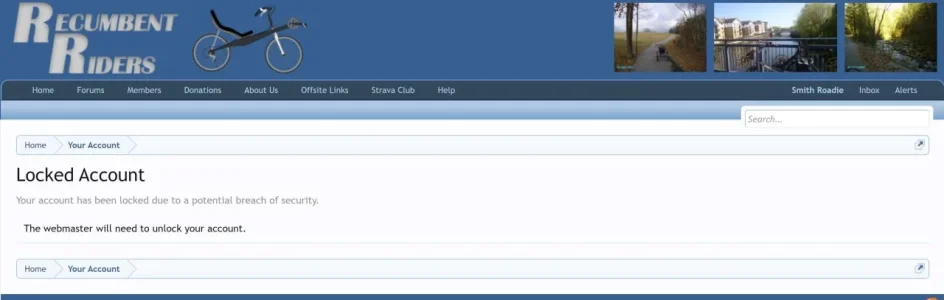
So, if there were no changes for XF2, you should see something like this, when editing the user in the admin cp:"...edit the user in the AdminCP and set the security lock flag there."

No, I don't see that. What TAB is it under? I've looked through all of them and still no luck.Apart form this:
.. and the fact that XF 1 does not receive security fixes anymore..
In the XF2 version this is how it works:
So, if there were no changes for XF2, you should see something like this, when editing the user in the admin cp:
View attachment 275911
In XF2 there are no tabs anymore, when you edit a user (only collapsible areas).What TAB is it under?
dbtech_security_account_lock, delete any entry for the user_id of the user account in question.user_option, search for the user_id of the user account and set dbtech_security_is_admin_locked to 0.
Well Thanxx for a backdoor method, but that's just beyond my comfortable skillset level. I just think there must be someway to unlock an account via the menu system of DB Security/Xenforo. Maybe someone will come along in time and see this post, who can fill me in on the way admins are intended to unlock an account.In XF2 there are no tabs anymore, when you edit a user (only collapsible areas).
On your own risk (better do a backup before you do this):
Go into the database and look for a table calleddbtech_security_account_lock, delete any entry for theuser_idof the user account in question.
Go to the tableuser_option, search for theuser_idof the user account and setdbtech_security_is_admin_lockedto0.


We use essential cookies to make this site work, and optional cookies to enhance your experience.