- Compatible XF 2.x versions
- 2.3
- Additional requirements
- Standard Library by Xon https://xenforo.com/community/resources/standard-library-by-xon.7915/
- License
- Use limited to one site per license
- Updates duration
- 12 Months
- Visible branding
- No
Tag Essentials adds essential features to XenForo's tagging system:
Tag Capitalisation
Tag Essentials supports capital letters in tag names instead of converting all tags to lowercase. This makes it possible to use the correct spelling of brands, products, model names, acronyms and other terms where capitalisation matters.
For example, tags can retain names such as BYD Seal, OLED, HDMI and iPhone.

Admin Tag Management Page

Tag Search and Replace
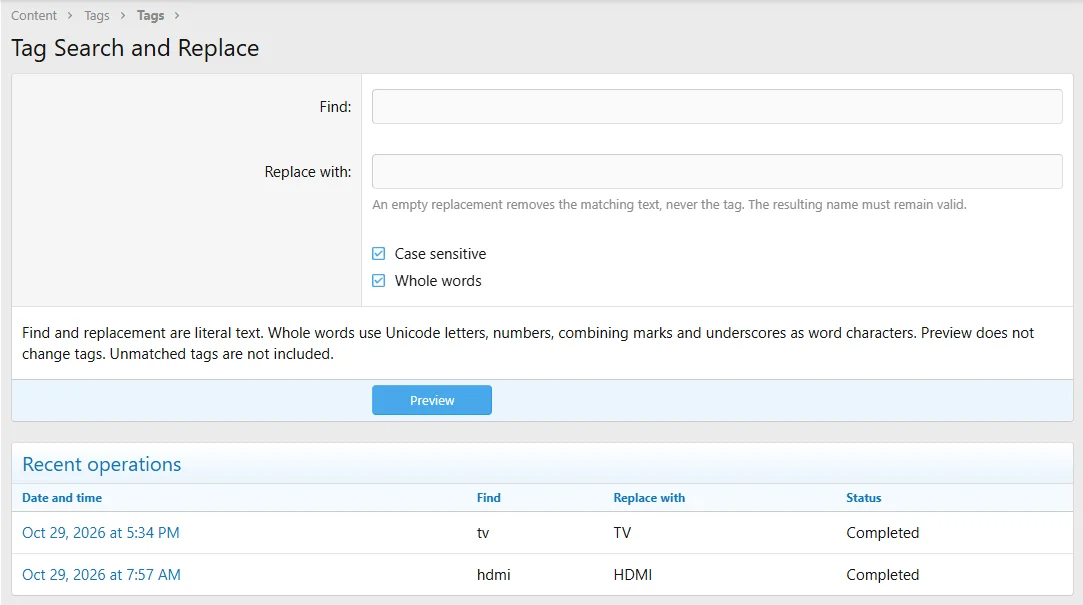
The new Tag Search and Replace tool in the AdminCP allows administrators to find and replace text across existing tag names.
This is particularly useful for correcting the capitalisation of historical tags, standardising product or brand names, and updating terminology across a large number of tags without editing each one individually.
For example, an administrator can replace hdmi with HDMI across matching tag names.
Search and replace preview. The list is paginated with 50 per page.
Blacklisted Tags Management

Changes to the AdminCP Edit Tag Page
Tag Synonyms
Tag Wiki
Admin Batch Update Threads
Tag Suggestions
AI Auto Tagging
Admin Tool to Edit and Test the AI Auto Tag Prompt
Available under the Tools menu in the AdminCP:
/admin.php?tags-test-openai/
Administrators can edit and test their AI Auto Tag prompt.
Tag Essentials also allows administrators to review the current default prompt, restore it and recover their previous prompt. Customised prompts and AI model settings are preserved during upgrades.
Enhanced Edit Tags Button
An administrator option allows the small tag-edit icon at the top of threads to be replaced with a more prominent Edit tags button, making tag editing easier for members to discover.
This option is disabled by default and can be enabled in the Tag Essentials options.

The tiny tag icon edit button above and the enhanced tag edit button below.

Resource Auto Tagging


Forum-specific Tag Cloud Widget

Filter Threads by Tags

Forum Tags

Prefix Tags
Watch Tags
Tag Preview
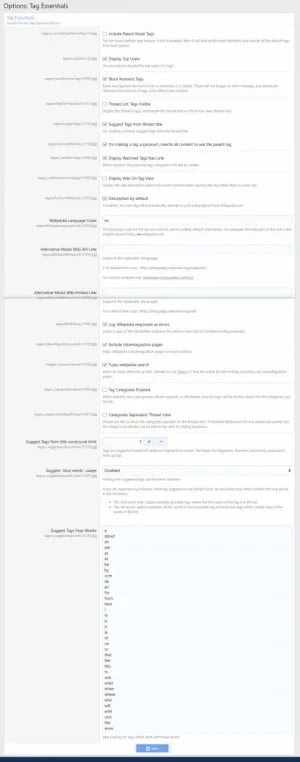
Admin Options
Live Examples From AVForums.com
Terms and Conditions
Please note that I do not have time to provide personal installation support. This add-on is used on AVForums.com, and I release maintenance updates and new features as required. Current licence holders with active support can download those updates.
I also vet licence purchasers. If you wish to purchase a licence, please follow the purchase instructions and send me a message on the M2N.co.uk forum. Thank you.
- Preserve capitalisation in tag names, including brands, product names and acronyms, rather than forcing all tags to lowercase.
- New AdminCP Tag Search and Replace tool to find, rename and correct existing tags in bulk, with previews and conflict detection.
- Automatically suggest tags from thread titles (words in the title which match existing tags).
- Automatically add tags using ChatGPT analysis of the forum title, thread title and first post text.
- Watch tags and receive alerts when a tag is used.
- Tag synonyms: replace variants of a tag with your chosen canonical version.
- Wikipedia integration: automatically attempt to retrieve information about a tag when it is created. You can edit this to write your own definition.
- Blacklist tags (including regex definitions) so they cannot be created. Useful for filtering common or unwanted words.
- Set default tags for forums.
- Batch update threads to:
- Find threads with specific tags.
- Add tags to, and remove tags from, the resulting threads.
- Automatically add tags to threads based on the thread title.
- And more.
Tag Capitalisation
Tag Essentials supports capital letters in tag names instead of converting all tags to lowercase. This makes it possible to use the correct spelling of brands, products, model names, acronyms and other terms where capitalisation matters.
For example, tags can retain names such as BYD Seal, OLED, HDMI and iPhone.
- Preserves capitalisation when tags are created or edited.
- Recognises existing tags regardless of capitalisation, helping prevent duplicates.
- Preserves the established names and identities of existing tags when they are reused.
- AI Auto Tag suggests appropriately capitalised tags for recognised brands, products, acronyms and technical terms.
- Existing tags are not automatically renamed. Administrators can correct historical capitalisation using the Tag Search and Replace tool described below.
Admin Tag Management Page
- Blacklist tag button for each tag.
- Edit Wiki button for each tag to open the wiki edit page.
- Blacklist/delete tag buttons update with Ajax so the page is not refreshed each time a tag is deleted or blacklisted. This is particularly useful when managing tags on a specific page of the list.
- Inline selection of tags to delete or blacklist. 'Select all' helps speed up the process.
- Search filters, sorting and pagination are retained when editing tags, saving changes or cancelling.
Tag Search and Replace
The new Tag Search and Replace tool in the AdminCP allows administrators to find and replace text across existing tag names.
This is particularly useful for correcting the capitalisation of historical tags, standardising product or brand names, and updating terminology across a large number of tags without editing each one individually.
For example, an administrator can replace hdmi with HDMI across matching tag names.
- Find and replace text within existing tag names.
- Optional case-sensitive and whole-word matching.
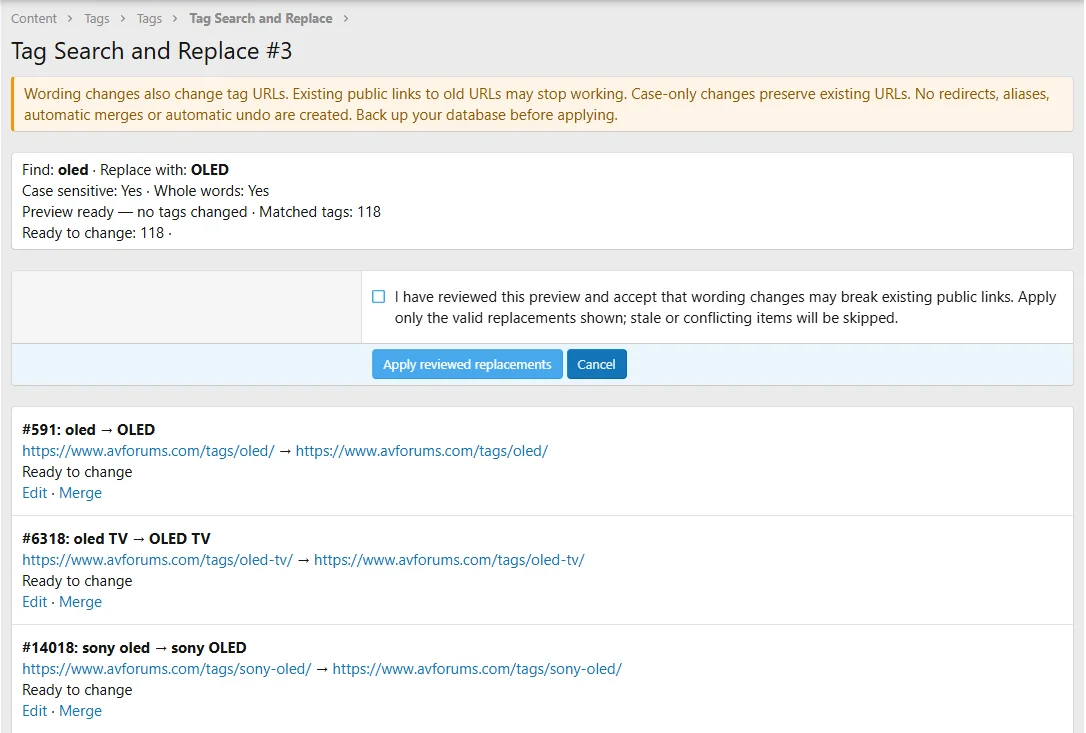
- Preview proposed changes before applying them.
- Detect invalid replacements, duplicate names and potential conflicts before changes are made.
- Process operations using native, resumable XenForo background jobs, suitable for forums with large numbers of tags.
- Preserve tag IDs and URLs when making capitalisation-only corrections.
- Update associated tag information using XenForo's native recache mechanisms.
- Maintain a dated history of recent operations, including their status and results.
- Automatically remove operation-history records after 90 days.
Search and replace preview. The list is paginated with 50 per page.
Blacklisted Tags Management
- Dedicated page for managing blacklisted tags.
- Pagination and regex rules for blacklisting.
- Bulk import of blacklisted tags.
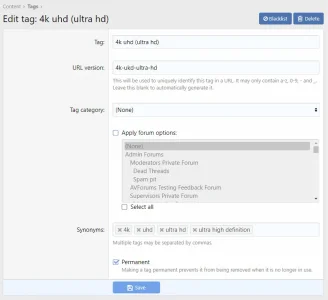
Changes to the AdminCP Edit Tag Page
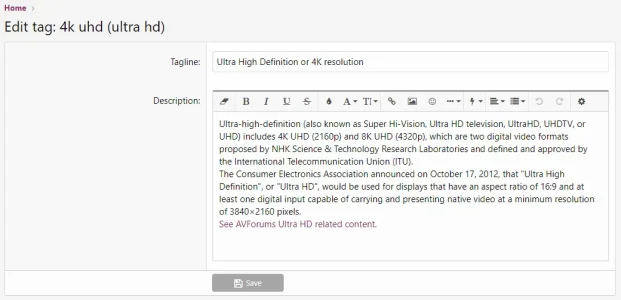
- Assign a tag category.
- Select forums where this tag can be added.
- Enter synonyms for the tag.
Tag Synonyms
- When someone uses a synonym tag, it will automatically be changed to the canonical tag.
Tag Wiki
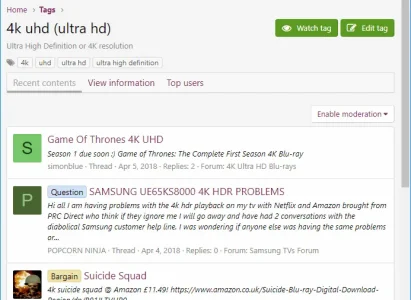
- Users with the appropriate permission can edit a tag's tagline and description from the front end, including BBCode formatting. The tag page displays this information alongside the content using that tag.
- Uses the Wikipedia API, with an administrator option to select a Wikimedia API.
- Permission to manage tag wiki information.
- With permission, the tag page (example tag page) provides an Edit tag wiki button to manage the description and tagline.
- Administrators with the appropriate permission also have an Edit settings button linking to the native AdminCP tag editor.
- Provides a tabbed interface to switch between the tag's recent content and wiki description.
- When saving a new tag or an existing tag with empty wiki information, retrieve the information from Wikipedia.
- Follow Wikipedia redirects, fixing cases where entries previously failed to load.
- Option to reject Wikipedia disambiguation pages.
- Option to try a fuzzy match if Wikipedia does not return an exact match.
- If Wikipedia cannot find an entry, the tag wiki can display the contents of the phrase "tagess_no_wikipedia_entry_exists" (default: "No Wikipedia entry exists for this tag"). To display no text, set this phrase to a single space character to avoid repeatedly attempting to populate the entry.
- If Wikipedia does not return a result, Tag Essentials can obtain information about the tag from ChatGPT when the relevant option is enabled.
- Batch update process to populate tags with wiki information if they are blank or contain the phrase above. This may take some time if you have many tags, as Wikipedia API requests are rate-limited.
Admin Batch Update Threads
- When batch updating threads, you can add or remove tags in addition to all the existing options. When adding a tag, the user who started the thread is credited.
Tag Suggestions
- When creating a thread, after typing the thread title (when the title loses focus), an Ajax request checks whether existing tags appear in the title. Matching tags are automatically added to the tag list. They can be removed, and more tags can be manually added before submitting the thread.
- Suggested tags can consist of single or multiple words. For example, if these tags exist: "I love John", "John Paul George Ringo", "Paul George Ringo" and "Ringo", and a new thread title is "I love John Paul George Ringo a lot", all those tags can be suggested.
- Administrator option to set the maximum number of words in an automatically suggested tag (default 3). This reduces processing when searching for tags within thread titles. With a three-word limit, the example above would not suggest "John Paul George Ringo" because it contains four words.
- An administrator-defined list of stop-words helps prevent common words from generating unwanted tag suggestions. The list can be disabled, applied only to tags beginning with a stop-word, or applied to tags containing any stop-word.
- A default stop-word list is included, containing words such as "A" and "I".
AI Auto Tagging
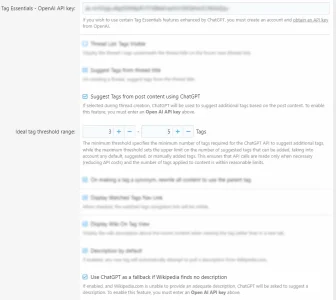
- Automatically add tags suggested by ChatGPT when a thread is created, based on the forum title, thread title and first post text. An OpenAI API key is required. If enabled, and fewer than 3 tags (default, administrator configurable) have already been entered, ChatGPT attempts to increase the total to 5 tags (default, administrator configurable).
- AI Auto Tagging is enabled in all forums by default but can be deactivated for individual forums by unticking Allow ChatGPT tag suggestions in this forum.
- When editing a thread's tags, an Auto tag button requests suggestions from ChatGPT. Suggestions are displayed for review and are not saved until the user saves the thread's tags.
- When editing thread tags, the maximum number of AI suggestions applies to new tags, excluding those already assigned to the thread.
- AI requests are limited to one per thread-tag editing session, and the Auto tag button includes a magic-wand icon.
- The improved default AI prompt prioritises useful, searchable and reusable tags. It discourages incidental specifications, vague descriptions and overlapping terms, while recommending appropriate capitalisation for brands, product names and acronyms.
- Using ChatGPT with Tag Essentials incurs API charges. Historically, the cost for AVForums.com and MGEVs.com combined has been less than $2 per month, although actual costs depend on usage and the selected model.
- Administrators can select the ChatGPT model to use.
Admin Tool to Edit and Test the AI Auto Tag Prompt
Available under the Tools menu in the AdminCP:
/admin.php?tags-test-openai/
Administrators can edit and test their AI Auto Tag prompt.
Tag Essentials also allows administrators to review the current default prompt, restore it and recover their previous prompt. Customised prompts and AI model settings are preserved during upgrades.
Enhanced Edit Tags Button
An administrator option allows the small tag-edit icon at the top of threads to be replaced with a more prominent Edit tags button, making tag editing easier for members to discover.
This option is disabled by default and can be enabled in the Tag Essentials options.
The tiny tag icon edit button above and the enhanced tag edit button below.
Resource Auto Tagging
- Resources can be automatically tagged using their titles and/or AI in the same way as threads.
- Batch Update Resource Tags allows filterable selection of resources to be tagged.
- Batch update tagging uses the simpler add existing tags within the title method, rather than AI tagging.
Forum-specific Tag Cloud Widget
- Create a forum-view Tag Cloud Widget showing popular tags from threads in the current forum and its subforums.
Filter Threads by Tags
- A facility in the forum view to filter threads by the tags used.
Forum Tags
- In forum administration, set a minimum number of tags required for new threads in a particular forum.
- Set default tags to be suggested when a new thread is created in a particular forum.
Prefix Tags
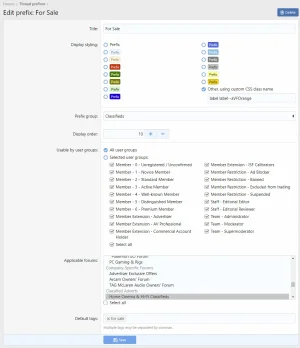
- In thread prefix administration, set default tags to be suggested when a new thread is created with a particular prefix.
Watch Tags
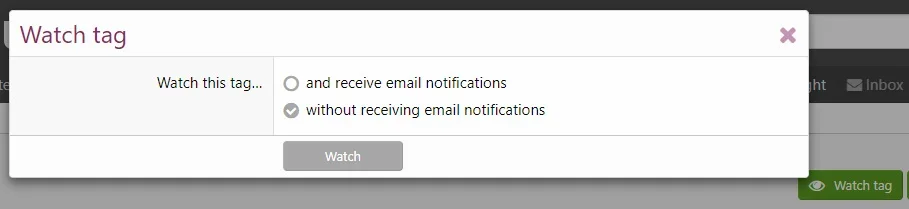
- With the Tagess - Can Watch Tag permission, users can watch tags and receive alerts or emails when new content is added using those tags.
Tag Preview
- Hovering over a tag displays a preview containing a snippet of its wiki description and links to recent content, top users and tag information.
Admin Options
- Extensive configuration options.
- Option to display an enhanced Edit tags button at the top of threads.
- AI Auto Tag prompt management and restoration.
- Rebuild Caches -> Rebuild Empty Wiki Tags.
- Rebuild Caches -> Prune low usage tags.
- Rebuild Caches -> Remove orphaned tags (primarily required to remove blacklisted tags after upgrading to 2.5.1.2).
Live Examples From AVForums.com
- https://www.avforums.com/tags/4k/ - Tag overview page for the "4k uhd (ultra hd)" tag, including synonyms, tagline and tabs.
- https://www.avforums.com/tags/4k/top-users/ - Users who have used the tag most frequently.
Terms and Conditions
- Each licence is valid for use on one site.
- Support renewals are available for 12 months. When support expires, you can continue using the add-on but will not receive further updates until you renew.
Please note that I do not have time to provide personal installation support. This add-on is used on AVForums.com, and I release maintenance updates and new features as required. Current licence holders with active support can download those updates.
I also vet licence purchasers. If you wish to purchase a licence, please follow the purchase instructions and send me a message on the M2N.co.uk forum. Thank you.