
Which one ?It turned out that I had an addon that was causing a template to not compile correctly which prevented this addon from showing the buttons on the page. It's been resolved now.
The information may help someone in the future.

![XF2 [8WR] XenPorta 2 (Portal) PRO](/community/data/resource_icons/6/6023.jpg?1516685317)
Which one ?It turned out that I had an addon that was causing a template to not compile correctly which prevented this addon from showing the buttons on the page. It's been resolved now.

Update to previous - Inserting an "Image" still not working on new articles, workaround is instead of adding an image to the post I insert the image as an attachment. The attachment is seen as an option for the icon. Would still prefer to use image.
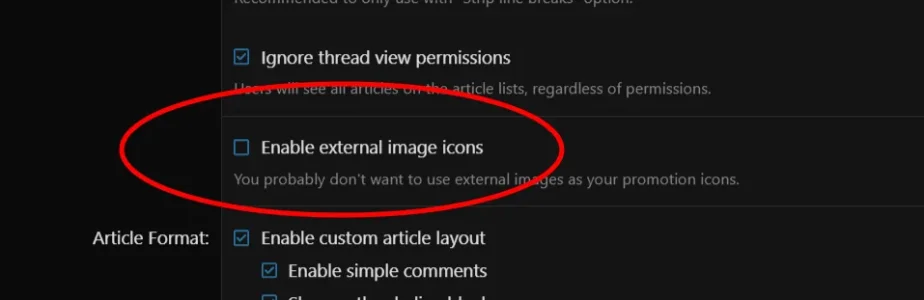
I had that checked so I think that stopped working after upgrading.

It's working fine. External images are any images within theI may be one of the few that use the "Enable external image icons" but would still like to continue to use it. @Jaxel can you check on your end if it is working with XF 2.3?
[IMG][/IMG] tags.You can not upgrade from XP1 for XF1 to XP2 for XF2.Hello,
I upgraded XenForo from 1.2.1 to 2.3.2. That part has been completed successfully, and I am now working to upgrade my XenPorta from 1.6.0 to 2.3.0.4
I followed the upgrade instructions for add-ons, and the XenPorta 2 comes up as a completely different add-on (i.e. it doesn't give me the option to upgrade, only to install). I'm assuming, based on the instructions for upgrading XenPorta from 1.x, that this is expected. Continuing to follow the instructions, I have gone to the Tools page and selected the 'Import data' option, which presents me with a page to:
Import target: [8WR] XenPorta 2.x.x
[8WR] XenPorta 1.0.0
[8WR] XenPorta 1.2.1
I select XenPorta 1.2.1 and then click 'Continue...'
On the next screen, I provide my database configuration information and click 'Continue...'
On the next screen, I take all of the defaults:
'Articles' checked
'Features' Checked
'Authors' Checked
'Categories' Checked
'Category Links' Checked
'Retain content IDs' NOT Checked
and the generated 'Import log table name'
and then click 'Continue...'
On the next screen 'No step configuration necessary' I click 'Continue...'
I then get a screen telling me I'm ready to start the import, and I click 'Start import'
I immediately get an error screen with the following:
XF\Db\Exception: MySQL statement prepare error [1146]: Table 'staging_gol_xenforo.EWRporta2_articles' doesn't exist in src/XF/Db/AbstractStatement.php at line 230
Any help?
- XF\Db\AbstractStatement->getException() in src/XF/Db/Mysqli/Statement.php at line 207
- XF\Db\Mysqli\Statement->getException() in src/XF/Db/Mysqli/Statement.php at line 43
- XF\Db\Mysqli\Statement->prepare() in src/XF/Db/Mysqli/Statement.php at line 61
- XF\Db\Mysqli\Statement->execute() in src/XF/Db/AbstractAdapter.php at line 96
- XF\Db\AbstractAdapter->query() in src/XF/Db/AbstractAdapter.php at line 152
- XF\Db\AbstractAdapter->fetchOne() in src/addons/EWR/Porta/Import/Importer/Porta121.php at line 124
- EWR\Porta\Import\Importer\Porta121->getStepEndArticles() in src/XF/Import/Runner.php at line 210
- XF\Import\Runner->setupRunnableStep() in src/XF/Import/Runner.php at line 83
- XF\Import\Runner->initializeRun() in src/XF/Import/Runner.php at line 54
- XF\Import\Runner->run() in src/XF/Admin/Controller/ImportController.php at line 247
- XF\Admin\Controller\ImportController->actionRun() in src/XF/Mvc/Dispatcher.php at line 362
- XF\Mvc\Dispatcher->dispatchClass() in src/XF/Mvc/Dispatcher.php at line 264
- XF\Mvc\Dispatcher->dispatchFromMatch() in src/XF/Mvc/Dispatcher.php at line 121
- XF\Mvc\Dispatcher->dispatchLoop() in src/XF/Mvc/Dispatcher.php at line 63
- XF\Mvc\Dispatcher->run() in src/XF/App.php at line 2813
- XF\App->run() in src/XF.php at line 802
- XF::runApp() in admin.php at line 15
It's working fine. External images are any images within the[IMG][/IMG]tags.
[IMG][/IMG] I see it inserts it as [IMG size="813x1078"][/IMG].[IMG][/IMG] the Image option appears in XenPorta.You can not upgrade from XP1 for XF1 to XP2 for XF2.
The included upgrade path is for XP2 for XF1 to XP2 for XF2.

Ah! Ok, so I need to upgrade to XP2 FIRST, THEN upgrade my forum from XF1 to XF2? In that case, which version of XP2 should I upgrade to? I've searched the forum but can't seem to find any clear indication of what XP2 version is compatible with XF1?
I'm testing all of this on my staging system, so it isn't a problem for me to wipe out and start again. This is why we test things first, folks.
There is no upgrade path from the free version of XP1 from XF1.


Thx for the info. I think I see the issue, may be something new with XF 2.3, in my test case I'm inserting an image with dimensions 813x1078. Instead of[IMG][/IMG]I see it inserts it as[IMG size="813x1078"][/IMG].
If I remove the size info and save it as[IMG][/IMG]the Image option appears in XenPorta.
Edit the file:It's a bit annoying now, the process of using an external image I need to do now is:
1. insert image in post.
2. Edit post, Toggle off bb code
3. Remove the size from [IMG], save.
4. Toggle back on bb code.
5. create or edit article promotion.
Before I didn't need to do steps 2- 4. Also the image can't be custom resized or the option to use external image disappears again (this behavior was present in the previous version).
if (preg_match_all('#\[IMG](.+?)\[/IMG]#i', $message, $matches)) if (preg_match_all('#\[IMG.*?](.+?)\[/IMG]#i', $message, $matches))We use essential cookies to make this site work, and optional cookies to enhance your experience.
![[8WR] XenPorta (Portal) PRO](/community/data/resource_icons/3/3894.jpg?1418955238)


