Ok, dude. But you haven't provided enough info to say more. It's obviously not the addon's problem, but your google app's.Dude, I am not an idiot, ok? -.-
http://stackoverflow.com/questions/...eturning-invalid-redirect-uri-in-my-rails-app

Ok, dude. But you haven't provided enough info to say more. It's obviously not the addon's problem, but your google app's.Dude, I am not an idiot, ok? -.-


Don't give upAlright dude
If you can't fix it send me the link for registration.
Can't. It's a secret internet marketing resource thinktank. I could show you, but then I would have to kill youDon't give up


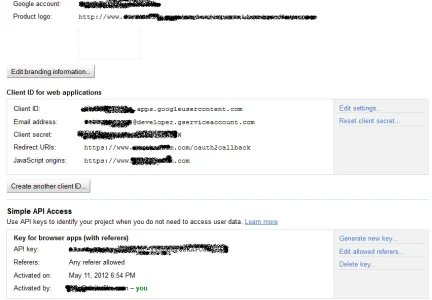
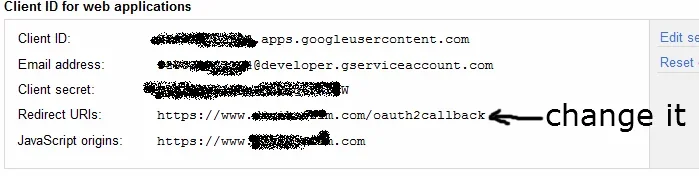
In google app set redirects:Thanks for this addon guiltar. I just installed this and have the same error as above with google. It says that http://www.site.com/register/google doesn't match a registered redirect URI. Can you point me to the right direction where to look?
View attachment 29421
http://example.com/register/google
http://example.com/register/google?assoc=1
In google app set redirects:
Code:http://example.com/register/google http://example.com/register/google?assoc=1
http://www.sternfannetwork.com/xen/register/google
http://www.sternfannetwork.com/xen/register/google?assoc=1http://www.sternfannetwork.comError: redirect_uri_mismatch
The redirect URI in the request: http://www.sternfannetwork.com/xen/index.php?register/google did not match a registered redirect URIhttp://www.sternfannetwork.com/xen/register/google
http://www.sternfannetwork.com/xen/register/google?assoc=1
http://www.sternfannetwork.com/xen/index.php?register/google
http://www.sternfannetwork.com/xen/index.php?register/google?assoc=1Excluded them at least for the first time since there are too many of them to be in sidebar.
They actually can be added (optionally) later if it makes sense.
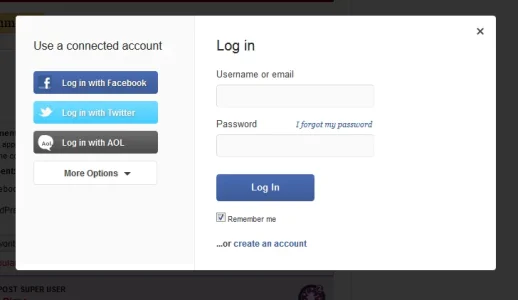

would really like to see it in the sidebar. Would also be nice w/ smaller icons sitting next to each other.
ultimately it could be nice to have the them at the quick reply box Huffington Post style. When reading a story there you can post a comment & if you aren't logged in, you get this overlay when you click reply.
could make it that much easier for lurkers to make that first post.
thanks by the way for the great job
That requires an addon. The quick reply form is explicitly disabled for guests.
XenForo_Model_Thread::canQuickReply

YesAre we saying that you want the quick reply to be there, enable a visitor to type a message, and then clicking on reply tells them they need to sign up?
I'm not at all promising anything, but I'll have a go and if I can't do it then I'll post the request in the proper place.Yes
TBH it will make forum more n00b friendly. If they don't know that they need to login to post something, then it'd help them lot. They post a reply, then the overlay shown in above image appears, that'd be great !
Thank you
thanksIf you want it in the sidebar there is some advice on the template modifications necessary here: http://xenforo.com/community/resour...oogle-and-steam-in-sidebar-visitor-panel.651/
We use it at our site, http://www.valvetime.net/forum.
yep that's exactly it. on Huffington Post you can go to any article and if you scroll past it there is a comment form much like our quick reply box. you type the message & then click the "Post Comment" button. if you aren't logged in it gives you the overlay I posted letting you log in or create an account using your facebook login. I understand it's not something simple. just thought it would be a nice feature that converts lurkers to members & figured I'd suggest it.Currently, the Quick Reply box is hidden for visitors and a little link is in its place that says "You must be logged in" etc.
Clicking on that link drops down the login bar form.
Are we saying that you want the quick reply to be there, enable a visitor to type a message, and then clicking on reply tells them they need to sign up?
Hmm, I guess that would help actually. If they've gone so far as to type a message then surely they'll continue that to logging in.
Let me look at this. I have a feeling it's not going to be as straight forward as it is in my head, but it's worth a try
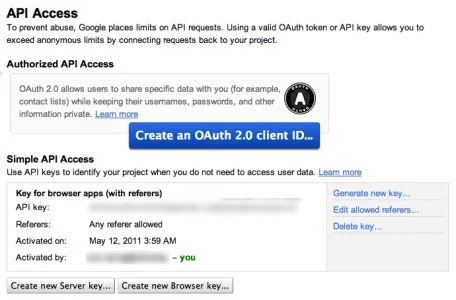
I think big blue button is what you need. Have you clicked it?Can someone please share a step by step for creating the google credentials ?
If I go to the link provided I get the overview.
Clicking in API Access I get what you can see in the attachment.
What to do ?
Thanks.
View attachment 29642

We use essential cookies to make this site work, and optional cookies to enhance your experience.