Social Groups for XenForo 1.x [Deleted]

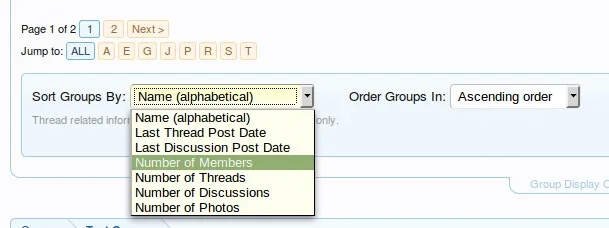
FYI, there is another update schedule for Friday. It will include some requested additions such as an Alphabetic jump menu and Group Display Options...

jumpmenu.webp

I am currently running the next release on my site if anyone wants to play around with it and try to break it. :)
 
I'll give it a go later, I am usually good at breaking stuff - cannot wait!

However, bigger banner icons pleeeeeease :P
 
@Gossamer ...

I will probably limit the size of the forum description to a single line, say 150 characters. XenForo itself allows a much longer (almost unlimited) description. The reason I want to do this is so we don't have people writing a full description of their group in the forum description when it should be in the group description.

Does this sound reasonable to you?
Would it be possible to have 300-500 characters max? Or a configurable option for a longer description field. I agree that it shouldn't be unlimited, but my players would often need a few sentences.
 
Would it be possible to have 300-500 characters max? Or a configurable option for a longer description field. I agree that it shouldn't be unlimited, but my players would often need a few sentences.
I'll make it a 500 character limit. I think that's more than enough to summarize what a group is. Much more than that and it defeats the purpose of the long description for a group.
 
Snog updated Social Groups with a new update entry:

Social Groups Update 1.3.4

An update to the Social Groups system has been released. Those that have purchased this add-on, please log into your account on my site to download this update.
  • Add - Alphabetic group filter to group lists.
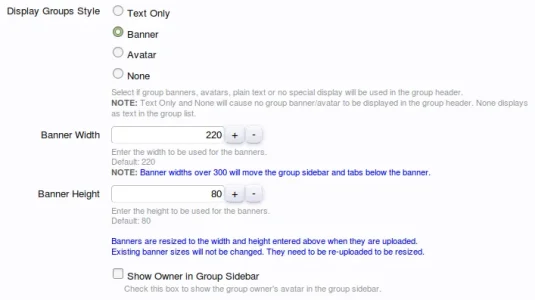
  • Add - Group display options to group list displays where applicable.
  • Add - Forum description option when creating/editing groups.
  • Add - Error when trying to delete a group forum from XF admin node list.
  • Add - Banner width and height options (group banners only, not...

Read the rest of this update entry...
 
Code:
Server Error

imagedestroy(): 11 is not a valid Image resource

XenForo_Application::handlePhpError()
imagedestroy() in Snog/SocialGroups/ControllerPublic/Index.php at line 3504
resize_image() in Snog/SocialGroups/ControllerPublic/Index.php at line 2214
Snog_SocialGroups_ControllerPublic_Index->actionBannerSave() in XenForo/FrontController.php at line 347
XenForo_FrontController->dispatch() in XenForo/FrontController.php at line 134
XenForo_FrontController->run() in /home/nginx/domains/removeddomain/public/index.php at line 13

The above was when I uploaded a picture, the extension was right but I tried another and it uploaded but never changed the image to the new banner, any ideas?
 
Last edited:
Okay, seems to be working now, not sure why the other image did not work but a third try and it changed fine.
 
Well, I have it set to 250 x 80, a logo I tried did not resize, guess its not scalable or whatever? But also it will not save the image sometimes until I upload a different file named ones.

I also resized the image attached here to 250w x 80h and it gave the initial error I posted above also.

Another thing, if you adjust the height up (had it on 200) it adds a HUGE gap between other group banners too so moved it back to 80px height.

Code:
Server Error

imagedestroy(): 11 is not a valid Image resource

XenForo_Application::handlePhpError()
imagedestroy() in Snog/SocialGroups/ControllerPublic/Index.php at line 3504
resize_image() in Snog/SocialGroups/ControllerPublic/Index.php at line 2214
Snog_SocialGroups_ControllerPublic_Index->actionBannerSave() in XenForo/FrontController.php at line 347
XenForo_FrontController->dispatch() in XenForo/FrontController.php at line 134
XenForo_FrontController->run() in /home/nginx/domains/domanename/public/index.php at line 13
 

Attachments

  • c57559.webp
    c57559.webp
    7.6 KB · Views: 2
  • logo.webp
    logo.webp
    11.8 KB · Views: 2
Another thing, if you adjust the height up (had it on 200) it adds a HUGE gap between other group banners too so moved it back to 80px height.
That would be expected and is why this note is in the options..
existing.webp
 
@Zynephix

Please re-download the add-on and upload the files to your server (no need to import XML again).

I missed suppressing errors from the imagedestroy function and I'm not going to increment the version for the two '@' characters that were needed. ;)
 
Well, I have it set to 250 x 80, a logo I tried did not resize, guess its not scalable or whatever? But also it will not save the image sometimes until I upload a different file named ones.
Could you also upload one or two of the files that won't resize for you?
 
Could you also upload one or two of the files that won't resize for you?

These are not saving or changing at all =\

I also just uploaded a new image completely and it went back to the one prior to this update =\
 
Back
Top Bottom