
You are using an out of date browser. It may not display this or other websites correctly.
You should upgrade or use an alternative browser.
You should upgrade or use an alternative browser.

iO [Paid] 2.3.10.0.0
No permission to buy ($59.50)
- Thread starter ThemeHouse
- Start date


@ThemeHouse please give me a couppon discount this theme. Thanks

Solution: change it in io.less
How to update this tyle?
This is the structure of styles I'm using. The highlighted styles are the active styles that will be used by users. I only make modifications to these active styles.
First question, is this a correct way to apply the style-io.xml and child-io.xml? In fact I'm not really quite sure the relationship between the these two files. child-io.xml is not substantially smaller in file size than style-io.xml. It more looks like a standalone style...
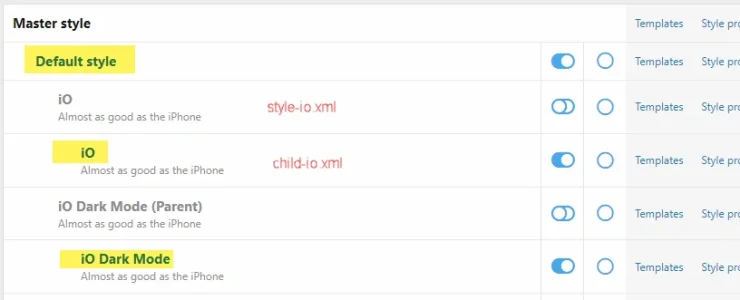
Ok, now when it comes up to a new version of UI.X IO style (v2.2.9 now), how to I apply the update without losing any existing data?
Thanks.
This is the structure of styles I'm using. The highlighted styles are the active styles that will be used by users. I only make modifications to these active styles.
First question, is this a correct way to apply the style-io.xml and child-io.xml? In fact I'm not really quite sure the relationship between the these two files. child-io.xml is not substantially smaller in file size than style-io.xml. It more looks like a standalone style...
Ok, now when it comes up to a new version of UI.X IO style (v2.2.9 now), how to I apply the update without losing any existing data?
Thanks.

Hello there!How to update this tyle?
This is the structure of styles I'm using. The highlighted styles are the active styles that will be used by users. I only make modifications to these active styles.
First question, is this a correct way to apply the style-io.xml and child-io.xml? In fact I'm not really quite sure the relationship between the these two files. child-io.xml is not substantially smaller in file size than style-io.xml. It more looks like a standalone style...
View attachment 267869
Ok, now when it comes up to a new version of UI.X IO style (v2.2.9 now), how to I apply the update without losing any existing data?
Thanks.
Your screenshot shows how these styles should be set up, yes! Although one question for you, how did you install the styles when first setting them up? Through the UI.X 2 add-on, through style.xml, or through the Install and Upgrade add-on?
Hello there!
Your screenshot shows how these styles should be set up, yes! Although one question for you, how did you install the styles when first setting them up? Through the UI.X 2 add-on, through style.xml, or through the Install and Upgrade add-on?
First uploaded the files in /upload to server's corresponding folders. Then in XF admin panel, imported style-io.xml as a child of style Default style and then imported child-io.xml as a child of the installed iO style.
Then it becomes the following:
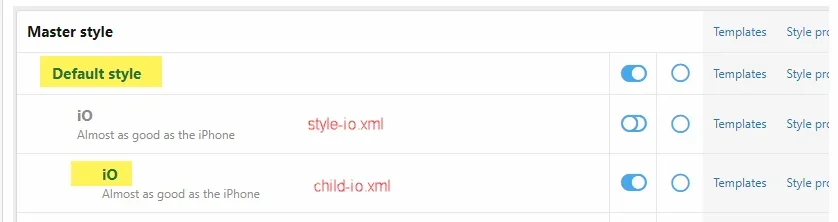
The problem now is: how do I update it? Maybe I can import the new style-io.xml and overwrite the old one with it. But what about the child-io.xml which I have already made modifications to?
Hello there! In order to update both, all you'd need to do is download the latest themes files for 2.2.9 from themehouse.com. Thereafter, import the style.xml from the unzipped archive for 2.2.9 of the iO theme folder to your parent/primary theme within your ACP. Thereafter it will update your primary style and your child style although before proceeding be sure to export your child style just in case something goes haywire while upgrading.First uploaded the files in /upload to server's corresponding folders. Then in XF admin panel, imported style-io.xml as a child of style Default style and then imported child-io.xml as a child of the installed iO style.
Then it becomes the following:
View attachment 267957
The problem now is: how do I update it? Maybe I can import the new style-io.xml and overwrite the old one with it. But what about the child-io.xml which I have already made modifications to?
Course if you have any questions then let me know please




Interesting; I'm not able to reproduce that myself. Could you start a ticket with us here? https://www.themehouse.com/contact/create-ticket

Any plan to push an update for XenForo 2.2.10 Patch 1 guys? Or this time isn't needed?
I still haven't updated my board yet as I always wait for the styles update to come out before installing the latest XF
I still haven't updated my board yet as I always wait for the styles update to come out before installing the latest XF
Alright, so I will wait
Thanks Will for your prompt reply
Thanks Will for your prompt reply

ThemeHouse updated iO with a new update entry:
Version 2.2.10.0.0 Released
Read the rest of this update entry...
Version 2.2.10.0.0 Released
Changelog:
- XenForo 2.2.10 compatibility
- Multiple bugfixes
Note: This release cannot be used on XenForo 2.1, it is exclusively for XenForo 2.2 only.
Note: This update does not require a UI.X add-on update to function properly.
Read the rest of this update entry...
Alright, so I will wait
Thanks Will for your prompt reply
How's that for prompt?

Awesome! 
Thank you!
Thank you!
ThemeHouse updated iO with a new update entry:
Version 2.2.10.0.1 Released
Read the rest of this update entry...
Version 2.2.10.0.1 Released
Changelog:
- Fixes for some notification/message placement configurations causing them to be inaccessible
- Other minor bugfixes
Note: This release cannot be used on XenForo 2.1, it is exclusively for XenForo 2.2 only.
Note: This update does not require a UI.X add-on update to function properly.
Read the rest of this update entry...
ThemeHouse updated iO with a new update entry:
Version 2.2.12.0.0 Released
Read the rest of this update entry...
Version 2.2.12.0.0 Released
Changelog:
- Updated compatibility with XenForo 2.2.12
Note: This release cannot be used on XenForo 2.1, it is exclusively for XenForo 2.2 only.
Note: This update does not require a UI.X add-on update to function properly.
Read the rest of this update entry...

HelpIf the Style Property isn't working, its possible that could be a bug. I'm not sure, Ill log it as an issue as you shouldn't have to use CSS if you don't want to. Big thanks to @nodle and @arms for the help.
Please create a ticketHelp
Similar threads


- Replies
- 1
- Views
- 46
