Google Adsense Autoads (Advanced)

Google Adsense Autoads (Advanced) [Paid] v2.4.0

No permission to buy ($25.00)
Wutime updated Google Adsense Autoads (Advanced) with a new update entry:

v2.3.0

  • UPDATE: Added CMP-compatible AdSense Auto Ads loading controls to help prevent AdSense requests before user consent is available.
New options added:
  • AdSense script loading mode: choose between direct loading, consent-blocked output, or disabled/manual loading.
  • Consent-blocked script type: controls the script type used for CMP-blocked output, defaulting to text/plain.
  • Consent-blocked script URL attribute: controls where the AdSense URL is stored...

Read the rest of this update entry...
 
Hello,

I am using Wutime Google Adsense Autoads Advanced together with CCM19 as my consent management platform.

Google AdSense reports IAB TCF error 10.1. After testing, I found that the add-on loads the AdSense Auto Ads head script before the user gives consent through CCM19.

Please update the add-on and set AdSense script loading mode to Consent-blocked output.

For CCM19, set the script type to text/plain, set the script URL attribute to data-ccm-loader-src, and set the consent group attribute to data-ccm-loader-group.

The consent group value must match the CCM19 group/category configured for AdSense or marketing cookies on your site.

After saving, the AdSense URL should no longer appear in a normal src attribute before consent. CCM19 should release the script only after the visitor gives the required consent. Please confirm the exact consent group value from your CCM19 configuration, as that part is site-specific.

If you're unsure about the CCM19 group value, you need to check your CCM19 script-blocking/category setup. The add-on can prevent the early AdSense request, but CCM19 still needs the correct category value to release it after consent.
 
Thank you, that sounds great.


I will update the add-on, test the new consent-blocked output with CCM19, and report back with the results.
 
Great, thank you very much for the quick help!

Everything is working perfectly now. Excellent support — you are one of the best add-on developers. ;)
 
Author or those with this installed in real communities.

1. Can you share a site link so I can experience it as a guest/vistor ?
2. Feedback. How did the community respond and how did your google cashflow change from traditional fixed ad location to auto?
 
Honest response:
  1. It's 40% of ad-based sites you visit
  2. Yes it'll increase ad revenue at the frustration of your visitors
 
nice addon

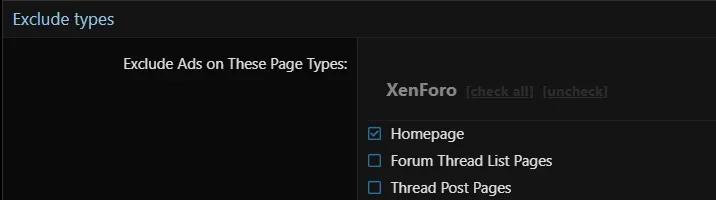
any idea how to get ads not display on the homepage, its a page with custom html.

got this checked
1791293350566.webp
the homepage url is: domain.com
Index page route: pages/portal/

still shows autoads

also tried using the "Exclude Ads From Showing in These Templates"
using the page template listed on the node page:

_page_node.120

still shows ads, can't select any pages in the "Exclude Ads in These Forums" section

any ideas?
 
any idea how to get ads not display on the homepage, its a page with custom html.

Exclude by template is a good way to go about it, but are you sure the template is "_page_node.120", it seems an odd template name with .120 in it; make me. believe if it is correct that something else renders your homepage and just includes that template.

---

Is the "pages/portal/" route managed by a custom add-on or third party add-on? If yes, you'd want to use the "Exclude Add-on Controllers (Patterns or Names)" option.

If you're not sure how to do that, tell me the add-on you're using for your homepage portal system, or direct message me the add-on ZIP and I can review the code to tell you the "controller name" to enter in Exclude Add-on Controllers (Patterns or Names)", and/o? the exclude template to use?
 
Exclude by template is a good way to go about it, but are you sure the template is "_page_node.120", it seems an odd template name with .120 in it; make me. believe if it is correct that something else renders your homepage and just includes that template.

---

Is the "pages/portal/" route managed by a custom add-on or third party add-on? If yes, you'd want to use the "Exclude Add-on Controllers (Patterns or Names)" option.

If you're not sure how to do that, tell me the add-on you're using for your homepage portal system, or direct message me the add-on ZIP and I can review the code to tell you the "controller name" to enter in Exclude Add-on Controllers (Patterns or Names)", and/o? the exclude template to use?
no homepage or portal addon, its just a page node

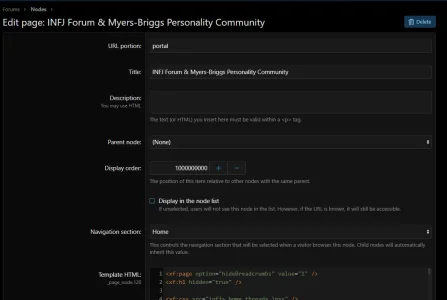
1791365194005.webp

the _page_node.120 is listed under the template html.

then that page is set in basic options here
1791365417858.webp
 
actually just created a new template, moved the code from the page into a new portal_page template
only code on the page now is


Code:
<xf:include template="portal_page" />

added portal_page to Exclude Ads From Showing in These Templates section
incognito browser, still showing ads on the home page
 
actually just created a new template, moved the code from the page into a new portal_page template
only code on the page now is
Try v2.4.0 and let me know, it should exclude your homepage with your original setup.

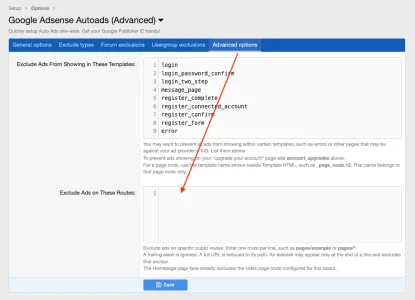
Or, try the new option added in v2.4.0 that allows you exclude routes... though you shouldn't have to because I fixed the issue you were originally having when "Homepage" was checked but your custom /portal/pages wasn't be recognized.

Here's the screenshot for "excluding custom routes":
 

Attachments

  • Screenshot 2026-10-07 at 6.54.19 AM.webp
    Screenshot 2026-10-07 at 6.54.19 AM.webp
    47.6 KB · Views: 0
Try v2.4.0 and let me know, it should exclude your homepage with your original setup.

Or, try the new option added in v2.4.0 that allows you exclude routes... though you shouldn't have to because I fixed the issue you were originally having when "Homepage" was checked but your custom /portal/pages wasn't be recognized.

Here's the screenshot for "excluding custom routes":
thanks now works
 
Back
Top Bottom