
You are using an out of date browser. It may not display this or other websites correctly.
You should upgrade or use an alternative browser.
You should upgrade or use an alternative browser.

Advanced Bb Codes Pack [Paid] 1.19.9
No permission to buy ($35.00)
- Thread starter Xon
- Start date
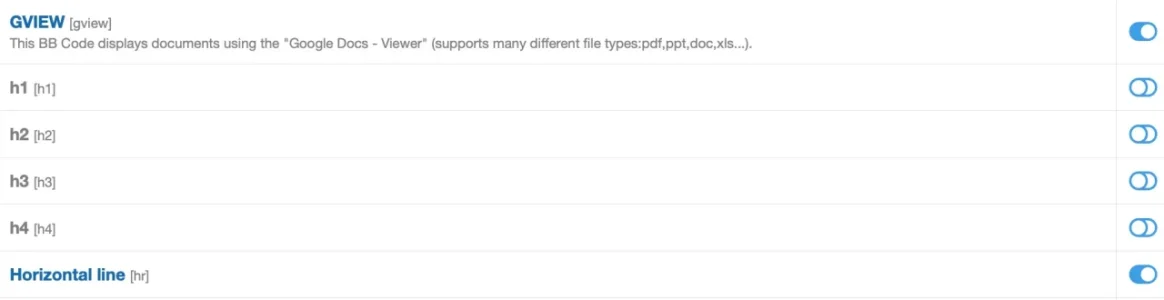
Do you really mean "disable", not enable? They were automatically disabled after the update and this is where the issue started. Enabling seens to have solved it. Kind of. I enabled all four yesterday and just checked again. Two were disabled again, two still enabled.Just disabling all 4 of them should work.

So possibly a maintenance job that does something weird. I've now enabled all of them again.
Checked the logs, I see the event of me enabling h3 and h4 yesterday and h1 and h2 the day before yesterday. There is however no log entry for enabling h3 and h4 despite I definitively did that, so it seems these were not recognized, whyever. Maybe I rushed to another page of the ACP too fast after switching them on.Check your admincp log, none of my add-ons toggle the enable/disable state outside of the setup/installer code
Did not find anything that had turned them off since the log entry for the upgrade of the BB Code add on.
They are still set to on, so possibly no maintenance job and the switching off still seems to be suspiciously connected to the add on update and done by the installer.
Xon updated Advanced Bb Codes Pack with a new update entry:
1.18.4 - Bugfix update
Read the rest of this update entry...
1.18.4 - Bugfix update
- Fix "Allow users to convert transparent colored post text into an inline-spoiler" option didn't load selectable text styling override as expected for dark styles for XF2.3
Read the rest of this update entry...
So it seems that 1.18.2 has deactivated those codes but failed to replace the exiting BB-Codes in postings.
Just upgraded from 1.18.2 to 1.18.4 and immediately after the update h1 - h4 were deactivated again and I had to activate them manually. So the issue persists with ever update and is clearly tied to the update.Those are all activated, I think the logic around only partially activating the custom h1/h2/h3/h4 bb-codes is somewhat buggy.

I just installed and the [tabs] code isnt working. Just renders the bbcode, I even cut and pasted the example code. I bought this pack explicitly for the tabs bbcode.

is it activated? Check this atthe [tabs] code isnt working.
admin.php?bb-codes/.If you had an old tabs bb-code installed before installing this add-on, you may need to manually import the XML files for the bb-code as this add-on attempts to avoid overwriting custom bb-codes which have the same name but do not use this add-on's code.I just installed and the [tabs] code isnt working. Just renders the bbcode, I even cut and pasted the example code. I bought this pack explicitly for the tabs bbcode.
If you had an old tabs bb-code installed before installing this add-on, you may need to manually import the XML files for the bb-code as this add-on attempts to avoid overwriting custom bb-codes which have the same name but do not use this add-on's code.
This was the issue. Deleted old code from before the upgrade to 2.x, and then reinstalled. Thanks, Xon.
Xon updated Advanced Bb Codes Pack with a new update entry:
1.18.5 - Bugfix update
Read the rest of this update entry...
1.18.5 - Bugfix update
- Fix inserting custom <hr> bb-code would fail on XF2.3.10
- Fix font-awesome editor fix isn't loaded on XF2.3.10
Read the rest of this update entry...
Dumb question: How do we use the xtable? I see no doc, and its not available to be added to the editor. And no entry in the bbcodes page on the forum.
The xtable bb-code is basically a legacy one since the stock bb-code is able todo most things without the wonky syntax. It is derived from the table bb-code from this old XF1.x add-on. It basically just swaps HTML's <> for table related html tags for {}.
The major thing it supports over the built in table support is probably colspan and some of the css class name support.
The major thing it supports over the built in table support is probably colspan and some of the css class name support.
Xon updated Advanced Bb Codes Pack with a new update entry:
1.19.0 - Feature update
Read the rest of this update entry...
1.19.0 - Feature update
- Add "Domains for no referrer for image tags" option (defaults disabled, consider adding
pbs.twimg.com i.imgur.com)
Read the rest of this update entry...
Xon updated Advanced Bb Codes Pack with a new update entry:
1.19.1 - Bugfix update
Read the rest of this update entry...
1.19.1 - Bugfix update
- Fix word-count timeout could trigger javascript error on XF2.3
- Fix table copy & paste bugfix workaround didn't work as expected when using non-jquery mode
- Disable
xf23-table-fix.jsfor XF2.3.11+
Read the rest of this update entry...
FYI: after upgrading from 1.18.4 to 1.19.1 the issue did NOT happen again. So thanks for that! What does happen however is, when I edit an exitsing post that contains headlines those are now rendered as code rather than wysiwyg:Just upgraded from 1.18.2 to 1.18.4 and immediately after the update h1 - h4 were deactivated again and I had to activate them manually. So the issue persists with ever update and is clearly tied to the update.
View attachment 335742

Hmm, ok. I had this behavior happen from time to time until now, but rarely. If I remember correctly sometimes even only with some of the headlines within a given post. Actually (and probably only since this latest version of the add on) whenever I edit a post with headlines it seems to render the whole thing in BB code, which kind of makes the WYSIWYG editor kind of pointless.The froala editor behaves really weirdly if the header html is used and mixed with some other formatting options, it just makes things much saner if they are rendered as bb-code in the editor.
So basically you say it kind of "has to be like that" / "as designed" and the only hope is to wait for 2.4 with it's new editor?