![[8WR] XenPorta (Portal) PRO](/community/data/resource_icons/3/3894.jpg?1418955238)

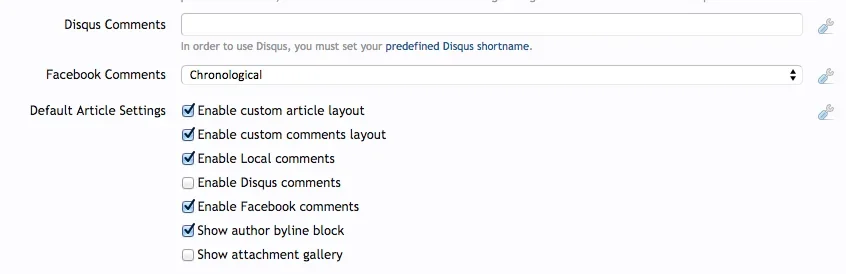
@masterchief : I got the same problem: it does not show the tab for facebook comment, but I can not find where to setting it out. Please give me some information! Thank so much!
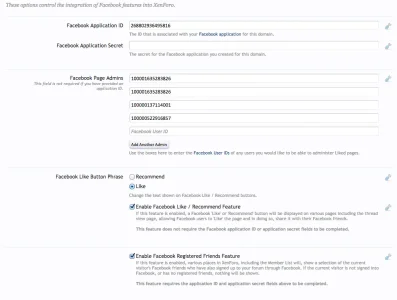
I was going to say, ACP -> options -> Facebook Integration

@masterchief : I got the same problem: it does not show the tab for facebook comment, but I can not find where to setting it out. Please give me some information! Thank so much!
/admin.php?options/list/facebook
Thanks for your quick reply, I think you are busy, so I asked masterchief...
However, I think that my facebook setting is OK. Because visitor can register via facebook account normally.
The article was published, but only have local comment, it doesn't has a tab for facebook comment. Very strange...
Any idea why this is happening? It's only an issue on the Article page, not my forum list. Both have Xenporta framework enabled.
(Using the built in TaigaChat widget)

Are you using the Social Connect addon for that? It is NOT the same as Facebook Integration. Please make sure that you have filled out Facebook Integration correctly.

Broken (Article List): http://i.imgur.com/zJCtQj9.pngcannot identify problem you are trying to identify... attachment does not reveal enough info
Broken (Article List): http://i.imgur.com/zJCtQj9.png
Working (Forum List): http://i.imgur.com/hQ5Tvu4.png
Both using the same build-in TaigaChat widget. Latest versions of both TaigaChat & Xenporta 2
http://i.imgur.com/gE6RoID.pngIt is working for me... what theme are you using? Have you checked it out while viewing Default theme?
http://planetbeacon.comlink to your site please

When you promoted the article, did you select the Facebook option?I'm sure not using any social connect addon. Just using Facebook Intergration included in Xenforo (I had deleted the application secret in screenshot).
Here is my settings:
View attachment 99229
And here is the XenPorta settings:
View attachment 99230
XenPorta 2 > Options > "Enable External Images"So what I'm trying to is have my pictures show up on the form feed.
Like this: http://prntscr.com/68qbq2
But when I add an image to one of my posts it replaces the user's picture with it.
Like this: http://prntscr.com/68qb3e
Any idea on how to fix this?
Is it possible to do that with the free version?XenPorta 2 > Options > "Enable External Images"
The free version is actually a completely different program and not comparable.Is it possible to do that with the free version?
Ok, well is it possible to do what I'm asking in the free version?The free version is actually a completely different program and not comparable.

When you promoted the article, did you select the Facebook option?
Yeah, when you promote... select to disable the promotion icon.Ok, well is it possible to do what I'm asking in the free version?
Do you mind responding to my issue?Yeah, when you promote... select to disable the promotion icon.


We use essential cookies to make this site work, and optional cookies to enhance your experience.