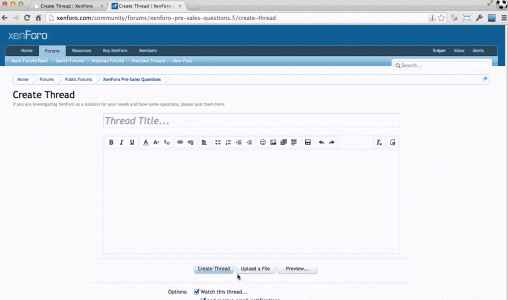
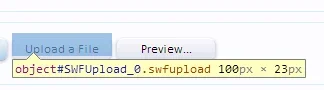
Sniper Active member Licensed customer Feb 8, 2014 #1 If you click the "upload a file" button" anywhere but the bottom left corner you get a different dialog. On the odd occasion, it also happens if you click elsewhere on the button. Using latest Chrome.
If you click the "upload a file" button" anywhere but the bottom left corner you get a different dialog. On the odd occasion, it also happens if you click elsewhere on the button. Using latest Chrome.
Sniper Active member Licensed customer Feb 8, 2014 #2 I know its running the latest beta here but this also happens in 1.2.4.
Chris D XenForo developer Staff member Licensed customer Feb 8, 2014 #3 I can confirm this. I wondered why I often ended up with the old uploader. Good find. Another great reason to ditch swfupload...
I can confirm this. I wondered why I often ended up with the old uploader. Good find. Another great reason to ditch swfupload...
Liam W in memoriam 1998-2020 Licensed customer Feb 8, 2014 #5 So, the swfupload isn't covering the entire button? Never had that before (the only times I had the non-flash uploader is when flash isn't on the device, or the swfupload file was blocked...) Liam
So, the swfupload isn't covering the entire button? Never had that before (the only times I had the non-flash uploader is when flash isn't on the device, or the swfupload file was blocked...) Liam
A Amaury Well-known member Feb 8, 2014 #6 I've noticed this as well. I thought it was by design. Is it safe to assume the overlay one is the old one?
I've noticed this as well. I thought it was by design. Is it safe to assume the overlay one is the old one?
Liam W in memoriam 1998-2020 Licensed customer Feb 8, 2014 #7 Amaury said: I've noticed this as well. I thought it was by design. Is it safe to assume the overlay one is the old one? Click to expand... The overlay isn't old. Its the non-flash fallback... Liam
Amaury said: I've noticed this as well. I thought it was by design. Is it safe to assume the overlay one is the old one? Click to expand... The overlay isn't old. Its the non-flash fallback... Liam
A Amaury Well-known member Feb 8, 2014 #8 Liam W said: The overlay isn't old. Its the non-flash fallback... Liam Click to expand... Then is the old one that @Chris Deeming mentioned the one that instantly takes you to your files?
Liam W said: The overlay isn't old. Its the non-flash fallback... Liam Click to expand... Then is the old one that @Chris Deeming mentioned the one that instantly takes you to your files?
Liam W in memoriam 1998-2020 Licensed customer Feb 8, 2014 #9 Amaury said: Then is the old one that @Chris Deeming mentioned the one that instantly takes you to your files? Click to expand... Nope, that's the flash one. Neither are old. One is flash, one is non flash. I'm assuming @Chris Deeming is referring to the non flash one when he says old one... Liam
Amaury said: Then is the old one that @Chris Deeming mentioned the one that instantly takes you to your files? Click to expand... Nope, that's the flash one. Neither are old. One is flash, one is non flash. I'm assuming @Chris Deeming is referring to the non flash one when he says old one... Liam
Chris D XenForo developer Staff member Licensed customer Feb 8, 2014 #10 Yeah. I didn't mean old. Wrong word
D.O.A. Well-known member Licensed customer Feb 9, 2014 #11 This has happened for quite a while now with our forums, confirmed here... I always assumed it was something with chrome specifically or updates breaking things.
This has happened for quite a while now with our forums, confirmed here... I always assumed it was something with chrome specifically or updates breaking things.
EQnoble Well-known member Licensed customer Feb 10, 2014 #14 You can add this in extra.css until the next update if you want to fix that now. Code: #AttachmentUploader object { margin-top: 5px; }
You can add this in extra.css until the next update if you want to fix that now. Code: #AttachmentUploader object { margin-top: 5px; }
Mike XenForo developer Staff member Licensed customer Feb 10, 2014 #15 Fixed now - moving the <object> tag based on how far the trigger button is from the offset parent. This should be resilient against various changes.
Fixed now - moving the <object> tag based on how far the trigger button is from the offset parent. This should be resilient against various changes.