
Sure, we will address your ticket asap. Thank you!Hi. Support works?


Sure, we will address your ticket asap. Thank you!Hi. Support works?

Hello,
I am receiving account suspension warnings if I do not pay for the renewal of my products. However, I do not intend to pay for them at this time. Could my account be suspended, or why am I receiving these emails? I have already paid for the products.

Fatal error: Only files produced by the PHP 8.2 ionCube Encoder can run on PHP 8.2. The file /home/altboard/public_html/src/addons/AL/ThreadFilter/Setup.php has been encoded by the ionCube Encoder for PHP 7.4. in Unknown on line 0I was gonna try out the trial version, but got this error:
Code:Fatal error: Only files produced by the PHP 8.2 ionCube Encoder can run on PHP 8.2. The file /home/altboard/public_html/src/addons/AL/ThreadFilter/Setup.php has been encoded by the ionCube Encoder for PHP 7.4. in Unknown on line 0


No, this is specifically for custom thread fields.Hi @AddonsLab,
Does this work for classifieds ad fields in the latest version of Bob's CAS (Classifieds) ?
Many thanks!

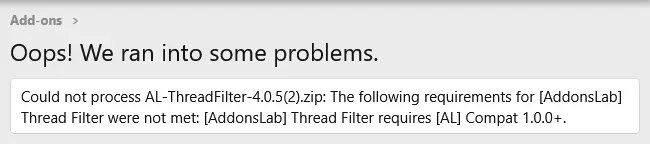
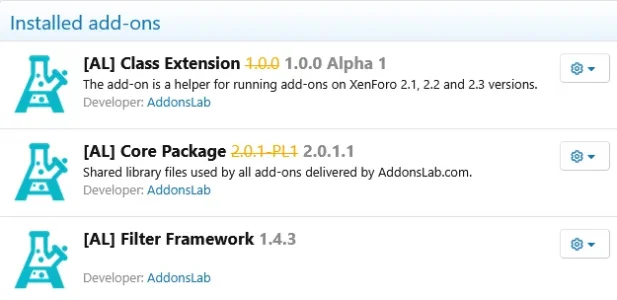

@AddonsLab - I'm trying to install thread filters, but continue to receive the error below when I try to upload. As you can see from the included screen captures, I have this installed, along with the other requited add-ons.
Is there another step I need for this to work correctly?
View attachment 332204
View attachment 332205
Thank you, @Joe Link . I do have the compatibility Layer add-on installed, downloaded directly from the link you provided. It installs as [AL] Class Extension and is in my add-on list above.
I have no idea why the message is still calling for it.
Thank you! Following up, it looks like this was caused by a conflict with another add-on. I'm not sure which one, but when I disabled them all, I was able to install this add-on. I re-enabled my add-ons afterwards and everything is working correctly now.Thank you for the report, we will reply back via ticket now to troubleshoot this further.

This release introduces an option to make custom field filters collapsible in the RMS filter form, improving usability for forms with many fields.
A new admin option is available:
- Collapse custom field filters
- None
- Checkbox and radio option lists
- All custom fields
When enabled, custom field filter blocks are collapsed by default and can be expanded:
- by clicking the field header/title
- by clicking the caret...

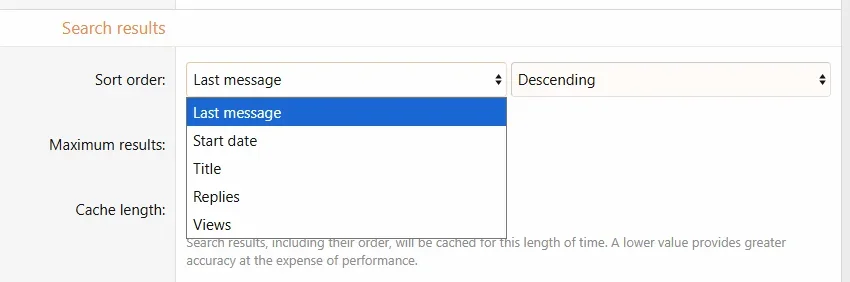
I have a question about how this add-on functions. I'm aware of all the nice features it has to help members sort through and find the content they like. And I see it does work with custom fields.
But, what I need to do is work with search forums. I'm creating some search forums, and would like to include a custom field for sorting, so the order of the items in the search forums are consistent. When creating a search forum mode, the custom fields do show up as parameters to select from, but there is no way to sort by custom fields.
View attachment 333873
Does your add-on add custom fields to the sort order? I am thinking your add-on does something different, but wanted to see if there was a chance it might do what I need.
Thanks!


We use essential cookies to make this site work, and optional cookies to enhance your experience.
![[AL] Compatibility Layer](/community/data/resource_icons/9/9536.jpg?1723211880)
