Nirjonadda Well-known member Licensed customer Feb 7, 2018 #1 Getting email from facebook about Required Security Update for Facebook Login. Please let me know this fix, Thanks
Getting email from facebook about Required Security Update for Facebook Login. Please let me know this fix, Thanks
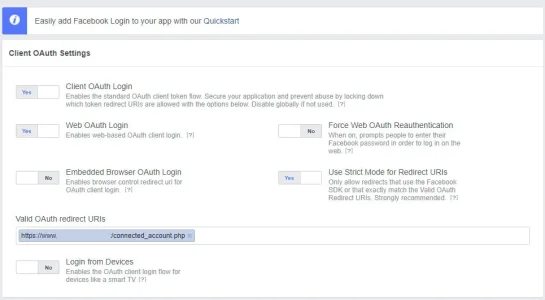
Bryan Active member Licensed customer Feb 7, 2018 #2 Turn on "Use Strict Mode for Redirect Urls" that's the only difference between mine and yours and I have no warnings. Upvote 0 Downvote
Turn on "Use Strict Mode for Redirect Urls" that's the only difference between mine and yours and I have no warnings.
Bryan Active member Licensed customer Feb 7, 2018 #3 Add: https://www.yourdomain.com/connected_account.php to the Valid Oauth redirect URLs too Upvote 0 Downvote
Nirjonadda Well-known member Licensed customer Feb 7, 2018 #4 Bryan said: Turn on "Use Strict Mode for Redirect Urls" that's the only difference between mine and yours and I have no warnings. Click to expand... Bryan said: Add: https://www.yourdomain.com/connected_account.php to the Valid Oauth redirect URLs too Click to expand... Still not marked fixed. we're making a security update to Facebook Login that will invalidate calls from URIs not listed in the Valid OAuth redirect URIs field of your Facebook Login settings. Click to expand... Upvote 0 Downvote
Bryan said: Turn on "Use Strict Mode for Redirect Urls" that's the only difference between mine and yours and I have no warnings. Click to expand... Bryan said: Add: https://www.yourdomain.com/connected_account.php to the Valid Oauth redirect URLs too Click to expand... Still not marked fixed. we're making a security update to Facebook Login that will invalidate calls from URIs not listed in the Valid OAuth redirect URIs field of your Facebook Login settings. Click to expand...
Bryan Active member Licensed customer Feb 7, 2018 #5 Do you still have both errors or just one? Did you save it? Upvote 0 Downvote
Nirjonadda Well-known member Licensed customer Feb 7, 2018 #6 Bryan said: Do you still have both errors or just one? Did you save it? Click to expand... Yes but fix now button are not marked resolved. Upvote 0 Downvote
Bryan said: Do you still have both errors or just one? Did you save it? Click to expand... Yes but fix now button are not marked resolved.
Bryan Active member Licensed customer Feb 7, 2018 #7 Here's what mine looks like: I'm not sure why yours wouldn't work when set the same. Upvote 0 Downvote
Nirjonadda Well-known member Licensed customer Feb 8, 2018 #8 Bryan said: I'm not sure why yours wouldn't work when set the same. Click to expand... Yes error are fixed but not marked resolved. Upvote 0 Downvote
Bryan said: I'm not sure why yours wouldn't work when set the same. Click to expand... Yes error are fixed but not marked resolved.
Chris D XenForo developer Staff member Licensed customer Feb 8, 2018 #9 All that matters is that you’ve taken the correct steps and that registering/logging in via Facebook still works. Upvote 0 Downvote
All that matters is that you’ve taken the correct steps and that registering/logging in via Facebook still works.