Quick Thread by AddonsLab

Quick Thread by AddonsLab [Paid] 1.10.2

No permission to buy ($24.99)
Hey. I purchased brand removal. How do I remove the link?

Hello! Please visitor the settings page of the product, and re-save it. You will see the license information updated, and it should say the branding is removed. You should not see any branding in the footer after that.

Thank you!
 
Hello! Please visitor the settings page of the product, and re-save it. You will see the license information updated, and it should say the branding is removed. You should not see any branding in the footer after that.

Thank you!
Quick and easy! Thank you very much! :)
 
conflicts with xenbase separate stickies from normal threads option, creates 2 entry boxes and bottom one don't work
 
Does this support @Xon 's similar threads (Elastic Search Essentials) ?
Does this have usergroup permission?
Can this be placed on a widget page?
 
Hello, @Alfa1

> Does this support @Xon 's similar threads (Elastic Search Essentials) ?

No, the add-on is not tested and similar threads will most likely not shown in our Quick Thread box. If @Xon is fine with us, we could implement the support if a development license for the add-on can be provided.

> Does this have usergroup permission?

The permissions to post a content are controlled by XenForo permissions, so if a user can not have a thread created in a forum, they will not be able to do so using Quick Thread as well. And for each "Thread Prompt" created you can set User Criteria, to show the prompt only to particular usergroups (or any other user criteria you would like to apply).

> Can this be placed on a widget page?

No, but it can be implemented if requested. We can implement Quick Thread itself as a widget, so it can be added anywhere. The widget will be configurable to choose which thread prompts should be shown.

Thank you!
 
For some reason the quick thread function does not display. The 'new thread' button does.
 
For some reason the quick thread function does not display. The 'new thread' button does.

Please double-check the configuration of "Thread Prompts" in the admin panel, and make sure you have a prompt setup for the current forum. If you still observe the issue, it may be due to the usage of a custom theme. Please open a ticket and we will review the issue.

Thank you!
 
On the forum chooser: Is it possible to hide the number of threads? It seems to me it only distracts and has no purpose.
 
On the forum chooser: Is it possible to hide the number of threads? It seems to me it only distracts and has no purpose.

You can use CSS to modify the look of the popup. A rule like

CSS:
.quickThreadMenuColumn dl.pairs {
    display: none;
}

should do what you mentioned.
 
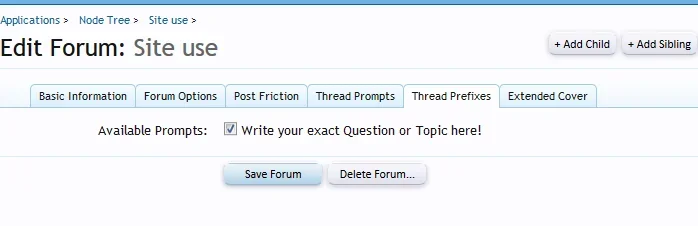
If I look at the thread prompts tab it has the thread prefixes content in it. And the thread prefixes tab is empty.

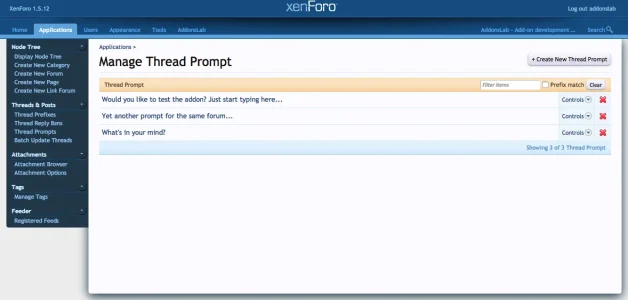
Do you mean you can not see the page in Admin Panel? Here is how it should look if installed successfully:

Screenshot at Jan 21 19-41-12.webp
 
No, I mean in the node tree: /admin.php?nodes/site-use.184/edit
I see the content of prompts:

Screenshot-2018-1-21 Edit Forum Site use Admin CP - Forum.webp
This is a conflict with @Xon 's post friction.

And the function to type a thread directly from forum index or from forum, is not there.
 
No, I mean in the node tree: /admin.php?nodes/site-use.184/edit
I see the content of prompts:

View attachment 167132
This is a conflict with @Xon 's post friction.

And the function to type a thread directly from forum index or from forum, is not there.

I see. Will check and update about tab issue soon. The input to create a thread, however, should be there anyway, if you have created thread prompts and enabled it in some forums and in forum home page. Please contact via a ticket to troubleshoot the issue.

Thank you!
 
Back
Top Bottom