I seen it somewhere. But never paid much attention to it. And you never know if adjustments have been done to make things act different. I try to ask as many questions as I can think of at the time.I was replying to @fords8 who seemed to not know about the feature.
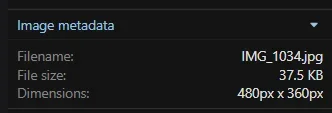
I could release just for extension. After a bit more testing. Image metadata still has the extension.This Suggestion is about the extension not the title.


The metadata filename is not the problem. The only thing an add-on needs to do is remove the extension from the filename in the gallery itself, in the Edit window, so that it doesn't appear in the URL. That's all I want anyway.I seen it somewhere. But never paid much attention to it. And you never know if adjustments have been done to make things act different. I try to ask as many questions as I can think of at the time.
I could release just for extension. After a bit more testing. Image metadata still has the extension.
View attachment 329634
/media/img_1034.32/
View attachment 329635
View attachment 329636View attachment 329637
/media/img_1034.32/
The above is the url for a image. Of course add your https://domain(dot)com to it.The only thing an add-on needs to do is remove the extension from the filename in the gallery itself, in the Edit window, so that it doesn't appear in the URL. That's all I want anyway.
Are you editing the post or the image in the gallery when they would show back up?Someone here advised to make some modifications in a couple of templates and it made the extension go away but it still showed in the URL and when I opened the edit window, sure enough the extension was still there so it didn't work.
No, it's the image in the gallery.The above is the url for a image. Of course add your https://domain(dot)com to it.
Are you editing the post or the image in the gallery when they would show back up?
EDIT: I take it that it was the post on the forum. I will try to add to the addon to take care of it.
OH, I forgot about that. Looking into it anyways.The names of images on the board, in posts, cannot be changed as they are the names in the embedded metadata.
too much work.Yes. I know. But people can also upload images directly into the gallery and copy the BBCode, post them on the forum.
I know right. No one on my forum uploads directly into the gallery. Why would they? And since the software sees images from the gallery posted on the board with the BBcode as embeds, you loose the EXIF (on my forum the EXIF is displayed below attachments).too much work.
today's platforms are about simplicity, speed, and ease of use.
if I had to upload a photo and then copy a code to post it on the forum, then I'm leaving instantly and posting somewhere else.
if I can post quickly and easily, then I'm a happy forum member.
I know right. No one on my forum uploads directly into the gallery. Why would they? And since the software sees images from the gallery posted on the board with the BBcode as embeds, you loose the EXIF (on my forum the EXIF is displayed below attachments).
I myself will do this on occasion though when I repost an image. Saves space. Stupid, as if a handful of images will make a difference, especially since I now switched to the webp format.

Well, yes, that's how that works. Changed it in the ACP.format conversion should/could be done automatically upon upload tho.
We use essential cookies to make this site work, and optional cookies to enhance your experience.