Cut off Extensions in media name

This Suggestion is about the extension not the title.

But the title is a problem to. Simple solution would be If no title is entered then use "Board short title"
 
I was replying to @fords8 who seemed to not know about the feature.
I seen it somewhere. But never paid much attention to it. And you never know if adjustments have been done to make things act different. I try to ask as many questions as I can think of at the time.

This Suggestion is about the extension not the title.
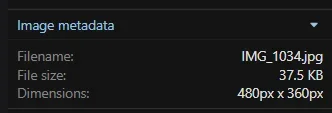
I could release just for extension. After a bit more testing. Image metadata still has the extension.
1761610922419.webp
/media/img_1034.32/
1761610969221.webp
1761611010594.webp1761611062386.webp
 
I seen it somewhere. But never paid much attention to it. And you never know if adjustments have been done to make things act different. I try to ask as many questions as I can think of at the time.


I could release just for extension. After a bit more testing. Image metadata still has the extension.
View attachment 329634
/media/img_1034.32/
View attachment 329635
View attachment 329636View attachment 329637
The metadata filename is not the problem. The only thing an add-on needs to do is remove the extension from the filename in the gallery itself, in the Edit window, so that it doesn't appear in the URL. That's all I want anyway.

Someone here advised to make some modifications in a couple of templates and it made the extension go away but it still showed in the URL and when I opened the edit window, sure enough the extension was still there so it didn't work.
 
/media/img_1034.32/
The only thing an add-on needs to do is remove the extension from the filename in the gallery itself, in the Edit window, so that it doesn't appear in the URL. That's all I want anyway.
The above is the url for a image. Of course add your https://domain(dot)com to it.

Someone here advised to make some modifications in a couple of templates and it made the extension go away but it still showed in the URL and when I opened the edit window, sure enough the extension was still there so it didn't work.
Are you editing the post or the image in the gallery when they would show back up?

EDIT: I take it that it was the post on the forum. I will try to add to the addon to take care of it.
 
The above is the url for a image. Of course add your https://domain(dot)com to it.


Are you editing the post or the image in the gallery when they would show back up?

EDIT: I take it that it was the post on the forum. I will try to add to the addon to take care of it.
No, it's the image in the gallery.

The names of images on the board, in posts, cannot be changed as they are the names in the embedded metadata. Unless you can change that.

EDIT: Not that there's a need for it as attachments are disallowed for bots. On my forum anyway.
 
Yes. I know. But people can also upload images directly into the gallery and copy the BBCode, post them on the forum.
too much work.

today's platforms are about simplicity, speed, and ease of use.

if I had to upload a photo and then copy a code to post it on the forum, then I'm leaving instantly and posting somewhere else.

if I can post quickly and easily, then I'm a happy forum member.
 
too much work.

today's platforms are about simplicity, speed, and ease of use.

if I had to upload a photo and then copy a code to post it on the forum, then I'm leaving instantly and posting somewhere else.

if I can post quickly and easily, then I'm a happy forum member.
I know right. No one on my forum uploads directly into the gallery. Why would they? And since the software sees images from the gallery posted on the board with the BBcode as embeds, you loose the EXIF (on my forum the EXIF is displayed below attachments).

I myself will do this on occasion though when I repost an image. Saves space. Stupid, as if a handful of images will make a difference, especially since I now switched to the webp format.
 
I know right. No one on my forum uploads directly into the gallery. Why would they? And since the software sees images from the gallery posted on the board with the BBcode as embeds, you loose the EXIF (on my forum the EXIF is displayed below attachments).

I myself will do this on occasion though when I repost an image. Saves space. Stupid, as if a handful of images will make a difference, especially since I now switched to the webp format.

format conversion should/could be done automatically upon upload tho.
 
People want to get rid of the extensions, but are ok with the numbers at the end of the images? I was able to build an addon for this. Extensions are gone but the numbers are not.

As far as the name of the image, how about require description and then pull the titles from the descriptions? Have not tryed it yet, but do you think that could work for naming each image?

Your URL = /media(default)/imagenamehere.23/ That the way you want it?
Any chance this addon is available? Have been wanting and waiting to upgrade to xenforo media gallery, but don't want my gallery to fill up with bad titles. I use the xenforo media gallery as a separate section for people to post their work, not mirroring the forum.
 
Any chance this addon is available? Have been wanting and waiting to upgrade to xenforo media gallery, but don't want my gallery to fill up with bad titles. I use the xenforo media gallery as a separate section for people to post their work, not mirroring the forum.
Never finished it. Don't have the time. Sorry!
 
The addon is on the final stage.

We have:
Auto removing of new image extensions
Rename junk names on new uploads. Automatically rename machine-generated titles (UUIDs, camera names like IMG_1234, date-time names like 20250514_210751) on newly uploaded media,

Scan data base and fix old extensions
Search partial names and replace with custom names

Log file of all changes.
 
This is what the addon does in v2.3.12 I can answer questions PM
Strip Media Extensions


Options section:
Auto removing of extensions

Automatically remove trailing file extensions from the titles of newly uploaded media and resources. Safe and recommended.

Auto Rename junk names on new uploads
Automatically rename machine-generated titles (UUIDs, camera names like IMG_1234, date-time names like 20250514_210751) on newly uploaded media, using the base name and separator you set in the Tools section, plus the item's ID (e.g. YourName_48213). Only affects NEW uploads, not existing media. Every automatic rename is logged and can be undone from Logs > Media rename log.


Tools section:
Scan option:

This tool scans your database and removes trailing file extensions (such as .jpg, .mp4 or .zip) from the titles shown to users.
  • Media Gallery detected: media item titles will be cleaned.
  • Resource Manager detected: resource titles will be cleaned.
Only the displayed titles are changed. The uploaded media and resource files themselves are never modified or deleted.
Handles large libraries (4,000+ items) by paging through them, so nothing gets left behind

Rename junk media names:
Detect media whose titles are meaningless machine names (for example a UUID like 00f2eba3-9a2f-450a-b8e7-09e620e4b992) and preview replacing them with a clean sequential name. Choose a base name and separator, then preview. Nothing is changed until you apply.
  • Set Base name: YourSite
    The word used for renamed items, e.g. "YourName" produces "YourName 001".

  • Set Separator: YourSite 0001
    Space (YourName 001), Underscore (YourName_001), Dash (YourName-001)

Search & replace in titles:
Find a piece of text in media titles and replace it with something else (for example, find "image_" and replace with your site name). This is a literal text replacement, not a pattern. You will preview and tick which items to change before anything is written. Leaving "Find text:" Blank will show all photos.
  • Find text: img
    The exact text to look for in titles. Leave this blank to match EVERY media item (useful with a counter, e.g. rename everything to SiteName_###).

  • Replace with: YourSite
    What to put in its place. Leave blank to simply remove the found text. Tip: include # to insert an auto-incrementing number, e.g. "SiteName_#" gives SiteName_1, SiteName_2... Use ### for zero-padded (001). You can still edit any name on the next page before applying.


Log view:
Strip Media Extensions — rename log:
Full working undo on 1 photo or the batch
A record of every title change this add-on has made. Total changes recorded: xxx. Changes are grouped by operation below. Use the Undo button on a group to reverse a whole run, or on a single row for just that item. Undo only restores a title if it hasn't been changed by hand since.

 
Back
Top Bottom