
You are using an out of date browser. It may not display this or other websites correctly.
You should upgrade or use an alternative browser.
You should upgrade or use an alternative browser.

Creating custom prefix styling
- Thread starter Paul B
- Start date

Great tutorial, thanks!
How you would do this code if you wanted the icon to the right of the text with the 4px in between text and icon and normal padding at the ends? Thanks for any help.
Your code:
How you would do this code if you wanted the icon to the right of the text with the 4px in between text and icon and normal padding at the ends? Thanks for any help.
Your code:
Code:
/* #### Thread Prefixes #### */
.label
{
    &:before
    {
        padding-right: 4px;
        .m-faBase();
    }

    &.label--
    {
        &ctaAttention:before
        {
            .m-faContent(@fa-var-exclamation-triangle);
        }

        &ctaAnnouncement:before
        {
            .m-faContent(@fa-var-bullhorn);
        }

        &ctaNotice:before
        {
            .m-faContent(@fa-var-flag);
        }

        &ctaPoll:before
        {
            .m-faContent(@fa-var-poll-h);
        }
    }
}
That's exactly what I tried but for some reason it adds padding to both sides of the icon. To test it I add a large number like 50px and it shows on both sides of the FA.You can probably just change:beforeto:afterand changepadding-righttopadding-left. You also don't need.m-faBase()in 2.3+.


Can't get this working in 2.3
Can't get this working in 2.3
It works fine - I still use it without any changes being made.
It works fine - I still use it without any changes being made.
Sorry but that's rubbish.... seeing as you literally do have to make template changes. After all, how would it know what custom changes to apply? Magic ?
Sorry but that's rubbish.... seeing as you literally do have to make template changes. After all, how would it know what custom changes to apply? Magic ?
I'm done with taking crap on this forum.
Come on, engage your brain, @Paul B clearly meant the changes still work in 2.3 and further changes aren’t required.Sorry but that's rubbish.... seeing as you literally do have to make template changes. After all, how would it know what custom changes to apply? Magic ?

Come on, engage your brain, @Paul B clearly meant the changes still work in 2.3 and further changes aren’t required.
Where did he say that ???
I got it working anyway so argue away.

I'm done with taking crap on this forum.

I don't know if you will see this, Paul, but thank you, because it worked beautifully.

Hey @Paul B, just wanted to let you know that I appreciate your having *provided this helpful resource. Thanks man.I'm done with taking crap on this forum.
*Edit: minor spelling correction.
Last edited:

Several parts can be done with my AddOn:
![[DD] Prefix & Label Tools - add Icons and more](/community/data/resource_icons/10/10213.jpg?1767134942)

Style your prefixes with icons and userbanners and add easy cusotm ones with icon

You can do most in one line in extra.less without touching any templates.
You can further adjust the styling as needed in the two examples above.
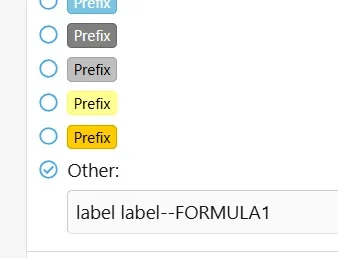
Then you would add the label to your prefix like below.
CSS:
.label.label--FORMULA1 { border-color: #6ABCDC; background: linear-gradient(45deg, #CB2D3E 0%, #EF473A 100%); box-shadow: inset 0px 0px 0px 0px; font-family:'Roboto',sans-serif; color:#fff; padding: 2px 5px 0px 1px; &:before{ .m-faContent(@fa-var-flag-checkered); font-size: 1.1em; padding-right: 5px;  }}
.label.label--ANDROID { border-color: #78C257; background: linear-gradient(to bottom, #78C257, #78C257 100%); box-shadow: inset 0px 0px 0px 0px; font-family:'Roboto',sans-serif; color:#fff; padding: 2px 5px 0px 1px; &:before{ .m-faContent(@fa-var-android); font-size: 1.1em; padding-right: 5px;  }}
You can further adjust the styling as needed in the two examples above.
Then you would add the label to your prefix like below.
Similar threads
- Replies
- 50
- Views
- 11K