
You are using an out of date browser. It may not display this or other websites correctly.
You should upgrade or use an alternative browser.
You should upgrade or use an alternative browser.

Back To The Top 1.0.3b
No permission to download
- Thread starter MattW
- Start date
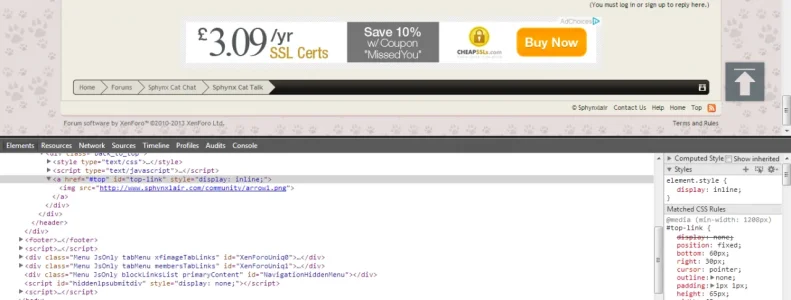

Some how tumblr.com makes it work, it show in the same spot on the laptop and desktop. I wonder what the trick is?
How did it effect the desktop?and they are both the same then?
My laptop is 1366x768 and they are still showing wrong. For it to move it into the boarder, I had to reduce the right down to 30px.
View attachment 58200

Well this uses a fixed position, so it shouldn't make any difference what device you are browsing from, it will always be
So it's always going to be positioned 60px from the bottom, and 305px from the right in your case.
Code:
position: fixed;
bottom: 60px;
right: 305px;
So it's always going to be positioned 60px from the bottom, and 305px from the right in your case.
So, i guess it will not work without interfering with the site on a laptop device. I wonder how tumblr does it.
it's a photo site, they have a scroll button top right (see image, button is top right of their page) when viewed on both of my device it falls in the same place. This is my desktop view.

And laptop screen shot. same place on both.

You will not be able to see the actual page with the scroll button unless you register. It's a photo blog site. www.tumblr.com
Well I can't help then unfortunately. I'm not registering at another site. The button in this add-on always appears in the SAME place in the browser, as it's in a fix position relative to the dimensions of your browser. It's ALWAYS by default 30px from the right, and 60px from the bottom.
On those images, the button isn't in the same place. The second smaller screen shot shows it's further into the browser.
On those images, the button isn't in the same place. The second smaller screen shot shows it's further into the browser.
Yes - I see that. It must adjust to different screen sizes I guess, either way, it doesn't move it dramatically as the add on allows it in this case for what ever reason. Oh well, uninstalled until I figure it out.
Sorry that's it's not working for you, but I'm still struggling to understand exactly what you are trying to achieve with it.
I'm presuming you are wanting it to stay in EXACTLY the same place inside your border, rather than it being fixed to the outside edge of the browser window?
I'm presuming you are wanting it to stay in EXACTLY the same place inside your border, rather than it being fixed to the outside edge of the browser window?
Nothing out of the ordinary, Just do not want it , floating in the middle of my forum no matter what the device. I'm not sure why it is doing that. As I said, a perfect example is the site Tumblr.com. The scroll button must resize and reposition I would imagine to suit any screen size resolution.
ok - 0'd it out - it now sits at edge on both devices like so. I can live with it. Liked it closer to forum area but oh well. Thanks for your help @MattW.
Any chance you can get this color darkening effect when hovering over button? Also, the speed on this scroll button site liked below is what I want, your scroll speed still does not change for some reason on my site.
http://webdesignerwall.com/demo/scroll-to-top/scrolltotop.html
Any chance you can get this color darkening effect when hovering over button? Also, the speed on this scroll button site liked below is what I want, your scroll speed still does not change for some reason on my site.
http://webdesignerwall.com/demo/scroll-to-top/scrolltotop.html

Adam Howard
Well-known member
Seems to work fine for me

TBH, the previous version worked for me as well. I had no issues with it on IOS or my Windows laptop.Seems to work fine for me
Adam Howard
Well-known member
I tested it on Firefox on Ubuntu using the responsive design tool. All the way from full screen to 320 x 240 (which is the size of some older Nokia smart phones).TBH, the previous version worked for me as well. I had no issues with it on IOS or my Windows laptop.
Then for kicks I used this on my original 1st gen Amazon Kindle Fire. Also worked for me. You figure that's using the old Android 2.2 browser and if that is working.... Just about everything else you can toss at it should.
What do you have the scroll speed value set to? I can assure you that it does work!ok - 0'd it out - it now sits at edge on both devices like so. I can live with it. Liked it closer to forum area but oh well. Thanks for your help @MattW.
Any chance you can get this color darkening effect when hovering over button? Also, the speed on this scroll button site liked below is what I want, your scroll speed still does not change for some reason on my site.
http://webdesignerwall.com/demo/scroll-to-top/scrolltotop.html
http://dev.z22se.org.uk/xenforo/
You can also have the transition effect you mentioned as well.
Similar threads


- Replies
- 16
- Views
- 196
