[AddonsLab] Post Limit Per Node

[AddonsLab] Post Limit Per Node 2.7.4

No permission to download
Hi @AddonsLab,

I tried top and bottom forum positions from your last update and I have a problem when a user has permission to post but it says 'You have insufficient privileges...' in the 'forum top' position. The forum bottom is empty as you would expect.

1759006691278.webp

Any advice?

Edit: could it be to do with it being:

- forum (with no privileges)
-- forum (with privileges) <- this is the forum with 'insufficient privileges...'

Cheers,

Alex
 
Last edited:
Hi @AddonsLab,

I tried top and bottom forum positions from your last update and I have a problem when a user has permission to post but it says 'You have insufficient privileges...' in the 'forum top' position. The forum bottom is empty as you would expect.

View attachment 327716

Any advice?

Edit: could it be to do with it being:

- forum (with no privileges)
-- forum (with privileges) <- this is the forum with 'insufficient privileges...'

Cheers,

Alex

Thank you for the report. We are checking this and will reply soon.
 
@AddonsLab

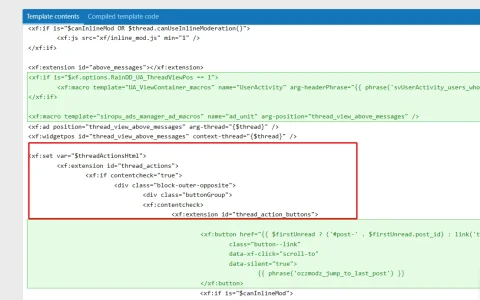
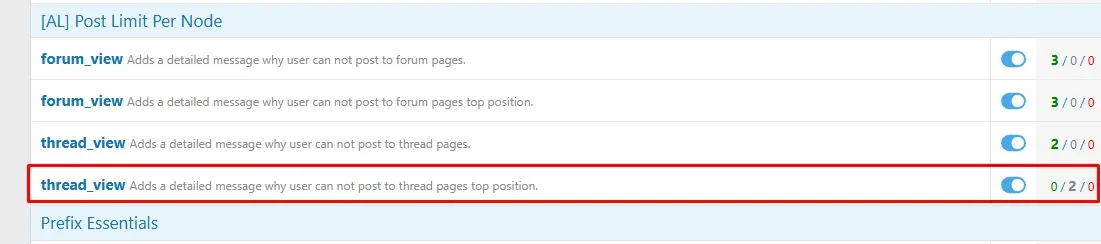
"Thread Top" is not working. I have all 4 checked, and only 3 show.

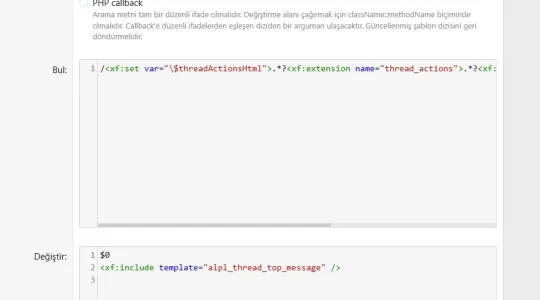
Please check if it works with the package attached. We have optimized the regular expression to be less sensitive to theme customizations and the message should appear now.

Let us know if it worked and we will release the fix publicly.

Thank you!
 

Attachments

The template is not being applied — is this a problem?
 

Attachments

  • Screenshot_3.webp
    Screenshot_3.webp
    63.5 KB · Views: 7
  • Screenshot_4.webp
    Screenshot_4.webp
    17.6 KB · Views: 7
  • Screenshot_5.webp
    Screenshot_5.webp
    16.5 KB · Views: 6
AddonsLab updated [AddonsLab] Post Limit Per Node with a new update entry:

Fixed Phrase Display Conflict

This update fixes a phrase-display conflict that occurred when using our add-on alongside [OzzModz] Thread Reply Button: No Permission Error Display and [OzzModz] Thread Reply Max Posts In Thread Permission.

In certain cases, our add-on incorrectly replaced a message from those add-ons. The correct message is now displayed consistently.

Thank you!

Read the rest of this update entry...
 
@AddonsLab can you please add "days" here? If I want to limit a thread to 30 days for example, I have to use hours, and the message the user sees as to when they can post they need a calculator for. I would rather it say they can post in 30 days, not 720 hours. Thanks!

Thread Time Unit
seconds
minutes
hours
Post Time Unit
seconds
minutes
hours


EDIT: I realize the message they see is formatted with days, but this would still be a good addition for admin configuration.
 
Last edited:
There seems to be a bug in counting the time between posts. So if a user posted in a thread (that is not theirs) 3 times on different dates, and is only allowed to post once every month (for example), the message that displays when they can post is based on post 1, not post 3, so it is allowing them to post sooner than the limit time.
Stays the same if this setting is Yes, No, or even Never: Skip limit check if already posted in the thread.
Normally on No.
 
Last edited:
I just started using the add-on so these are existing posts. Not sure that matters. Use this example:
A member can post once every two months, they posted on Jan 17, Jan 25, Jan 30 (in a thread that was not theirs and had no posts before). Today is Feb 17 and the message stating when they can post is based off of the Jan 17 date and not the Jan 30 date.
 
Last edited:
Back
Top Bottom