

-
This forum has been archived. New threads and replies may not be made. All add-ons/resources that are active should be migrated to the Resource Manager. See this thread for more information.
- Home
- Forums
- XenForo resources and add-ons
- Resource and add-on archive
- Template modifications [Archive]
You are using an out of date browser. It may not display this or other websites correctly.
You should upgrade or use an alternative browser.
You should upgrade or use an alternative browser.
Add custom sidebar block
- Thread starter Trombones13
- Start date

Opps. I saw that,but figured it was just about re-arranging custom blocks. Thanks Kurt!


No problem (p.s. this was an unknown issue with the image, not the sidebar block, for those wondering).Fixed. Thanks for the help Kurt. I have NO idea what I missed, as I've been designing pngs for a long time. heh.

Thanks--Shelley has been a great help with it.I just want to say, the skin for TheVoiceInternet Radio....is really nice. I like it. A lot.
And what's better is that you gots some help from the resident barefoot designer!

Carlos
Well-known member
Hence how I said "barefoot"!Thanks--Shelley has been a great help with it.
Shelley's a nice person.


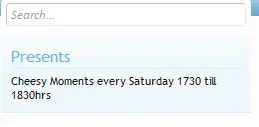
Change the size of the text, either with a div class or by making it <h2> (or whichever number you want for that size).Hi, Ive added the custom block, however the text is really small. I dont suppose anyone knows of an easy way to increase the size?


This should work:Ok, got it done, except I can't get the text color changed. Trying to do this - <TEXT="#66CCFF"> What am I doing wrong?
Code:
<div class="section">
    <div class="secondaryContent" style="color:#66CCFF">
<h3>TITLE</h3>
TEXT INSIDE
    </div>
</div>Similar threads
- Question
- Replies
- 33
- Views
- 3K

- Replies
- 6
- Views
- 1K
- Replies
- 1
- Views
- 709