Ads Manager 2 by Siropu

Ads Manager 2 by Siropu [Paid] 2.8.1

No permission to buy (€50.00)
Be aware if this ad is coming from an ad publisher, other than yourself, they likely have rules against any manipulation of the size of the ad, even if to enlarge. Doing so could get your account cancelled.
I appreciate the warning… However, these are all private ad clients - CTR is better with them enlarged so I make a judgement call our clients wont mind. Thanks again.
 
@Siropu thank you for the amazing add on we have been using for years! I'm really now starting to tap into the power of using keywords. I do have one question.

I know setting up a keyword will show all the impressions of that key word after set up but is there a way to set up a keyword and then have the ad manager show me the keyword in all the places it was used PRIOR to setting up the keyword.

Example: I want to see all the times the word "Chevy" was used going forward and all the time prior.

Is that doable?
 
I created a text ad package and for some reason when creating the ad it allows a banner upload. Why?
EDIT: Still can't figure this out. Have it disabled for now.
 
Last edited:
@Siropu

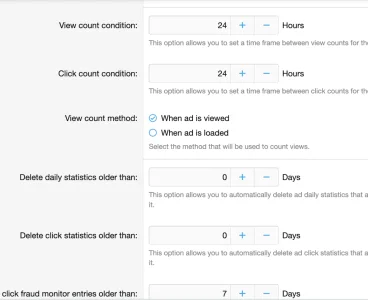
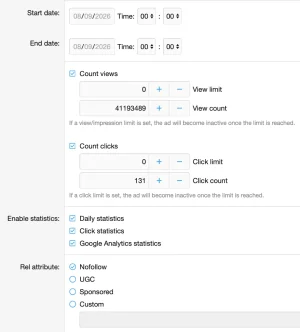
We are getting some crazy high impression stats Clicks look realistic)
can you help trouble shoot this please?
What are we doing wrong?
Thank you

Screenshot 2026-09-03 at 23.12.35.webp
 
Have the same thing. It's been going on for a while now. Something in the script causes the views to be huge and distort the CTR value.
 
Okay so if you check this, when it saves, it is unchecked (as stated.)
So... how do you undo (reverse) it since it's unchecked after you select it once?
1788476896721.webp
 
is there a way to set up a keyword and then have the ad manager show me the keyword in all the places it was used PRIOR to setting up the keyword.
There isn't.

I created a text ad package and for some reason when creating the ad it allows a banner upload. Why?
Because a text ad can have a small image displayed to the left but it is not required.

How do we turn off the device and geo targeting setting for when users create ads?
It is user group permission based.

can you help trouble shoot this please?
What kind of ad type are you using?

Something in the script causes the views to be huge and distort the CTR value.
I don't see any tracking issues in my tests. What value are you using for "View count condition" and "View count method"?

So... how do you undo (reverse) it since it's unchecked after you select it once?
There is no reverse. This just overrides it each time is used.
 
Would a swamp of AI bots inflate the view counts? Many sites experience AI swamps in recent months.
 
I've been testing Ad Unit Lazy Loading with AdSense and found that while Ads Manager correctly loads the ad markup when the ad unit reaches the viewport, the AdSense ad itself doesn't render. The <ins class="adsbygoogle"> is inserted along with the normal AdSense initialization script, but the dynamically inserted script isn't executed.

I fixed it with a small helper that watches lazy-loaded Ads Manager units and initializes AdSense after the markup has been inserted. I'm posting it here both for Siropu and in case anyone else using AdSense wants to implement lazy loading for their ad units:

JavaScript:
document.addEventListener('DOMContentLoaded', () => {
    document.querySelectorAll('.samItem[data-ll="true"]').forEach(unit => {
        const observer = new MutationObserver(() => {
            const ads = unit.querySelectorAll('ins.adsbygoogle:not([data-adsbygoogle-status])');

            if (!ads.length) {
                return;
            }

            ads.forEach(ad => {
                try {
                    (window.adsbygoogle = window.adsbygoogle || []).push({});
                } catch (error) {
                    console.error('AdSense lazy-load initialization failed:', error);
                }
            });

            observer.disconnect();
        });

        observer.observe(unit, {
            childList: true,
            subtree: true
        });
    });
});

This has been working reliably with AdSense code ads.

I've also been tracking the results in AdSense, and so far the results have been very encouraging. Before enabling Ad Unit Lazy Loading, my Active View viewability was averaging 40%. It is now averaging 57%, while impressions per page have dropped 29%. Despite serving nearly 30% fewer ad impressions, Page RPM has not declined and has actually been running slightly higher more recently.

It's much too early to know whether that increase is related to the improved viewability or simply normal variation, but there has been no indication so far that eliminating those low-viewability impressions has hurt revenue, just the opposite it has gone up.

The potential longer-term benefit is even more interesting. Viewability is a signal advertisers use when evaluating inventory and making bidding decisions, and campaigns can target inventory based on expected viewability. Eliminating impressions that are unlikely to be seen therefore improves the measured quality of the remaining inventory and potentially makes it more competitive for advertiser demand and higher bids.

Whether that is already contributing to the recent increase in Page RPM is impossible to say yet, again it may simply be normal variation. But the immediate result is clear: I've substantially improved the viewability of the inventory without sacrificing revenue.

I also experimented with having my helper preload lazy ad units shortly before they reached the viewport. After testing both ways, I removed the preload and now let Ads Manager handle the lazy-loading trigger normally. Since the ads are loading quickly enough without it, I don't currently see a benefit to the additional preload.

Some individual units showed just how many unnecessary impressions were previously being generated. My above-footer unit, for example, averaged 8% Active View before lazy loading and is currently averaging 52%.

Thought I'd pass this along in case you want to handle the AdSense initialization directly in Ads Manager when Ad Unit Lazy Loading is enabled, or in case anyone else using AdSense wants to use the helper in the meantime.

 
Because a text ad can have a small image displayed to the left but it is not required.
Suggestion: Turn off this feature so it is only text.

But while it is optional, I can't select an image size smaller that 200x200 and that is too big. Are we supposed to leave it blank and it will be small? What size so I can recommend the image uploaded. Thanks
 
I can't select an image size smaller that 200x200 and that is too big.
You can use any size you want as long as you haven't set size restrictions in the package.

Are we supposed to leave it blank and it will be small? What size so I can recommend the image uploaded.
The width is set to 150px but you can change that via CSS if you want.
 
You can use any size you want as long as you haven't set size restrictions in the package.
I just discovered the "Custom ad sizes" option in General settings. Added 100x100 and now I can select that for the package.
 
Bug:
The "View discounts" link does not appear in the cost column of packages unless it is a duration discount set at the package level. I have a usergroup discount and it does not show there unless you add a discount in the actual package, and then the link shows, but when you click it, the discount is actually the usergroup discount. This seems to be another bug because I created a discount that is greater than the usergroup discount, but that link shows the usergroup discount and when I click to create a package, the greater discount (package level) isn't even on the page. Seems like a two-layer bug here but I'd be happy to have the first one fixed, where, if there's a usergroup discount and they are in the group, the link shows. Thanks. PS. The package discount does show correctly if they are not eligible for a usergroup discount.
STILL an annoying bug.
If a usergroup discount is not active for a package, the discount link works and shows the quantity discount set in the package. But if a usergroup discount is active and you have a quantity discount for the package, the link appears BUT shows the usergroup discount amount (when logged in as a user with the group discount) and NOT the quantity discount. It should still show the quantity discount there, as, the usergroup discount is never shown there it is shown on the create page. Suggestion also: Perhaps shows ALL discounts, group and quantity, and have the link appear when it's only a group discount as well.
 
Basically I can't use discounts yet because those with a group discount will click the link and not see the package discount. So as of now only using group discounts.
 
What would cause in the recent update for a location to not "apply" when purchased? so a header spot is available but they purchase it, upload a banner but the "header" location now is unselected and doesnt appear in rotation.
 
Can I force a package to be a subscription (recurring billing)? If not can you please add this? (Suggestion)
In the meantime can the subscription box be automatically checked for a package?
Thanks
 
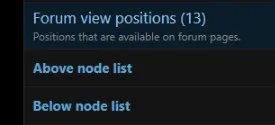
I don't understand this ad location because forum view does not include the node list, forum list does.
1788721716593.webp
 
Back
Top Bottom