[XTR] IP Threat Monitor

[XTR] IP Threat Monitor [Paid] 1.1.1

No permission to buy ($30.00)
This product has blacklisted my IP for no reason.
Hard to believe. It acts based on criteria, so there will be a reason, even if it might be wrong.
i work with people doing custom addons for and other sites where i buy addons from and i cant access any of them because, ipthreatmonitor has determined I'm apparently a threat.
So you are locked out from a bunch of sites, all using IP Thread monitor? Well, then something seems fishy about your IP or what you do.

IP Threat monitor per se does not determine anything as a threat. In the default configuration is relies on the outcome of proxycheck.io for the decision what to block. So maybe you should feed your IP into their web interface to find out if they see a reason to block you.
Other than that there are other criteria available in IP Threat Monitor like rate limiting or country or asn blocking or VPN blocking. Blocking of single IPs is also possible - but all of that would be either manual configuration or behaviour based and typically not identical over several web sites.

Based on the part of your story where you talk about logins and tokens there seems no connection to this add on as it has nothing to do with IP Threat Monitor. Later you talk about being locked out from multiple sites using this add on. So maybe you should explain better what the issue is that you suffer from. ATM it sounds more like a rant against the developer than something regarding the add on and it lacks a common logic at the same time.
 
Last edited:
@Osman : the last two releases really made working with the logs much easier! Very helpful!

What would be awesome:

  • having the allowed search engine bots displayed in the IP list in the same way as now usernames are displayed
  • having the block reason (i.e. country, ASN, ...) displayed in the blacklisting IP list in the same way as now the usernames are displayed
  • having the ability to filter the lists by i.e. country, user/guest/bot, ASN
  • having a better search in the lists - currently searching the list is limited to the actually shown page only, so basically of no use for most scenarios
  • using maxmind instead of proxycheck not only for country blocking but also for ASN blocking - would save a ton of API calls
  • having a graph of active/blocked/blacklisted very much in the same way as on the proxycheck dashboard.
 
First of all, thank you @smallwheels for explaining the fundamental logic of the add-on so accurately.

To clarify the situation clearly for everyone reading this thread:
  1. How IP Threat Monitor works:
    The add-on does not arbitrarily target individual users. It queries real-time threat intelligence feeds (such as proxycheck.io), inspects network parameters (VPN, Tor, datacenter/proxy ranges, ASN), or enforces automated rate-limiting and custom administrator-defined rules. If your IP address is flagged across multiple independent sites, it is because your IP address carries a high threat/proxy score on these public threat intelligence databases — not because of this add-on. You can check your own IP address directly via services like proxycheck.io to see why networks classify it as risky.
  2. Irrelevant Claims:
    XenForo API/validation tokens, user account registrations, and 2FA are core platform or store-management features that have absolutely nothing to do with the architecture or operation of IP Threat Monitor. Conflating account/website policies with an IP-filtering add-on is technically incorrect and misleading.
  3. Keep the Thread on Topic:
    This thread is dedicated to the technical discussion, updates, and feedback for the IP Threat Monitor add-on. It is not an arena for personal grievances, account disputes, or unfounded rants.
As there is no add-on defect or bug here to address, let's keep this thread focused strictly on the add-on itself.
 
@Osman : the last two releases really made working with the logs much easier! Very helpful!

What would be awesome:

  • having the allowed search engine bots displayed in the IP list in the same way as now usernames are displayed
  • having the block reason (i.e. country, ASN, ...) displayed in the blacklisting IP list in the same way as now the usernames are displayed
  • having the ability to filter the lists by i.e. country, user/guest/bot, ASN
  • having a better search in the lists - currently searching the list is limited to the actually shown page only, so basically of no use for most scenarios
  • using maxmind instead of proxycheck not only for country blocking but also for ASN blocking - would save a ton of API calls
  • having a graph of active/blocked/blacklisted very much in the same way as on the proxycheck dashboard.
Thank you for the positive feedback and these great suggestions, @smallwheels!

Most of these points (especially the server-side search, block reasons in the list, and utilizing MaxMind for ASN to save API calls) are very logical improvements. I have added them to my development roadmap for upcoming releases. Stay tuned! ;)
 
Hard to believe. It acts based on criteria, so there will be a reason, even if it might be wrong.

So you are locked out from a bunch of sites, all using IP Thread monitor? Well, then something seems fishy about your IP or what you do.

IP Threat monitor per se does not determine anything as a threat. In the default configuration is relies on the outcome of proxycheck.io for the decision what to block. So maybe you should feed your IP into their web interface to find out if they see a reason to block you.
Other than that there are other criteria available in IP Threat Monitor like rate limiting or country or asn blocking or VPN blocking. Blocking of single IPs is also possible - but all of that would be either manual configuration or behaviour based and typically not identical over several web sites.

Based on the part of your story where you talk about logins and tokens there seems no connection to this add on as it has nothing to do IP Threat Monitor. Later you talk about being logged out from multiple sites using this add on. So maybe you should explain better what the issue is that you suffer from. ATM it sounds more like a rant against the developer than something regarding the add on and it lacks a common logic at the same time.

#1 - Treated my ip as suspicious but they were all legitimate. (which should've been taken into consideration) All from me via my regular internet provider (spectrum & verizon) and my mobile provider which is boost mobile. I use to be logged in from my mobile at one point.

There's absolutely no reason I would've need to nefariously use multiple ips to use a site i wasn't blocked from to begin with. I've never once logged in from a VPN or Proxy. I even provided him video evidence of showing whats happening when Attempting to sign in from my end.

Decided to give until 2 months later, I reached out back. Asked him to delete my account so I can re-register so to see if that'll fix my issue.
He replies some time after with some really crazy statement there couldve been 3 possible reasons as to why I'm still having issues. read the Screenshot.

I didn't understand how that could've possibly happened since I've only 1 account, with 1 email and 1 XF token, If i already had an account with those credentials, how could someone else or something else could've possibly make another account using my already used credentials? I couldn't fathom what he was talking about. So I replied to that. Even provided a screenshot of my XF token from my account as proof thats me.

Conversation ends there as he refuses to reply to anything else.

Yes, it applies to this addon because the addon has a blacklist featured thats constantly being updated from him and his site. So I have 2 people who has this addon installed, so now the blacklist has blocked my ip from accessing their site as well. I dont think you understood that part.

This whole thing wasnt a rant, I'm showing you its flawed and can make mistakes and apparently theirs no option to have it rectified accordingly, because I havent done anything wrong and im being punished unfairly for things I have no control over.

Below are my ips from his logs when he first sent me messages. Dont care if my ips are public. As u can see, all legitimate logins from me. I can control what ips my isp provider uses when I connect my computer/mobile.
 
Last edited:
First of all, thank you @smallwheels for explaining the fundamental logic of the add-on so accurately.

To clarify the situation clearly for everyone reading this thread:
  1. How IP Threat Monitor works:
    The add-on does not arbitrarily target individual users. It queries real-time threat intelligence feeds (such as proxycheck.io), inspects network parameters (VPN, Tor, datacenter/proxy ranges, ASN), or enforces automated rate-limiting and custom administrator-defined rules. If your IP address is flagged across multiple independent sites, it is because your IP address carries a high threat/proxy score on these public threat intelligence databases — not because of this add-on. You can check your own IP address directly via services like proxycheck.io to see why networks classify it as risky.
  2. Irrelevant Claims:
    XenForo API/validation tokens, user account registrations, and 2FA are core platform or store-management features that have absolutely nothing to do with the architecture or operation of IP Threat Monitor. Conflating account/website policies with an IP-filtering add-on is technically incorrect and misleading.
  3. Keep the Thread on Topic:
    This thread is dedicated to the technical discussion, updates, and feedback for the IP Threat Monitor add-on. It is not an arena for personal grievances, account disputes, or unfounded rants.
As there is no add-on defect or bug here to address, let's keep this thread focused strictly on the add-on itself.
All good bro. i just wanted to show you how your system is flawed and you refuse to rectify it as I have legitimately done nothing wrong. You wanna be keep me blacklisted for no reason, then so be it.

I have no issues with you, other than the fact you cant see that your add-on or site cant tell the difference between real ips or fake ones causing this whole issue to begin with. I give up trying to prove anymore thing to you. clearly you don't care about improving.

My people will just have to disabled your addon when I need access from now. If thats the way it has to be then so be it. Cheers
 
Conversation ends there as he refuses to reply to anything else.
Possibly b/c what you write is completely weird and cannot be understood while at the same time you refuse to understand what IP Threat Monitor does and -more importantly - does not. This:

the addon has a blacklist featured thats constantly being updated from him and his site.
is simply not true. I use this add on and believe me: I would have recognized it.
So I have 2 people who has this addon installed, so now the blacklist has blocked my ip from accessing their site as well. I dont think you understood that part.
Fact is: Ad explained multiple times this add on uses the API of proxycheck.io. It has no blacklist of it's own. If you are blocked chances are that proxycheck sees your IP as a threat. Simle stupid. Now explained for the forth time.
i just wanted to show you how your system is flawed and you refuse to rectify it as I have legibility done nothing wrong.
Actually the only thing you've shown is how your brain is flawed while @Osman seems to not have been doing anything wrong.
 
:DI have added them to my development roadmap for upcoming releases. Stay tuned! ;)
Looking forward to it! What would further improve filtering the lists (once it is able to filter not only the page but the list) would be an "is not" filter. In my case it would i.e. be helpful to filter for visitors that neither come from Germany, Austria or Switzerland. If the country and the ASN would be in the downloadable csv of visitors this would also help with building statistics, analyzing traffic and verifying the effectiveness of the ruleset.
 
Thank you @smallwheels for stepping in and explaining the technical realities of modern threat intelligence so accurately.

To ensure there is no misunderstanding for our community and customers, I would like to clarify a few definitive facts:
  1. You Are Not a Customer or License Holder: You do not own this add-on, have never installed it, and have never accessed its administrator control panel. Making authoritative claims about the inner workings of software you have never administered—such as falsely claiming it lacks whitelisting or has a shared blacklist—is completely unfounded and misleading.
  2. No Central or Shared Blacklist Exists: IP Threat Monitor does NOT maintain or push a global blacklist across forums. Every XenForo installation is 100% self-hosted and independently configured by its own administrator. If you were blocked on a specific third-party forum, that was an automated trigger or manual policy decision made by that site's owner—not this add-on's developer. Furthermore, whenever an IP is actively blocked by this add-on, it serves a signature, branded red "Access Denied" screen with incident details. If a user was genuinely blocked by this software rather than being manually banned by a site administrator for policy violations, they would readily see and present that screen—which explains why no such screenshot has ever been produced.
  3. Full Whitelisting Capabilities: The add-on has always featured comprehensive Whitelist tools (IP, IP ranges, trusted status).
  4. Residential Proxies & Legitimate ISPs: Legitimate ISP pools (Spectrum, Verizon, etc.) are unfortunately the primary target of botnets and compromised residential proxy networks today. Services like proxycheck.io evaluate real-time behavioral risk scores rather than giving unverified IPs a blind pass based on ISP name alone.
Constructive feedback and suggestions from our actual community and verified customers are always welcome. However, repeated baseless claims, deliberate attempts to sabotage this commercial resource, and disrespectful personal remarks from individuals who do not even own the product have no place here.

I kindly request XenForo staff and moderators to review this continuous thread disruption.

Let's return the focus of this thread to constructive development. Version 1.0.39 with new visual analytics and exclusion filtering is on its way shortly!
 
Last edited:
Admin Control Panel Preview (Version 1.0.39 Updates)

Here is a comprehensive visual tour of the newly redesigned Admin Control Panel interfaces coming in IP Threat Monitor 1.0.39. This release delivers major visual upgrades, interactive threat charts, powerful exclusion filtering, and total visitor transparency across all pages:

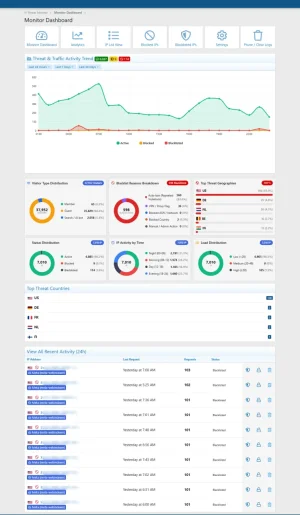
1. Symmetrical 3x3 Visual Analytics & Dashboard Grid
The Analytics and Dashboard views now feature a perfectly balanced 9-card interactive grid with zero empty spaces:
  • Dynamic HTML5 Canvas Donut charts displaying Visitor Types (Members, Guests, Bots), Temporary Block Reasons, and Blacklist Threat Sources.
  • Country distribution progress bar cards with national flags for Top Traffic Origins, Top Blocked Geographies, and Top Threat Geographies.
  • Real-time quick-stat donut gauges for Status Distribution, Hourly Activity, and Server Load.
1790717731316.webp

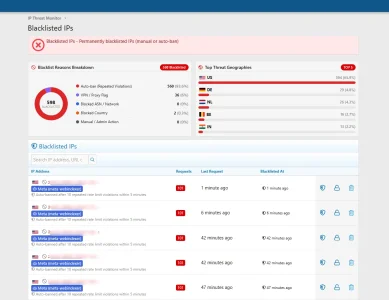
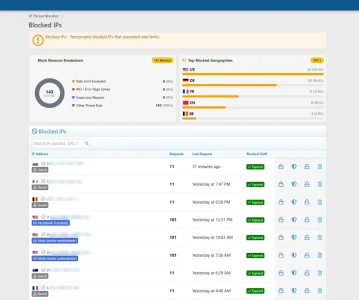
2. Blocked IPs Overview & Reason Breakdown
Gain immediate clarity on why temporary rate-limiting and security blocks are triggered:
  • Block Reasons Donut Chart: Visualizes distribution across rate-limit thresholds, 403 error spikes, suspicious patterns, and custom security rules.
  • Top Blocked Geographies: Identifies which countries generate the highest volume of temporary blocks with progress bars and country flags.
  • Granular Identification: Unregistered visitors triggering blocks are now labeled with clean Guest badges alongside search bots and registered users.
1790717834195.webp

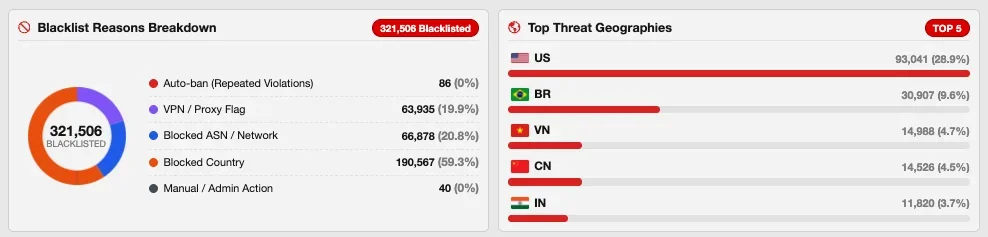
3. Blacklisted IPs & Threat Origin Analysis
Inspect permanently blocked high-risk IP addresses with dedicated intelligence charts:
  • Blacklist Reasons Donut Chart: Categorizes auto-bans from repeated violations, confirmed VPN/proxy flags, blocked ASN networks, and manual administrator actions.
  • Top Threat Geographies: Displays the top 5 countries where severe attacks and repeat offenders originate.
  • Actionable Threat Rows: See exact ban reasons, timestamps, request counts, and one-click unblock/trust actions.
1790717912245.webp

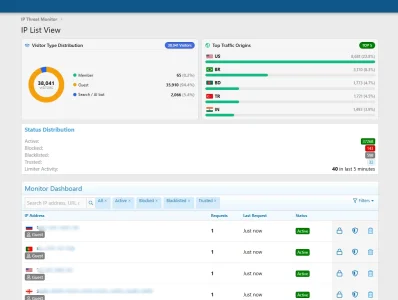
4. Universal Visitor, Bot & Member Status Badging (IP List View)
Never wonder who an IP belongs to again. Every table across the add-on now follows a clear, unified labeling hierarchy:
  • Search & AI Bots: Prominently highlighted with royal blue badges displaying the crawler name (Googlebot, Bingbot, SEMrush, Meta, etc.).
  • Registered Members: Displayed with direct user profile links and user badges.
  • Organic Guests: Clearly marked with clean, subtle Guest badges.
1790717979889.webp

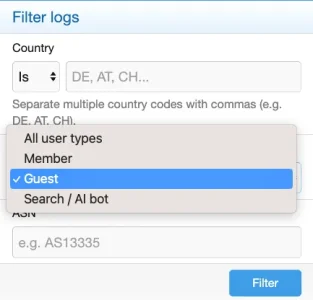
5. "Is Not" (Exclusion) & Multi-Country Filter Bar
Effortlessly isolate traffic outside your primary target audience:
  • Multi-country queries separated by commas (e.g. DE, AT, CH) with live autocomplete suggestions.
  • "Is Not" Mode: Toggle from "Is" to "Is not" with a single click to filter out trusted regions and inspect only foreign or suspicious traffic.
  • Dynamic filter chips with one-click removal.
1790718021489.webp

6. Filter-Aware CSV Export with Country & ASN
Downloadable visitor logs now feature dedicated Country (ISO code) and parsed ASN (Autonomous System Number) columns, fully honoring whichever filters you have currently applied on screen.

Version 1.0.39 will be released very soon. Thank you for your continued support!
 
Osman updated [XTR] IP Threat Monitor with a new update entry:

1.0.39

We are thrilled to announce the release of IP Threat Monitor version 1.0.39! This major update focuses on making security management intuitive, fully transparent, and visually engaging through multi-criteria exclusion filtering, granular visitor & bot labeling, enriched CSV exports, quota-free offline protection, and interactive analytics grids.

What's New in Version 1.0.39?
  • Balanced 3x3 Analytics & Dashboard Grid:...

Read the rest of this update entry...
 
I was just about to jump back into this thread on what a great improvement v1.0.38 has been and then saw notice that 1.0.39 had just been released. I downloaded and installed the latest release immediately.

All I can say is

Oh My God Reaction GIF by Friends


I am 💯 percent so grateful for this excellent product. Thank you Osman for your wonderful work.
 
Dear @Elisabeth_K,

Thank you from the bottom of my heart for your incredibly kind and uplifting words!

Seeing this level of satisfaction from our verified, licensed customers who actually use, test, and rely on the add-on in production means the absolute world to me. Unlike baseless claims and speculation from people who don't even own the product, genuine feedback from real community administrators like you is the ultimate proof that we are on the right track.

Thanks to continuous support and valuable input from users like you, [XTR] IP Threat Monitor will continue to get better, faster, and more powerful with every release.

Thank you once again for your fantastic support and for being a wonderful part of this journey!
 
@Osman : Wow! What a phantastic update! IP Threat Manager was already incredibly good, but this update brings it to another level! The improved statistics now show clearly how all three major ways of intervention (proxycheck.io, country-blocking, ASN-blocking) are equally useful and also, that the US are the main source of evil by far (in opposite to the others in the top five they do not even have a country ban in my config):


Bildschirm­foto 2026-09-30 um 09.40.29.webp

There's one small glitch in the IP list filtering:

Bildschirm­foto 2026-09-30 um 10.09.45.webp

When filtering for "guest" this also includes Search engine bots. In principal not wrong as these are technically guests, however: for my typical filtering needs it would be helpful to exclude them here. Maybe it would be a good Alternative to use checkboxes here instead of a dropdown, so any combination could be achieved here.

The visitor type distribution chart suffers slighly from two issues, one is temporary and one is probably permanent:
  • temporary: as registred users are only shown in the statistic since yesterday and every vistor before that is considered a guest the ratio member/guests is way too heavy towards guests. This will however iron out.
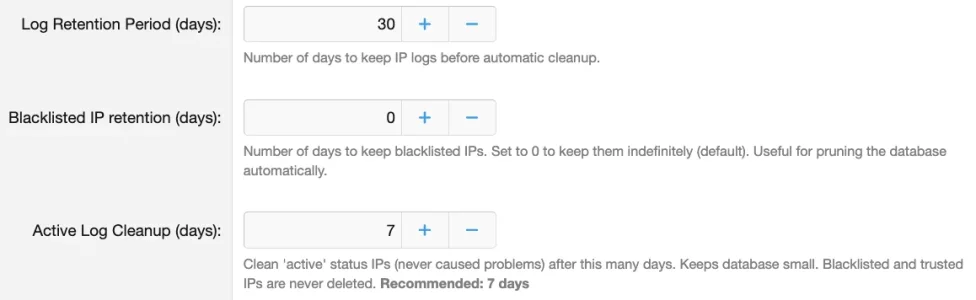
  • pemanent, depending from the configuration: If you (like me until now) do not prone blacklisted IPs but keep the blacklist forever but cut the active log after 7 days (as it is the default and useful)...
Bildschirm­foto 2026-09-30 um 10.23.40.webp

... probably the inequality between guests and members in the statistic is permantenly somwhat wrong as they are based on different timeframes, with blacklisted IPs (all of which are guests) having an unlimited timeframe while members are only counted for the last seven days).

Not a drama, but something to have in mind and it renders the visitor type distribution graphic somewhat useless at the moment. Possible solution: Implement a date filter that not only can be applied to the lists but also has effect on the graphics.

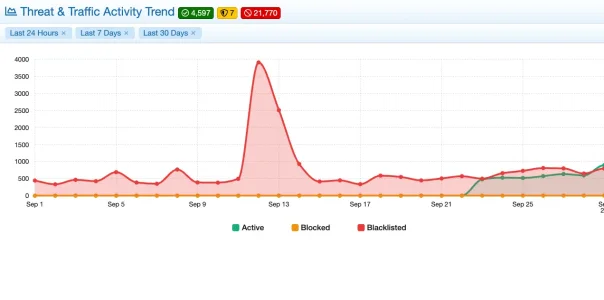
I absolute love the new timeline chart! Obviously it has the same cut regarding members but this is no surprise - and it finally gives you some overview about how the bots and blocking evolved over time:

Bildschirm­foto 2026-09-30 um 10.26.35.webp
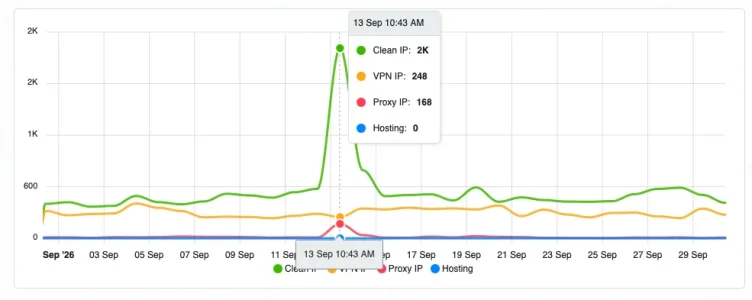
and it finally offers the option to compare against the graph at proxyckeck.io, impressively showing the amount of resident proxies that proxycheck misses to identify:
Bildschirm­foto 2026-09-30 um 10.47.22.webp


In this example one can see that on Sept. 13th IP Threat monitor has blocked ~4000 IPs while proxycheck has only blocked about 400 and seen in total around 2.500. This means that about 1500 were blocked by country through IP-Threat Monitor by using the local maxmind db and therefor not reaching the proxycheck API. But of the remaining ~2.500 proxycheck declared ~2.000 as "ok" while the local blacklist and ASN blocks filtered out most of them. So the combination of the proxycheck threat database and local rules once more proved to be valuable.

Absolutely love IP Threat Monitor for what it does!

PS: In my case, whatever passes IP Threat Monitor's IP-based rules then bumps into the Bot Guard add on where it is checked sorrowly by other means. The two are a bit of a dream team: IP Threat Monitor does the rough stuff and helps to keep load off Bot Guard. Bot Guard then does the more granular checks and as a result only few bots manage to get through.
 
@smallwheels

Thank you so much for this incredible, in-depth feedback and for sharing those comparative graphs! Seeing our add-on catch thousands of aggressive bots and residential proxies that external APIs missed is the greatest validation of this project.

Both points you raised are spot-on:

1. Guest vs. Bot Filtering: You are completely right. While bots are technically unauthenticated visitors, lump-filtering them together with human guests obscures legitimate visitor inspection. We will revamp the filter modal to allow granular multi-selection (Checkboxes: Members, Real Guests [Excl. Bots], and Verified Bots) so you can isolate exactly what you need.
2. Chart Timeline Consistency: Excellent observation regarding retention mismatch. When blacklists are retained indefinitely while active logs are pruned to 7 days, the distribution ratio naturally skews. We will bind the distribution analytics to synchronized time windows (Last 24 Hours, 7 Days, 30 Days) so it always compares apples to apples.

These enhancements are already planned for our upcoming v1.0.40 release. ;)
 
@Osman : Found another tiny statistic glitch: A fake search engine bot (in my example Google) shows up as Google Bot in the list of blacklisted IPs:

Bildschirm­foto 2026-09-30 um 12.35.35.webp

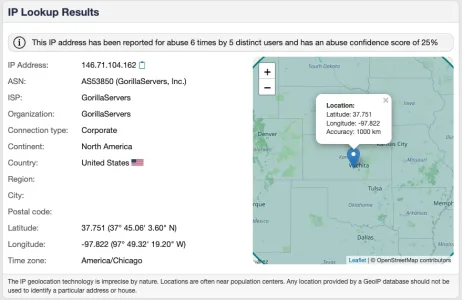
What has probably happened: IP Threat Monitor checked wether this "Google Bot" belonged to the published IP range and had the correct reverse DNS resolution. As it did not it was forwardet to the proxycheck API. They identified it as a bot and so it was blacklisted. However: in the IP list it seems IP Threat Monitor only refers to the transmitted user agent for flagging it as Google Bot.

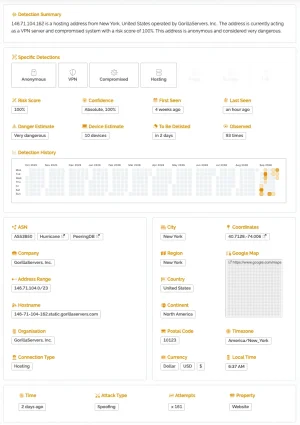
Indeed the check of the IP shows that this is a bad bot:


Bildschirm­foto 2026-09-30 um 12.36.14.webp
Bildschirm­foto 2026-09-30 um 12.37.59.webp

So while all information is there in such a case the result displayed is somewhat wrong at the moment.
 
Hi @smallwheels,

First of all, thank you very much for this sharp and valuable observation!

You are completely right about what is happening under the hood:
1. The security engine worked as intended:** The IP (146.71.104.162) spoofed its User-Agent as Googlebot. The add-on verified it against Google's official IP ranges/rDNS, found no match, stripped its bot immunity, and routed it to ProxyCheck. Once identified as a compromised hosting/VPN IP, it was instantly blacklisted.
2. The visual glitch: While the IP was correctly blocked, the list view only referenced the transmitted User-Agent to render the bot badge, mistakenly displaying the legitimate blue Google (Googlebot) badge. This naturally creates the false impression that real Google crawlers were blacklisted.

Solution in upcoming update (v1.0.40):
We have introduced a Fake / Spoofed Bot Detection system:
  • When an IP claims to be a major search crawler (Google, Bing, Yandex, etc.) in its User-Agent but fails IP verification or gets blacklisted/blocked, it will no longer display the legitimate blue badge.
  • Instead, it will be flagged with a distinct orange warning badge: [Fake Google (Googlebot)] with a stealth/secret-agent icon (fa-user-secret) and an explanatory tooltip explaining that the User-Agent was spoofed and failed verification.

This will be included in the 1.0.40 release. Thanks again for helping make IP Threat Monitor even better!
 
Osman updated [XTR] IP Threat Monitor with a new update entry:

1.0.40

In this update, we focused on eliminating confusion caused by spoofed bot signatures and brought total clarity and transparency to your traffic and threat monitoring logs.

1. Visual Distinction for Spoofed Crawlers (Fake Bot Detection)
Malicious crawlers and scrapers frequently disguise themselves as legitimate search engines (like Googlebot or Bingbot) to bypass rate limits. While our security engine already caught and blocked these bad actors under the hood, displaying a blue...

Read the rest of this update entry...
 
Seeing our add-on catch thousands of aggressive bots and residential proxies that external APIs missed is the greatest validation of this project.
Absolutely. The secret ingedient is to identify which ASNs are worth blocking. While I started building up my blocking lists already two years ago it was pretty cumbersome an time intensive back then. Now I simply check the Proxycheck dashboard regularly. As it is very easy to see which ASNs pop up there notoriously and at the same time, being odd server ranges and hosting or cloud providers, do not carry regular users, I simply put those ASNs into the blocking list in IP Threat Monitor, following the assumption: If Proxycheck identifies such an ASN like i.e. ten times there are probably more bad IPs there and there will be more in future. Over time this leads to a pretty large blocking list, based on real traffic to the own forum and - as you can see from the charts, successful.

When blocked ASNs will be identified locally through maxmind in future it will become even easier as then only new, until now unblocked ASNs will show up in the proxycheck dashboard.
 
Hi @smallwheels,

That is an absolute masterclass in proactive forum security! Identifying toxic hosting/datacenter ASNs and blocking the whole network once malicious patterns emerge is the most effective way to eliminate automated noise before it even hits your server resources.

And we have fantastic news regarding your last paragraph: You don't need to wait for the future — IP Threat Monitor ALREADY does this right now! ;)

Here is exactly how our local offline ASN engine works under the hood:
1. Whenever a visitor connects, the add-on first queries your local MaxMind GeoLite2-ASN.mmdb database directly on your server.
2. If the IP's ASN matches any ASN in your Blocked ASN List (xentr_ipt_blocked_asns), it is instantly blocked locally.
3. Zero external API calls are made to Proxycheck for that request. It consumes 0 credits and produces 0 latency.
4. As a result, the only requests that actually reach Proxycheck are completely new, unblocked ASNs and residential proxies that aren't on your local blacklist yet!

How to ensure GeoLite2-ASN is downloaded and active via Cron:

The add-on comes with an automated Cron job that downloads and keeps both GeoLite2-Country and GeoLite2-ASN up to date:

1. Add your MaxMind License Key:
Go to Admin CP -> Options -> [XTR] IP Threat Monitor -> GeoIP & MaxMind Settings.
Enter your free MaxMind License Key and ensure "Enable Automatic GeoIP Database Updates" is checked.

2. Trigger the Download via Cron:
Go to Admin CP -> Tools -> Cron entries.
Find XENTR: Update GeoIP Database (xentrIptGeoIpUpdate).
Click the controls icon on the right and select Run.
(This will immediately fetch both GeoLite2-Country.mmdb and GeoLite2-ASN.mmdb from MaxMind and place them into internal_data/xentrIPThreatMonitor/).

3. Verify in Diagnostics:
Open Admin CP -> IP Threat Monitor -> Diagnostics.
You should see green checkmarks for both the Country and ASN databases.

Once active, make sure "Enable ASN Blocking" is turned on in your options. You are already running the exact zero-API, local MaxMind ASN filtration you envisioned!
 
Back
Top Bottom