[XTR] IP Threat Monitor

[XTR] IP Threat Monitor [Paid] 1.1.1

No permission to buy ($30.00)
Osman updated [XTR] IP Threat Monitor with a new update entry:

1.0.44

We are pleased to announce the release of v1.0.44 for IP Threat Monitor! This update brings crucial improvements designed to safeguard your search engine indexing (SEO), eliminate cloud network dilemmas, and provide granular control over search engine bots.

Key Highlights:
  • Search Engines vs. Cloud Scrapers Dilemma Solved:
    Blocking large cloud infrastructure (such as Microsoft Azure to stop aggressive AI scrapers) previously risked affecting legitimate crawlers...

Read the rest of this update entry...
 
Got this when upgrading 1.0.43 to 1.0.44. Downloaded package twice, uploaded twice
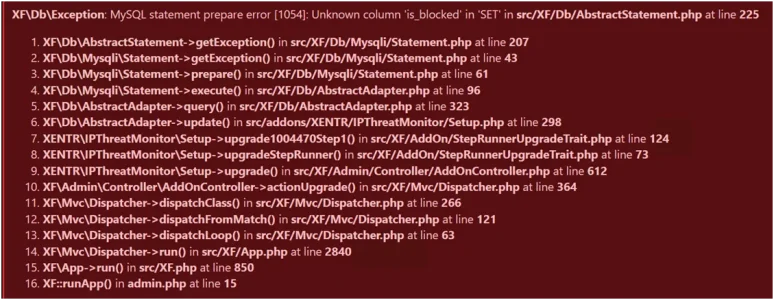
1791305515037.webp
1791305515045.webp

Re-uploaded 1.0.43 and rebuilt. It is working now but is there something wrong? How can I fix this?

Stack trace​

UPDATE xf_xentr_ip_threat_log SET status = ?, is_blocked = ?, blocked_until = ?, ban_reason = ? WHERE ip_address IN ('17.166.150.104', '17.166.25.247', '17.166.235.30', '17.166.152.67', '17.166.23.121', '17.166.25.180', '17.166.154.9', '17.166.151.151', '17.166.151.68', '17.166.150.16', '17.166.25.253', '17.166.234.47', '17.166.22.196', '17.166.232.158', '17.166.232.228', '17.166.152.235', '17.166.22.70', '17.166.232.182', '17.166.153.227', '17.166.154.122', '17.166.233.252', '17.166.24.70', '17.166.153.237', '17.166.235.216', '17.166.153.38', '17.166.235.173', '17.166.154.245', '17.166.21.56', '17.166.234.190', '17.166.155.99', '17.166.20.4', '17.166.150.219', '17.166.23.162', '17.166.21.77', '17.166.21.72', '17.166.232.213', '17.166.151.183', '17.166.234.91', '17.166.20.25', '17.166.153.41', '17.166.20.162', '17.166.151.11', '17.166.236.254', '17.166.151.254', '17.166.152.79', '17.166.235.106', '17.166.20.6', '17.166.236.16', '17.166.22.216', '17.166.150.66', '17.166.21.127', '17.166.234.109', '17.166.151.116', '17.166.232.85', '17.166.235.229', '17.166.25.143', '17.166.25.65', '17.166.233.192', '17.166.236.189', '17.166.154.144', '17.166.154.201', '17.22.130.156', '17.166.234.158', '17.166.235.10', '17.166.24.243', '17.166.153.150', '17.166.20.163', '17.166.152.164', '17.166.20.86', '17.166.152.20', '17.166.150.50', '17.166.154.61', '17.166.21.39', '17.166.237.136', '17.166.154.242', '17.166.22.152', '17.166.154.69', '17.166.22.167', '17.166.21.130')
------------

#0 src/XF/Db/Mysqli/Statement.php(207): XF\Db\AbstractStatement->getException('MySQL statement...', 1054, '42S22')
#1 src/XF/Db/Mysqli/Statement.php(43): XF\Db\Mysqli\Statement->getException('MySQL statement...', 1054, '42S22')
#2 src/XF/Db/Mysqli/Statement.php(61): XF\Db\Mysqli\Statement->prepare()
#3 src/XF/Db/AbstractAdapter.php(96): XF\Db\Mysqli\Statement->execute()
#4 src/XF/Db/AbstractAdapter.php(323): XF\Db\AbstractAdapter->query('UPDATE `xf_xen...', Array)
#5 src/addons/XENTR/IPThreatMonitor/Setup.php(298): XF\Db\AbstractAdapter->update('xf_xentr_ip_thr...', Array, 'ip_address IN (...')
#6 src/XF/AddOn/StepRunnerUpgradeTrait.php(124): XENTR\IPThreatMonitor\Setup->upgrade1004470Step1(Array)
#7 src/XF/AddOn/StepRunnerUpgradeTrait.php(73): XENTR\IPThreatMonitor\Setup->upgradeStepRunner(1004470, 1, Array, NULL)
#8 src/XF/Admin/Controller/AddOnController.php(612): XENTR\IPThreatMonitor\Setup->upgrade(Array)
#9 src/XF/Mvc/Dispatcher.php(364): XF\Admin\Controller\AddOnController->actionUpgrade(Object(XF\Mvc\ParameterBag))
#10 src/XF/Mvc/Dispatcher.php(266): XF\Mvc\Dispatcher->dispatchClass('XF:AddOn', 'Upgrade', Object(XF\Mvc\RouteMatch), Object(SV\StandardLib\XF\Admin\Controller\AddOn), NULL)
#11 src/XF/Mvc/Dispatcher.php(121): XF\Mvc\Dispatcher->dispatchFromMatch(Object(XF\Mvc\RouteMatch), Object(SV\StandardLib\XF\Admin\Controller\AddOn), NULL)
#12 src/XF/Mvc/Dispatcher.php(63): XF\Mvc\Dispatcher->dispatchLoop(Object(XF\Mvc\RouteMatch))
#13 src/XF/App.php(2840): XF\Mvc\Dispatcher->run()
#14 src/XF.php(850): XF\App->run()
#15 admin.php(15): XF::runApp('XF\\Admin\\App')
#16 {main}

Request state​

array(4) {
["url"] => string(52) "/xen/admin.php?add-ons/XENTR-IPThreatMonitor/upgrade"
["referrer"] => string(78) "https://www.citadel-81.com/xen/admin.php?add-ons/XENTR-IPThreatMonitor/upgrade"
["_GET"] => array(1) {
["add-ons/XENTR-IPThreatMonitor/upgrade"] => string(0) ""
}
["_POST"] => array(7) {
["_xfProcessing"] => string(1) "1"
["continue"] => string(1) "1"
["confirm"] => string(1) "1"
["params"] => string(2) "[]"
["count"] => string(1) "1"
["finished"] => string(1) "0"
["_xfToken"] => string(8) "********"
}
}

 
Last edited:
Thank you for reporting this and providing the detailed stack trace!
A hotfix has just been packaged into the 1.0.44 download archive. Please re-download the 1.0.44 package, re-upload the files, and click "Upgrade". It will now run and complete smoothly!
 
The update from 1.0.43 to 1.0.44 (original and patched version) via ACP dies reproducably in the process:

Bildschirm­foto 2026-10-06 um 20.14.31.webp

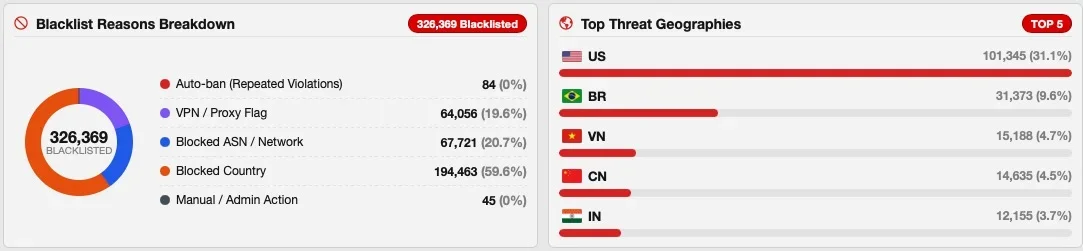
No errors in the error.log. Possibly caused by me being on shared hosting (and therefor potentially running into time limits) in combination with a very large blacklist of several hundertthousand entries.

I've now fired up the update via ssh/CLI - seems to take forever, no idea if it may hang. I'll let it run for a while...
 
I've now fired up the update via ssh/CLI - seems to take forever, no idea if it may hang. I'll let it run for a while...
Does not look good. The CLI update has been running for more than 30 minutes until now - I assume something is broken in the process.
 
I've now also re-uploaded 1.0.43 and rebuilt the addon. Back to working state. Another try to update to 1.0.44 ended in another dead update-process, so I went again back to 1.0.43 and leave it like that for the moment.
 
I did 1.0.43 to 1.0.44 upgrade and it failed
re-uploaded 1.0.43 and rebuilt - working normally
retried 1.0.44 and it failed again
re-uploaded 1.0.43 and rebuilt - working normally
Downloaded hotfix 1.0.44
Uploaded hotfix version
Upgrade 1.0.43 to 1.0.44 completed successfully with no errors

I'm not really sure how you're supposed to do this but I unzip the download package and use an FTP client to copy the src folder to my (shared) server overwriting existing files. I've done every upgrade since 1.0.32 this way. I only have 33,000 blacklisted IPs.

On Xf 2.3.13 and I only have 2 other add-ons and a helper library

1791316344649.webp
I haven't seen more than 11 guests at once in a week and usually average about 2 to 6. In the minutes when IP Threat Monitor wasn't working, I suddenly had 45. I'm sure if it had been longer I would have had hundreds. Now there are 2!
 

Attachments

  • 1791315745894.webp
    1791315745894.webp
    12.4 KB · Views: 2
Hi @smallwheels,

The issue you experienced has been thoroughly investigated and resolved in version 1.0.45.

What caused the CLI hang in 1.0.44?
In 1.0.44, the ASN remediation routine (which identifies and unblocks verified search engine bots and Apple iCloud Relay IPs) was executed synchronously inside the installer step. Because your forum has a very large database with extensive log entries, looping through tens of thousands of IPs alongside DNS/CIDR lookups exceeded typical execution windows and blocked the CLI upgrade thread.

What changed in 1.0.45?
1. Instant Upgrade: The heavy remediation loop was completely removed from the upgrade installer. The add-on upgrade process now finishes in just a few seconds without stalling.
2. Native Background Deferred Job: Remediation has been moved to XenForo's native deferred Job queue. It now processes safely in small, time-sliced background batches without blocking your forum or server resources.
3. Admin CP & CLI Tool: You can also manually trigger and monitor this process anytime from Admin CP -> Tools -> Rebuild caches (with a live progress bar) or via the new CLI command:
php cmd.php xf-rebuild:xentr-ipt-remediate-bots

1791317040092.webp

You can safely upgrade directly from 1.0.43 to 1.0.45 now. Thank you for your patience and for reporting this!
 
Osman updated [XTR] IP Threat Monitor with a new update entry:

1.0.45

This maintenance and stability update is specifically designed to eliminate upgrade freezes on high-traffic boards with large IP log databases and to ensure seamless crawling for verified search engines.

Key Highlights:
  • Instant & Seamless Upgrades: Resolved an issue where forums with extensive threat logs experienced timeouts or "Action pending" screens during upgrades. Add-on updates now complete smoothly within seconds.
  • Non-Blocking Background...

Read the rest of this update entry...
 
I'm not really sure how you're supposed to do this but I unzip the download package and use an FTP client to copy the src folder to my (shared) server overwriting existing files. I've done every upgrade since 1.0.32 this way.
That's absolutely fine. The alternative would be to upload the zip-file via the GUI in ACP. More comfortable but often not possible on shared hosting.
I only have 33,000 blacklisted IPs.
No reason to feel bad. My blacklist has aggregated since February. There is no real reason to let it grow that huge, in opposite: at some point it will create more problems than benefit as especially with residential proxies (but also with changes in ownership of IP-ranges) it may lead to overblocking and blocking the wrong clients if you rely on data (ban reasons) that is too old and outdated.
 
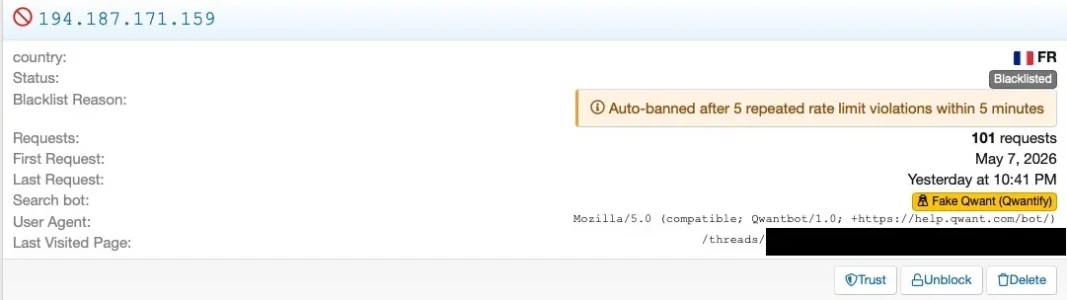
@Osman: There still seems to be a possibly small hiccup. Today, I found this in my logs:

Bildschirmfoto 2026-10-10 um 13.49.41.webp

First, rDNS showed that the bot was a genuine Quant crawler, according to Quant.

Code:
$ host 194.187.171.159
159.171.187.194.in-addr.arpa domain name pointer qwantbot-159-171-187-194.qwant.com.

So the declaration as "Fake Quant (Quantify)" seems wrong.

Secondly, I cannot see the number of 101 requests in my web server log, let alone within five minutes:

Bash:
$ grep qwantbot-159-171-187-194.qwant.com web.log
qwantbot-159-171-187-194.qwant.com - - [09/Oct/2026:22:41:48 +0200] "GET /threads/$somethread HTTP/1.1" 301 - "-" "Mozilla/5.0 (compatible; Qwantbot/1.0; +https://help.qwant.com/bot/)" 1913 8022
qwantbot-159-171-187-194.qwant.com - - [09/Oct/2026:22:41:49 +0200] "GET /threads/$somethread/ HTTP/1.1" 200 14228 "$somethread" "Mozilla/5.0 (compatible; Qwantbot/1.0; +https://help.qwant.com/bot/)" 435 15462
qwantbot-159-171-187-194.qwant.com - - [10/Oct/2026:08:13:59 +0200] "GET /threads/$otherthread HTTP/1.1" 301 - "-" "Mozilla/5.0 (compatible; Qwantbot/1.0; +https://help.qwant.com/bot/)" 1916 8025
qwantbot-159-171-187-194.qwant.com - - [10/Oct/2026:08:13:59 +0200] "GET /threads/$otherthread HTTP/1.1" 200 18261 "$otherthread" "Mozilla/5.0 (compatible; Qwantbot/1.0; +https://help.qwant.com/bot/)" 441 19573
qwantbot-159-171-187-194.qwant.com - - [10/Oct/2026:09:29:24 +0200] "GET /threads/$thirdthread HTTP/1.1" 301 - "-" "Mozilla/5.0 (compatible; Qwantbot/1.0; +https://help.qwant.com/bot/)" 1896 8005
qwantbot-159-171-187-194.qwant.com - - [10/Oct/2026:09:29:25 +0200] "GET /threads/$thirdthread/ HTTP/1.1" 200 17026 "$thirdthread" "Mozilla/5.0 (compatible; Qwantbot/1.0; +https://help.qwant.com/bot/)" 401 18338

The request the log entry with the block refers to is one of the first two in the webserver log, following the time stamp and the thread it refers to. As it seems, the bot got a code 200 after that today, using that same IP address, so

Thirdly, "blacklisted" seems not to be the case either.

Just to be sure that this isn't already resolved I've started the cleanup-job on the CLI as I got repeated notifications about an incomplete job in ACP since the latest update of Threat Monitor that then vanished only to come back again shortly later. However, seems it may take quite a while. Firstly I started the job via the GUI but it was very slow, so I canceled it and switched to CLI. It has been running for a couple of hours now (like four or five hours until now) and is crunching forward in small batches:

Bash:
php cmd.php xf-rebuild:xentr-ipt-remediate-bots -vv
(...)
Erstellt neu... Rebuild & Remediate Verified Bots (23504 processed, 0 remediated)
Erstellt neu... Rebuild & Remediate Verified Bots (23514 processed, 0 remediated)
Erstellt neu... Rebuild & Remediate Verified Bots (23522 processed, 0 remediated)
Erstellt neu... Rebuild & Remediate Verified Bots (23527 processed, 0 remediated)
Erstellt neu... Rebuild & Remediate Verified Bots (23532 processed, 0 remediated)
Erstellt neu... Rebuild & Remediate Verified Bots (23538 processed, 0 remediated)
Erstellt neu... Rebuild & Remediate Verified Bots (23545 processed, 0 remediated)
Erstellt neu... Rebuild & Remediate Verified Bots (23558 processed, 0 remediated)

So it will probably take at least until tomorrow if not days until it will be finished. Anyway: It is not a huge issue and I'll see if something like that pops up again once the job has been finished.
 
Thanks for the detailed report and logs! Everything you've observed makes complete sense, and here is exactly what happened under the hood:

1. The "Fake Qwant" label: You are completely right—that IP is indeed an official Qwant crawler. Unlike Google or Bing, Qwant does not publish static IP CIDR blocks; instead, they verify exclusively via Forward-Confirmed reverse DNS (FCrDNS). The display logic in the ACP was looking only at static IP ranges to determine whether a blacklisted bot was genuine. Because this IP was historically in the blacklist table and not in a static subnet, the UI rendered the "Fake Bot" label. We are refining this display helper so it checks rDNS verification as well.

2. The "101 requests" & "Auto-banned" note: Those 101 requests were not from yesterday. If you look at the "First Request: May 7, 2026" timestamp, that record was originally logged 5 months ago when the IP exceeded the 100-request threshold and was auto-banned back then. Yesterday's visit at 10:41 PM simply touched the existing historical record and updated the Last Request timestamp.

3. Why Qwant is receiving 200 OK today: Because our live protection engine properly verifies Qwant via rDNS (qwantbot-*.qwant.com) and allows it to pass through seamlessly! The bot is NOT being blocked. The "Blacklisted" badge you see in ACP is simply the old historic status stored in the database table from May.

4. The Rebuild CLI Job (RemediateBots):
  • Why it shows 0 remediated for Qwant: That specific maintenance job specifically targets entries with ban_reason LIKE '%ASN%' (false positives caused by datacenter/ASN blocks). Since this Qwant entry was historically auto-banned by rate-limiting, the ASN remediation job skips it.
  • Why it takes hours: With tens of thousands of historic blocked IP logs, running live reverse DNS queries over the network across thousands of external IPs takes significant network round-trip time. You can safely let it finish or hit Ctrl+C—since your Qwant crawler is already receiving HTTP 200 and passing freely, there is no urgency. You can simply click "Unblock" on that Qwant row in the ACP to clear its historic status.
We will update the ACP display badge logic and streamline the background job in the upcoming maintenance release!
 
Osman updated [XTR] IP Threat Monitor with a new update entry:

1.0.46

This maintenance and optimization update focuses on full search engine crawler verification (specifically Qwantbot), eliminating false-positive "Fake Bot" labels, auto-healing verified bots on the fly, and dramatically accelerating the background bot remediation job.

Key Highlights
  • Built strictly against official Qwant crawler documentation and daily IP prefixes. Genuine Qwant crawlers are now verified via official subnets and Forward-Confirmed Reverse...

Read the rest of this update entry...
 
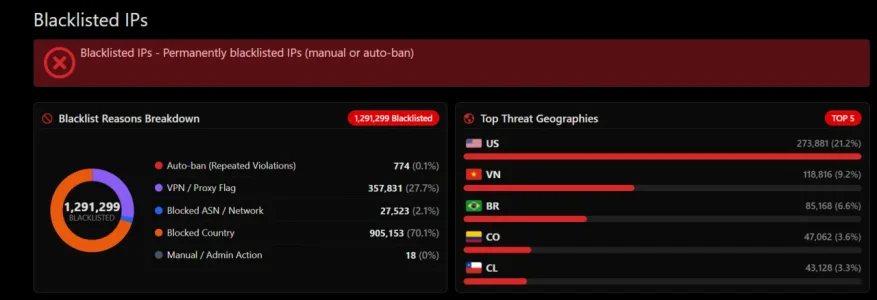
Haha, @Paul that 1.29M blacklist count is wild! 🤯 Definitely takes the crown for the biggest threat log we've seen so far!

Good news for both you and @smallwheels:

Version 1.0.46 has just been released specifically to fix this massive bottleneck! 🚀

Why was it taking so long on 1.0.45?
In previous versions, the RemediateBots rebuilder performed synchronous network reverse DNS queries on every blacklisted entry. Because 99.9% of those entries were residential IPs, VPNs, or country blocks without PTR records, DNS lookups timed out, which capped the processing speed at roughly ~6,000 per hour. At that rate, 320k records took over 50 hours!

What we fixed in 1.0.46:
  • Ultra-Fast Rebuilder: We introduced in-memory CIDR matching and smart crawler User-Agent pre-filtering. The tool now instantly recognizes that 99.9% of those 320k (or 1.29M!) records aren't search engines and skips them in microseconds without making any network DNS calls.
  • Qwantbot Integration: Official Qwant IP subnets (194.187.171.0/24 and 91.242.162.0/24) and dual-stack FCrDNS verification are now fully supported. Genuine Qwant crawlers will never be labeled as "Fake Bot" again.
  • On-the-fly Auto-Healing: Any verified bot that visits your forum will have its historical blacklist or rate-limit violations automatically cleared from the database on the fly.
You can safely upgrade to 1.0.46. Once updated, run the rebuilder via Admin CP (Tools > Rebuild caches) or via CLI:
Code:
php cmd.php xf-rebuild:xentr-ipt-remediate-bots -vv

It will now breeze through those hundreds of thousands of records in just a couple of minutes instead of two days. Enjoy! 😉
 
Code:
php cmd.php xf-rebuild:xentr-ipt-remediate-bots -vv
It will now breeze through those hundreds of thousands of records in just a couple of minutes instead of two days.

Lets give it a go and see what happens!! :D
 
Back
Top Bottom