
-
This forum has been archived. New threads and replies may not be made. All add-ons/resources that are active should be migrated to the Resource Manager. See this thread for more information.
You are using an out of date browser. It may not display this or other websites correctly.
You should upgrade or use an alternative browser.
You should upgrade or use an alternative browser.
XF Optimise
- Thread starter Luke F
- Start date
- Status
- Not open for further replies.


Ideally, this tool would have some method of collecting it's own statistics.
It could maybe collect "pre-installation" data for a week.
Then install it.
Then collect post-installation data for a week.
and then show "objectively" what has improved.
If it could be proven what is optimized and by how much, it would essentially sell itself.
It could maybe collect "pre-installation" data for a week.
Then install it.
Then collect post-installation data for a week.
and then show "objectively" what has improved.
If it could be proven what is optimized and by how much, it would essentially sell itself.

Thanks Darki, installed on http://www.smsmasters.co.uk
Insanely fast!
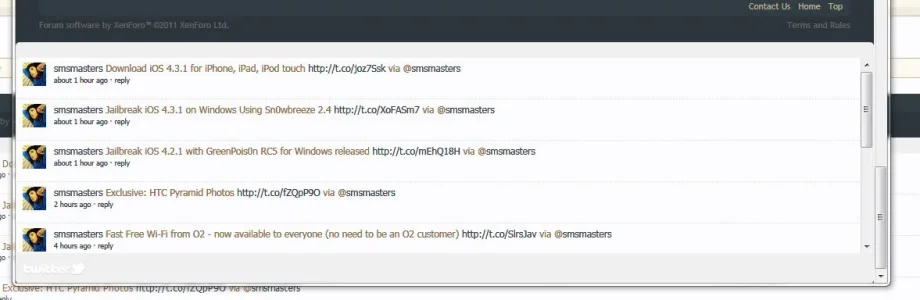
However, it broke the twitter module on xenporta
http://www.smsmasters.co.uk/forum/portal/ See bottom
This is code for the twitter module
Insanely fast!
However, it broke the twitter module on xenporta
http://www.smsmasters.co.uk/forum/portal/
See bottomThis is code for the twitter module
HTML:
<div class="section">
    <div class="secondaryContent" id="twitter" style="padding-bottom: 10px;">
        <h3>Twitter Feed</h3>
        <script src="http://widgets.twimg.com/j/2/widget.js"></script>
        <script>
        new TWTR.Widget({
            version: 2,
            type: 'search',
            search: '{$option.twitter_search}',
            interval: 6000,
            width: 'auto',
            height: {$option.twitter_height},
            theme: {
                shell: {
                    background: '@pageBackground',
                    color: '@pageBackground'
                },
                tweets: {
                    background: '@contentBackground',
                    color: '@mutedTextColor',
                    links: '@primaryMedium'
                }
            },
            features: {
                scrollbar: {$option.twitter_scroll},
                hashtags: {$option.twitter_hashtags},
                timestamp: {$option.twitter_timestamps},
                avatars: {$option.twitter_avatars},
                toptweets: {$option.twitter_toptweets},
                live: true,
                loop: false,
                behavior: 'all'
            }
        }).render().start();
        </script>
        <div>
            <span style="float: right;">
                <a href="http://twitter.com/#search?q={$option.twitter_search}" target="_blank">Join the conversation</a>
            </span>
            <a href="http://twitter.com" target="_blank"><img src="http://widgets.twimg.com/i/widget-logo.png" alt="" /></a>
        </div>
    </div>
</div>
x4rl
Well-known member
Blah snip
Works fine try clearing your cache
x4rl
Well-known member
Oh lololol thought you meant the tweet buttonThe twitter module is not supposed to appear at the footer, it is supposed to appear in the sidebar.
I tried in firefox 4 and chrome 10 and cleared cache.

*needs to read the whole post*


Darki, any ideas on how to fix this please? It only occurs when I enable "Defer Javascript loading".
Thanks!

Thanks!
Thanks Darki, installed on http://www.smsmasters.co.uk
Insanely fast!
However, it broke the twitter module on xenporta
http://www.smsmasters.co.uk/forum/portal/
This is code for the twitter module
HTML:<div class="section"> <div class="secondaryContent" id="twitter" style="padding-bottom: 10px;"> <h3>Twitter Feed</h3> <script src="http://widgets.twimg.com/j/2/widget.js"></script> <script> new TWTR.Widget({ version: 2, type: 'search', search: '{$option.twitter_search}', interval: 6000, width: 'auto', height: {$option.twitter_height}, theme: { shell: { background: '@pageBackground', color: '@pageBackground' }, tweets: { background: '@contentBackground', color: '@mutedTextColor', links: '@primaryMedium' } }, features: { scrollbar: {$option.twitter_scroll}, hashtags: {$option.twitter_hashtags}, timestamp: {$option.twitter_timestamps}, avatars: {$option.twitter_avatars}, toptweets: {$option.twitter_toptweets}, live: true, loop: false, behavior: 'all' } }).render().start(); </script> <div> <span style="float: right;"> <a href="http://twitter.com/#search?q={$option.twitter_search}" target="_blank">Join the conversation</a> </span> <a href="http://twitter.com" target="_blank"><img src="http://widgets.twimg.com/i/widget-logo.png" alt="" /></a> </div> </div> </div>

I'm getting the following when attempting to run the compressor.
Fatal error: Call to undefined function mb_check_encoding() in/home/xx/public_html/forum/library/Dark/XFOptimise/ControllerAdmin/Kondou.phpon line41
Enable the PHP mbstring extension
Hey dark! Got it working just fine after that on a friends site running on XF1.0.0. I tried running it on XFProud and it finishes but all javascript is broken. When I view /xenforo/xenforo.js and js/jquery/jquery.xenforo.rollup.js they display white pages.
I've uninstalled and restored the old-js and attempted to redo it. I got the same results. Everything else the addon offers works fine. I'm running XenForo 1.0.1.
I've uninstalled and restored the old-js and attempted to redo it. I got the same results. Everything else the addon offers works fine. I'm running XenForo 1.0.1.

I've just migrated my server so the uglifyjs script is probably broken - will check it later.
All the scripts stopped working, would it work if I remove the add-on?


Working fine now, thanks for the quick fix! I have two requests whether it be part of this addon or another.
1. CSS Compression
2. Combine JS Files into one.
Dead example: http://www.scriptalizer.com/
1. CSS Compression
2. Combine JS Files into one.
Dead example: http://www.scriptalizer.com/
- Status
- Not open for further replies.
Similar threads
- Replies
- 1
- Views
- 52
- Replies
- 5
- Views
- 149


- Replies
- 19
- Views
- 118
