No difference. I also (alternately) tried Firefox, which I havent used in some time.Can you try a hard refresh / cache clear in your browser?


No difference. I also (alternately) tried Firefox, which I havent used in some time.Can you try a hard refresh / cache clear in your browser?

No error in the log here, no Cloudflare use, either.
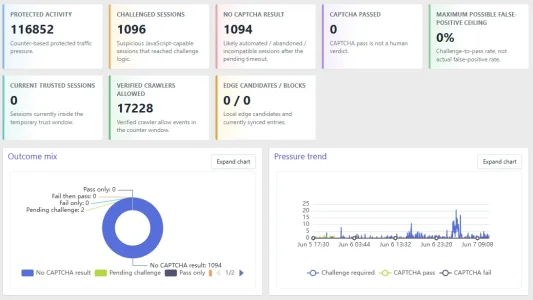
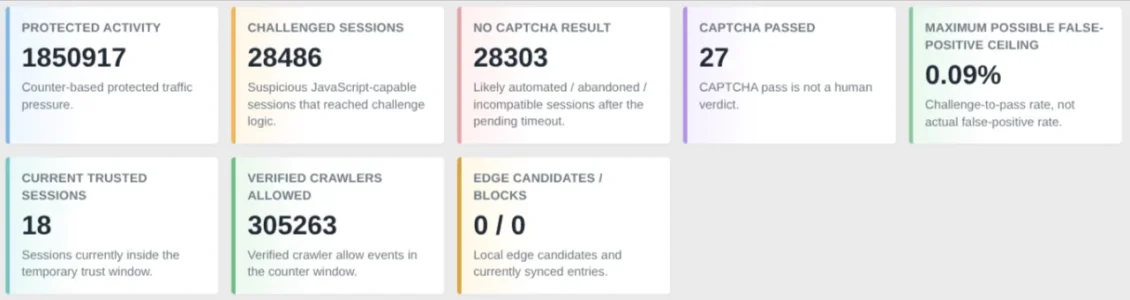
https://yourdomain.com/yourforum/styles/default/zee/zee_botguard_admin.css?v=1020270https://yourdomain.com/yourforum.zbgAdmin.zbgDashboardIf your Dashboard screen does not look like the one shown in the update, this is most likely a cache issue.
Although the CSS file has been versioned, some caching systems can be configured to ignore version query strings, so the older file may still be loading.
Please open the following URL in your browser:
Code:https://yourdomain.com/yourforum/styles/default/zee/zee_botguard_admin.css?v=1020270
Replace:
Code:https://yourdomain.com/yourforum
with your own forum URL, including the correct forum path if your forum is installed in a subdirectory.
Once the CSS file opens, use your browser’s search/find function and search for:
Code:.zbgAdmin.zbgDashboard
If you cannot find that text in the file, then your site is still serving an old cached version of the CSS file.
You will need to clear the cache from your caching layer first, then clear your local browser cache.
Common caching layers include:
- Cloudflare
- Apache cache
- LiteSpeed cache
- Other server-side or CDN caching systems
After clearing the server/CDN cache, do a hard refresh in your browser and check the Dashboard again.
upload/js/ into your XenForo js/ directory, so you end up with js/zee/botguard/botguard.js, js/zee/botguard/dashboard.js, js/zee/botguard/fingerprintjs/fp.min.js, and js/zee/botguard/echarts/echarts.min.js; then upload the zee folder from upload/styles/default/ into your XenForo styles/default/ directory, so you end up with styles/default/zee/zee_botguard_admin.css.
What is interesting: The challenges happened on either "what's new/posts", "/", "feed" (should now be excluded) and in one case on a picture. All other challenges happened on articles within Bob's AMS, so "/articles/..." - not a single one on the normal forums.
Worked like a charm. Thank you!Someone has reported that the new CSS and JS files didn't even get installed by their XenForo add-on install process.
I’ll try to figure out exactly why these files didn’t copy over for you, as the 1.2.2 package does include them and the installer has copied them correctly on other installs. In the meantime, please manually extract the Zee-BotGuard-1.2.2.zip package, then upload the zee folder fromupload/js/into your XenForojs/directory, so you end up withjs/zee/botguard/botguard.js,js/zee/botguard/dashboard.js,js/zee/botguard/fingerprintjs/fp.min.js, andjs/zee/botguard/echarts/echarts.min.js; then upload the zee folder fromupload/styles/default/into your XenForostyles/default/directory, so you end up withstyles/default/zee/zee_botguard_admin.css.
@wrkalot FYI
You're welcome!Looks great. Thank you.
| Table | Rows | Data | Index | Total |
|---|---|---|---|---|
| xf_zee_botguard_session | 2.4M | 869 MB | 1,103 MB | ~1.97 GB |
| xf_zee_botguard_counter | 4.4M | 1,041 MB | 1,294 MB | ~2.34 GB |
| xf_zee_botguard_event | 438K | 416 MB | 635 MB | ~1.05 GB |
| xf_zee_botguard_ip | 669K | 138 MB | 70 MB | ~208 MB |
| xf_zee_botguard_visitor | 32K | 82 MB | 23 MB | ~105 MB |
| xf_zee_botguard_fp_ip | 55K | 16 MB | 37 MB | ~53 MB |
| xf_zee_botguard_ip_rdns | 10K | 5 MB | 6 MB | ~11 MB |
| Total | 8.0M rows | 2,567 MB | 3,168 MB | ~5.74 GB |
The dashboard timed out for me similar to viewing logs. Claude saw 5GB of Bot Guard data and suggested truncating these tables:
Table Rows Data Index Total xf_zee_botguard_session 2.4M 869 MB 1,103 MB ~1.97 GB xf_zee_botguard_counter 4.4M 1,041 MB 1,294 MB ~2.34 GB xf_zee_botguard_event 438K 416 MB 635 MB ~1.05 GB xf_zee_botguard_ip 669K 138 MB 70 MB ~208 MB xf_zee_botguard_visitor 32K 82 MB 23 MB ~105 MB xf_zee_botguard_fp_ip 55K 16 MB 37 MB ~53 MB xf_zee_botguard_ip_rdns 10K 5 MB 6 MB ~11 MB Total 8.0M rows 2,567 MB 3,168 MB ~5.74 GB
I went ahead and did that, the dashboard and logs load quickly now.
I did truncate, I had set the event logs to 1 day yesterday but was still seeing timeouts.Did you truncate or just prune records?
Truncated you probably wont get much of a dashboard except for whatever happens right now as it begins building up data again.
The dashboard timed out for me similar to viewing logs. Claude saw 5GB of Bot Guard data and suggested truncating these tables:
Table Rows Data Index Total xf_zee_botguard_session 2.4M 869 MB 1,103 MB ~1.97 GB xf_zee_botguard_counter 4.4M 1,041 MB 1,294 MB ~2.34 GB xf_zee_botguard_event 438K 416 MB 635 MB ~1.05 GB xf_zee_botguard_ip 669K 138 MB 70 MB ~208 MB xf_zee_botguard_visitor 32K 82 MB 23 MB ~105 MB xf_zee_botguard_fp_ip 55K 16 MB 37 MB ~53 MB xf_zee_botguard_ip_rdns 10K 5 MB 6 MB ~11 MB Total 8.0M rows 2,567 MB 3,168 MB ~5.74 GB
I went ahead and did that, the dashboard and logs load quickly now.
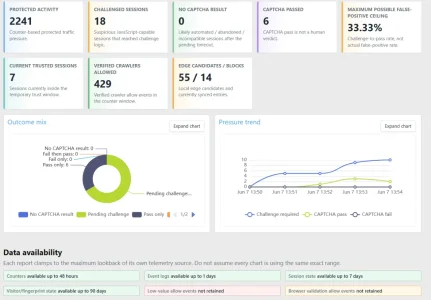
Edit: add screenshot
View attachment 339317
Attack resumed several hours ago, currently 6000 reported guests.

I did truncate, I had set the event logs to 1 day yesterday but was still seeing timeouts.
Numbers like your's are why I am framing my forum as "laboratory environment where one can watch things at small scale".24hr stats

We use essential cookies to make this site work, and optional cookies to enhance your experience.