XF Bot Guard

XF Bot Guard 1.4.1

No permission to download
Today I will modify the dashboard report system such that each hour, it takes a snapshot of the hour that passed, and stores it. This will avoid querying the tables in real-time to create the dashboard, and means even as the tables are pruned - you won't lose dashboard data over time. The snapshots will be tiny statistical hourly data, so won't take up much space. Plus, it will be configurable for pruning too.
 
Last edited:
Shameless plug time.

I won’t do this often, but bear with me, because I genuinely think this add-on is awesome.

Not “better than XF Bot Guard” awesome. Different job, different layer. But still bloody useful.

XF Bot Guard handles the traffic side of things: bots, scrapers, suspicious visitors, and the usual automated rubbish.

AI Rules Moderation handles the content side of things: posts that may need a moderator to take a closer look.

Together, they cover two very different parts of running a forum, and on my own forum they work really well as a pair.

With both running, my forum is getting pretty close to auto-pilot, but I still have my hands on the steering wheel. XF Bot Guard keeps a lot of the junk away before it becomes a problem, and AI Rules Moderation helps surface the posts that look like they may need moderation.

I still stay in control. It does not delete posts, ban users, warn anyone, or make final moderation decisions. It just pushes likely rule breaches into the normal XenForo approval queue with a reason, so I can quickly review them and move on.

In practice, I only need to check the moderator queue now and then, and most of the time the posts it flags are exactly the ones I would have wanted to look at anyway.

The add-on is AI Rules Moderation:

https://xenforo.com/community/resources/ai-rules-moderation-14-day-trial-then-25-year.10496/

There is a 14-day trial, and if you bring your own OpenAI API key, product access is only $25/year.

For forums with active discussion, clear rules, and moderation that is hard to manage with keyword filters alone, I think it is well worth a look.

 
zeeb0t updated XF Bot Guard with a new update entry:

Major Release: v1.2.3

XF Bot Guard 1.2.3

Release type:
Major update

Important: please read before upgrading

XF Bot Guard 1.2.3 is a major database, retention, reporting, and cleanup update.

This is not an update that very large forums should blindly apply without first choosing the right upgrade path.

For most small and medium forums, the normal XenForo add-on upgrade process should be fine.

For very large forums, this release may take considerably longer to upgrade because existing Bot...

Read the rest of this update entry...
 
The dashboard timed out for me similar to viewing logs. Claude saw 5GB of Bot Guard data and suggested truncating these tables:

TableRowsDataIndexTotal
xf_zee_botguard_session2.4M869 MB1,103 MB~1.97 GB
xf_zee_botguard_counter4.4M1,041 MB1,294 MB~2.34 GB
xf_zee_botguard_event438K416 MB635 MB~1.05 GB
xf_zee_botguard_ip669K138 MB70 MB~208 MB
xf_zee_botguard_visitor32K82 MB23 MB~105 MB
xf_zee_botguard_fp_ip55K16 MB37 MB~53 MB
xf_zee_botguard_ip_rdns10K5 MB6 MB~11 MB
Total8.0M rows2,567 MB3,168 MB~5.74 GB

I went ahead and did that, the dashboard and logs load quickly now.

Edit: add screenshot

View attachment 339317

Attack resumed several hours ago, currently 6000 reported guests.

Please apply the latest 1.2.3 - but carefully consider your upgrade path. Then, for your forum in particular, I would try with the following retention settings:

Data typeDefaultFor you
Raw event data336 hours24 hours
Visitor data336 hours24 hours
Session data336 hours24 hours
Counter data336 hours24 hours
Dashboard snapshots17,520 hours17,520 hours (2 years) - or however long you want to retain dashboard data. This area is lightweight. Shouldn't grow crazy fast, and you can always revise this down as needed.
Zero-signal IP data2,160 hours24 hours
 
Please apply the latest 1.2.3 - but carefully consider your upgrade path. Then, for your forum in particular, I would try with the following retention settings:

Data typeDefaultFor you
Raw event data336 hours24 hours
Visitor data336 hours24 hours
Session data336 hours24 hours
Counter data336 hours24 hours
Dashboard snapshots17,520 hours17,520 hours (2 years) - or however long you want to retain dashboard data. This area is lightweight. Shouldn't grow crazy fast, and you can always revise this down as needed.
Zero-signal IP data2,160 hours24 hours
Many thanks, I'll update with these values and will post how it goes.
 
Something went wrong during the update from 1.2.2 to 1.2.3

  • XF\Db\Exception: XF Bot Guard hash transition trigger cleanup failed: MySQL statement prepare error [1295]: This command is not supported in the prepared statement protocol yet
  • src/XF/Db/AbstractStatement.php:225

Stack trace:

Code:
DROP TRIGGER IF EXISTS `zbg_h_61481ade_bu`
------------

#0 src/XF/Db/Mysqli/Statement.php(207): XF\Db\AbstractStatement->getException('MySQL statement...', 1295, 'HY000')
#1 src/XF/Db/Mysqli/Statement.php(43): XF\Db\Mysqli\Statement->getException('MySQL statement...', 1295, 'HY000')
#2 src/XF/Db/Mysqli/Statement.php(61): XF\Db\Mysqli\Statement->prepare()
#3 src/XF/Db/AbstractAdapter.php(96): XF\Db\Mysqli\Statement->execute()
#4 src/addons/Zee/BotGuard/Setup.php(1688): XF\Db\AbstractAdapter->query('DROP TRIGGER IF...')
#5 src/addons/Zee/BotGuard/Setup.php(1566): Zee\BotGuard\Setup->dropHashTransitionTriggers('xf_zee_botguard...')
#6 src/addons/Zee/BotGuard/Setup.php(1294): Zee\BotGuard\Setup->migrateTableHashColumnsToBinaryStep('xf_zee_botguard...', Array, Array)
#7 src/addons/Zee/BotGuard/Setup.php(49): Zee\BotGuard\Setup->migrateHashColumnsToBinaryStep(Array)
#8 src/XF/AddOn/StepRunnerUpgradeTrait.php(124): Zee\BotGuard\Setup->upgrade1020370Step3(Array)
#9 src/XF/AddOn/StepRunnerUpgradeTrait.php(73): Zee\BotGuard\Setup->upgradeStepRunner(1020370, 3, Array, NULL)
#10 src/XF/Admin/Controller/AddOnController.php(612): Zee\BotGuard\Setup->upgrade(Array)
#11 src/XF/Mvc/Dispatcher.php(362): XF\Admin\Controller\AddOnController->actionUpgrade(Object(XF\Mvc\ParameterBag))
#12 src/XF/Mvc/Dispatcher.php(264): XF\Mvc\Dispatcher->dispatchClass('XF:AddOn', 'Upgrade', Object(XF\Mvc\RouteMatch), Object(MaZ\AUN\XF\Admin\Controller\AddOn), NULL)
#13 src/XF/Mvc/Dispatcher.php(121): XF\Mvc\Dispatcher->dispatchFromMatch(Object(XF\Mvc\RouteMatch), Object(MaZ\AUN\XF\Admin\Controller\AddOn), NULL)
#14 src/XF/Mvc/Dispatcher.php(63): XF\Mvc\Dispatcher->dispatchLoop(Object(XF\Mvc\RouteMatch))
#15 src/XF/App.php(2824): XF\Mvc\Dispatcher->run()
#16 src/XF.php(814): XF\App->run()
#17 admin.php(15): XF::runApp('XF\\Admin\\App')
#18 {main}

Request state:

Code:
Request state
array(4) {
  ["url"] => string(39) "/admin.php?add-ons/Zee-BotGuard/upgrade"
  ["referrer"] => string(63) "https://myforum/admin.php?add-ons/Zee-BotGuard/upgrade"
  ["_GET"] => array(1) {
    ["add-ons/Zee-BotGuard/upgrade"] => string(0) ""
  }
  ["_POST"] => array(7) {
    ["_xfProcessing"] => string(1) "1"
    ["continue"] => string(1) "1"
    ["confirm"] => string(1) "1"
    ["params"] => string(72) "{"table_index":9,"table":{"stage":"swap"},"step":3,"version_id":1020370}"
    ["count"] => string(3) "110"
    ["finished"] => string(1) "0"
    ["_xfToken"] => string(8) "********"
  }
}
 
Something went wrong during the update from 1.2.2 to 1.2.3


Stack trace:

Code:
DROP TRIGGER IF EXISTS `zbg_h_61481ade_bu`
------------

#0 src/XF/Db/Mysqli/Statement.php(207): XF\Db\AbstractStatement->getException('MySQL statement...', 1295, 'HY000')
#1 src/XF/Db/Mysqli/Statement.php(43): XF\Db\Mysqli\Statement->getException('MySQL statement...', 1295, 'HY000')
#2 src/XF/Db/Mysqli/Statement.php(61): XF\Db\Mysqli\Statement->prepare()
#3 src/XF/Db/AbstractAdapter.php(96): XF\Db\Mysqli\Statement->execute()
#4 src/addons/Zee/BotGuard/Setup.php(1688): XF\Db\AbstractAdapter->query('DROP TRIGGER IF...')
#5 src/addons/Zee/BotGuard/Setup.php(1566): Zee\BotGuard\Setup->dropHashTransitionTriggers('xf_zee_botguard...')
#6 src/addons/Zee/BotGuard/Setup.php(1294): Zee\BotGuard\Setup->migrateTableHashColumnsToBinaryStep('xf_zee_botguard...', Array, Array)
#7 src/addons/Zee/BotGuard/Setup.php(49): Zee\BotGuard\Setup->migrateHashColumnsToBinaryStep(Array)
#8 src/XF/AddOn/StepRunnerUpgradeTrait.php(124): Zee\BotGuard\Setup->upgrade1020370Step3(Array)
#9 src/XF/AddOn/StepRunnerUpgradeTrait.php(73): Zee\BotGuard\Setup->upgradeStepRunner(1020370, 3, Array, NULL)
#10 src/XF/Admin/Controller/AddOnController.php(612): Zee\BotGuard\Setup->upgrade(Array)
#11 src/XF/Mvc/Dispatcher.php(362): XF\Admin\Controller\AddOnController->actionUpgrade(Object(XF\Mvc\ParameterBag))
#12 src/XF/Mvc/Dispatcher.php(264): XF\Mvc\Dispatcher->dispatchClass('XF:AddOn', 'Upgrade', Object(XF\Mvc\RouteMatch), Object(MaZ\AUN\XF\Admin\Controller\AddOn), NULL)
#13 src/XF/Mvc/Dispatcher.php(121): XF\Mvc\Dispatcher->dispatchFromMatch(Object(XF\Mvc\RouteMatch), Object(MaZ\AUN\XF\Admin\Controller\AddOn), NULL)
#14 src/XF/Mvc/Dispatcher.php(63): XF\Mvc\Dispatcher->dispatchLoop(Object(XF\Mvc\RouteMatch))
#15 src/XF/App.php(2824): XF\Mvc\Dispatcher->run()
#16 src/XF.php(814): XF\App->run()
#17 admin.php(15): XF::runApp('XF\\Admin\\App')
#18 {main}

Request state:

Code:
Request state
array(4) {
  ["url"] => string(39) "/admin.php?add-ons/Zee-BotGuard/upgrade"
  ["referrer"] => string(63) "https://myforum/admin.php?add-ons/Zee-BotGuard/upgrade"
  ["_GET"] => array(1) {
    ["add-ons/Zee-BotGuard/upgrade"] => string(0) ""
  }
  ["_POST"] => array(7) {
    ["_xfProcessing"] => string(1) "1"
    ["continue"] => string(1) "1"
    ["confirm"] => string(1) "1"
    ["params"] => string(72) "{"table_index":9,"table":{"stage":"swap"},"step":3,"version_id":1020370}"
    ["count"] => string(3) "110"
    ["finished"] => string(1) "0"
    ["_xfToken"] => string(8) "********"
  }
}

One moment - this is not a destructive failure and your data has not been damaged.

The upgrade hit a database compatibility issue while checking/cleaning up a temporary trigger used by the migration process. It works correctly in my test environments, but some PHP/MySQL/MariaDB combinations reject that specific trigger statement when XenForo sends it through the prepared-statement path.

I am preparing a quick patch now so the upgrade process will work correctly on your server.
 
Something went wrong during the update from 1.2.2 to 1.2.3


Stack trace:

Code:
DROP TRIGGER IF EXISTS `zbg_h_61481ade_bu`
------------

#0 src/XF/Db/Mysqli/Statement.php(207): XF\Db\AbstractStatement->getException('MySQL statement...', 1295, 'HY000')
#1 src/XF/Db/Mysqli/Statement.php(43): XF\Db\Mysqli\Statement->getException('MySQL statement...', 1295, 'HY000')
#2 src/XF/Db/Mysqli/Statement.php(61): XF\Db\Mysqli\Statement->prepare()
#3 src/XF/Db/AbstractAdapter.php(96): XF\Db\Mysqli\Statement->execute()
#4 src/addons/Zee/BotGuard/Setup.php(1688): XF\Db\AbstractAdapter->query('DROP TRIGGER IF...')
#5 src/addons/Zee/BotGuard/Setup.php(1566): Zee\BotGuard\Setup->dropHashTransitionTriggers('xf_zee_botguard...')
#6 src/addons/Zee/BotGuard/Setup.php(1294): Zee\BotGuard\Setup->migrateTableHashColumnsToBinaryStep('xf_zee_botguard...', Array, Array)
#7 src/addons/Zee/BotGuard/Setup.php(49): Zee\BotGuard\Setup->migrateHashColumnsToBinaryStep(Array)
#8 src/XF/AddOn/StepRunnerUpgradeTrait.php(124): Zee\BotGuard\Setup->upgrade1020370Step3(Array)
#9 src/XF/AddOn/StepRunnerUpgradeTrait.php(73): Zee\BotGuard\Setup->upgradeStepRunner(1020370, 3, Array, NULL)
#10 src/XF/Admin/Controller/AddOnController.php(612): Zee\BotGuard\Setup->upgrade(Array)
#11 src/XF/Mvc/Dispatcher.php(362): XF\Admin\Controller\AddOnController->actionUpgrade(Object(XF\Mvc\ParameterBag))
#12 src/XF/Mvc/Dispatcher.php(264): XF\Mvc\Dispatcher->dispatchClass('XF:AddOn', 'Upgrade', Object(XF\Mvc\RouteMatch), Object(MaZ\AUN\XF\Admin\Controller\AddOn), NULL)
#13 src/XF/Mvc/Dispatcher.php(121): XF\Mvc\Dispatcher->dispatchFromMatch(Object(XF\Mvc\RouteMatch), Object(MaZ\AUN\XF\Admin\Controller\AddOn), NULL)
#14 src/XF/Mvc/Dispatcher.php(63): XF\Mvc\Dispatcher->dispatchLoop(Object(XF\Mvc\RouteMatch))
#15 src/XF/App.php(2824): XF\Mvc\Dispatcher->run()
#16 src/XF.php(814): XF\App->run()
#17 admin.php(15): XF::runApp('XF\\Admin\\App')
#18 {main}

Request state:

Code:
Request state
array(4) {
  ["url"] => string(39) "/admin.php?add-ons/Zee-BotGuard/upgrade"
  ["referrer"] => string(63) "https://myforum/admin.php?add-ons/Zee-BotGuard/upgrade"
  ["_GET"] => array(1) {
    ["add-ons/Zee-BotGuard/upgrade"] => string(0) ""
  }
  ["_POST"] => array(7) {
    ["_xfProcessing"] => string(1) "1"
    ["continue"] => string(1) "1"
    ["confirm"] => string(1) "1"
    ["params"] => string(72) "{"table_index":9,"table":{"stage":"swap"},"step":3,"version_id":1020370}"
    ["count"] => string(3) "110"
    ["finished"] => string(1) "0"
    ["_xfToken"] => string(8) "********"
  }
}

I have attached a new 1.2.3 build. It falls back to a raw query function in XenForo which should not then rely on specific PHP/DB version combinations to support the approach. Before you try install this, can you just first check what version of Bot Guard XenForo says is already installed?
 

Attachments

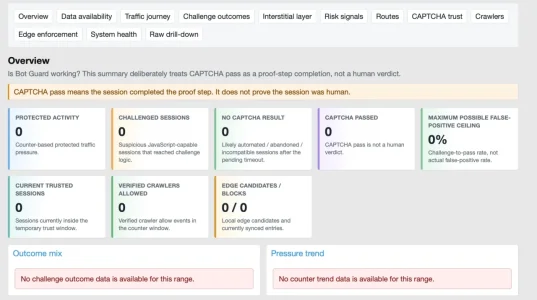
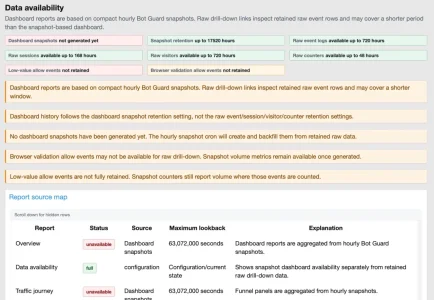
It states 1.2.3 in ACP. The dashboard is however empty (in opposite to yesterday) and complaining:

View attachment 339464
View attachment 339465

Attached are versions 1.2.2 and 1.2.3. Install 1.2.2 (choose the option to replace files). Confirm it now says 1.2.2. Then install 1.2.3 (again, choosing option to replace files). Hopefully the upgrade then sails through for you.
 

Attachments

Installed the patched 1.2.3, no more complaints in the error log, Dashboard stays empty until now.

Edit: Oups, I was faster than your post. o_O
 
Installed the patched 1.2.3, no more complaints in the error log, Dashboard stays empty until now.

Yes, they dashboard will be empty until it's hourly cron runs and begins populating the data for the report snapshots. If you want the data now, go to ACP -> Tools -> Cron entries, then search for "XF Bot Guard dashboard snapshot build" and click the "Run now" button over on the far right - it should then begin the process of backfilling the snapshot data, and catching up to now.
 
Yes, they dashboard will be empty until it's hourly cron runs and begins populating the data for the report snapshots. If you want the data now, go to ACP -> Tools -> Cron entries, then search for "XF Bot Guard dashboard snapshot build" and click the "Run now" button over on the far right - it should then begin the process of backfilling the snapshot data, and catching up to now.

Correction the cron is "XF Bot Guard dashboard snapshot build"
 
Attached are versions 1.2.2 and 1.2.3. Install 1.2.2 (choose the option to replace files). Confirm it now says 1.2.2. Then install 1.2.3 (again, choosing option to replace files). Hopefully the upgrade then sails through for you.
Downgrading did not work.
Bildschirm­foto 2026-06-08 um 07.37.15.webp
Rebuild was not an option that would have been offered. Uploaded and rebuilt 1.2.3 sucessfully. However, now I have tons of different errors in the XF error log, all related to bot guard.

I'll give it a couple of minutes to clarify if that was just during the rebuilt. If it persists probably the easiest way out is to uninstall bot guard and install from fresh. Will loose a week of data but this is probably not the end of the world.
 
Downgrading did not work.
View attachment 339468
Rebuild was not an option that would have been offered. Uploaded and rebuilt 1.2.3 sucessfully. However, now I have tons of different errors in the XF error log, all related to bot guard.

I'll give it a couple of minutes to clarify if that was just during the rebuilt. If it persists probably the easiest way out is to uninstall bot guard and install from fresh. Will loose a week of data but this is probably not the end of the world.

At this point, it is probably best to uninstall, install again - just note your config items before doing so. What needed to happen is to downgrade to 1.2.2, then upgrade to 1.2.3. Otherwise the data migration sequence will not begin again.
 
At this point, it is probably best to uninstall, install again
That's what I finally did and everything seems to work.

I can safely say that Bot Guard does let a bunch of scrapers pass: I do see guests in the visitor list that read very old and very dead threads, that are buried deeply in the forum. A normal user would not get to these, as search is disabled for guests, these threads are not cross linked and. as thread visibility for guests it set to "first post only", they would not run into such a link anyway.

The question is if one could gain something from identifying such a bot in the list (i.e. by flagging the fingerprint or something like that for higher risk scoring in future).
 
I can safely say that Bot Guard does let a bunch of scrapers pass: I do see guests in the visitor list that read very old and very dead threads, that are buried deeply in the forum. A normal user would not get to these, as search is disabled for guests, these threads are not cross linked and. as thread visibility for guests it set to "first post only", they would not run into such a link anyway.

That is fair feedback, and I would never claim Bot Guard is perfect or that it will stop every single scraper. Realistically, I do not think any add-on can honestly promise that without also risking false positives against real visitors.

The goal of Bot Guard is to massively reduce automated traffic while keeping the forum usable for genuine guests and members. From the screenshots many post, it looks like Bot Guard has already blocked bot activity in the many thousands, so I think the dashboard probably tells the more important story: the volume has been brought down heavily.

A number of suspicious guests still reaching old or buried threads is definitely something worth looking at, though. There will always be edge cases, especially with bots that behave more like normal browsers or arrive through old indexed URLs, external links, archives, bookmarks, or previously discovered URLs.

I am also planning additional detection features that should help with exactly this type of behaviour, including deliberately placed hidden/trap URLs that normal users should never reach, but crawlers and scrapers often will. That should give Bot Guard another strong signal for identifying bots that currently appear more human-like.

So yes, I agree: it is not 100%. I do not think 100% is a realistic or safe promise. But the aim is to reduce bot activity to the lowest practical level without making life harder for real users, and I will keep improving the detection from there.
 
The question is if one could gain something from identifying such a bot in the list (i.e. by flagging the fingerprint or something like that for higher risk scoring in future).

I could introduce a mechanism for you to block certain IPs - which, when hashed, can then be used to link sessions and fingerprints and so on, effectively blocking them even if they come back on new IPs. However, I will say - that is probably not going to scale. You will spend forever basically doing that.

That's why my primary focus is on techniques which catch them in droves.
 
Back
Top Bottom