XF Bot Guard

XF Bot Guard 1.4.1

No permission to download
My logs showed:

416 challenged sessions
99 Turnstile passes
317 no result

So the raw challenge-to-pass rate was 23.8%.

But that should not be read as a 23.8% false-positive rate.

Roundtable Research found Cloudflare Turnstile was at the low end of tested bot-detection systems, detecting roughly one third of capable bot sessions. Flipped around, that means a large share of capable bots may still pass.
I switched my captcha to Turnstile when installing Bot Guard to have my visitors as little annoyed as possible when running into a captcha. Realistically, with Bot Guard only checking what has passed the other filters before, it improves the existing situation that cannot be further improved by other means. Even if it is not perfect it is better than before. At least that's the way I look at it.

What would be critical was if normal users became annoyed and went away b/c they would be challenged too frequently or the process of "identifying browser" takes too long or hangs. So this is what the metrics should be about.

If absolutely no one would be filtered out by the captcha it would be of no use at all. If every visitor would pass the browser test it would be of no use. What is critical is the time needed for the browser verification as this is critical (in my eyes more critical than if there is a turnstile captcha) and this should be shown in a potential statistic, preferably with a distribution range between super fast and super slow (in absolute numbers for both, time needed and amount of visitors).
Then the amount and percentage of visitors who got presented with a captcha.
I would (naively) assume, that passing a turnstile captcha should not be a big deal for humans and not really annoying either. On the other hand I did sometimes have the situation myself where I have been locked into a turnstile captcha that kept popping up for no obvious reason. So it not only is not bot-proof but also seems to have it's issues sometimes.
However: Those who would not pass the turnstile captacha are, I'd assume, bots to a very high percentage. If you use a different captcha an unknown amount of regular visitors would probably simply walk away w/o even trying to solve it. So the kind of captcha you use is relevant. Would even be good if one could set it independently from the one used for the registration.
 
I switched my captcha to Turnstile when installing Bot Guard to have my visitors as little annoyed as possible when running into a captcha. Realistically, with Bot Guard only checking what has passed the other filters before, it improves the existing situation that cannot be further improved by other means. Even if it is not perfect it is better than before. At least that's the way I look at it.

What would be critical was if normal users became annoyed and went away b/c they would be challenged too frequently or the process of "identifying browser" takes too long or hangs. So this is what the metrics should be about.

If absolutely no one would be filtered out by the captcha it would be of no use at all. If every visitor would pass the browser test it would be of no use. What is critical is the time needed for the browser verification as this is critical (in my eyes more critical than if there is a turnstile captcha) and this should be shown in a potential statistic, preferably with a distribution range between super fast and super slow (in absolute numbers for both, time needed and amount of visitors).
Then the amount and percentage of visitors who got presented with a captcha.
I would (naively) assume, that passing a turnstile captcha should not be a big deal for humans and not really annoying either. On the other hand I did sometimes have the situation myself where I have been locked into a turnstile captcha that kept popping up for no obvious reason. So it not only is not bot-proof but also seems to have it's issues sometimes.
However: Those who would not pass the turnstile captacha are, I'd assume, bots to a very high percentage. If you use a different captcha an unknown amount of regular visitors would probably simply walk away w/o even trying to solve it. So the kind of captcha you use is relevant. Would even be good if one could set it independently from the one used for the registration.

Exactly right and that is why I opt for turnstile.

The data and research proves turnstile is not a perfect CAPTCHA that stops every bot dead in its tracks.

But, it is near zero friction for a human.

That is a very important trade-off to consider. A trade-off worth having, IMO.

Had Bot Guard not been so effective in getting dumb bots stuck in the mud before even getting to the challenge gate, the trade-off would maybe be something worth reconsidering.

But my own logs and other data suggest it is simply not worth switching to a harder CAPTCHA provider. Even if all of that 20%~ passing it are bots, the number (90~ or so) in 4 or 5 hrs is miniscule compared to the many thousands it removed without bothering a single human in the meantime.

Thats the thing about Bot Guard. I have tried hard to ensure it is effective, without pissing off our real human audience.
 
Thanks so much for this huge update, I'll start testing it out. XF Bot Guard has already been very effective but adding the Cloudflare integration takes it to the next level!

I had mentioned before that going to the logs in the ACP times out for me and checking database logs I see FreeStorageSpace and FreeableMemory noticeably trending lower since installing a week or so ago, so was considering increasing the RAM and disk space on it. I turned off the main "Log challenge decisions and audit events" option yesterday to see if it that helps and will monitor along with the new 1.2.0 update.

Cloudwatch stats over last 2 weeks:

View attachment 339268

That's awesome, thank you for posting the resource graphs. They are actually really useful.

The storage trend makes sense to me: the main thing being retained there is the optional audit/event logging. On a heavily botted forum, that can obviously add up, especially before the configured retention window has had time to roll through and prune older rows. Disabling that logging stabilising the storage line is pretty much what I would expect.

The important bit is that audit logging is only retained visibility. It does not make Bot Guard more or less capable at the actual protection/scoring/challenge layer, so leaving it off is completely fine if you prefer the lower database footprint. Internal counters/rate limits still continue; you just lose the retained decision/audit trail.

On the memory side, I would read that as the database settling into a lower free-memory band rather than an obvious ongoing problem. Small database instances often run with low freeable memory by design, and the key thing is whether it keeps deteriorating or starts causing swap/CPU/latency issues. From that graph, it looks more like it has stabilised after the initial heavier logging period.

One caveat on storage: once old retained rows are pruned, database engines do not always immediately return that space back as visible free storage. Often it becomes reusable internal table space first. So I would expect the growth curve to flatten/settle before I would necessarily expect a big instant jump back up.

I would still be comfortable with you enabling the higher-value logging if you want the extra visibility, but it is absolutely your call, and this is exactly why that logging is optional. Bot Guard does not depend on it to do its job.

When I eventually add the buffered-write performance option, it will likely end up with broadly the same retained storage for the same logging/retention settings, but it should help smooth out write bursts and reduce CPU/memory spikeiness. Granted, based on your graph, those spikes now look fairly inconsequential, but it is still on my backlog for an upcoming release.

And I am really glad you like the look of the Cloudflare Edge Enforcement feature. I am proud of that one. Not because Bot Guard is not already doing a solid job at the XenForo layer, but because moving repeat worst-offender traffic out to the edge is still a win. Less bad traffic reaching PHP/XenForo/database is always better.

The only thing I have been deliberately conservative about is what gets promoted to Cloudflare. For now, I would rather start with sane safe defaults and avoid over-exporting. Once I have more real-world data, I will add options so administrators can tune thresholds and related factors themselves.
 
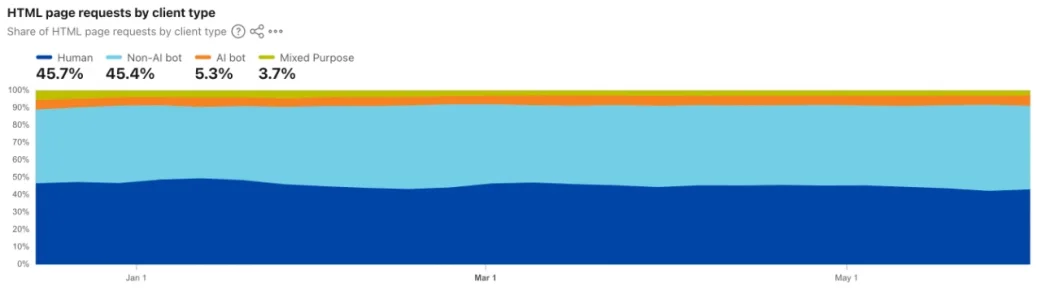
Some wider context from Cloudflare Radar as well.

Screenshot 2026-06-07 at 9.17.39 am.webp

Worldwide, over the last 24 weeks, Cloudflare shows HTML page requests as roughly:

  • Human: 45.7%
  • Non-AI bot: 45.4%
  • AI bot: 5.3%
  • Mixed purpose: 3.7%

So in this dataset, humans are less than half of HTML page requests.

Screenshot 2026-06-07 at 9.17.59 am.webp

That matters for forum owners because bot traffic is not some tiny edge case anymore. It is a normal part of the modern web.

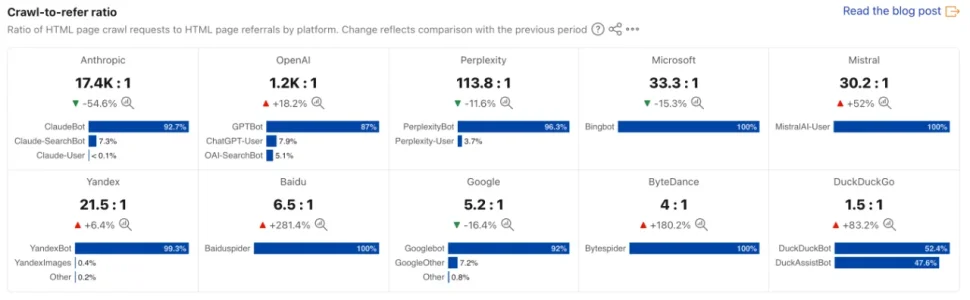
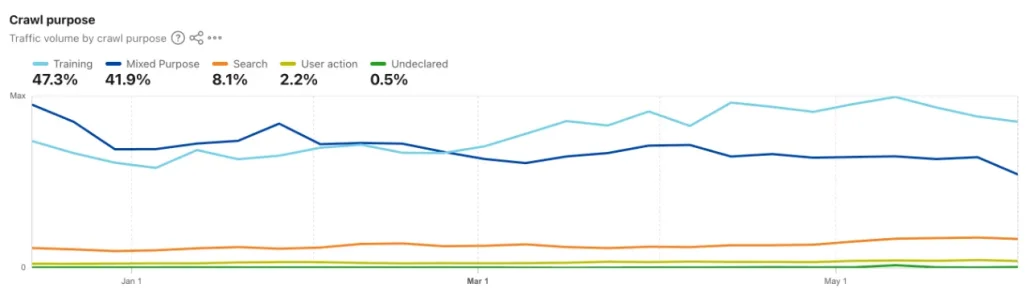
The AI crawler numbers are also interesting. Cloudflare’s crawl-to-refer ratios show how many HTML pages are crawled compared with how many referrals are sent back.

Screenshot 2026-06-07 at 9.18.28 am.webp

Examples from the same view:

  • Anthropic: 17.4K crawls per referral
  • OpenAI: 1.2K crawls per referral
  • Perplexity: 113.8 crawls per referral
  • Microsoft: 33.3 crawls per referral
  • Google: 5.2 crawls per referral
  • DuckDuckGo: 1.5 crawls per referral

So a lot of this traffic consumes pages without behaving like normal human visitors, and often without sending much traffic back.

This is broadly why I think forum bot protection needs to be layered. CAPTCHA alone is not enough, analytics alone is not enough, and “it loaded the page” definitely does not mean “it was a human”.

Source: https://radar.cloudflare.com/ai-insights?dateRange=24w
 
That's awesome, thank you for posting the resource graphs. They are actually really useful.

The storage trend makes sense to me: the main thing being retained there is the optional audit/event logging. On a heavily botted forum, that can obviously add up, especially before the configured retention window has had time to roll through and prune older rows. Disabling that logging stabilising the storage line is pretty much what I would expect.

The important bit is that audit logging is only retained visibility. It does not make Bot Guard more or less capable at the actual protection/scoring/challenge layer, so leaving it off is completely fine if you prefer the lower database footprint. Internal counters/rate limits still continue; you just lose the retained decision/audit trail.

On the memory side, I would read that as the database settling into a lower free-memory band rather than an obvious ongoing problem. Small database instances often run with low freeable memory by design, and the key thing is whether it keeps deteriorating or starts causing swap/CPU/latency issues. From that graph, it looks more like it has stabilised after the initial heavier logging period.

One caveat on storage: once old retained rows are pruned, database engines do not always immediately return that space back as visible free storage. Often it becomes reusable internal table space first. So I would expect the growth curve to flatten/settle before I would necessarily expect a big instant jump back up.

I would still be comfortable with you enabling the higher-value logging if you want the extra visibility, but it is absolutely your call, and this is exactly why that logging is optional. Bot Guard does not depend on it to do its job.

When I eventually add the buffered-write performance option, it will likely end up with broadly the same retained storage for the same logging/retention settings, but it should help smooth out write bursts and reduce CPU/memory spikeiness. Granted, based on your graph, those spikes now look fairly inconsequential, but it is still on my backlog for an upcoming release.

And I am really glad you like the look of the Cloudflare Edge Enforcement feature. I am proud of that one. Not because Bot Guard is not already doing a solid job at the XenForo layer, but because moving repeat worst-offender traffic out to the edge is still a win. Less bad traffic reaching PHP/XenForo/database is always better.

The only thing I have been deliberately conservative about is what gets promoted to Cloudflare. For now, I would rather start with sane safe defaults and avoid over-exporting. Once I have more real-world data, I will add options so administrators can tune thresholds and related factors themselves.

Thanks for the information on the database side, the site has been performing great with the all the bots being mitigated but just that logs call timing out was a concern. It's been about 8 hours and not seeing much change with the logs turned off. I'll try turning back on and was also going to try lowering the retention defaults.

The Cloudflare Edge Enforcement was easy to set up following your detailed instructions. Great work once again. Currently after about 8 hours I see:

Synced active IPs 24
Active local candidates 24

I noticed there were about 4000 guests yesterday due to an ongoing attack but stopped today, now down to the normal 200 or 300. It wasn't clear to me why these ongoing attacks happen but perhaps with Bot Guard and the Edge Enforcement they can see they aren't getting through so decide to stop? Speculation on my end for the moment, recently when I think things are calm another attack starts and 12,000 guests suddenly appear.
 
Quick update on the Bot Guard challenge numbers.

The earlier sample was:

Code:
416 challenged sessions
99 Turnstile passes
317 no result
76.20% no result

The latest sample is now:

Code:
1,123 challenged sessions
161 Turnstile passes
962 no result
85.66% no result

So as the sample grew, the pattern became stronger, not weaker.

The most interesting bit is the movement since the earlier check:

Code:
+707 challenged sessions
+62 Turnstile passes
+645 no result

That means roughly 91.23% of the newly challenged sessions did not complete the Turnstile proof step.

I still would not call this a long-term benchmark yet, but the direction is pretty clear: most challenged sessions are not behaving like normal users who simply complete the CAPTCHA and continue.

The pass rate has also dropped from 23.80% to 14.34%, which means even the maximum possible human false-positive ceiling is falling as more data comes in.

And again, that 14.34% is not the actual false-positive rate. It only would be if every Turnstile-passing session was a real human. Given that capable browser/JS bots can pass Turnstile, the true human false-positive rate is likely lower.

So far, this is exactly the kind of funnel I would want to see from a layered bot protection system.
 
It's been about 8 hours and not seeing much change with the logs turned off. I'll try turning back on and was also going to try lowering the retention defaults.

Definitely lower your retention defaults given your traffic and bot volume. The retention/pruning side is what should reduce that over time.

Honestly, if you do not need or want the logging, I would leave it off. But of course, feel free to test different retention and logging settings to find the right balance for your site. It is always a trade-off between visibility and production stability.

Currently after about 8 hours I see:

Synced active IPs 24
Active local candidates 24

That means 24 seriously bad offenders are now being pushed to Cloudflare, so ideally they do not even reach your XenForo site anymore unless they are able to bypass the Cloudflare challenge, which is always possible.

That is a good result, especially because I am being very conservative at the moment about what gets promoted as a candidate for the Cloudflare rule. Once I have more confidence in those indicators from my own forum data, and after inspecting IP ownership and other factors, I will likely make the defaults less conservative and expose more controls so people can tune this properly.

It wasn't clear to me why these ongoing attacks happen but perhaps with Bot Guard and the Edge Enforcement they can see they aren't getting through so decide to stop?

Yes, that is very possible.

A lot of automated traffic uses some form of retry/backoff behaviour. If a target keeps failing, timing out, getting challenged, or producing no useful result, the bot may reduce its attempts, widen the time between retries, rotate to other IPs, or move on to easier targets.

So while we cannot say for certain that every drop in traffic is because XF Bot Guard made them give up, this is exactly the kind of outcome we want: the worst traffic either gets challenged before reaching XenForo, or eventually decides your site is not worth the effort.

Basically, Bot Guard is doing its job. They learn there is a big guard dog at the gate and start looking elsewhere.

Just remember to keep the guard dog there, or they may come back. 😅
 
The Cloudflare Edge Enforcement was easy to set up following your detailed instructions. Great work once again.

Great to hear! Today / tomorrow I am working on the administrator quality-of-life (make the ACP look less like spaghetti). That should help everyone navigate XF Bot Guard in the backend. Later in the week, statistics dashboard (real-time, relevant for you) and historic (where logged data provides).
 
Definitely lower your retention defaults given your traffic and bot volume. The retention/pruning side is what should reduce that over time.

Honestly, if you do not need or want the logging, I would leave it off. But of course, feel free to test different retention and logging settings to find the right balance for your site. It is always a trade-off between visibility and production stability.
Thanks, I will try it with reduced retention. From the start likely due to a large number of recent attacks I wasn't able to view the logs so will see if the tuned settings help. In the health check section I see:

OK Event table 2,256,283 rows approx / 3.1 GB Approximate metadata from information_schema; no full COUNT(*) was run.
OK Counter table 5,009,702 rows approx / 2.2 GB Approximate metadata from information_schema; no full COUNT(*) was run.
 
Thanks, I will try it with reduced retention. From the start likely due to a large number of recent attacks I wasn't able to view the logs so will see if the tuned settings help. In the health check section I see:

OK Event table 2,256,283 rows approx / 3.1 GB Approximate metadata from information_schema; no full COUNT(*) was run.
OK Counter table 5,009,702 rows approx / 2.2 GB Approximate metadata from information_schema; no full COUNT(*) was run.

Based on that, yes - XF Bot Guard is dealing with extensive bot traffic. Default logging values are not ideal, and you did the right thing by initially just switching the logging off.

If you want to try turning it on for visibility, for your forum, I'd suggest trying the following:
  • Enable "Log challenge decisions and audit events"
  • Disable "Log low-value allow/skip audit events"
  • Disable "Log browser validation allow events"
  • Disable "Debug note for raw entropy collection"
  • "Event retention days" -> 1 (this is the event table, safe to prune and you currently have it disabled, save for historic data from before you disabled it) - this set to 1 means you'd at least have 1 day of event data to look at, and, will start pruning the old data immediately
  • For now, leave "Visitor reputation retention days after last seen" and "Session retention days". These can impact the effectiveness of XF Bot Guard over time.
Some of the above are the defaults. I just thought I would mention them incase you had changed them.
 
zeeb0t updated XF Bot Guard with a new update entry:

Minor Release: v1.2.1

XF Bot Guard 1.2.1

Release type:
Minor update

This minor update gives XF Bot Guard’s admin pages a much-needed quality-of-life pass. The old ACP layouts worked, but let’s be honest: some of those tables were doing their best impression of a car crash. 😅

This update makes the admin-side pages cleaner, easier to scan, and much less painful when dealing with long bot data, hashes, paths, metadata, and Cloudflare edge records.

  • Improves the layout and styling of XF Bot Guard...

Read the rest of this update entry...
 
Seeing a lot of errors like these:

Code:
ErrorException: XF Bot Guard bootstrap interstitial failed: collector token unavailable. src/XF/Error.php:75 

#0 src/XF.php(184): XF\Error->logError('XF Bot Guard bo...', false)
#1 src/addons/Zee/BotGuard/Service/BootstrapInterstitial.php(25): XF::logError('XF Bot Guard bo...')
#2 src/addons/Zee/BotGuard/Listener.php(53): Zee\BotGuard\Service\BootstrapInterstitial::send(Array, Array)
#3 [internal function]: Zee\BotGuard\Listener::dispatcherPreDispatch(Object(XF\Mvc\Dispatcher), Object(XF\Mvc\RouteMatch))
#4 src/XF/Extension.php(67): call_user_func_array(Array, Array)
#5 src/XF/App.php(2661): XF\Extension->fire('dispatcher_pre_...', Array, NULL)
#6 src/XF/Mvc/Dispatcher.php(88): XF\App->fire('dispatcher_pre_...', Array)
#7 src/XF/Mvc/Dispatcher.php(49): XF\Mvc\Dispatcher->beforeDispatch(Object(XF\Mvc\RouteMatch))
#8 src/XF/App.php(2191): XF\Mvc\Dispatcher->run()
#9 src/XF.php(391): XF\App->run()
#10 index.php(20): XF::runApp('XF\\Pub\\App')
#11 {main}
 
Seeing a lot of errors like these:

Code:
ErrorException: XF Bot Guard bootstrap interstitial failed: collector token unavailable. src/XF/Error.php:75

#0 src/XF.php(184): XF\Error->logError('XF Bot Guard bo...', false)
#1 src/addons/Zee/BotGuard/Service/BootstrapInterstitial.php(25): XF::logError('XF Bot Guard bo...')
#2 src/addons/Zee/BotGuard/Listener.php(53): Zee\BotGuard\Service\BootstrapInterstitial::send(Array, Array)
#3 [internal function]: Zee\BotGuard\Listener::dispatcherPreDispatch(Object(XF\Mvc\Dispatcher), Object(XF\Mvc\RouteMatch))
#4 src/XF/Extension.php(67): call_user_func_array(Array, Array)
#5 src/XF/App.php(2661): XF\Extension->fire('dispatcher_pre_...', Array, NULL)
#6 src/XF/Mvc/Dispatcher.php(88): XF\App->fire('dispatcher_pre_...', Array)
#7 src/XF/Mvc/Dispatcher.php(49): XF\Mvc\Dispatcher->beforeDispatch(Object(XF\Mvc\RouteMatch))
#8 src/XF/App.php(2191): XF\Mvc\Dispatcher->run()
#9 src/XF.php(391): XF\App->run()
#10 index.php(20): XF::runApp('XF\\Pub\\App')
#11 {main}

Thanks - this could be an attempt by a bot bypass. Its all designed to fail-open, so won't impact anybody - but does log.

What version of XenForo, and version of Bot Guard?
 
Seeing a lot of errors like these:

Code:
ErrorException: XF Bot Guard bootstrap interstitial failed: collector token unavailable. src/XF/Error.php:75

#0 src/XF.php(184): XF\Error->logError('XF Bot Guard bo...', false)
#1 src/addons/Zee/BotGuard/Service/BootstrapInterstitial.php(25): XF::logError('XF Bot Guard bo...')
#2 src/addons/Zee/BotGuard/Listener.php(53): Zee\BotGuard\Service\BootstrapInterstitial::send(Array, Array)
#3 [internal function]: Zee\BotGuard\Listener::dispatcherPreDispatch(Object(XF\Mvc\Dispatcher), Object(XF\Mvc\RouteMatch))
#4 src/XF/Extension.php(67): call_user_func_array(Array, Array)
#5 src/XF/App.php(2661): XF\Extension->fire('dispatcher_pre_...', Array, NULL)
#6 src/XF/Mvc/Dispatcher.php(88): XF\App->fire('dispatcher_pre_...', Array)
#7 src/XF/Mvc/Dispatcher.php(49): XF\Mvc\Dispatcher->beforeDispatch(Object(XF\Mvc\RouteMatch))
#8 src/XF/App.php(2191): XF\Mvc\Dispatcher->run()
#9 src/XF.php(391): XF\App->run()
#10 index.php(20): XF::runApp('XF\\Pub\\App')
#11 {main}

Hey, I’ve tracked this down.

This occurs when a bot/request sends no User-Agent header at all. In that situation, Bot Guard can’t generate the lightweight collector token because the token is intentionally bound to request characteristics, including the user agent.

The important bit: the visitor/bot does not see a server error. When this happens, Bot Guard simply falls back to the normal challenge flow and sends the request to the CAPTCHA challenge page instead.

So this is not really a bug in the user-facing sense. It is more of an overly noisy server log entry for a malformed/obviously bot-like request.

I’ll adjust this so the condition is handled cleanly without logging it as an error, while keeping the current treatment the same: no user agent means no collector token, and the request continues to the normal challenge page.
 
One last update on the Bot Guard challenge data.

Latest numbers:

Code:
1,585 challenged sessions
208 sessions with a Turnstile pass
1,375 sessions with no CAPTCHA result

Challenge-to-pass rate: 13.12%
No-result rate: 86.75%

At this point, my read is stronger than just “maybe bots”.

These were not random visitors. These were sessions that had already made it through the earlier Bot Guard interstitial layer, which removes the weakest bots that cannot even run JavaScript properly.

So by the time a session reaches the Turnstile CAPTCHA, it has already shown at least some browser / JavaScript capability, and it has still triggered Bot Guard’s bot-like detection checks.

Only 13.12% of those already-suspicious, JavaScript-capable sessions managed to pass Turnstile. 86.75% produced no CAPTCHA result at all.

The useful context is that published testing has shown Turnstile can be passed by capable bots. In Roundtable Research’s benchmark, Cloudflare Turnstile detected roughly one third of capable bot sessions. In other words, roughly two thirds of capable bots were able to pass in that kind of test.

So if capable bots can pass Turnstile at that sort of rate, and only 13.12% of Bot Guard-challenged sessions passed Turnstile after already getting through the JavaScript interstitial and triggering other bot-like checks, I think the practical conclusion is fairly obvious:

The challenged traffic is almost certainly overwhelmingly bots.

I cannot prove that every single passing session was a bot. There may be a genuine human somewhere in that bucket.

But I also do not think it is reasonable to read the 13.12% pass rate as a human false-positive rate.

A better read is:

13.12% of already-suspicious, JavaScript-capable sessions were capable of passing Turnstile.​

That is not the same thing as saying 13.12% were genuine users.

The real human false-positive rate is likely much lower, potentially close to zero, although I cannot prove absolute zero from this data alone.

I am still sticking with Turnstile as the CAPTCHA provider because it is low-friction, and on my forum at least, the data does not suggest it is weakening Bot Guard in any material way. Even with a low-friction CAPTCHA provider, 86.75% of challenged sessions are still not completing the proof step.

The point is not that Turnstile is perfect. The point is that CAPTCHA should be treated as one signal in a layered system, not as a final human/bot verdict.

Relevant context:
 
The useful context is that published testing has shown Turnstile can be passed by capable bots. In Roundtable Research’s benchmark, Cloudflare Turnstile detected roughly one third of capable bot sessions. In other words, roughly two thirds of capable bots were able to pass in that kind of test.
For this reason it would be really good if the Captcha-provider used by Bot Guard could be chosen independently from the one used for user registration. I did deliberately go not for CF turnstile there but have it in place there now due to wanting to use turnstile for the captcha provided by Bot Guard. I know this is probably a stretch goal, but nevertheless it would be good. I do not like the idea to lower the hurdle for bot registrations.

This update makes the admin-side pages cleaner, easier to scan, and much less painful when dealing with long bot data, hashes, paths, metadata, and Cloudflare edge records.
What would be further improvements in this area:

  • make filter options pulldowns where appropriate (i.e. for decision or event type)
  • atm it seems impossible to filter for guests (user ID 0) - or I am to stupid to do it. ;-) Possibly a plain field would be simpler and better as the "+-" does not make much sense here anyway:
Bildschirm­foto 2026-06-07 um 09.11.11.webp

  • the layout of the log seems still a bit to small - in English it is worse than in German as you have to scroll vertically if you want to klick on an entry:
German:
Bildschirm­foto 2026-06-07 um 09.14.48.webp
English:
Bildschirm­foto 2026-06-07 um 09.15.20.webp
 
For this reason it would be really good if the Captcha-provider used by Bot Guard could be chosen independently from the one used for user registration. I did deliberately go not for CF turnstile there but have it in place there now due to wanting to use turnstile for the captcha provided by Bot Guard. I know this is probably a stretch goal, but nevertheless it would be good. I do not like the idea to lower the hurdle for bot registrations.

Yes, I think it's certainly something I am willing to explore. It is on my backlog.

What would be further improvements in this area:

Thank you for the suggestions. Certainly I will do more work in the area, especially in the allowed fields / drop-downs and making things like the view options sit to the right and data horizontally scrolling behind it.

As for the User ID - you just enter the ID number of a register user. e.g., 1234

The +/- buttons is just XenForo doing that, as I indicated it is an integer / number field.

Does this not work for you?
 
Sure. Just that this does not work with ID 0 - it does not filter then.

Oh, I see what you mean. Yeah, 0 is ignored / treated as being "no filter" rather than, exclude any with user IDs. I will update it so that the default is <empty> and then 0 can be treated as literal 0 / none logged in user.
 
Oh, I see what you mean. Yeah, 0 is ignored / treated as being "no filter" rather than, exclude any with user IDs. I will update it so that the default is <empty> and then 0 can be treated as literal 0 / none logged in user.
For the matter: A filter option "is not" could also be worth having. And/or an option to export the log as csv to make it easier to work with them in a spreadsheet w/o having to go to the DB directly. Not overly important, but as we are just talking about it... :)
 
Back
Top Bottom