XF Bot Guard

XF Bot Guard 1.4.1

No permission to download
I think for now, adding your IP is a good compromise. But if you have auto-scaling groups setup and might have many IPs - you could either configure those groups to proxy out via a single IP and whitelist that, or, disable the unfurl option.

These are the options on the current build.

Otherwise, I was thinking (by default disabled) the add-on could automatically add whatever IP it is currently running on. This would mean your scale group would effectively always include itself as a safe scraper IP, whether that be a single shared hosting IP (not great, but not the worst) or your own dedicated IPs or many of them.

Claude did suggest setting up a NAT gateway but it is a bit costly so not something I consider just for the unfurl option to work. Being able to add its own IP is an interesting option if not too difficult to implement, I was thinking that other users may have different server setups so that could cover a lot of cases.
 
Claude did suggest setting up a NAT gateway but it is a bit costly so not something I consider just for the unfurl option to work. Being able to add its own IP is an interesting option if not too difficult to implement, I was thinking that other users may have different server setups so that could cover a lot of cases.

Yep, exactly! It's not too difficult to implement. I will work on something for this over the weekend.
 
Do you use Cloudflare? If you do, there is a setting you can enable that will allow more bots to bypass XF Bot Guard. Alternatively, you can add IP's of known crawlers you want to allow access into the IP / CIDR field.

The two settings are: "Allow known verified crawler headers where determinable" and "Excluded IPs/CIDRs". But please do not use "Allow known verified crawler headers where determinable" unless your origin is secured to communicate only with the edge servers at Cloudflare.

You can also look in the FAQ for instructions to ensure Cloudflare is sending the appropriate header, search for "How do I set up Cloudflare known bot headers for XF Bot Guard?": https://xenforo.com/community/resources/xf-bot-guard.10508/field?field=faq
We use only Cloudflare Turnstile as capcha.
We dont use Cloudflare otherwise, also not for pictures eg.
The links we have trouble with are internal xenforo links to members profiles maybe thats the problem?
 
We use only Cloudflare Turnstile as capcha.
We dont use Cloudflare otherwise, also not for pictures eg.
The links we have trouble with are internal xenforo links to members profiles maybe thats the problem?

Ah, if it is linking within your own XenForo to other XenForo pages on the same forum - the simple workaround at the moment is to enter your server IP into the exclide IP / CIDR config item. It will then allow your XenForo to scrape itself. The reason this is needed, is because XenForo 'scrapes' the URL to unfurl it. :)
 
Last edited:
zeeb0t updated XF Bot Guard with a new update entry:

Major Release: v1.1.8

XF Bot Guard 1.1.8

Release type:
Major update

This release adds a new reverse-DNS hosting/datacentre detection layer, improves compatibility with online bot/statistics handling, and adds protection against incompatible guest-page caching configurations that can prevent XF Bot Guard from validating visitors correctly.

Changes

  • Added reverse-DNS hosting and datacentre detection for public IP addresses.
  • Added a new hosting/datacentre reverse-DNS score option...

Read the rest of this update entry...
 
Ah, if it is linking within your own XenForo to other XenForo pages on the same forum - the simple workaround at the moment is to enter your server IP into the exclide IP / CIDR config item. It will then allow your XenForo to scrape itself. The reason this is needed, is because XenForo 'scrapes' the URL to unfurl it. :)
Yup, this is absolutely necessary and is no issue caused by Bot Guard. I have the same with IP Threat Manager - XF considers itself as a bot and visits itself to unfurl links to itself. Maybe it needs to see a psychologist. Until then, whitelisting the own server IP is sufficient.
 
BTW, talking about whitelisting: If you are using the AUN (Add on Update Notifier) add on it's IPs (135.181.76.30 and 2a01:4f9:4b:1421::2/64) should also be whitelisted.
 
Last edited:
added the server ip, the ips cloudflare shows and i cannot seem to fix the validating browser in links lol. thinking of what else do i need to fix.
 
added the server ip, the ips cloudflare shows and i cannot seem to fix the validating browser in links lol. thinking of what else do i need to fix.

Sent you a DM - the Cloudflare IPs are not the ones you want.

Remove those, just run this from terminal:

Bash:
curl -s https://api.ipify.org && echo

And it will tell you which IP you want there.
 
so... if you are using the Use Cloudflare Workers as unfurl proxy feature of the digitalpoint cloudflare add, whitelisting your server ip is not going to help as we found out. you are essentially using cloudflare to access external links to fetch data. so you would need to whitelist that ip. which i imagine would change frequently? so to make unfurl links with this addon, you would need to disable that setting. or whitelist entire cloudflare ip range which might have its own series of issues? overall, it is a weird position to be in lol!
 
so... if you are using the Use Cloudflare Workers as unfurl proxy feature of the digitalpoint cloudflare add, whitelisting your server ip is not going to help as we found out. you are essentially using cloudflare to access external links to fetch data. so you would need to whitelist that ip. which i imagine would change frequently? so to make unfurl links with this addon, you would need to disable that setting. or whitelist entire cloudflare ip range which might have its own series of issues? overall, it is a weird position to be in lol!

I will add this to the new checks it performs and auto-disables full-page cache. Because yeah, it is likely going to create issues like we had, trying to figure out what IP exactly your server was using to unfurl pages!
 
zeeb0t updated XF Bot Guard with a new update entry:

Major Release: v1.1.9

XF Bot Guard 1.1.9

Release type:
Major update

This release significantly strengthens XF Bot Guard's cache-bypass protection, adds reverse-DNS verification for additional legitimate crawlers, improves feed/RSS handling, adds browser-validation page customisation, and expands the Health Check system so site owners can more easily detect configurations that may prevent XF Bot Guard from validating visitors correctly.

Changes

  • Added a new protected-response cache...

Read the rest of this update entry...
 
zeeb0t updated XF Bot Guard with a new update entry:

Major Release: v1.2.0

XF Bot Guard 1.2.0

Release type:
Major update

This release adds Cloudflare Edge Enforcement, an optional new protection layer that allows XF Bot Guard to feed high-confidence application-level abuse intelligence back into Cloudflare.

For heavily botted forums using Cloudflare, this is a significant step forward. XF Bot Guard can now detect repeat abusive behaviour inside XenForo, promote the worst offending public IPs into a managed Cloudflare IP list, and have Cloudflare...

Read the rest of this update entry...
 
I am so happy with v1.2.0. Ok, sure, the ACP for it is a mess (promise, next few releases that's my focus area). But, what this enables - application layer intelligence exporting back to the edge - is exactly what is needed to help Cloudflare keep the heat off of your server, especially during attacks.

In the release note is a full explanation and guide on setting it up. If you use Cloudflare, this one is potentially big for you.
 
I've looked into my statistics an tried to find whether I can identify effects of Bot Guard, positive or negative with my main interest being possible false positives and positive effects on the other hand. As I do pretty harsh filtering before traffic reaches Bot Guard the main things that Bot Guard can filter at all are residential scraping proxies within Central Europe as most other things have been filtered out before that by either .htaccess or IP Threat Monitor (and within that the identification via Proxycheck.io as well as extensive ASN and country blocking). As a result, on a typical day IP Threat Monitor lets between 600 and 1.200 IPs pass per day, filtering out between 40 and 85% of the traffic (plus what has been filtered by .htaccess before). I am somewhat unsure if allowed search engine Bots like Google/Bing/Apple etc. are counted or not.

What is unknown is the amount of resident proxies within those on average ~700 IPs and obviously also the amount of genuine guests.

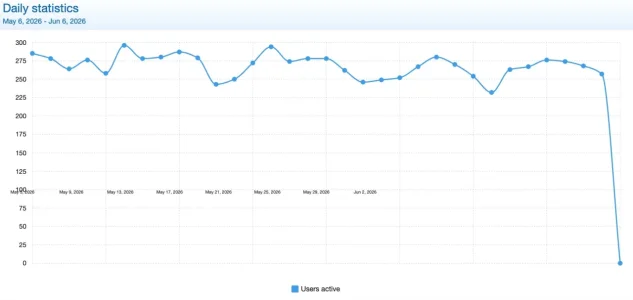
The XF statistic shows, that I do have around 275 registered users per day active on my forum. The current slight drop is due to holidays over the last two weeks (the date labeling is defective, this is a bug in XF).

Bildschirm­foto 2026-06-06 um 13.01.57.webp

So I know that more than a third and less than half of the visiting IPs are from registered users. I also know, that many of my users do use 2-3 IP addresses per day as they have their connection from home plus many check into the forum via their mobile phone and a lot from their office computer as well. So it is probably fair to assume that probably 500-600 IPs per day are coming from registered users.

Along to the XF statistics I do have anonymized Google Analytics and a local Matomo instance.

Matomo shows, that the number of visits does not seem to have degraded since installing Bot Guard on Tuesday at noon:
visits-matomo.jpg.webp

Obviously, the typical scraper bot won't serve Matomo or Google Analytics for the most part, so what I could see here would be the possible collateral damage. So far there seems to be none.

When I overlay visits with unique visitors this plays along nicely, so again nothing bad to see:

visits-visitors-matomo.webp

If I add page views and average visiting time it becomes a tad more interesting, but the patterns are nor unexpected.

visits-visitors-pgeviews-time-matomo.jpg.webp

I do typically have my weekly peek on Wednesdays and the low on Fridays and, as said before, the last two weeks were somewhat lower due to holidays. People still seem to check the forums, but they spend less time there and view less pages. Will go up again starting from next week.
Basically the only thin that could in theory have a connection to Bot guard is a slight increase in session time since Thursday this week, especially in relation to page views (I Installed Bot Guard on Tuesday and it got countless updates since). But we are talking about 35 seconds on until now a single day, so that's rather random than anything else.

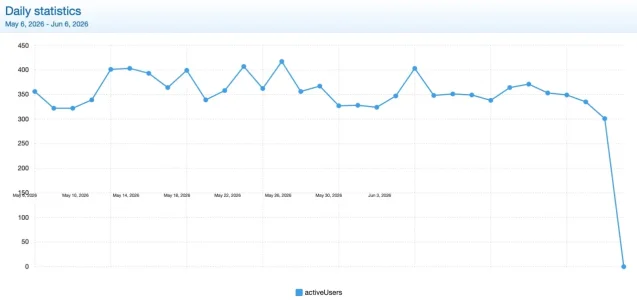
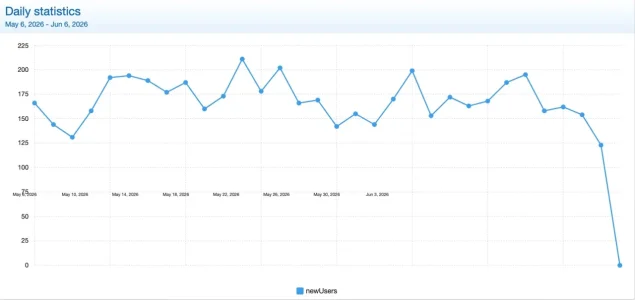
The only statistic that could possibly indicate somesthing somewhat potentially worrying come from Google Analytics. Both, the "active users" stat as well als the "new visitors" stat clearly show a decrease since the installation of Bot Guard:
Bildschirm­foto 2026-06-06 um 13.49.01.webp
Bildschirm­foto 2026-06-06 um 13.06.26.webp

But then this does not necessarily have to be bad: It could be both: Genuine visitors pushed away by the browser verification as well as bots that imitate real users as far as serving Google Analytics.

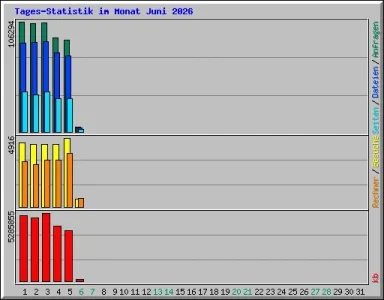
But if I go as raw as looking at the webalizer stats I see no dramatical change in comparison to the week before I installed Bot Guard.

So so far little enough to tell. It seems that Bot Guard does possibly not have a negative effect or massive amounts of false positives. Due to the nature of the bots the high level measures with Matomo and Analytics cannot really prove a relevant positive effect either. Especially not at the small sample size of my forum and the short time frame. I guess, if I released my ASN and country blocking things could look dramatically different.

I am looking forward to a statistics function built into Bot Guard to hopefully then see the effects more clearly.
 

Attachments

  • 1780747110326.webp
    1780747110326.webp
    12.3 KB · Views: 4
I've looked into my statistics an tried to find whether I can identify effects of Bot Guard, positive or negative with my main interest being possible false positives and positive effects on the other hand. As I do pretty harsh filtering before traffic reaches Bot Guard the main things that Bot Guard can filter at all are residential scraping proxies within Central Europe as most other things have been filtered out before that by either .htaccess or IP Threat Monitor (and within that the identification via Proxycheck.io as well as extensive ASN and country blocking). As a result, on a typical day IP Threat Monitor lets between 600 and 1.200 IPs pass per day, filtering out between 40 and 85% of the traffic (plus what has been filtered by .htaccess before). I am somewhat unsure if allowed search engine Bots like Google/Bing/Apple etc. are counted or not.

What is unknown is the amount of resident proxies within those on average ~700 IPs and obviously also the amount of genuine guests.

The XF statistic shows, that I do have around 275 registered users per day active on my forum. The current slight drop is due to holidays over the last two weeks (the date labeling is defective, this is a bug in XF).

View attachment 339255

So I know that more than a third and less than half of the visiting IPs are from registered users. I also know, that many of my users do use 2-3 IP addresses per day as they have their connection from home plus many check into the forum via their mobile phone and a lot from their office computer as well. So it is probably fair to assume that probably 500-600 IPs per day are coming from registered users.

Along to the XF statistics I do have anonymized Google Analytics and a local Matomo instance.

Matomo shows, that the number of visits does not seem to have degraded since installing Bot Guard on Tuesday at noon:
View attachment 339256

Obviously, the typical scraper bot won't serve Matomo or Google Analytics for the most part, so what I could see here would be the possible collateral damage. So far there seems to be none.

When I overlay visits with unique visitors this plays along nicely, so again nothing bad to see:

View attachment 339257

If I add page views and average visiting time it becomes a tad more interesting, but the patterns are nor unexpected.

View attachment 339258

I do typically have my weekly peek on Wednesdays and the low on Fridays and, as said before, the last two weeks were somewhat lower due to holidays. People still seem to check the forums, but they spend less time there and view less pages. Will go up again starting from next week.
Basically the only thin that could in theory have a connection to Bot guard is a slight increase in session time since Thursday this week, especially in relation to page views (I Installed Bot Guard on Tuesday and it got countless updates since). But we are talking about 35 seconds on until now a single day, so that's rather random than anything else.

The only statistic that could possibly indicate somesthing somewhat potentially worrying come from Google Analytics. Both, the "active users" stat as well als the "new visitors" stat clearly show a decrease since the installation of Bot Guard:
View attachment 339264
View attachment 339263

But then this does not necessarily have to be bad: It could be both: Genuine visitors pushed away by the browser verification as well as bots that imitate real users as far as serving Google Analytics.

But if I go as raw as looking at the webalizer stats I see no dramatical change in comparison to the week before I installed Bot Guard.

So so far little enough to tell. It seems that Bot Guard does possibly not have a negative effect or massive amounts of false positives. Due to the nature of the bots the high level measures with Matomo and Analytics cannot really prove a relevant positive effect either. Especially not at the small sample size of my forum and the short time frame. I guess, if I released my ASN and country blocking things could look dramatically different.

I am looking forward to a statistics function built into Bot Guard to hopefully then see the effects more clearly.

Thanks for taking the time to dig into this - that is a really useful breakdown.

That is broadly what I would hope to see. With JavaScript-based analytics like Matomo/GA, I would not necessarily expect a huge visible change, because a lot of the traffic Bot Guard is targeting may not execute those scripts properly anyway. So the main thing I would watch there is collateral damage, and your Matomo/page view/session data not showing a dramatic drop is a good sign.

It is also worth noting that Bot Guard’s members-online handling can give a useful server-side indication here. When enabled, detected bots are moved into their own tally, while the remaining guest count is left as traffic Bot Guard has not considered risky enough to treat as bot traffic. So if the bot tally is rising while the normal guest/member activity remains stable, that is a useful sign that the add-on is separating unwanted traffic rather than simply depressing real visitor activity.

Bot Guard already keeps logs for deeper inspection, but I agree that a proper stats/dashboard view would make this much easier to understand at a glance.
 
Thanks for taking the time to dig into this - that is a really useful breakdown.

That is broadly what I would hope to see. With JavaScript-based analytics like Matomo/GA, I would not necessarily expect a huge visible change, because a lot of the traffic Bot Guard is targeting may not execute those scripts properly anyway. So the main thing I would watch there is collateral damage, and your Matomo/page view/session data not showing a dramatic drop is a good sign.

It is also worth noting that Bot Guard’s members-online handling can give a useful server-side indication here. When enabled, detected bots are moved into their own tally, while the remaining guest count is left as traffic Bot Guard has not considered risky enough to treat as bot traffic. So if the bot tally is rising while the normal guest/member activity remains stable, that is a useful sign that the add-on is separating unwanted traffic rather than simply depressing real visitor activity.

Bot Guard already keeps logs for deeper inspection, but I agree that a proper stats/dashboard view would make this much easier to understand at a glance.

Another metric I follow is the money... my adsense revenue hasn't dipped at all since running XF Bot Guard on my forum since early editions months ago. And the load levels on my forum have dropped significantly.

Had genuine users been getting blocked routinely, I'd expect to be financially penalised. But that has not been the case.

And then there's the CAPTCHA pass rate. Generally, it's very low - indicating that the browsers run as bots with full JavaScript are generally the ones being sent to the challenge. Had it been any meaningful amount of false positives, you'd see a high amount of pass rate.
 
I've looked into my statistics an tried to find whether I can identify effects of Bot Guard, positive or negative with my main interest being possible false positives and positive effects on the other hand. As I do pretty harsh filtering before traffic reaches Bot Guard the main things that Bot Guard can filter at all are residential scraping proxies within Central Europe as most other things have been filtered out before that by either .htaccess or IP Threat Monitor (and within that the identification via Proxycheck.io as well as extensive ASN and country blocking). As a result, on a typical day IP Threat Monitor lets between 600 and 1.200 IPs pass per day, filtering out between 40 and 85% of the traffic (plus what has been filtered by .htaccess before). I am somewhat unsure if allowed search engine Bots like Google/Bing/Apple etc. are counted or not.

What is unknown is the amount of resident proxies within those on average ~700 IPs and obviously also the amount of genuine guests.

The XF statistic shows, that I do have around 275 registered users per day active on my forum. The current slight drop is due to holidays over the last two weeks (the date labeling is defective, this is a bug in XF).

View attachment 339255

So I know that more than a third and less than half of the visiting IPs are from registered users. I also know, that many of my users do use 2-3 IP addresses per day as they have their connection from home plus many check into the forum via their mobile phone and a lot from their office computer as well. So it is probably fair to assume that probably 500-600 IPs per day are coming from registered users.

Along to the XF statistics I do have anonymized Google Analytics and a local Matomo instance.

Matomo shows, that the number of visits does not seem to have degraded since installing Bot Guard on Tuesday at noon:
View attachment 339256

Obviously, the typical scraper bot won't serve Matomo or Google Analytics for the most part, so what I could see here would be the possible collateral damage. So far there seems to be none.

When I overlay visits with unique visitors this plays along nicely, so again nothing bad to see:

View attachment 339257

If I add page views and average visiting time it becomes a tad more interesting, but the patterns are nor unexpected.

View attachment 339258

I do typically have my weekly peek on Wednesdays and the low on Fridays and, as said before, the last two weeks were somewhat lower due to holidays. People still seem to check the forums, but they spend less time there and view less pages. Will go up again starting from next week.
Basically the only thin that could in theory have a connection to Bot guard is a slight increase in session time since Thursday this week, especially in relation to page views (I Installed Bot Guard on Tuesday and it got countless updates since). But we are talking about 35 seconds on until now a single day, so that's rather random than anything else.

The only statistic that could possibly indicate somesthing somewhat potentially worrying come from Google Analytics. Both, the "active users" stat as well als the "new visitors" stat clearly show a decrease since the installation of Bot Guard:
View attachment 339264
View attachment 339263

But then this does not necessarily have to be bad: It could be both: Genuine visitors pushed away by the browser verification as well as bots that imitate real users as far as serving Google Analytics.

But if I go as raw as looking at the webalizer stats I see no dramatical change in comparison to the week before I installed Bot Guard.

So so far little enough to tell. It seems that Bot Guard does possibly not have a negative effect or massive amounts of false positives. Due to the nature of the bots the high level measures with Matomo and Analytics cannot really prove a relevant positive effect either. Especially not at the small sample size of my forum and the short time frame. I guess, if I released my ASN and country blocking things could look dramatically different.

I am looking forward to a statistics function built into Bot Guard to hopefully then see the effects more clearly.

Just to put some hard Bot Guard event-log numbers behind this as well, I had a look at my forum.

One caveat: unfortunately I only have a few hours of event-log data at the moment, as I recently cleared the logs while testing a new Bot Guard version. So I would not present these numbers as a long-term benchmark yet.

Another important caveat: these stats are only for sessions that reached the challenge state. On my system I am not currently logging the very basic bots that fail immediately at the interstitial stage. Other sites can enable that logging on their own installs if they want to measure that layer as well. But in practice, those failures are almost certainly not genuine humans, because the only real requirement to pass the interstitial is having JavaScript enabled.

I’ll follow up again once I have at least 12–24 hours of cleaner data. Tomorrow is Sunday, so with any luck I will manage the rare achievement of not developing and testing a new version and wiping my own logs again. 😅

For this particular question, session_hash is probably the cleanest unit because it represents the browser session that was actually challenged.

The query I used was:

SQL:
SELECT
    COUNT(*) AS challenged_sessions,

    SUM(has_pass = 1 OR has_fail = 1) AS captcha_result_sessions,
    SUM(has_pass = 1) AS sessions_with_pass,
    SUM(has_fail = 1) AS sessions_with_fail,
    SUM(has_fail = 1 AND has_pass = 0) AS fail_only_sessions,
    SUM(has_pass = 1 AND has_fail = 0) AS pass_only_sessions,
    SUM(has_pass = 1 AND has_fail = 1) AS fail_then_or_also_pass_sessions,
    SUM(has_pass = 0 AND has_fail = 0) AS no_captcha_result_sessions,

    ROUND(SUM(has_pass = 1 OR has_fail = 1) / COUNT(*) * 100, 2) AS challenge_to_result_rate,
    ROUND(SUM(has_pass = 1) / COUNT(*) * 100, 2) AS challenge_to_pass_rate,
    ROUND(SUM(has_fail = 1) / NULLIF(SUM(has_pass = 1 OR has_fail = 1), 0) * 100, 2) AS fail_rate_among_result_sessions,
    ROUND(SUM(has_pass = 0 AND has_fail = 0) / COUNT(*) * 100, 2) AS no_result_rate
FROM (
    SELECT
        `session_hash`,
        MAX(`event_type` = 'challenge_required') AS has_challenge,
        MAX(`event_type` = 'captcha_pass') AS has_pass,
        MAX(`event_type` = 'captcha_fail') AS has_fail
    FROM `xf_zee_botguard_event`
    WHERE `event_type` IN ('challenge_required', 'captcha_pass', 'captcha_fail')
      AND `session_hash` IS NOT NULL
      AND `session_hash` <> ''
    GROUP BY `session_hash`
) AS x
WHERE has_challenge = 1;

The latest result is:

Code:
challenged sessions:             416
captcha result sessions:          99
captcha passed sessions:          99
sessions with at least one fail:  12
fail-only sessions:                0
pass-only sessions:               87
fail then/or also pass sessions:  12
challenged with no result:       317

challenge to captcha result:     23.80%
challenge to pass:               23.80%
fail rate among result sessions: 12.12%
no result after challenge:        76.20%

So in this sample, around three quarters of challenged sessions never produced a CAPTCHA result at all. In fact, since I first checked, challenged sessions increased from 388 to 416, but CAPTCHA-result sessions only increased from 98 to 99. So the newer data is moving further in the same direction: most challenged sessions are not completing the proof step.

That is the most useful part for me. If Bot Guard was heavily challenging genuine users, I would expect a much higher proportion of challenged sessions to complete the CAPTCHA and continue. Instead, most challenged sessions appear to stop at the proof step.

I would not call the 23.80% pass rate the false-positive rate either. I would treat it as the maximum possible false-positive ceiling from that data. That would only be the false-positive rate if every CAPTCHA-passing session was a genuine human.

In reality, a CAPTCHA pass proves capability, not humanity. Any bot that is already capable of rendering JavaScript can potentially also be fitted with CAPTCHA-solving capability. So some percentage of those 99 passing sessions may still be bots or automated traffic that survived the challenge.

The 12 sessions that failed at least once are also interesting, but I would not overstate that either. All of them eventually had a pass event, so a fail is better treated as a risk signal rather than a definitive bot verdict. Humans can fail a CAPTCHA once. Repeated failures, pass/fail cycling, or strange behaviour after passing would be more concerning.

So my current read is:

  • GA/Matomo are useful for spotting obvious collateral damage
  • Bot Guard event logs are better for understanding the actual challenge funnel
  • interstitial failures are a separate earlier layer, and are not included in the numbers above
  • challenged with no result is probably the strongest positive signal
  • CAPTCHA pass should reduce suspicion, but should not fully prove the session is human
  • the raw pass rate is best treated as an upper-bound false-positive ceiling
  • the true human false-positive rate is likely lower than the pass rate

This also lines up with what I have seen practically. My AdSense revenue has not dipped since running Bot Guard, while forum load has dropped significantly. If genuine users were routinely being blocked or pushed away, I would expect to see that show up in revenue, engagement, or complaints. So far, I have not seen that.

So while this is only a small data window because of my recent log clear, the early signal is broadly what I would want to see: most challenged sessions do not complete the proof step, normal analytics/revenue do not appear to be materially damaged, and server load is noticeably lower.

A built-in stats view would definitely make this much easier to see, and is on the near-term radar. Stay tuned.

 
Just to put some hard Bot Guard event-log numbers behind this as well, I had a look at my forum.

One caveat: unfortunately I only have a few hours of event-log data at the moment, as I recently cleared the logs while testing a new Bot Guard version. So I would not present these numbers as a long-term benchmark yet.

Another important caveat: these stats are only for sessions that reached the challenge state. On my system I am not currently logging the very basic bots that fail immediately at the interstitial stage. Other sites can enable that logging on their own installs if they want to measure that layer as well. But in practice, those failures are almost certainly not genuine humans, because the only real requirement to pass the interstitial is having JavaScript enabled.

I’ll follow up again once I have at least 12–24 hours of cleaner data. Tomorrow is Sunday, so with any luck I will manage the rare achievement of not developing and testing a new version and wiping my own logs again. 😅

For this particular question, session_hash is probably the cleanest unit because it represents the browser session that was actually challenged.

The query I used was:

SQL:
SELECT
    COUNT(*) AS challenged_sessions,

    SUM(has_pass = 1 OR has_fail = 1) AS captcha_result_sessions,
    SUM(has_pass = 1) AS sessions_with_pass,
    SUM(has_fail = 1) AS sessions_with_fail,
    SUM(has_fail = 1 AND has_pass = 0) AS fail_only_sessions,
    SUM(has_pass = 1 AND has_fail = 0) AS pass_only_sessions,
    SUM(has_pass = 1 AND has_fail = 1) AS fail_then_or_also_pass_sessions,
    SUM(has_pass = 0 AND has_fail = 0) AS no_captcha_result_sessions,

    ROUND(SUM(has_pass = 1 OR has_fail = 1) / COUNT(*) * 100, 2) AS challenge_to_result_rate,
    ROUND(SUM(has_pass = 1) / COUNT(*) * 100, 2) AS challenge_to_pass_rate,
    ROUND(SUM(has_fail = 1) / NULLIF(SUM(has_pass = 1 OR has_fail = 1), 0) * 100, 2) AS fail_rate_among_result_sessions,
    ROUND(SUM(has_pass = 0 AND has_fail = 0) / COUNT(*) * 100, 2) AS no_result_rate
FROM (
    SELECT
        `session_hash`,
        MAX(`event_type` = 'challenge_required') AS has_challenge,
        MAX(`event_type` = 'captcha_pass') AS has_pass,
        MAX(`event_type` = 'captcha_fail') AS has_fail
    FROM `xf_zee_botguard_event`
    WHERE `event_type` IN ('challenge_required', 'captcha_pass', 'captcha_fail')
      AND `session_hash` IS NOT NULL
      AND `session_hash` <> ''
    GROUP BY `session_hash`
) AS x
WHERE has_challenge = 1;

The latest result is:

Code:
challenged sessions:             416
captcha result sessions:          99
captcha passed sessions:          99
sessions with at least one fail:  12
fail-only sessions:                0
pass-only sessions:               87
fail then/or also pass sessions:  12
challenged with no result:       317

challenge to captcha result:     23.80%
challenge to pass:               23.80%
fail rate among result sessions: 12.12%
no result after challenge:        76.20%

So in this sample, around three quarters of challenged sessions never produced a CAPTCHA result at all. In fact, since I first checked, challenged sessions increased from 388 to 416, but CAPTCHA-result sessions only increased from 98 to 99. So the newer data is moving further in the same direction: most challenged sessions are not completing the proof step.

That is the most useful part for me. If Bot Guard was heavily challenging genuine users, I would expect a much higher proportion of challenged sessions to complete the CAPTCHA and continue. Instead, most challenged sessions appear to stop at the proof step.

I would not call the 23.80% pass rate the false-positive rate either. I would treat it as the maximum possible false-positive ceiling from that data. That would only be the false-positive rate if every CAPTCHA-passing session was a genuine human.

In reality, a CAPTCHA pass proves capability, not humanity. Any bot that is already capable of rendering JavaScript can potentially also be fitted with CAPTCHA-solving capability. So some percentage of those 99 passing sessions may still be bots or automated traffic that survived the challenge.

The 12 sessions that failed at least once are also interesting, but I would not overstate that either. All of them eventually had a pass event, so a fail is better treated as a risk signal rather than a definitive bot verdict. Humans can fail a CAPTCHA once. Repeated failures, pass/fail cycling, or strange behaviour after passing would be more concerning.

So my current read is:

  • GA/Matomo are useful for spotting obvious collateral damage
  • Bot Guard event logs are better for understanding the actual challenge funnel
  • interstitial failures are a separate earlier layer, and are not included in the numbers above
  • challenged with no result is probably the strongest positive signal
  • CAPTCHA pass should reduce suspicion, but should not fully prove the session is human
  • the raw pass rate is best treated as an upper-bound false-positive ceiling
  • the true human false-positive rate is likely lower than the pass rate

This also lines up with what I have seen practically. My AdSense revenue has not dipped since running Bot Guard, while forum load has dropped significantly. If genuine users were routinely being blocked or pushed away, I would expect to see that show up in revenue, engagement, or complaints. So far, I have not seen that.

So while this is only a small data window because of my recent log clear, the early signal is broadly what I would want to see: most challenged sessions do not complete the proof step, normal analytics/revenue do not appear to be materially damaged, and server load is noticeably lower.

A built-in stats view would definitely make this much easier to see, and is on the near-term radar. Stay tuned.

Quick follow-up on the Turnstile pass rate, which is my CAPTCHA provider behind this data.

My logs showed:

416 challenged sessions
99 Turnstile passes
317 no result

So the raw challenge-to-pass rate was 23.8%.

But that should not be read as a 23.8% false-positive rate.

Roundtable Research found Cloudflare Turnstile was at the low end of tested bot-detection systems, detecting roughly one third of capable bot sessions. Flipped around, that means a large share of capable bots may still pass.

So the 99 passes are better understood as:

“99 sessions capable of passing Turnstile”​

Not:

“99 confirmed humans”​

A rough scenario range could be:

  • Best-case ceiling: 99 humans, 0 bots
  • More realistic: 25–50 humans, 49–74 capable bots
  • Bot-heavy: 10–25 humans, 74–89 capable bots

So the real human false-positive rate is likely below 23.8%, possibly much lower.

Roundtable benchmark:
 
I am so happy with v1.2.0. Ok, sure, the ACP for it is a mess (promise, next few releases that's my focus area). But, what this enables - application layer intelligence exporting back to the edge - is exactly what is needed to help Cloudflare keep the heat off of your server, especially during attacks.

In the release note is a full explanation and guide on setting it up. If you use Cloudflare, this one is potentially big for you.
Thanks so much for this huge update, I'll start testing it out. XF Bot Guard has already been very effective but adding the Cloudflare integration takes it to the next level!

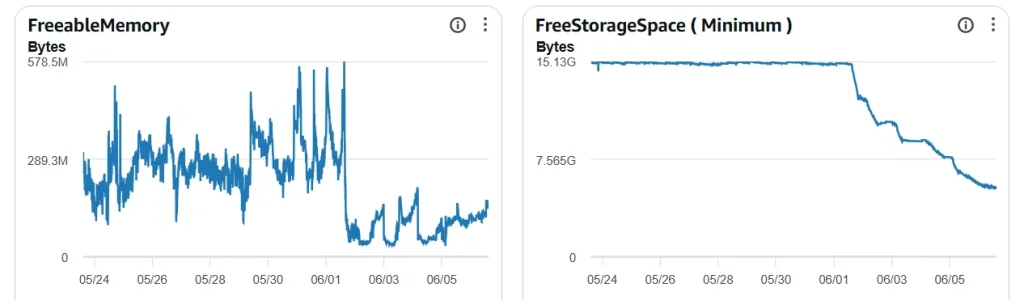
I had mentioned before that going to the logs in the ACP times out for me and checking database logs I see FreeStorageSpace and FreeableMemory noticeably trending lower since installing a week or so ago, so was considering increasing the RAM and disk space on it. I turned off the main "Log challenge decisions and audit events" option yesterday to see if it that helps and will monitor along with the new 1.2.0 update.

Cloudwatch stats over last 2 weeks:

db_mem_storage_2026-06-06.webp
 
Last edited:
Back
Top Bottom