XF Bot Guard

XF Bot Guard 1.4.1

No permission to download
For the matter: A filter option "is not" could also be worth having. And/or an option to export the log as csv to make it easier to work with them in a spreadsheet w/o having to go to the DB directly. Not overly important, but as we are just talking about it... :)

Another great idea, thank you!

By the way, within a hour or two, the dashboard will be coming out. It's... amazing!!!
 
zeeb0t updated XF Bot Guard with a new update entry:

Major Release: v1.2.2

XF Bot Guard 1.2.2

Release type:
Major update

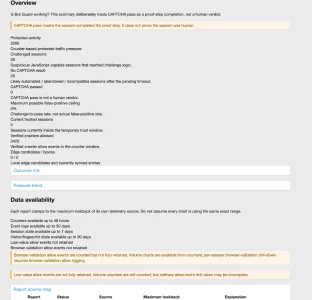
This release adds the new XF Bot Guard Dashboard, a visual single-page overview designed to show what Bot Guard is doing, why traffic is being challenged, where suspicious activity is coming from, and whether the system is healthy.

This is not just a prettier log page.

The dashboard is designed to tell the full Bot Guard story:

  • what protected traffic Bot Guard saw;
  • what was handled before CAPTCHA;
  • what reached...

Read the rest of this update entry...
 
I have been playing around with CloudFlare AI search using the webcrawler. While all pages from my site map are indexed, they don't get past the validating browser message, so none of my sites content gets properly indexed.
 
I have been playing around with CloudFlare AI search using the webcrawler. While all pages from my site map are indexed, they don't get past the validating browser message, so none of my sites content gets properly indexed.

At the moment, AI-based crawlers are not yet trusted. However, you can add the IPs and / or rDNS domains of the crawlers you wish to allow.

In my backlog I do have an item to provide built-in recognition and allow for AI-crawlers as an option (disabled by default).

For now, you'll need to add them manually in the IP/CIDR and reverse DNS sections.
 
I have been playing around with CloudFlare AI search using the webcrawler. While all pages from my site map are indexed, they don't get past the validating browser message, so none of my sites content gets properly indexed.

I forgot to mention - if your forum is behind Cloudflare, you can enable "Allow known verified crawler headers where determinable"

And follow the Cloudflare instructions in the FAQ: https://xenforo.com/community/resources/xf-bot-guard.10508/field?field=faq

Search for "How do I set up Cloudflare known bot headers for XF Bot Guard?"

Presumably, they have whitelisted their own AI crawlers. So, that should do the trick if you are behind Cloudflare already.
 
Havent installed this yet but certainly will try it out. Just wanted to say thank you for providing what looks like an indepth and neccessary addon for free. Kudos to you @zeeb0t

Your support looks amazing as well and continuous improvement. Feel free to share your paypal as im happy to put something in.
 
Havent installed this yet but certainly will try it out. Just wanted to say thank you for providing what looks like an indepth and neccessary addon for free. Kudos to you @zeeb0t

Your support looks amazing as well and continuous improvement. Feel free to share your paypal as im happy to put something in.

Thank you for your kind words and support. Give it a try, and if you need any help, I'm here.

On the topic if financial contribution - In the ACP on any of the Bot Guard admin panels, you'll find a button at the very top that allows you to do just that. Any amount helps!

Either way, thank you for considering that.
 
Thank you for your kind words and support. Give it a try, and if you need any help, I'm here.

On the topic if financial contribution - In the ACP on any of the Bot Guard admin panels, you'll find a button at the very top that allows you to do just that. Any amount helps!

Either way, thank you for considering that.

I just took advantage of that a few minutes ago. Thanks for the development!
 
Wohoo!

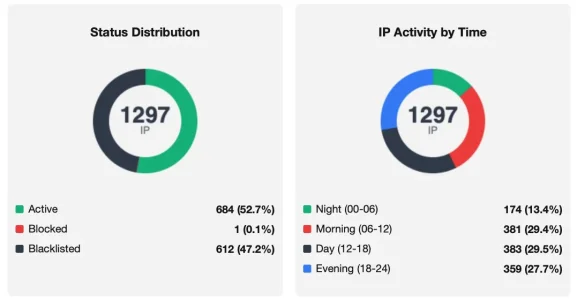
I'm trying to make sense of the numbers. For the timespan of the last 24h IP thread monitor gives me this:

Bildschirm­foto 2026-06-07 um 12.36.08.webp

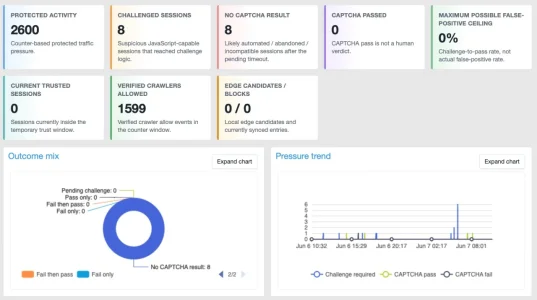
So 684 (685) different IPs that visited in the last 24 hours and were passed through to Bot Guard. The Bot Guard Dashboard on the other hand gives me this for the same timespan:

Bildschirm­foto 2026-06-07 um 12.35.52.webp

I am scratching my head a little. Even if I assumed that Thread Monitor would not count the allowed bots this would leave a delta of ~300 visitors (2600 - 1599 - 684).
Also, I am wondering a bit about "( 8 captchas provided, 0 captchas passed" vs. "13 captchas provided, 4 passed" in the graphic in the corner down right.

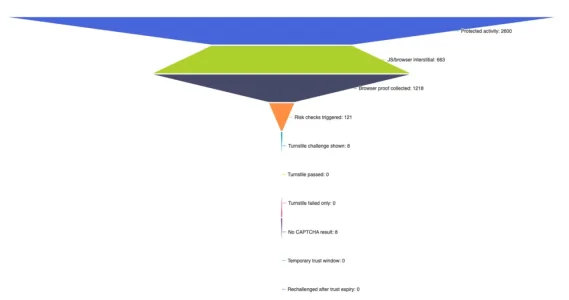
With the second graphic (which looks like modern art :) ) I am also wondering a bit about how the numbers add up:

Bildschirm­foto 2026-06-07 um 12.33.49.webp

2600 in total, ~1880 either passed or were fingerprinted makes a lack of 720. Of 121 that triggered risk checks only 8 got shown a challenge - could you explain a little what the numbers say please?

 
Wohoo!

I'm trying to make sense of the numbers. For the timespan of the last 24h IP thread monitor gives me this:

View attachment 339287

So 684 (685) different IPs that visited in the last 24 hours and were passed through to Bot Guard. The Bot Guard Dashboard on the other hand gives me this for the same timespan:

View attachment 339289

I am scratching my head a little. Even if I assumed that Thread Monitor would not count the allowed bots this would leave a delta of ~300 visitors (2600 - 1599 - 684).
Also, I am wondering a bit about "( 8 captchas provided, 0 captchas passed" vs. "13 captchas provided, 4 passed" in the graphic in the corner down right.

With the second graphic (which looks like modern art :) ) I am also wondering a bit about how the numbers add up:

View attachment 339298

2600 in total, ~1880 either passed or were fingerprinted makes a lack of 720. Of 121 that triggered risk checks only 8 got shown a challenge - could you explain a little what the numbers say please?

The core difference right off the bat: those two sets of charts and data are based on sessions, rather than IP.

An IP address is not a reliable indicator of a single visitor, but session is. So, those IPs threat monitor let through: had more sessions per IP on average, which makes sense.
 
My 1.2.2 isn't showing any visual graphs in the DASHBOARD, for some reason. Is that what you are clicking, to bring these up?
 
Also, I am wondering a bit about "( 8 captchas provided, 0 captchas passed" vs. "13 captchas provided, 4 passed" in the graphic in the corner down right.

I will check the query again to be sure, however I believe this is an anomoly difference between the first set of tiles and chart using counter data, while the other one using logged events (because it is pointed over time, something the counters don't do, as they are totals).

Basically different storage methods being read for stats and each have a different lifetime.

There may be a slight nuance in the queries, so I will review it.

With the second graphic (which looks like modern art :) )

Haha. That is definitely an interesting flow chart. Browser proof collected being more than interstitial is because browser proofs can be collected more than once inside a single session. I ordered it this way because that is the real order of the visitor journey. The reality of visitor behaviour on your forum just provides us with a flow chart graphic we can have a chuckle about.

If there is something my two posts did not help clarify, let me know. I think the main disconnect is IP is not a single session. IP has many sessions.
 
Back
Top Bottom