XF Bot Guard

XF Bot Guard 1.4.1

No permission to download
A thing possibly worth mentioning - not a bug but maybe not within attention span of site admins as no longer very popular today: If you have visitors reading the rss feed of your forum those clients will be observed by bot guard as well in the default config. Depending from the abilities of the rss client they may pass the browser identification or not or may be hit with a challenge or not (and may get stuck there as rss readers tend to run non interactively). Depending from your site it may be worth excluding the rss routes from protection or not. It may however even be a desired feature - I have the suspicion that some of the baddies and bots may use the rss feed to gain URLs to scrape and there's AFAIK no option in ACP to get rid of the rss feed.

On my forum I do have a small hand full of users using the rss feed, with various dedicated rss clients. So it may be worth checking your web server logs, grepping for "rss" to identify if this is the case at your site and which URLs and user agents we are talking about.
 
A thing possibly worth mentioning - not a bug but maybe not within attention span of site admins as no longer very popular today: If you have visitors reading the rss feed of your forum those clients will be observed by bot guard as well in the default config. Depending from the abilities of the rss client they may pass the browser identification or not or may be hit with a challenge or not (and may get stuck there as rss readers tend to run non interactively). Depending from your site it may be worth excluding the rss routes from protection or not. It may however even be a desired feature - I have the suspicion that some of the baddies and bots may use the rss feed to gain URLs to scrape and there's AFAIK no option in ACP to get rid of the rss feed.

On my forum I do have a small hand full of users using the rss feed, with various dedicated rss clients. So it may be worth checking your web server logs, grepping for "rss" to identify if this is the case at your site and which URLs and user agents we are talking about.

Hey mate, DM me your RSS feed URL and I will confirm it. And I can introduce an option to protect that (or not) rather than leaving it in the wild or unknowingly protected.
 
zeeb0t updated XF Bot Guard with a new update entry:

Minor Release: v1.1.7

XF Bot Guard 1.1.7

Release type:
Minor update

This minor update improves how XF Bot Guard’s browser-validation JavaScript is loaded, helping avoid stale cached files after upgrades.

  • Loads Bot Guard’s main JavaScript directly instead of through XenForo’s normal JS include/combiner path.
  • Adds version-based cache busting to Bot Guard’s JavaScript and bundled fingerprinting script.
  • Helps Cloudflare, CDN, browser, and JavaScript-combiner caches pick up the latest Bot...

Read the rest of this update entry...
 
DM me your RSS feed URL and I will confirm it.
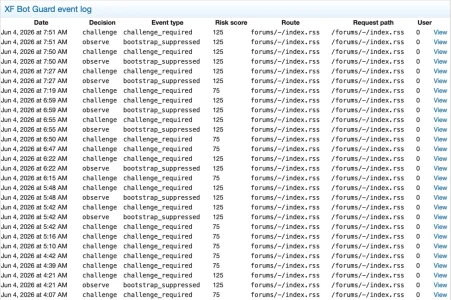
I know that this is the case when looking at the logs and filtering the Bot guard events for "rss" ;)

The generic feed URL is /forums/-/index.rss

Bildschirm­foto 2026-06-05 um 08.34.08.webp

However: the term "rss" stopped popping up in Bot Guard event log two days ago, when I do fire up my rss reader, visiting as a guest, I see it in the web log:

[05/Jun/2026:08:40:17 +0200] "GET /forums/-/index.rss HTTP/1.1" 200 1986 "-" "Leaf/54 CFNetwork/1404.0.5 Darwin/22.3.0" 914 7026

I do neither get a failure notice nor do I get new threads since two days, but this may have another reason.

I also see, that i.e. Semrush bot is trying to make use of rss, despite being disallowed on my site via robots.txt (but is blocked by the user agent blocking that I have set in .htaccess as a consequence):

185.191.171.17 - - [05/Jun/2026:07:32:07 +0200] "GET /forums/-/index.rss HTTP/1.1" 403 1978 "-" "Mozilla/5.0 (compatible; SemrushBot/7~bl; +http://www.semrush.com/bot.html)" 728 6609

Overall not critical or especially relevant in my eyes, I just wanted to mention it.
 
I know that this is the case when looking at the logs and filtering the Bot guard events for "rss" ;)

The generic feed URL is /forums/-/index.rss

View attachment 339196

However: the term "rss" stopped popping up in Bot Guard event log two days ago, when I do fire up my rss reader, visiting as a guest, I see it in the web log:

[05/Jun/2026:08:40:17 +0200] "GET /forums/-/index.rss HTTP/1.1" 200 1986 "-" "Leaf/54 CFNetwork/1404.0.5 Darwin/22.3.0" 914 7026

I do neither get a failure notice nor do I get new threads since two days, but this may have another reason.

I also see, that i.e. Semrush bot is trying to make use of rss, despite being disallowed on my site via robots.txt (but is blocked by the user agent blocking that I have set in .htaccess as a consequence):

185.191.171.17 - - [05/Jun/2026:07:32:07 +0200] "GET /forums/-/index.rss HTTP/1.1" 403 1978 "-" "Mozilla/5.0 (compatible; SemrushBot/7~bl; +http://www.semrush.com/bot.html)" 728 6609

Overall not critical or especially relevant in my eyes, I just wanted to mention it.

Thanks, yes, definitely being protected by Bot Guard - but I imagine pretty much every RSS client would break. And thanks, I have literally never used RSS in sooo many years, so didn't even consider this.

I am not sure what we could do about this really, other than not protect it. With protection, the RSS itself becomes redundant.

What are your thoughts on this?
 
Hi,

when i activate the add-on, and then put a internal link in a posting, I see now this:
1780642798818.webp
instead of normaly this:
1780642863013.webp
Is there a setting I can change to have back the old view of a internal link?

Thanks. :)
 
@azzurro and @Chromaniac the v1.1.7 I believe should resolve the issue you are having. But I did notice for instance, @Chromaniac must have some edge cache or similar that is caching the JS file at /js/zee/botguard/botguard.js

So please apply the update and then purge cache at your edge services for that path and domain as needed.

Please DM me @azzurro with your forum URL if this doesn't resolve it, so I can test it directly. I absolutely cannot replicate it on my own forum and browser, so it is proving difficult to figure out. So I am fixing based on symptoms which isn't an exact science.
 
@azzurro and @Chromaniac the v1.1.7 I believe should resolve the issue you are having. But I did notice for instance, @Chromaniac must have some edge cache or similar that is caching the JS file at /js/zee/botguard/botguard.js

So please apply the update and then purge cache at your edge services for that path and domain as needed.

Please DM me @azzurro with your forum URL if this doesn't resolve it, so I can test it directly. I absolutely cannot replicate it on my own forum and browser, so it is proving difficult to figure out. So I am fixing based on symptoms which isn't an exact science.

With 1.1.7 the interstitial is now working on my site with cloudflare for guests without needing reload, thanks!

I did see this RSS related error in the server error log, sounds related to the reported error. The RSS is used for some automated CMS article feeds in my case.

---
Server error log

ErrorException: XF Bot Guard bootstrap interstitial failed: collector token unavailable. src/XF/Error.php:81
Generated by: Unknown account Jun 5, 2026 at 12:00 AM
Stack trace
#0 src/XF.php(270): XF\Error->logError('XF Bot Guard bo...', false)
#1 src/addons/Zee/BotGuard/Service/BootstrapInterstitial.php(25): XF::logError('XF Bot Guard bo...')
#2 src/addons/Zee/BotGuard/Listener.php(48): Zee\BotGuard\Service\BootstrapInterstitial::send(Array, Array)
#3 src/XF/Extension.php(86): Zee\BotGuard\Listener::dispatcherPreDispatch(Object(XF\Mvc\Dispatcher), Object(XF\Mvc\RouteMatch))
#4 src/XF/App.php(3366): XF\Extension->fire('dispatcher_pre_...', Array, NULL)
#5 src/XF/Mvc/Dispatcher.php(96): XF\App->fire('dispatcher_pre_...', Array)
#6 src/XF/Mvc/Dispatcher.php(57): XF\Mvc\Dispatcher->beforeDispatch(Object(XF\Mvc\RouteMatch))
#7 src/XF/App.php(2824): XF\Mvc\Dispatcher->run()
#8 src/XF.php(814): XF\App->run()
#9 index.php(23): XF::runApp('XF\\Pub\\App')
#10 {main}
Request state
array(4) {
["url"] => string(19) "/articles/index.rss"
["referrer"] => bool(false)
["_GET"] => array(0) {
}
["_POST"] => array(0) {
}
 
Hi,

when i activate the add-on, and then put a internal link in a posting, I see now this:
View attachment 339198
instead of normaly this:
View attachment 339199
Is there a setting I can change to have back the old view of a internal link?

Thanks. :)

Do you use Cloudflare? If you do, there is a setting you can enable that will allow more bots to bypass XF Bot Guard. Alternatively, you can add IP's of known crawlers you want to allow access into the IP / CIDR field.

The two settings are: "Allow known verified crawler headers where determinable" and "Excluded IPs/CIDRs". But please do not use "Allow known verified crawler headers where determinable" unless your origin is secured to communicate only with the edge servers at Cloudflare.

You can also look in the FAQ for instructions to ensure Cloudflare is sending the appropriate header, search for "How do I set up Cloudflare known bot headers for XF Bot Guard?": https://xenforo.com/community/resources/xf-bot-guard.10508/field?field=faq
 
With 1.1.7 the interstitial is now working on my site with cloudflare for guests without needing reload, thanks!

I did see this RSS related error in the server error log, sounds related to the reported error. The RSS is used for some automated CMS article feeds in my case.

---
Server error log

ErrorException: XF Bot Guard bootstrap interstitial failed: collector token unavailable. src/XF/Error.php:81
Generated by: Unknown account Jun 5, 2026 at 12:00 AM
Stack trace
#0 src/XF.php(270): XF\Error->logError('XF Bot Guard bo...', false)
#1 src/addons/Zee/BotGuard/Service/BootstrapInterstitial.php(25): XF::logError('XF Bot Guard bo...')
#2 src/addons/Zee/BotGuard/Listener.php(48): Zee\BotGuard\Service\BootstrapInterstitial::send(Array, Array)
#3 src/XF/Extension.php(86): Zee\BotGuard\Listener::dispatcherPreDispatch(Object(XF\Mvc\Dispatcher), Object(XF\Mvc\RouteMatch))
#4 src/XF/App.php(3366): XF\Extension->fire('dispatcher_pre_...', Array, NULL)
#5 src/XF/Mvc/Dispatcher.php(96): XF\App->fire('dispatcher_pre_...', Array)
#6 src/XF/Mvc/Dispatcher.php(57): XF\Mvc\Dispatcher->beforeDispatch(Object(XF\Mvc\RouteMatch))
#7 src/XF/App.php(2824): XF\Mvc\Dispatcher->run()
#8 src/XF.php(814): XF\App->run()
#9 index.php(23): XF::runApp('XF\\Pub\\App')
#10 {main}
Request state
array(4) {
["url"] => string(19) "/articles/index.rss"
["referrer"] => bool(false)
["_GET"] => array(0) {
}
["_POST"] => array(0) {
}

This sometimes happens, very rarely, thanks for the report. I have it on my list to look at. For me it happens once per 24 hr period, let me know if it happens often for you.

The reason it happens is you cannot inject the token etc. into RSS (naturally), its just really that RSS can only be protected by interstitial only.
 
With 1.1.7 the interstitial is now working on my site with cloudflare for guests without needing reload, thanks!

I did see this RSS related error in the server error log, sounds related to the reported error. The RSS is used for some automated CMS article feeds in my case.

---
Server error log

ErrorException: XF Bot Guard bootstrap interstitial failed: collector token unavailable. src/XF/Error.php:81
Generated by: Unknown account Jun 5, 2026 at 12:00 AM
Stack trace
#0 src/XF.php(270): XF\Error->logError('XF Bot Guard bo...', false)
#1 src/addons/Zee/BotGuard/Service/BootstrapInterstitial.php(25): XF::logError('XF Bot Guard bo...')
#2 src/addons/Zee/BotGuard/Listener.php(48): Zee\BotGuard\Service\BootstrapInterstitial::send(Array, Array)
#3 src/XF/Extension.php(86): Zee\BotGuard\Listener::dispatcherPreDispatch(Object(XF\Mvc\Dispatcher), Object(XF\Mvc\RouteMatch))
#4 src/XF/App.php(3366): XF\Extension->fire('dispatcher_pre_...', Array, NULL)
#5 src/XF/Mvc/Dispatcher.php(96): XF\App->fire('dispatcher_pre_...', Array)
#6 src/XF/Mvc/Dispatcher.php(57): XF\Mvc\Dispatcher->beforeDispatch(Object(XF\Mvc\RouteMatch))
#7 src/XF/App.php(2824): XF\Mvc\Dispatcher->run()
#8 src/XF.php(814): XF\App->run()
#9 index.php(23): XF::runApp('XF\\Pub\\App')
#10 {main}
Request state
array(4) {
["url"] => string(19) "/articles/index.rss"
["referrer"] => bool(false)
["_GET"] => array(0) {
}
["_POST"] => array(0) {
}

Fantastic news it is fixed! This was basically a combination of cache, the JS bundler sometimes messing up the Bot Guard JavaScript, and the timing for interstitial cookie handling. Complicated, but finally resolved. :)
 
I am not sure what we could do about this really, other than not protect it. With protection, the RSS itself becomes redundant.

What are your thoughts on this?
Yes, excluding the default rss-URL is possibly the best option. I've done this via the settings now.

Edit: after unblocking the URL in the settings my rss reader is showing new threads again. So it was blocked from fetching by bot guard since two days but his desperate tries did not show up in the bot guard logs any more. ;)
 
Last edited:
Yes, excluding the default rss-URL is possibly the best option. I've done this via the settings now.

Perfect! Still, I will add an option so people can intentionally disable it with just a checkbox across all RSS patterns. For now, you are using it as an effective work-around. Good stuff!
 
Edit: after unblocking the URL in the settings my rss reader is showing new threads again. So it was blocked from fetching by bot guard since two days but his desperate tries did not show up in the bot guard logs any more. ;)

Yep... blocked by the interstitial! I will have to implement an option for those who want to see that treated as a high level log entry, rather than the default low. The funny thing is, the interstitial is not intended to be the primary bot killer. It just turns out that is, because they like to avoid executing JavaScript and in particular like to avoid running anything that appears to fingerprint them (of course they don't want that!) but I treat that as a strong signal, of course :D
 
Do you use Cloudflare? If you do, there is a setting you can enable that will allow more bots to bypass XF Bot Guard. Alternatively, you can add IP's of known crawlers you want to allow access into the IP / CIDR field.

The two settings are: "Allow known verified crawler headers where determinable" and "Excluded IPs/CIDRs". But please do not use "Allow known verified crawler headers where determinable" unless your origin is secured to communicate only with the edge servers at Cloudflare.

You can also look in the FAQ for instructions to ensure Cloudflare is sending the appropriate header, search for "How do I set up Cloudflare known bot headers for XF Bot Guard?": https://xenforo.com/community/resources/xf-bot-guard.10508/field?field=faq
Just saw this issue, internal links also seeing 'Validating browser...' in the unfurled URL.

From Claude:

Internal AJAX navigation triggers inline "Validating browser..." on every link click, even within an established session. The validation response is being rendered inline in the page content rather than as a full-page redirect, suggesting Bot Guard is intercepting XenForo's AJAX navigation requests without checking whether the session has already been validated.
 
Just saw this issue, internal links also seeing 'Validating browser...' in the unfurled URL.

From Claude:

Internal AJAX navigation triggers inline "Validating browser..." on every link click, even within an established session. The validation response is being rendered inline in the page content rather than as a full-page redirect, suggesting Bot Guard is intercepting XenForo's AJAX navigation requests without checking whether the session has already been validated.

Claude is mistaken. It is not because it is intercepting the AJAX request. It is because XenForo itself tries to scrape the target URL page, and it gets blocked as a bot... which is by design. What you can do, for instance, is add your own server IP in the excluded IP / CIDR setting, and, it should then begin to work (although, maybe it needs the cache in XenForo proxy cleared after making that change).
 
Claude is mistaken. It is not because it is intercepting the AJAX request. It is because XenForo itself tries to scrape the target URL page, and it gets blocked as a bot... which is by design. What you can do, for instance, is add your own server IP in the excluded IP / CIDR setting, and, it should then begin to work (although, maybe it needs the cache in XenForo proxy cleared after making that change).
Thanks, I added the server public IP and the internal link worked. That works for now as I have just 1 server running but it is set to autoscale under load so could add some dynamic IPs. Are there ways to add other exclusions, Claude suggests:

Are user-agent based exclusions supported... XenForo's unfurl/proxy requests send a specific user agent string you could identify and whitelist without relying on IP at all.

Edit: quick log shows XenForo/2.x as the user agent.
 
Last edited:
Thanks, I added the server public IP and the internal link worked. That works for now as I have just 1 server running but it is set to autoscale under load so could add some dynamic IPs. Are there ways to add other exclusions, Claude suggests:

Are user-agent based exclusions supported... XenForo's unfurl/proxy requests send a specific user agent string you could identify and whitelist without relying on IP at all.

I am happy to add that as an option for you - but you should understand... if anybody figures out what user-agent you are using, they can spoof that value in about 1 second and scrape your website. So you would have to use an almost cryptographic user-agent value and hope nobody figures it out, or no other add-on reads the value and sends it away to abuse it or something like that.

I am interested to hear what you and Claude think about that. Basically, it's giving a master key to something which may be easily spoofed.
 
I am happy to add that as an option for you - but you should understand... if anybody figures out what user-agent you are using, they can spoof that value in about 1 second and scrape your website. So you would have to use an almost cryptographic user-agent value and hope nobody figures it out, or no other add-on reads the value and sends it away to abuse it or something like that.

I am interested to hear what you and Claude think about that. Basically, it's giving a master key to something which may be easily spoofed.
Yes, I see that could be abused. Let's see if there is a better solution.

I've had the unfurl option as it's a nice XenForo feature but it can be turned off in the Options -> Messages -> Unfurl URL to a rich preview automatically setting.
 
Yes, I see that could be abused. Let's see if there is a better solution.

I've had the unfurl option as it's a nice XenForo feature but it can be turned off in the Options -> Messages -> Unfurl URL to a rich preview automatically setting.

I think for now, adding your IP is a good compromise. But if you have auto-scaling groups setup and might have many IPs - you could either configure those groups to proxy out via a single IP and whitelist that, or, disable the unfurl option.

These are the options on the current build.

Otherwise, I was thinking (by default disabled) the add-on could automatically add whatever IP it is currently running on. This would mean your scale group would effectively always include itself as a safe scraper IP, whether that be a single shared hosting IP (not great, but not the worst) or your own dedicated IPs or many of them.
 
Back
Top Bottom