XF Bot Guard

XF Bot Guard 1.4.1

No permission to download
One thing that I see which makes me wonder: Since upgrading from 1.1.2 to 1.1.4 this morning (leaving out 1.1.3) I do not see a single challenge / challenge required in the event log. Before that, it was popping up quite frequently. So it seems, that singe 1.1.4 (or possibly 1.1.3) bots are bypassing to content unchallenged. Not having any bots since 8 this morning seems somewhat unplausible.

Be aware that due to my pre filtering more or less the only bots that can hit BotGuard on my forums are coming through residential proxies from limited countries as almost everything else is filtered out before.

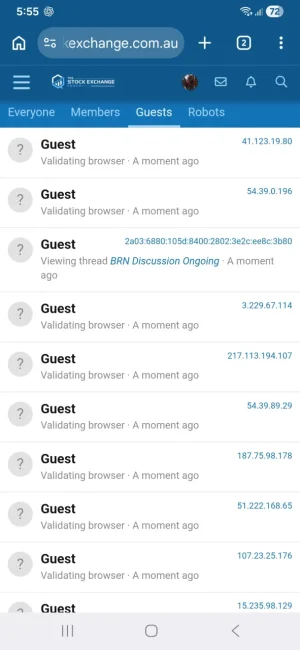
Are you seeing "Validating browser" on visitors?

If so, this is the new interstitial fingerprint phase and most bots just get caught there.

Bot being blocked is basically any visitor session state remaining on the challenge gate or validating browser.

Since most bots aren't that smart, they tend to get stuck at validating browser.
 
Last edited:
This is my forum guests right now. Largely bots, a handful of humans... about 200+ of them just stuck at verifying browser stage.

Dumb bots.

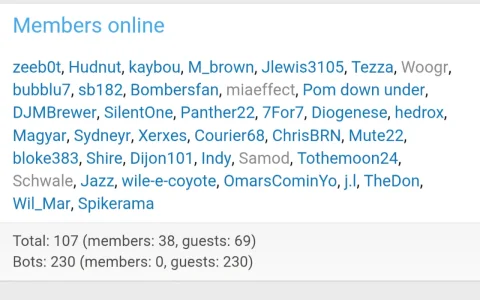
If you enable the members online option, it displays how many are considered bots by XF Bot Guard.

Soon the ACP will have a dashboard giving you all this as reports and more info.

The reason why validating browser doesn't create log entries is because they are "low value" entries so as default settings, not logged there.

It's done this way as the approach is to help those with heavily botted forums maintain lower load levels. A bit of a blunt tool approach to knocking out the dumb bots, which are usually the majority.

But their session status is how you can tell - or turn on low value logging. However, I don't recommend that on busy forums.

1000077711.webp
 
or turn on low value logging. However, I don't recommend that on busy forums.
I rather prefer not to do that, the size and growth of the db tables with the logs is already relatively big and I have to care about DB size with my current host.
 
I rather prefer not to do that, the size and growth of the db tables with the logs is already relatively big and I have to care about DB size with my current host.

Yes, exactly - and its essentially why I tried to make this most basic of layers the first and most cheapest defence.

The downside is less logging by default for this exact phase. But its important, for heavy forums. Once the easiest bots are dealt with, it then is focused on more logging for the trickier ones.

When the ACP dashboard comes out, you will be able to view stats and graphs for all the different stages of bot detection over time.

For now, without the low level logging - you have to rely on members online status and even turn on the members online option for the add-on which gives an overall count, like this:

Screenshot_20260604_182421_Chrome.webp
 
But their session status is how you can tell
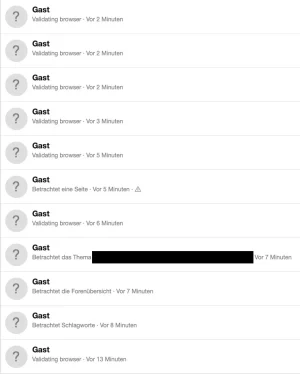
After watching it for a couple of hours it feels about right regarding the distribution between guests. I do see lots of "verifying browser" and guests being stuck there. So basically it seems to work as intended.

guests.webp

Still it leaves a bit of a strange feeling as there is no simple way to find out if there are false positives and innocent people stuck in "verifying browser". Basically, it seems one has to trust the tool more or less blindly. Also, I still did not have a single challenge event over the last eight hours, according to the logs. I tested access as a guest with a variety of different browsers and devices, including older ones - for me it worked as it should during the tests. The somewhat strange gut feeling remains. 🥸
 
Running 1.1.4 for about 8 hours and just installed 1.1.5, looks good. Database seems to be generally slightly higher load but not out of control.

Guests dropped from 2000+ down to under 70, even though cloudflare still reports high amount of bot traffic. I see a lot of Guests with 'validating browser' status in the current visitors as mentioned.

I had disabled Surge Guard earlier during the debugging of the high database load as I had installed that recently. It doesn't seem urgent to re-enable as Bot Guard appears to be effective.

Thanks for the continued updates!
 
If it happens again on a future upgrade, please send through the full server error log entry again and I’ll investigate further, but from what you’ve shown here it looks resolved.
Agreed. Flukes happen. And my last upgrade this morning went perfectly.
 
so i tried one of the newer builds earlier today and noticed that guest users were stuck on Validating browser screen. i tried in incognito. just wanted to post here. i have edge caching enabled in digitalpoint cloudflare addon which serve cached pages to guests. not user if that was causing the issue. i would test out the latest build in a while and see if that's fixed. i have noticed that if i turned on this addon, cloudflare edge caching sort of stops working?
 
Your post seems a little confusing.
noticed that guest users were stuck on Validating browser screen.
That is the idea, if they are bots.
i tried in incognito.
so did you yourself get stuck on the "validating browser" screen?
i have noticed that if i turned on this addon, cloudflare edge caching sort of stops working?
I don't use cloudflare but I would assume that the idea of the add on is to verify guests before they get served anything. After passing "validating browser" (and maybe the turnstile captcha) I'd assume that caching would start to work. But I don't know if that is really the way it is intended to bo or the way it behaves.

Did you adjust the settings of the add on to deal with cloud flare?
 
so i tried one of the newer builds earlier today and noticed that guest users were stuck on Validating browser screen. i tried in incognito. just wanted to post here. i have edge caching enabled in digitalpoint cloudflare addon which serve cached pages to guests. not user if that was causing the issue. i would test out the latest build in a while and see if that's fixed. i have noticed that if i turned on this addon, cloudflare edge caching sort of stops working?
I just tested on my install, I'm using the same cloudflare addon but I didn't set up cached pages for guests. For guests in incognito mode / Chrome it just shows the "Validating Browser..." page without any options, after a few reloads it worked, similar with regular browser mode.
 
Last edited:
yes, i opened incognito and open a thread and it just got stuck there. same ip. same browser. just incognito. same behavior on phone. i was just wondering if the interstitial page got cached by cloudflare and well it was serving just that when a user opened that page.

yes, cloudflare settings were configured in this addon.
 
I haven't jumped from 1.1.2 yet, just wondering on the browser verification, can that be turned off completely or also set for guests only and not members?
 
For guests in incognito mode / Chrome it just shows the "Validating Browser..." page without any options, after a few reloads it worked, similar with regular browser mode.
yes, i opened incognito and open a thread and it just got stuck there. same ip. same browser. just incognito. same behavior on phone. i was just wondering if the interstitial page got cached by cloudflare

In my setup w/o cloudflare there was no reload necessary in my tests and I had no hangs either.
 
Still it leaves a bit of a strange feeling as there is no simple way to find out if there are false positives and innocent people stuck in "verifying browser". Basically, it seems one has to trust the tool more or less blindly. Also, I still did not have a single challenge event over the last eight hours, according to the logs. I tested access as a guest with a variety of different browsers and devices, including older ones - for me it worked as it should during the tests. The somewhat strange gut feeling remains. 🥸

Even if you only enable low-value logging briefly to test this, you should then see those events appear. The reason the “Verifying browser” stage is currently treated as low-value is that, for sites dealing with heavy bot traffic, logging every one of those checks as a higher-value event can create unnecessary database contention during an attack. That said, I understand the use case, so in a future release I may add a dedicated option to treat “Verifying browser” as a high-value logged event on its own, without requiring all other low-level logging to be enabled just to view it.

Running 1.1.4 for about 8 hours and just installed 1.1.5, looks good. Database seems to be generally slightly higher load but not out of control.

Guests dropped from 2000+ down to under 70, even though cloudflare still reports high amount of bot traffic. I see a lot of Guests with 'validating browser' status in the current visitors as mentioned.

I had disabled Surge Guard earlier during the debugging of the high database load as I had installed that recently. It doesn't seem urgent to re-enable as Bot Guard appears to be effective.

Thanks for the continued updates!

Wonderful news! Thanks for the update.

Agreed. Flukes happen. And my last upgrade this morning went perfectly.

:love:

I haven't jumped from 1.1.2 yet, just wondering on the browser verification, can that be turned off completely or also set for guests only and not members?

Yes, this is controlled by the “Run browser validation bootstrap before challenging fresh visitors” option, which is enabled by default. If you disable that option, the interstitial will no longer be shown, and regular fingerprinting and CAPTCHA behaviour will continue without it. That said, the interstitial is highly effective and relatively cheap for filtering out the majority of basic bots before they reach the more expensive challenge stages.
 
so i tried one of the newer builds earlier today and noticed that guest users were stuck on Validating browser screen. i tried in incognito. just wanted to post here. i have edge caching enabled in digitalpoint cloudflare addon which serve cached pages to guests. not user if that was causing the issue. i would test out the latest build in a while and see if that's fixed. i have noticed that if i turned on this addon, cloudflare edge caching sort of stops working?

I looked into this further, including how the DigitalPoint Cloudflare add-on handles guest page caching, and I think this is a fundamental compatibility issue rather than a XF Bot Guard bug.

The two add-ons are trying to achieve very different things.

XF Bot Guard needs protected guest requests to remain fresh and reach XenForo/PHP. For Bot Guard, a guest is not just an anonymous page viewer - they are an untrusted visitor who may need to be observed, fingerprinted, validated, challenged, or recorded as non-compliant. In that respect, Bot Guard has to treat protected guest page requests much more like member/session-sensitive requests: they should not be served as stale cached HTML from the edge.

The validating-browser response is also explicitly sent with no-cache/no-store headers, for example:

PHP:
header('Cache-Control: no-store, no-cache, must-revalidate, max-age=0');
header('Pragma: no-cache');
header('Expires: 0');
header('Vary: Cookie, User-Agent, Sec-CH-UA, Sec-CH-UA-Mobile, Sec-CH-UA-Platform');

So Bot Guard is not intending or permitting that temporary validation page to be cached.

Full-page guest edge caching is trying to do the opposite. Its goal is to let Cloudflare serve guest HTML before the request reaches XenForo. That is great for performance, but it means Bot Guard may never see the request at all. If Bot Guard does not see the request, it cannot run browser validation, record failures, detect repeat non-compliance, or escalate suspicious traffic.

In your case, it also sounds like the temporary “Validating browser” response may have been cached despite those headers. If that happens, guests can get stuck because Cloudflare keeps serving the cached validation screen instead of letting the request come back to XenForo and resolve normally.

So static asset caching is fine, and normal Cloudflare protection features are fine. The issue is full guest page HTML caching on routes protected by XF Bot Guard. Unless the cache layer is specifically configured to bypass unvalidated visitors and never cache Bot Guard validation responses, it reduces or breaks the protection model.

For that reason, the safest guidance is that guest full-page edge caching should not be used on routes protected by XF Bot Guard.

I will also add a future XF Bot Guard update that detects known add-ons/options which enable this kind of guest full-page edge caching. The DigitalPoint Cloudflare add-on is the first one I am aware of, so I will start there. When detected, XF Bot Guard will add a warning to its health check and strongly recommend disabling that specific guest full-page caching feature while Bot Guard is protecting guest-facing routes.
 
...

I will also add a future XF Bot Guard update that detects known add-ons/options which enable this kind of guest full-page edge caching. The DigitalPoint Cloudflare add-on is the first one I am aware of, so I will start there. When detected, XF Bot Guard will add a warning to its health check and strongly recommend disabling that specific guest full-page caching feature while Bot Guard is protecting guest-facing routes.
I checked my CloudFlare addon settings and didn't have "Cloudflare network edge caching -> Cache pages for guests" set to on. Perhaps some other Cloudflare rule is caching, but I thought they should respect the headers.
 
Thanks @zeeb0t
Just one more question, the validating browser, is there any way we can customize that page? Just to alter the colors to be dark theme, etc.
 
I checked my CloudFlare addon settings and didn't have "Cloudflare network edge caching -> Cache pages for guests" set to on. Perhaps some other Cloudflare rule is caching, but I thought they should respect the headers.

For anyone using XF Bot Guard behind Cloudflare, these are my own Cloudflare cache settings.

This is not the only valid setup, but it shows the important distinction: I cache specific static/media-style XenForo endpoints only. I do not cache normal forum pages, guest HTML responses, login/register pages, XF Bot Guard verification pages, or challenge/interstitial responses.

XF Bot Guard needs fresh guest requests. Anything that turns normal guest page responses into cached edge HTML is likely to cause problems.

Cloudflare → Caching → Configuration

  • Caching Level: Standard
  • Browser Cache TTL: 4 hours
  • CSAM Scanning Tool: Enabled, but not relevant to this discussion
  • Crawler Hints: Enabled
  • Always Online™: Disabled
  • Development Mode: Disabled
  • Enable Query String Sort: Disabled

Cloudflare → Caching → Tiered Cache

  • Tiered Cache Topology: Enabled
  • Smart Tiered Cache: Enabled
  • Regional Tiered Cache: Disabled

Cloudflare → Caching → Cache Reserve

  • Cache Reserve: Disabled

Cloudflare → Caching → Cache Rules

These are the only explicit cache rules I use.

1. Cache proxy.php images

Code:
(http.request.method eq "GET" and http.request.uri.path eq "/proxy.php" and http.request.uri.query contains "image=")

  • Cache eligibility: Eligible for cache
  • Edge TTL: Use cache-control header if present, cache request with Cloudflare's default TTL for the response status if not
  • Status code TTL:
    • 100–103: No store
    • 200–226: 7 days
    • 300–526: No store

2. Cache css.php

Code:
(http.request.method eq "GET" and http.request.uri.path eq "/css.php" and http.request.uri.query contains "css=")

  • Cache eligibility: Eligible for cache
  • Edge TTL: Use cache-control header if present, cache request with Cloudflare's default TTL for the response status if not
  • Status code TTL:
    • 100–103: No store
    • 200–226: 7 days
    • 300–526: No store

3. Cache webmanifest.php

Code:
(http.request.method eq "GET" and http.request.uri.path eq "/webmanifest.php")

  • Cache eligibility: Eligible for cache
  • Edge TTL: Use cache-control header if present, cache request with Cloudflare's default TTL for the response status if not
  • Status code TTL:
    • 100–103: No store
    • 200–226: 7 days
    • 300–526: No store

4. Cache /attachments/*

Code:
(http.request.method eq "GET" and starts_with(http.request.uri.path, "/attachments/"))

  • Cache eligibility: Eligible for cache
  • Edge TTL: Use cache-control header if present, cache request with Cloudflare's default TTL for the response status if not
  • Status code TTL:
    • 100–103: No store
    • 200–226: 7 days
    • 300–526: No store

What matters for XF Bot Guard compatibility

The key point is that these rules are intentionally narrow. They cache things like proxied images, CSS, web manifest output, and attachments. They do not tell Cloudflare to cache full XenForo pages.

Cloudflare itself is not the problem. Caching itself is not the problem. Cloudflare’s standard caching is perfectly fine when it respects normal dynamic-page freshness.

The problem starts when another Cloudflare setting, page rule, cache rule, worker, plugin, or add-on causes guest HTML pages to be cached.

Specific note for the DigitalPoint Cloudflare add-on

If you are using the DigitalPoint Cloudflare add-on, the incompatible feature is:

Code:
Cloudflare → Edge caching → Cache pages for guests

That feature is designed to cache XenForo HTML pages for guests at Cloudflare’s edge.

This is different from simply caching CSS, proxied images, web manifests, or attachments. Guest page caching means normal XenForo HTML pages can be served from Cloudflare without the request reaching XenForo/PHP.

That is the part XF Bot Guard is not compatible with.

The guest page caching feature works by creating a Cloudflare Cache Rule for guests and by making eligible XenForo guest HTML responses cacheable.

The Cloudflare rule to look for will usually be named something like:

Code:
Cache XenForo guest pages

The expression will look similar to this, although your cookie prefix may differ:

Code:
(not http.cookie contains "xf_session=" and not http.cookie contains "xf_user=")

If you use a different XenForo cookie prefix, the cookie names in the rule may be different. The important part is that it is a broad rule matching visitors who do not have the XenForo session/user cookies.

How to disable it

In the XenForo Admin CP:

Code:
Admin CP → Cloudflare → Edge caching

Find:

Code:
Cache pages for guests

Disable it.

After disabling it, the guest page caching time should be zero/off. In technical terms, the DigitalPoint option behind this is:

Code:
cfPageCachingSeconds = 0

You should not need to manually edit that option if you disable it through the add-on’s Cloudflare edge caching screen.

Verify the Cloudflare rule was removed or disabled

After disabling the option in XenForo, also check Cloudflare directly.

Go to:

Code:
Cloudflare dashboard → Caching → Cache Rules

Look for any rule named something like:

Code:
Cache XenForo guest pages

or any broad guest-page rule using an expression similar to:

Code:
(not http.cookie contains "xf_session=" and not http.cookie contains "xf_user=")

If that rule is still present and enabled, delete it or disable it.

It is not enough to only disable the XenForo-side option if Cloudflare still has a broad rule that makes guest HTML eligible for caching.

Purge Cloudflare cache afterwards

After disabling guest page caching and confirming the Cloudflare rule is gone or disabled, purge Cloudflare cache.

At minimum, purge cached HTML/forum pages. If in doubt, purge everything.

This avoids testing against stale cached guest pages that were stored before the setting was changed.

How to verify it is working correctly

Test as a logged-out guest, preferably in a private/incognito browser window.

Normal forum pages should not be served as cached Cloudflare HTML.

For normal XenForo pages, you do not want to see Cloudflare serving them as:

Code:
cf-cache-status: HIT

You also do not want normal guest HTML pages returning cache headers like:

Code:
cache-control: max-age=0,s-maxage=3600

or any other positive s-maxage value.

Seeing cached responses for things like CSS, proxied images, web manifests, or attachments is fine if you intentionally configured those rules. The issue is normal guest HTML pages.

Rule of thumb

It is generally fine to cache static/media-style endpoints.

It is not fine to cache:

  • Normal forum pages
  • Guest HTML responses
  • Login or register pages
  • XF Bot Guard verification pages
  • Challenge/interstitial responses
  • Anything that depends on a fresh visitor state, cookie state, session state, or validation state

So for DigitalPoint Cloudflare add-on users, the practical recommendation is:

  • You may keep using the add-on if you want its other Cloudflare management features.
  • You may keep narrowly-scoped static/media cache rules if you understand what they do.
  • You should disable Cache pages for guests.
  • You should confirm the Cache XenForo guest pages Cloudflare Cache Rule is removed or disabled.
  • You should purge Cloudflare cache after changing it.

Once guest HTML page caching is disabled, XF Bot Guard and Cloudflare can coexist normally.

 
Back
Top Bottom