XF Bot Guard

XF Bot Guard 1.4.1

No permission to download
Thanks for the quick and detailed response! I have downloaded 1.1.2 and will test it out in a few hours and monitor. I'll post here anything I find.

Thank you! As part of this test, I disabled all my Cloudflare rules so that all the extremely known / ugly / abusive IPs can flood my forum. This is how I verify the impact of load-related fixes :D
 
Running 1.1.2 for about 5 hours and not seeing any database issues. For several hours it was steady at around 400 guests but just checked and it moved up to 16,000, then a few minutes down to 10,000. Site is responsive.

I did try going to the Bot Guard log (/admin.php?bot-guard-log/) and it times out. I recall previously it did take some time to load.
 
Running 1.1.2 for about 5 hours and not seeing any database issues. For several hours it was steady at around 400 guests but just checked and it moved up to 16,000, then a few minutes down to 10,000. Site is responsive.

That's fantastic to hear. I have been letting my own forum hit hard all day as previously disclosed, and found no load issues, either.

I did try going to the Bot Guard log (/admin.php?bot-guard-log/) and it times out. I recall previously it did take some time to load.

That's less fantastic to hear, but, less concerning overall. I will look at the query, as it must not be paginating correctly with LIMIT applied - or something like that.

Still, directionally a great improvement to performance!
 
zeeb0t updated XF Bot Guard with a new update entry:

Release: v1.1.2

This is an important maintenance release that corrects the “Bots” calculation in XenForo’s “Members online” area, and improves how XF Bot Guard records routine visitor activity under heavier traffic conditions.
  • Fixed an issue where the “Bots” count would underreport visitors that XF Bot Guard had identified as bots. This was a display/counting issue only and did not affect bot detection, challenge decisions, or protection behaviour.
  • Reduced unnecessary per-request database...

Read the rest of this update entry...
 
@azzurro - 1.1.2 released officially. I think you should install it, it adds the pre-release you have, but also fixes a minor display bug. FYI @Neal this v1.1.2 fixes the display bug that was pretty heavily impacting your Members online. Please apply this release and hopefully we get a real picture of your members online status :)
 
I didn't get a chance to update to the released version of 1.1.2 but at around 14 hours and consistent 8000 guests I started getting gateway timeouts and high database load. Site restored after disabling addon for now. Claude reports:

Finding: The updated version performs well under normal load but degrades over extended periods of high bot traffic. After ~14 hours under DDoS conditions (~8,000 concurrent guests), cumulative DB write volume caused InnoDB history list to climb and query times to increase, resulting in gateway timeouts. The per-request writes to xf_zee_botguard_session, xf_zee_botguard_counter, and xf_zee_botguard_event tables, combined with embedded botguard state in every xf_session write, generate sustained write pressure that the RDS purge thread cannot keep pace with under attack conditions. No lock cascades observed (improvement over previous version), but the fundamental issue of DB writes on every request makes the addon unsuitable for sites experiencing sustained high-volume bot traffic. A write buffer, async logging, or Redis-based rate limiting would help significantly.

Edit: Also seen, SurgeGuard behaving similarly so I needed to disable that also. Claude noted:

SurgeGuard is also writing per-request — xf_zee_surge_guard_pattern updates on every request. Under sustained bot traffic this adds up too.
 
Last edited:
I didn't get a chance to update to the released version of 1.1.2 but at around 14 hours and consistent 8000 guests I started getting gateway timeouts and high database load. Site restored after disabling addon for now. Claude reports:

Finding: The updated version performs well under normal load but degrades over extended periods of high bot traffic. After ~14 hours under DDoS conditions (~8,000 concurrent guests), cumulative DB write volume caused InnoDB history list to climb and query times to increase, resulting in gateway timeouts. The per-request writes to xf_zee_botguard_session, xf_zee_botguard_counter, and xf_zee_botguard_event tables, combined with embedded botguard state in every xf_session write, generate sustained write pressure that the RDS purge thread cannot keep pace with under attack conditions. No lock cascades observed (improvement over previous version), but the fundamental issue of DB writes on every request makes the addon unsuitable for sites experiencing sustained high-volume bot traffic. A write buffer, async logging, or Redis-based rate limiting would help significantly.

Thanks - that makes sense, and I appreciate the detailed follow-up.

The important thing I take from this is that the latest version did materially improve things. Previously, under this kind of bot pressure, you had to disable the add-on much sooner. This time it lasted around 14 hours under roughly 8,000 guests, and the earlier lock-cascade style failure does not appear to be the main issue anymore.

That said, this also shows the limit of where XF Bot Guard sits in the stack.

XF Bot Guard is an application-layer XenForo add-on. It makes decisions once the request has already reached XenForo/PHP. It is not a firewall, reverse proxy, CDN, WAF, nginx rule, Apache rule, LiteSpeed rule, or iptables block, and it cannot stop requests before they reach the origin.

So under sustained DDoS-style traffic, especially with thousands of guests continuously reaching PHP and MySQL for many hours, the correct first layer of defence still needs to be upstream: Cloudflare, WAF rules, rate limits, server firewall rules, origin lockdown, or host-level mitigation. Bot Guard can then work as the XenForo-aware layer behind that, where it can see routes, sessions, CAPTCHA state, cookies, collector state, and reputation signals.

I do still plan to improve high-traffic behaviour further. The likely direction is to use XenForo’s configured cache layer, where available, for more front-line real-time behaviour, followed by buffered or rolled-up database writes. That would reduce pressure on MySQL while preserving immediate request-time decisions. However, XenForo does not require a cache to be configured by default, so the add-on also has to keep working safely on standard installations where the database is the only reliable shared store.

There are trade-offs there. Buffered writes can reduce database pressure, but if the server crashes before the buffer is flushed, some diagnostic/event data may be lost. That is not catastrophic for bot protection, but it is still a real operational trade-off.

So my view is:

The latest version improved the situation significantly, but if 8,000 hostile guests are being allowed to continuously reach PHP/MySQL for many hours, Bot Guard should not be expected to solve that alone. It is not intended to be a one-and-only front-line defence under DDoS conditions. In those conditions, it should be used behind proper edge/server protection, not instead of it.

I do expect Bot Guard’s high-traffic resilience to improve over time, including better use of configured cache layers and safer buffering strategies. But at its current stage, I cannot honestly position it as a standalone DDoS mitigation product. It is a XenForo-aware bot challenge and behaviour layer, and for DDoS-style conditions it needs to sit behind proper upstream protection.

To be clear, I do not read this as Bot Guard failing to identify the problem traffic. From what you have described, it was doing its job and denying/challenging the bots. The remaining issue is the cost of doing that work after the traffic has already reached XenForo/PHP/MySQL.

That is the part I want to improve further over time. There is clearly room to make the high-traffic path cheaper, especially by using configured cache layers more aggressively where available and by reducing or buffering non-critical database writes.

But that is still different from true DDoS mitigation. If thousands of hostile guests are continuously reaching the origin for many hours, the first layer of defence still needs to be upstream. Bot Guard can then sit behind that as the XenForo-aware layer that understands sessions, CAPTCHA state, cookies, routes, and forum-specific behaviour.

 
@azzurro one practical thing you could do is block the most aggressive sources before they reach XenForo.

For example, if your logs show particular IPs or ranges hammering the site, block those at the server firewall, web server, or Cloudflare/WAF level. Cloudflare can be especially useful here because it lets you identify patterns, create custom rules, rate limit abusive traffic, and stop the worst requests before they ever reach PHP/MySQL.

You could also look at the IPs and ranges used by OpenAI, Anthropic, and similar AI/crawler operators, and decide whether you want to block or challenge those more aggressively. In my own experience, and from what I have seen reported by other forum owners, these can be some of the worst offenders - sometimes hitting forums in waves of a thousand or more at a time.

Once you use a hammer to knock those sources out upstream, the remaining traffic usually becomes much more manageable for Bot Guard in its present state.

Bot Guard can then do what it is designed to do: act as the XenForo-aware layer behind your edge/server protection, using session, route, CAPTCHA, cookie, collector, and behaviour signals to challenge or deny suspicious visitors.
 
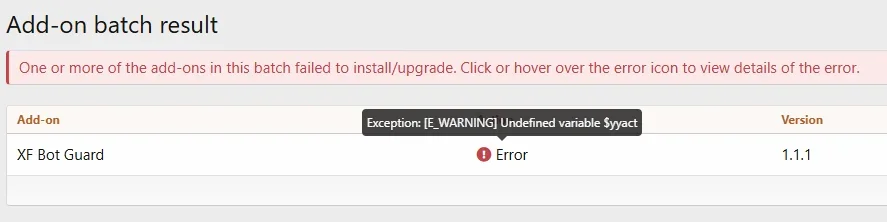
I just attempted an upgrade from 1.1.1 to 1.1.2...

1780487581238.webp

Running XF 2.2.15 on this particular installation.

The Logs page is also unavailable due to the aborted upgrade:

1780487708550.webp

Not a big deal as this is low traffic and across two days, I haven't had any activity yet.
 
I just attempted an upgrade from 1.1.1 to 1.1.2...

View attachment 339085

Running XF 2.2.15 on this particular installation.

The Logs page is also unavailable due to the aborted upgrade:

View attachment 339086

Not a big deal as this is low traffic and across two days, I haven't had any activity yet.

Thanks for reporting this.

I’ve checked the XF Bot Guard package directly, and that variable - $yyact - is not present anywhere in the add-on source at all.

From what I can find, this appears to be a XenForo-side parser/compiler warning that can show during add-on install or upgrade processing, rather than an error coming directly from the add-on code. There are similar reports around XenForo’s template/compiler handling where retrying the install/upgrade has worked.

Could you please try running the upgrade again?

If it fails again, please send me the full server error log entry from:

Admin CP → Tools → Server error log → click the error → copy the full stack trace

The hover tooltip only shows the final warning, but the full stack trace should show exactly which import step XenForo was processing when it failed.

Then, uninstall the add-on, delete add-on files, and install again fresh - this way you can get back on the road again sooner.
 
I didn't get a chance to update to the released version of 1.1.2 but at around 14 hours and consistent 8000 guests I started getting gateway timeouts and high database load. Site restored after disabling addon for now. Claude reports:

Finding: The updated version performs well under normal load but degrades over extended periods of high bot traffic. After ~14 hours under DDoS conditions (~8,000 concurrent guests), cumulative DB write volume caused InnoDB history list to climb and query times to increase, resulting in gateway timeouts. The per-request writes to xf_zee_botguard_session, xf_zee_botguard_counter, and xf_zee_botguard_event tables, combined with embedded botguard state in every xf_session write, generate sustained write pressure that the RDS purge thread cannot keep pace with under attack conditions. No lock cascades observed (improvement over previous version), but the fundamental issue of DB writes on every request makes the addon unsuitable for sites experiencing sustained high-volume bot traffic. A write buffer, async logging, or Redis-based rate limiting would help significantly.

Edit: Also seen, SurgeGuard behaving similarly so I needed to disable that also. Claude noted:

SurgeGuard is also writing per-request — xf_zee_surge_guard_pattern updates on every request. Under sustained bot traffic this adds up too.

I meant to ask, does your XenForo have a cache defined in the config?

The add-on will use a defined cacher if available, which eliminates a lot if read tension on the database.
 
I have the impression that the latest versions (possibly starting with 1.1.0) tend to underblock somewhat. I see way less guests getting challenged in "active visitors" but see again multiple guests from residential IPs visiting the same very old threads in parallel as well as pages like "tags" which is quite common for bot traffic from scrapers via residential proxies. Was way better in the earlier versions of the add on. My total guest count is low (atm not more than 20 at any given time, thanks to the pretty brutal pre filtering by IP Threat Monitor), so it is easy to spot these things.
 
Thanks for reporting this.

I’ve checked the XF Bot Guard package directly, and that variable - $yyact - is not present anywhere in the add-on source at all.

From what I can find, this appears to be a XenForo-side parser/compiler warning that can show during add-on install or upgrade processing, rather than an error coming directly from the add-on code. There are similar reports around XenForo’s template/compiler handling where retrying the install/upgrade has worked.

Could you please try running the upgrade again?

If it fails again, please send me the full server error log entry from:

Admin CP → Tools → Server error log → click the error → copy the full stack trace

The hover tooltip only shows the final warning, but the full stack trace should show exactly which import step XenForo was processing when it failed.

Then, uninstall the add-on, delete add-on files, and install again fresh - this way you can get back on the road again sooner.
Here is the stack trace:

Code:
#0 src/XF/Template/Compiler/Parser.php(832): XF::handlePhpError(2, '[E_WARNING] Und...', '/var/www/forum....', 832)#1 src/XF/Template/Compiler/Parser.php(1547): XF\Template\Compiler\Parser->yy_is_expected_token(32)
#2 src/XF/Template/Compiler.php(208): XF\Template\Compiler\Parser->doParse(32, '}}')
#3 src/XF/Template/Compiler.php(368): XF\Template\Compiler->compileToAst('{{ $check.statu...', Array)
#4 src/XF/Template/Compiler.php(386): XF\Template\Compiler->forceToExpression(Array)
#5 src/XF/Template/Compiler/Tag/IfTag.php(61): XF\Template\Compiler->compileForcedExpression(Object(XF\Template\Compiler\Syntax\Str), Array)
#6 src/XF/Template/Compiler/Tag/IfTag.php(17): XF\Template\Compiler\Tag\IfTag->compileToCallback(Object(XF\Template\Compiler\Syntax\Tag), Object(XF\Template\Compiler), Array, Object(Closure), false)
#7 src/XF/Template/Compiler/Syntax/Tag.php(47): XF\Template\Compiler\Tag\IfTag->compile(Object(XF\Template\Compiler\Syntax\Tag), Object(XF\Template\Compiler), Array, false)
#8 src/XF/Template/Compiler.php(269): XF\Template\Compiler\Syntax\Tag->compile(Object(XF\Template\Compiler), Array, false)
#9 src/XF/Template/Compiler/Tag/ForeachTag.php(14): XF\Template\Compiler->traverseBlockChildren(Array, Array)
#10 src/XF/Template/Compiler/Tag/ForeachTag.php(158): XF\Template\Compiler\Tag\ForeachTag->XF\Template\Compiler\Tag\{closure}('foreach', Array)
#11 src/XF/Template/Compiler/Tag/ForeachTag.php(17): XF\Template\Compiler\Tag\ForeachTag->compileToCallback(Object(XF\Template\Compiler\Syntax\Tag), Object(XF\Template\Compiler), Array, Object(Closure), false)
#12 src/XF/Template/Compiler/Syntax/Tag.php(47): XF\Template\Compiler\Tag\ForeachTag->compile(Object(XF\Template\Compiler\Syntax\Tag), Object(XF\Template\Compiler), Array, false)
#13 src/XF/Template/Compiler.php(269): XF\Template\Compiler\Syntax\Tag->compile(Object(XF\Template\Compiler), Array, false)
#14 src/XF/Template/Compiler.php(251): XF\Template\Compiler->traverseBlockChildren(Array, Array)
#15 src/XF/Entity/Template.php(226): XF\Template\Compiler->compileAst(Object(XF\Template\Compiler\Ast))
#16 src/XF/Entity/Template.php(168): XF\Entity\Template->validateTemplateText('<xf:title>{{ ph...', false, Object(XF\Template\Compiler\Ast), NULL)
#17 src/XF/Mvc/Entity/Entity.php(803): XF\Entity\Template->verifyTemplate('<xf:title>{{ ph...', 'template', 5, Array)
#18 src/XF/Mvc/Entity/Entity.php(648): XF\Mvc\Entity\Entity->_verifyValueCustom('<xf:title>{{ ph...', 'template', 5, Array)
#19 src/XF/Mvc/Entity/Entity.php(582): XF\Mvc\Entity\Entity->set('template', '<xf:title>{{ ph...')
#20 src/XF/AddOn/DataType/Template.php(95): XF\Mvc\Entity\Entity->__set('template', '<xf:title>{{ ph...')
#21 src/XF/Job/AddOnData.php(110): XF\AddOn\DataType\Template->importAddOnData('Zee/BotGuard', Object(SimpleXMLElement), 0, 7.99229)
#22 src/XF/Job/AddOnInstallBatch.php(341): XF\Job\AddOnData->run(7.99229)
#23 src/XF/Job/AddOnInstallBatch.php(95): XF\Job\AddOnInstallBatch->stepData(Object(XF\Timer))
#24 src/XF/Job/Manager.php(260): XF\Job\AddOnInstallBatch->run(8)
#25 src/XF/Job/Manager.php(202): XF\Job\Manager->runJobInternal(Array, 8)
#26 src/XF/Job/Manager.php(118): XF\Job\Manager->runJobEntry(Array, 8)
#27 src/XF/Admin/Controller/Tools.php(122): XF\Job\Manager->runByIds(Array, 8)
#28 src/XF/Mvc/Dispatcher.php(352): XF\Admin\Controller\Tools->actionRunJob(Object(XF\Mvc\ParameterBag))
#29 src/XF/Mvc/Dispatcher.php(259): XF\Mvc\Dispatcher->dispatchClass('XF:Tools', 'RunJob', Object(XF\Mvc\RouteMatch), Object(Hampel\KnownBots\XF\Admin\Controller\Tools), NULL)
#30 src/XF/Mvc/Dispatcher.php(115): XF\Mvc\Dispatcher->dispatchFromMatch(Object(XF\Mvc\RouteMatch), Object(Hampel\KnownBots\XF\Admin\Controller\Tools), NULL)
#31 src/XF/Mvc/Dispatcher.php(57): XF\Mvc\Dispatcher->dispatchLoop(Object(XF\Mvc\RouteMatch))
#32 src/XF/App.php(2487): XF\Mvc\Dispatcher->run()
#33 src/XF.php(524): XF\App->run()
#34 admin.php(13): XF::runApp('XF\\Admin\\App')
#35 {main}

But, going to the main Add-Ons page, it showed the add-on in a pending state. I clicked "Install" again and it worked with no issues. Health check shows all the XF Bot Guard components are functioning OK.

Looks like we're good. (I'm just hesitant to keep trying to reinstall something if there's an error.)
 
I meant to ask, does your XenForo have a cache defined in the config?

The add-on will use a defined cacher if available, which eliminates a lot if read tension on the database.
Thanks for the previous detailed response. I have a local redis cache defined using the SV RedisCache addon:

$config['cache']['provider'] = 'SV\RedisCache\Redis';

Also I do have a lot of Cloudflare rules set up that have been added over time to address load issues with these attacks. I haven't checked out the rules you posted earlier but was planning to. For the most part the Cloudflare appear to work as the server is able to withstand all the current attacks, even though I see the visitor counts go up to the 16,000 range. I don't know exactly what gets through, it seems for the most part the load is mitigated / challenged but they still count as hitting the site.

The attacks seem to vary so I welcome other solutions such as BotGuard and SurgeGuard., also since the problem seems to be similar and you also mentioned using Cloudflare rules.

Edit: Claude suggests:

The Redis cache should reduce DB reads, but the problem here was writes, not reads — and Redis cache doesn't help with writes.

Here's the distinction:
  • Redis cache — stores frequently read data (templates, options, permissions) in memory so XenForo doesn't need to query the DB for them. Reduces read load significantly.
  • Per-request DB writes — every bot request still writes to xf_zee_botguard_session, xf_zee_botguard_event, xf_zee_botguard_counter, and xf_session. Redis cache has no effect on these writes.
 
Last edited:
I have the impression that the latest versions (possibly starting with 1.1.0) tend to underblock somewhat. I see way less guests getting challenged in "active visitors" but see again multiple guests from residential IPs visiting the same very old threads in parallel as well as pages like "tags" which is quite common for bot traffic from scrapers via residential proxies. Was way better in the earlier versions of the add on. My total guest count is low (atm not more than 20 at any given time, thanks to the pretty brutal pre filtering by IP Threat Monitor), so it is easy to spot these things.

This is somewhat true. The issue is, hit-and-run style of scrapers. They come in with a different agent (or one commonly used by real users), look all sorts of real, fresh IPs - get the page content and never return in that shape to be then challenged.

This is due to the recommended bootstrap allow option.

That said, I am preparing an update right now which introduces a interstitial browser validation. This means they will no longer be able to simply hit and run, unless they can also solve CAPTCHAs etc... which is far less likely.

I will have the update out soon, after I complete internal testing.

Here is the stack trace:

Code:
#0 src/XF/Template/Compiler/Parser.php(832): XF::handlePhpError(2, '[E_WARNING] Und...', '/var/www/forum....', 832)#1 src/XF/Template/Compiler/Parser.php(1547): XF\Template\Compiler\Parser->yy_is_expected_token(32)
#2 src/XF/Template/Compiler.php(208): XF\Template\Compiler\Parser->doParse(32, '}}')
#3 src/XF/Template/Compiler.php(368): XF\Template\Compiler->compileToAst('{{ $check.statu...', Array)
#4 src/XF/Template/Compiler.php(386): XF\Template\Compiler->forceToExpression(Array)
#5 src/XF/Template/Compiler/Tag/IfTag.php(61): XF\Template\Compiler->compileForcedExpression(Object(XF\Template\Compiler\Syntax\Str), Array)
#6 src/XF/Template/Compiler/Tag/IfTag.php(17): XF\Template\Compiler\Tag\IfTag->compileToCallback(Object(XF\Template\Compiler\Syntax\Tag), Object(XF\Template\Compiler), Array, Object(Closure), false)
#7 src/XF/Template/Compiler/Syntax/Tag.php(47): XF\Template\Compiler\Tag\IfTag->compile(Object(XF\Template\Compiler\Syntax\Tag), Object(XF\Template\Compiler), Array, false)
#8 src/XF/Template/Compiler.php(269): XF\Template\Compiler\Syntax\Tag->compile(Object(XF\Template\Compiler), Array, false)
#9 src/XF/Template/Compiler/Tag/ForeachTag.php(14): XF\Template\Compiler->traverseBlockChildren(Array, Array)
#10 src/XF/Template/Compiler/Tag/ForeachTag.php(158): XF\Template\Compiler\Tag\ForeachTag->XF\Template\Compiler\Tag\{closure}('foreach', Array)
#11 src/XF/Template/Compiler/Tag/ForeachTag.php(17): XF\Template\Compiler\Tag\ForeachTag->compileToCallback(Object(XF\Template\Compiler\Syntax\Tag), Object(XF\Template\Compiler), Array, Object(Closure), false)
#12 src/XF/Template/Compiler/Syntax/Tag.php(47): XF\Template\Compiler\Tag\ForeachTag->compile(Object(XF\Template\Compiler\Syntax\Tag), Object(XF\Template\Compiler), Array, false)
#13 src/XF/Template/Compiler.php(269): XF\Template\Compiler\Syntax\Tag->compile(Object(XF\Template\Compiler), Array, false)
#14 src/XF/Template/Compiler.php(251): XF\Template\Compiler->traverseBlockChildren(Array, Array)
#15 src/XF/Entity/Template.php(226): XF\Template\Compiler->compileAst(Object(XF\Template\Compiler\Ast))
#16 src/XF/Entity/Template.php(168): XF\Entity\Template->validateTemplateText('<xf:title>{{ ph...', false, Object(XF\Template\Compiler\Ast), NULL)
#17 src/XF/Mvc/Entity/Entity.php(803): XF\Entity\Template->verifyTemplate('<xf:title>{{ ph...', 'template', 5, Array)
#18 src/XF/Mvc/Entity/Entity.php(648): XF\Mvc\Entity\Entity->_verifyValueCustom('<xf:title>{{ ph...', 'template', 5, Array)
#19 src/XF/Mvc/Entity/Entity.php(582): XF\Mvc\Entity\Entity->set('template', '<xf:title>{{ ph...')
#20 src/XF/AddOn/DataType/Template.php(95): XF\Mvc\Entity\Entity->__set('template', '<xf:title>{{ ph...')
#21 src/XF/Job/AddOnData.php(110): XF\AddOn\DataType\Template->importAddOnData('Zee/BotGuard', Object(SimpleXMLElement), 0, 7.99229)
#22 src/XF/Job/AddOnInstallBatch.php(341): XF\Job\AddOnData->run(7.99229)
#23 src/XF/Job/AddOnInstallBatch.php(95): XF\Job\AddOnInstallBatch->stepData(Object(XF\Timer))
#24 src/XF/Job/Manager.php(260): XF\Job\AddOnInstallBatch->run(8)
#25 src/XF/Job/Manager.php(202): XF\Job\Manager->runJobInternal(Array, 8)
#26 src/XF/Job/Manager.php(118): XF\Job\Manager->runJobEntry(Array, 8)
#27 src/XF/Admin/Controller/Tools.php(122): XF\Job\Manager->runByIds(Array, 8)
#28 src/XF/Mvc/Dispatcher.php(352): XF\Admin\Controller\Tools->actionRunJob(Object(XF\Mvc\ParameterBag))
#29 src/XF/Mvc/Dispatcher.php(259): XF\Mvc\Dispatcher->dispatchClass('XF:Tools', 'RunJob', Object(XF\Mvc\RouteMatch), Object(Hampel\KnownBots\XF\Admin\Controller\Tools), NULL)
#30 src/XF/Mvc/Dispatcher.php(115): XF\Mvc\Dispatcher->dispatchFromMatch(Object(XF\Mvc\RouteMatch), Object(Hampel\KnownBots\XF\Admin\Controller\Tools), NULL)
#31 src/XF/Mvc/Dispatcher.php(57): XF\Mvc\Dispatcher->dispatchLoop(Object(XF\Mvc\RouteMatch))
#32 src/XF/App.php(2487): XF\Mvc\Dispatcher->run()
#33 src/XF.php(524): XF\App->run()
#34 admin.php(13): XF::runApp('XF\\Admin\\App')
#35 {main}

But, going to the main Add-Ons page, it showed the add-on in a pending state. I clicked "Install" again and it worked with no issues. Health check shows all the XF Bot Guard components are functioning OK.

Looks like we're good. (I'm just hesitant to keep trying to reinstall something if there's an error.)

Thanks for that - although, given it worked when you retried - I think this was some transient type of error. I will backlog it in my list of things to look at, but I am glad you are back on the road / working again!

Thanks for the previous detailed response. I have a local redis cache defined using the SV RedisCache addon:

$config['cache']['provider'] = 'SV\RedisCache\Redis';

Also I do have a lot of Cloudflare rules set up that have been added over time to address load issues with these attacks. I haven't checked out the rules you posted earlier but was planning to. For the most part the Cloudflare appear to work as the server is able to withstand all the current attacks, even though I see the visitor counts go up to the 16,000 range. I don't know exactly what gets through, it seems for the most part the load is mitigated / challenged but they still count as hitting the site.

The attacks seem to vary so I welcome other solutions such as BotGuard and SurgeGuard., also since the problem seems to be similar and you also mentioned using Cloudflare rules.

Edit: Claude suggests:

The Redis cache should reduce DB reads, but the problem here was writes, not reads — and Redis cache doesn't help with writes.

Here's the distinction:
  • Redis cache — stores frequently read data (templates, options, permissions) in memory so XenForo doesn't need to query the DB for them. Reduces read load significantly.
  • Per-request DB writes — every bot request still writes to xf_zee_botguard_session, xf_zee_botguard_event, xf_zee_botguard_counter, and xf_session. Redis cache has no effect on these writes.

Thanks for that extra detail. If you see above, I have a new version coming out that introduces a lightweight interstitial. Intentionally, I have avoided running the more expensive risk assessments for those visitors who qualify for the interstitial. As such, I expect not only will the protection level increase dramatically - but it will also create far less load on the DDoS-style of bot behaviour pattern.

So, it's not recoding it into a buffer DB write approach - but it is making a fairly important architectural change, that will only strengthen Bot Guard, and deliver upon a solid performance improvement. Pre-release will be available soon... :)
 
zeeb0t updated XF Bot Guard with a new update entry:

Release: v1.1.3

New Browser Validation Bootstrap​


This update adds a new lightweight browser validation step for fresh visitors before protected forum content is rendered.

Instead of giving an unverified visitor immediate access to the requested page, XF Bot Guard can now serve a small validation page that runs the browser collector first. Real browsers complete the collector and are returned to the requested page automatically. Clients that do not run the collector do not receive the...

Read the rest of this update entry...
 
zeeb0t updated XF Bot Guard with a new update entry:

Release: v1.1.4

This minor update improves Bot Guard’s Members online / Current visitors reporting for visitors held in verification states, while reducing unnecessary writes to XenForo’s session activity table.

  • Visitors moved from browser validation into the normal verification challenge are now shown with the correct Bot Guard activity status instead of remaining listed as “Validating browser”.
  • Bot Guard now coalesces repeated verification-state activity updates, reducing unnecessary...

Read the rest of this update entry...
 
@smallwheels @Wildcat Media @azzurro please update to v1.1.4 - it includes the changes mentioned above. It seems to generally improve bot detection quite a lot, due to front-loading the fingerprint and entropy collection BEFORE allowing access to the content, by way of interstitial (like Cloudflare challenge works, but without having to actually challenge visitors... yet).

It also dials down the updates to the members online status. It keeps it accurate, without pounding the table with new writes if the bot just keeps trying, over and over...

And finally, the interstitial loads up before risk scoring, which should help improve performance again.

Hopefully improves both detection and performance!
 
@smallwheels @Wildcat Media @azzurro please update to v1.1.4 - it includes the changes mentioned above. It seems to generally improve bot detection quite a lot, due to front-loading the fingerprint and entropy collection BEFORE allowing access to the content, by way of interstitial (like Cloudflare challenge works, but without having to actually challenge visitors... yet).

It also dials down the updates to the members online status. It keeps it accurate, without pounding the table with new writes if the bot just keeps trying, over and over...

And finally, the interstitial loads up before risk scoring, which should help improve performance again.

Hopefully improves both detection and performance!

Sorry, @Neal this is probably an important one for you, too!
 
But, going to the main Add-Ons page, it showed the add-on in a pending state. I clicked "Install" again and it worked with no issues. Health check shows all the XF Bot Guard components are functioning OK.

Just following up on this...

The full stack trace confirms this warning was raised inside XenForo’s own template compiler/parser while it was importing the add-on template data. The reported $yyact variable is not present anywhere in the XF Bot Guard package; it appears to be coming from XenForo’s parser internals.

I’ve also tested this on a fresh install of the same XenForo version you mentioned and I can’t reproduce the issue there, so at minimum this appears to have been transient rather than a consistent install/upgrade fault in the add-on package.

I also noticed the stack trace includes Hampel\KnownBots\XF\Admin\Controller\Tools, which suggests another add-on is extending the XenForo Admin Tools controller involved in running background jobs. I’m not saying that add-on caused it - it may simply be present in the call stack because XenForo was running the install job through that extended controller - but it is worth noting as part of the environment.

The important bit is that XenForo left the add-on in a pending state, then successfully completed the install when you clicked Install again. That suggests the first install batch/job did not finish cleanly, but XenForo resumed and completed the import safely on the second run.

Given the add-on now installs correctly and the XF Bot Guard health check shows all components functioning OK, I would leave it as-is. I agree there is no need to keep reinstalling it.

If it happens again on a future upgrade, please send through the full server error log entry again and I’ll investigate further, but from what you’ve shown here it looks resolved.
 
Back
Top Bottom