
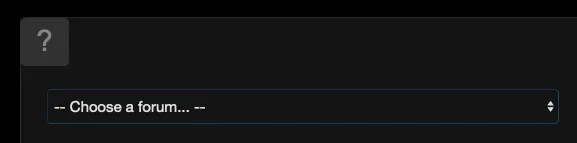
Can you hide this forcing everything to post to one node?


My relative, who’s responsible for the complex coding, is away until August 1st. I’ll let him know about this feature request.Can Bob's AMS articles appear in the feed? I will buy if this is possible!
Same here, I’ll find out when my relative returns. You CAN select which forums can be posted to. So if you only wanted to set XenSocial threads to only be postable to one forum - you can.
The feed doesn’t have filters like this yet. I’ll discuss this with my relative when he returns.Hi Sal!
Doesn't the addon have filters for the feed?? If it doesn't have them... are you planning to add the option??
It would be great to have filters for trending threads, most commented, most visited, and number of replies for example
Thanks for your work!!
Thank you! Okay, so you’re looking to give users the ability to control the feed as far as which forums can be seen and posted to. Outside of the admin controls. I’ll discuss this with my relative when he returns. Thanks again!hi @Sal Collaziano went a head and bought this. Did the $40 monetary option. Two things this add-on needs. Ability for a user to choose what forums they wish not to view in the feed and ads shown based on what forum the feed post was from. Everything else seems great so far!
Correct, someone doesn't want a bunch of posts from topics they have no interest in on their feed. Like for example you do car sites.. a ford driver doesn't want to see a bunch of Honda content on their feed, so they should be able to ignore the Honda forum on it. My site is hockey, so same thing for me, I wanna show users only teas they are interested in. otherwise it's just Facebook 2.0. lolThe feed doesn’t have filters like this yet. I’ll discuss this with my relative when he returns.
Thank you! Okay, so you’re looking to give users the ability to control the feed as far as which forums can be seen and posted to. Outside of the admin controls. I’ll discuss this with my relative when he returns. Thanks again!
That makes sense - but the “My Feed” option only displays topics or forums the user is subscribed to. If the user only wants to see posts from specific forums, they’d subscribe to those forums - and the social feed will only show them on their My Feed tab.Correct, someone doesn't want a bunch of posts from topics they have no interest in on their feed. Like for example you do car sites.. a ford driver doesn't want to see a bunch of Honda content on their feed, so they should be able to ignore the Honda forum on it. My site is hockey, so same thing for me, I wanna show users only teas they are interested in. otherwise it's just Facebook 2.0. lol
Oh I see, I was under the impression that My Feed only showed members you followed.That makes sense - but the “My Feed” option only displays topics or forums the user is subscribed to. If the user only wants to see posts from specific forums, they’d subscribe to those forums - and the social feed will only show them on their My Feed tab.
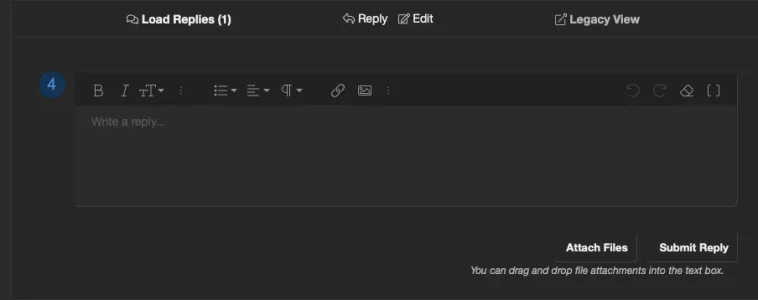
I’ll find out about this. I typically like to jump on these things immediately, but this is an unusual week.can reply box be collapsed until you hit reply to a post/comment? It takes up a lot of landscape after every post otherwise.
View attachment 341872
More on the way... Read the rest of this update entry...This is a major update that transforms how members experience your community. XenSocial can now act as a full Social Feed alternative to the classic forum view - with per-user preferences, smart navigation, read-state syncing, widget support, guest-post protection, and a smoother, cleaner posting experience.
The Navigator - Social Feed as a Full Experience
- Social Feed or Classic View - Logged-in members can set the Social Feed as their...
I'm just getting back to trying to tweak our XenSocial homepage and this is a biggy, that big open reply box kills the vibe as the page is scrolling. it's probably been fixed already, I have to read through everythingcan reply box be collapsed until you hit reply to a post/comment? It takes up a lot of landscape after every post otherwise.
View attachment 341872
Yes, the latest version allows you to Collapse reply editor in settings...I'm just getting back to trying to tweak our XenSocial homepage and this is a biggy, that big open reply box kills the vibe as the page is scrolling. it's probably been fixed already, I have to read through everything
Did we ever get the ability to make a post sticky in the xensocial feed so it's always on top?
Thanks for the quick reply Sal. I edited the post as you were replying, is it possible to make a thread stick to the top of the feed now?Yes, the latest version allows you to Collapse reply editor in settings...
No problem. Not yet. It IS on our to do list - but it'll be in a future version. My relative who does all the coding is preparing for a long trip and will likely be away with limited internet access for a while. If there are any features that are currently available and not working properly - let me know so I can get him to focus on them before he leaves. Otherwise, he has a lot of preparation for his upcoming trip - and won't be adding new features until he returns.Thanks for the quick reply Sal. I edited the post as you were replying, is it possible to make a thread stick to the top of the feed now?
Installed update, have Collapse Reply Editor by Default selected but empty Reply box is still displaying under each post. Any suggestions?

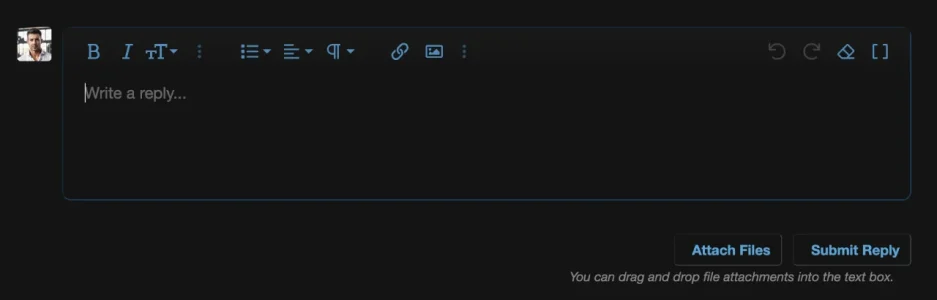

I will send you a direct message as there's going to be a lot of back and forth here - and nobody wants constant emails of new replies.It's showing the full reply box still, tried refresh of the browser
We use essential cookies to make this site work, and optional cookies to enhance your experience.
